
- Last Updated

Character
Understanding
By integrating the STOVE platform's character service, you can store the game's character info on the platform and use it across various STOVE services such as Community, Customer Center, and events.
If you don't integrate it, some or all features may be restricted.
Character Features
| Supported platform | Feature name | Impact of using the STOVE character feature |
|---|---|---|
| Mobile / multi-platform | Community | When used, the game-saved nickname can be shown in each game's community and timeline. When not used, the STOVE platform nickname is shown. |
| Customer Center | When used, world/character info can be selected directly in [Customer Center] > [Contact Us] > [Game Info]. When not used, the user enters the info directly in the inquiry body. |
|
| Partners customer info | When used, saved character info can be checked in the STOVE back office when a CS inquiry is received. When not used, character info isn't shown. |
|
| Mobile | Coupon/item | When used, coupons/items can be used per character When not used, the coupon/item service can't be used per character. |
Usage Examples
1) Community
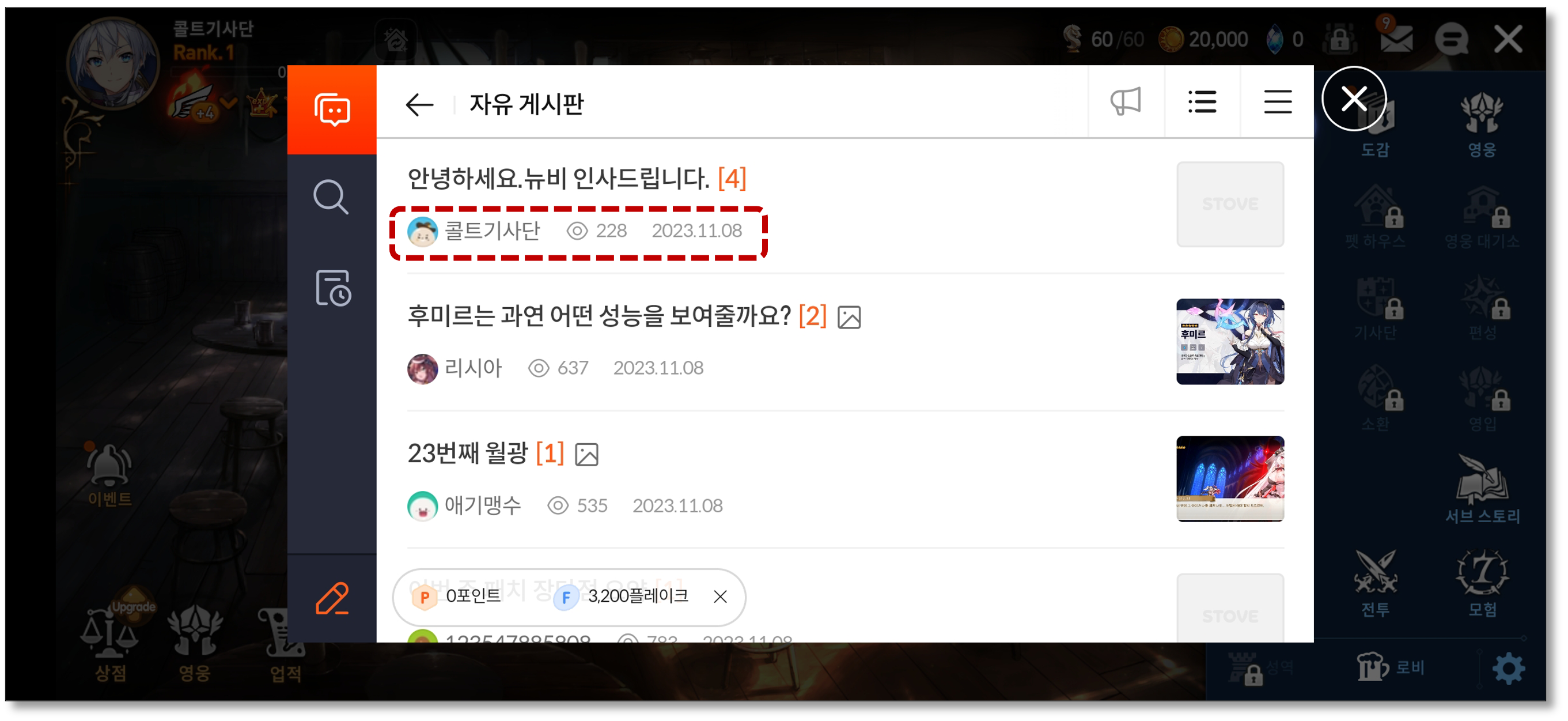
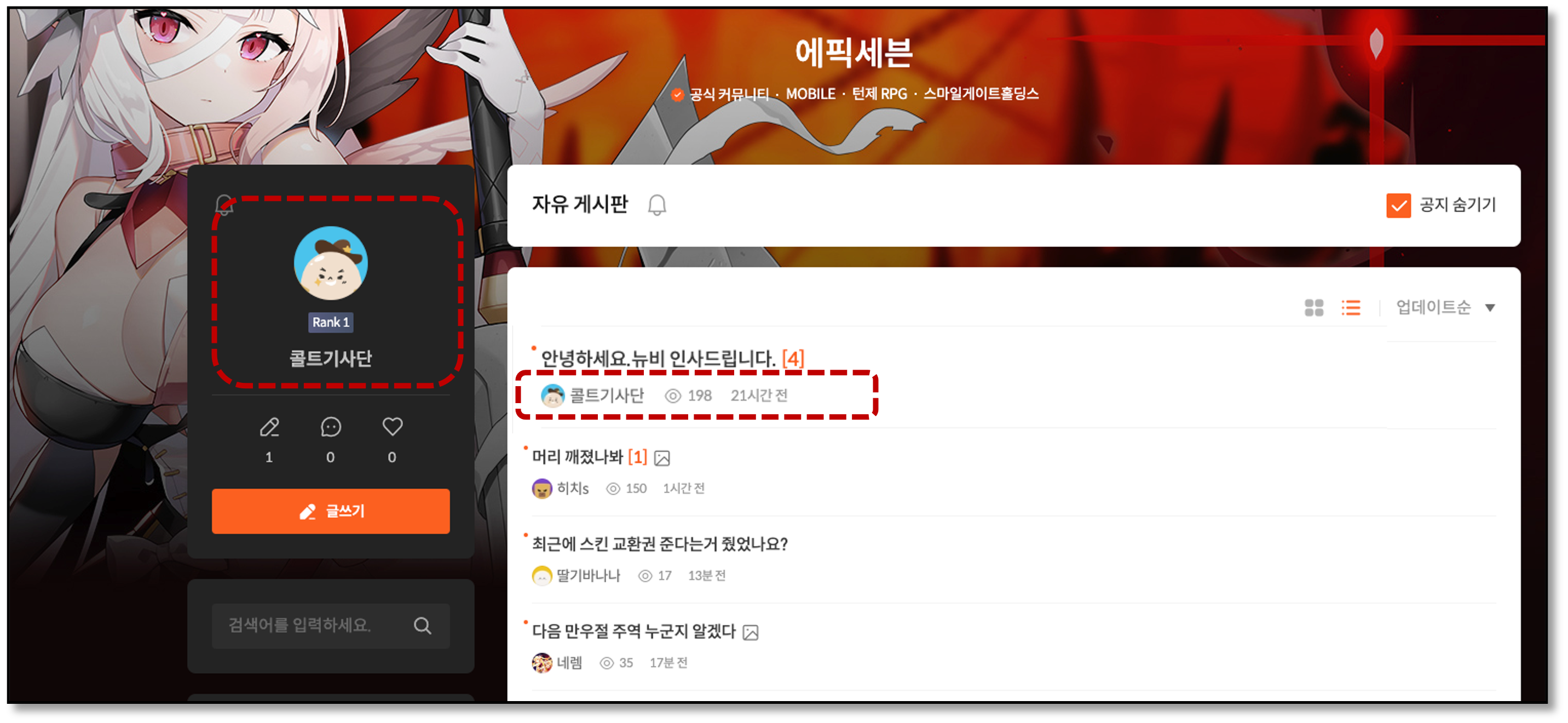
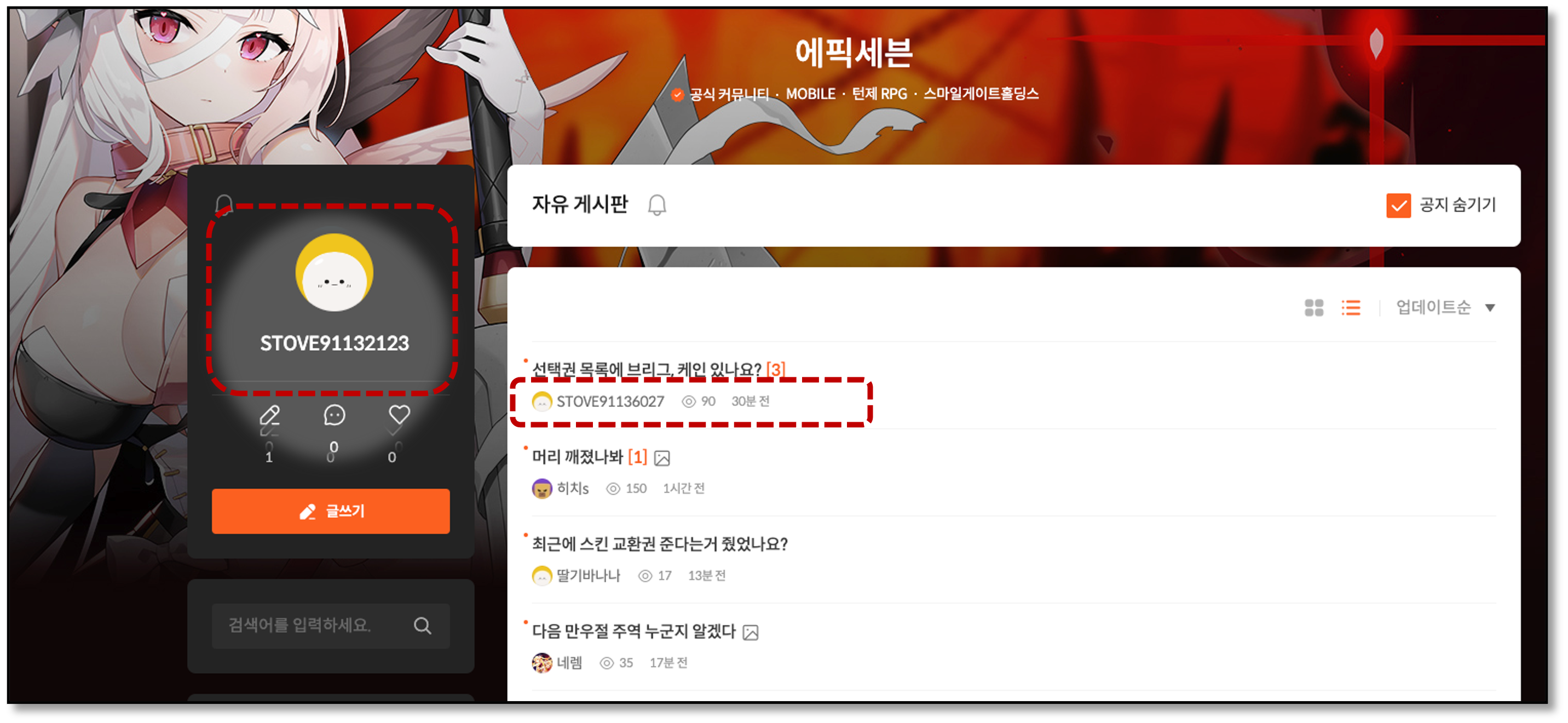
The STOVE representative nickname is shown by default, but if you integrate the character service, you can freely set and display the game nickname.
(Where shown: mobile in-game, PC web, STOVE app, online timeline, etc.)
When used — mobile (in-game)
When used — PC (web)
When not used — mobile (in-game)
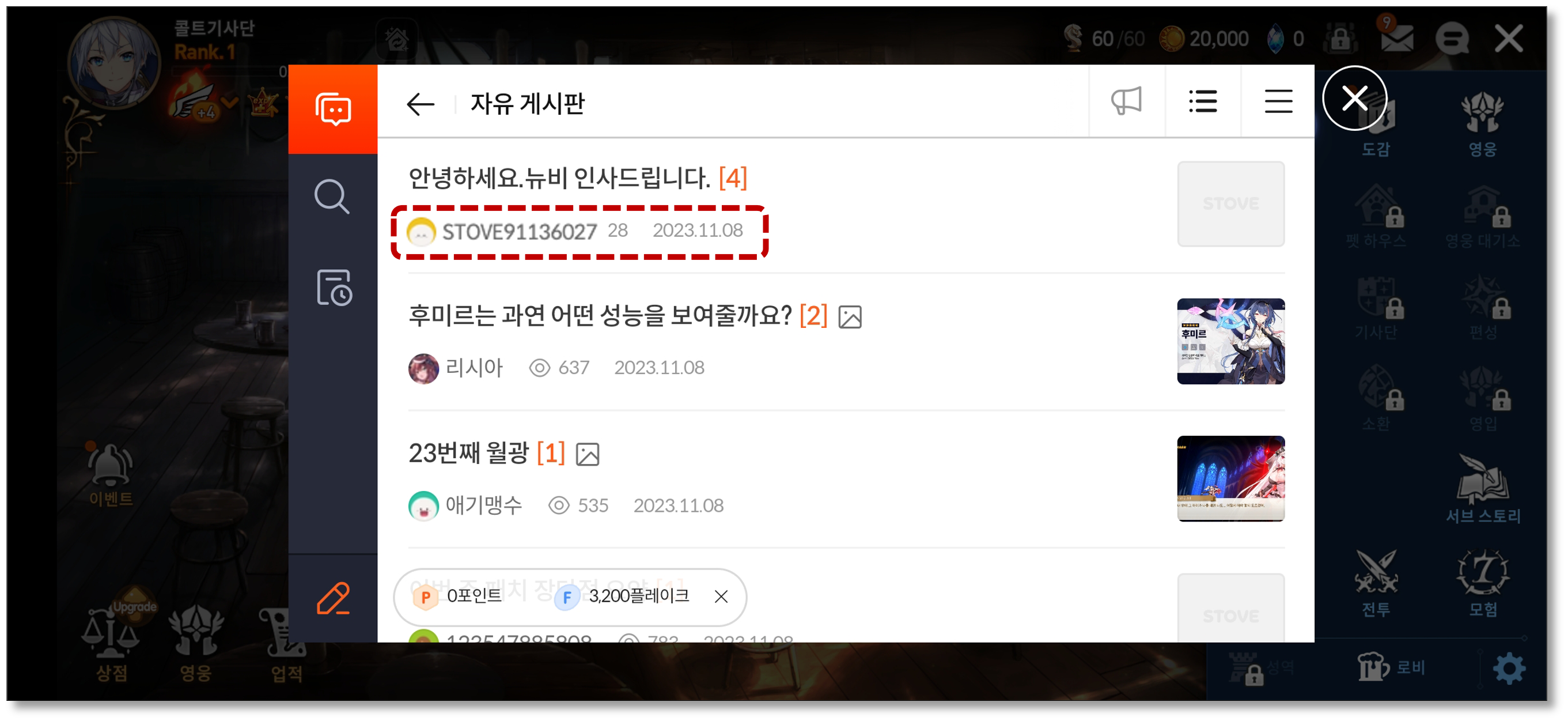
(The STOVE platform nickname is shown, and if no nickname is set, an auto-issued ID such as STOVE91136027 is shown as the default.)
When not used — PC (web)
2) Customer Center
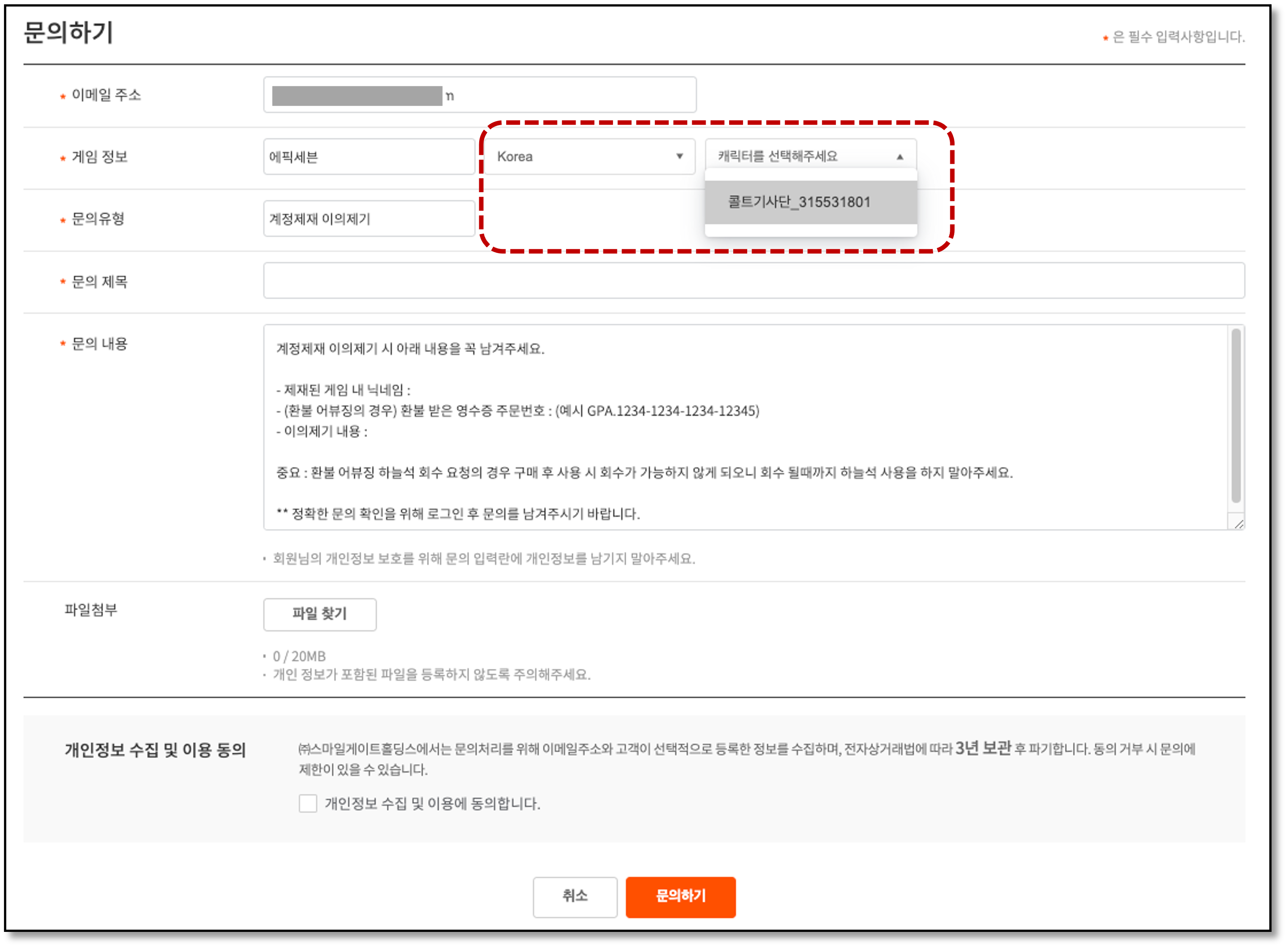
You can select world and character info directly in [Customer Center] > [Contact Us] > [Game Info].
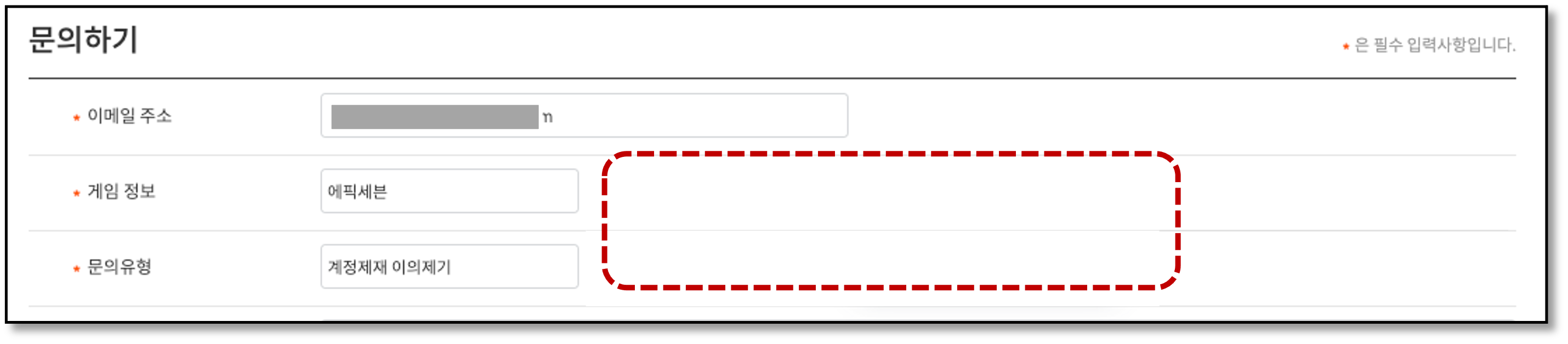
If you don't integrate the character service, that item is shown blank.
When used
When not used
3) Partners
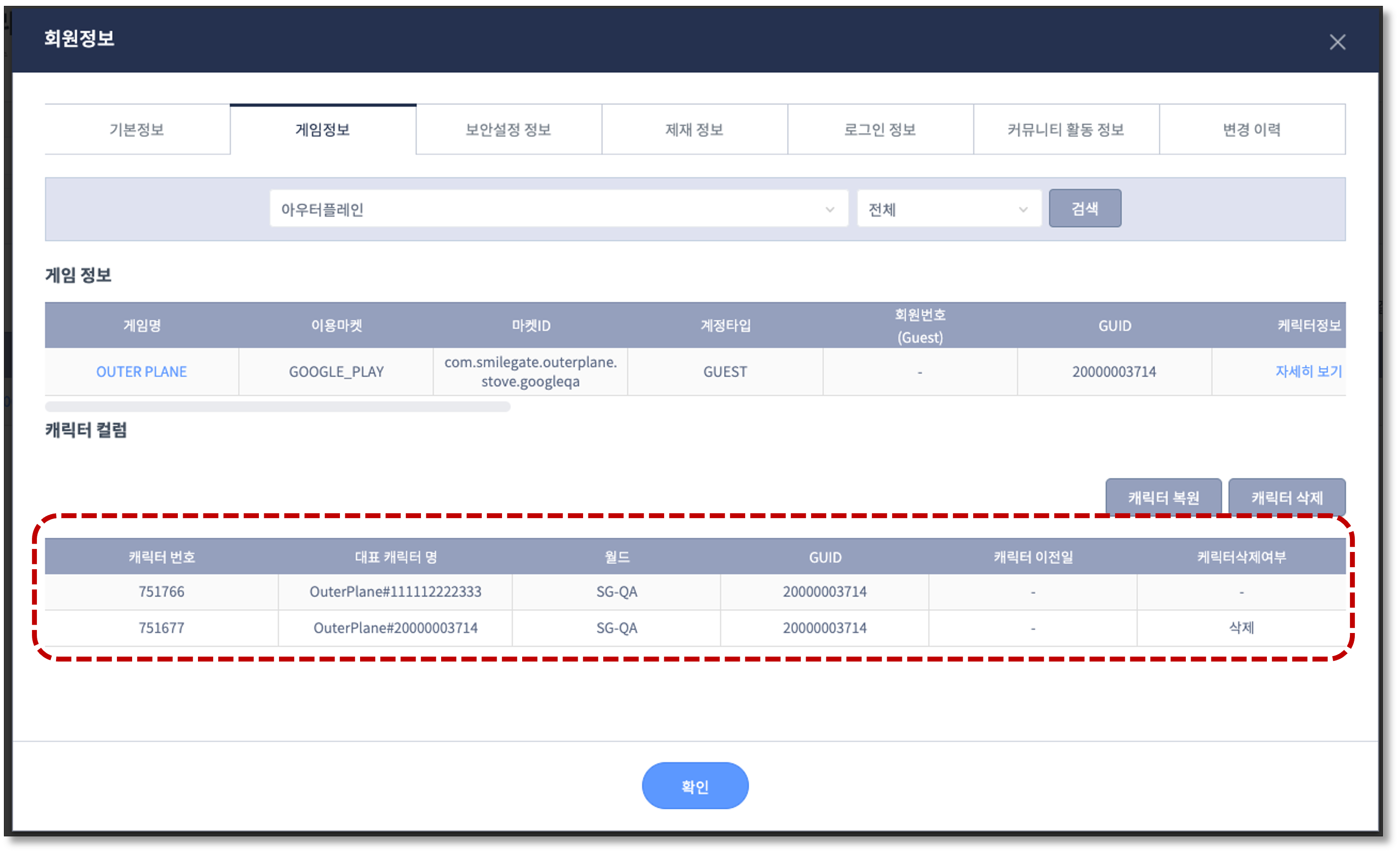
When a customer CS inquiry is received, you can check per-game character details in STOVE Partners' member-info management.
If you don't integrate the character service, it's shown blank.
When used
Be sure to know this
ㅁ world_id (world info) must be pre-registered in STOVE Partners to use the character feature.
ㅁ If the character feature isn't integrated, some or all features like Community, Customer Center, and in-game coupons are restricted.
Integration Guide
Provided Features
| Provided feature | Description |
|---|---|
| Register game character | Registers new character info on the platform and issues a unique character number |
| Change character info | Changes character info (nickname or world) registered on the platform |
| Delete game character | Deletes character info registered on the platform |
| Recover game character | Recovers character info registered on the platform |
| Look up game character | Looks up character info registered on the platform |
Integration Preparation
| Item | Details | Notes |
|---|---|---|
| Issue API Access Token | A token for communicating with the STOVE API server. Issued through the publishing technical contact | Request from the technical contact |
| Register world info in Partners | Pre-register world/channel info (world_id, world name) in STOVE Partners( world_id can't be left blank) |
Register directly in Partners |
World (world_id) naming examples
You can name the world freely, and it's generally named per the purposes below.
The world name may be shown to users in platform services.
| world_id | world_name | Purpose |
|---|---|---|
| world_kr | Korea world | When country distinction is needed among services in various countries |
| world_us | US world | When country distinction is needed among services in various countries |
| world_global | Global world | When country distinction is needed among services in various countries |
| world_id | world_name | Purpose |
|---|---|---|
| world_dev | CP company dev environment | For distinguishing development environments |
| world_qa | Build-verification environment | For distinguishing development environments |
| world_review | iOS build environment | A review server for build review (Google / iOS, etc.) |
Character Handling on Cancellation/Withdrawal
The way character info is handled differs when a game is cancelled or a STOVE membership is withdrawn.
| Type | Character handling | Notes |
|---|---|---|
| Game cancellation | Bulk-deletes all character info across all worlds of that game | To delete only specific characters → call the character-deletion API individually |
| STOVE membership withdrawal | Bulk-deletes character info after the withdrawal grace period passes | Look up withdrawal-completed users, then delete in-game data |
Development
This explains how to integrate game characters with the STOVE platform. For detailed request/response parameter specs of each API, see the API docs.
Prerequisites
| Item | Details | Notes |
|---|---|---|
| Issue API Access Token | The authentication token used for server-to-server communication | Request from the publishing technical contact |
| Register world info | The world info to use in the game | Register directly in [Partners > Publishing Center > A. Game Onboarding Management > A-10. Mobile Environment Settings] World/Channel Info tab |
Policy and Input Rules
Before integrating the character feature, check the character-nickname policy and input rules.
Character-nickname input rules
The STOVE platform validates the character-nickname input rules below. Be sure to check them before registering a character nickname.
| Item | Rule |
|---|---|
| Length limit | Minimum 2 characters, maximum 50 characters (Korean also counts as 1 character) |
| Allowed characters | Full UTF-8 Unicode (utf8mb4); special characters/spaces/all languages allowed |
| Case and accents | Stored exactly as entered |
Character-nickname duplicate check
If you use the platform's character-nickname duplicate-check feature, duplicate nicknames aren't allowed on character registration/change. If you want to use the platform's duplicate-check feature, tell the publishing technical contact which type of duplicate check to use.
※ The STOVE platform doesn't check for duplicate character nicknames by default. We recommend the game handle nickname duplicate checks itself.
| Type | Description |
|---|---|
| No duplicate check. (default) | The platform doesn't check for duplicate nicknames. |
| No nickname duplicates within the game | Doesn't allow duplicate nicknames within the same game (game_id). |
| No nickname duplicates within the world | Doesn't allow duplicate nicknames within the same world (world_id). (duplicates across the game are allowed) |
The nickname duplicate check operates as AS (Accent-Sensitive) CI (Case-Insensitive).
- AS (Accent-Sensitive): distinguishes accents (treats é and e differently)
- CI (Case-Insensitive): doesn't distinguish case (treats A and a the same)
Notes when passing nicknames
When passing a character nickname to the STOVE platform, you must pass the value the user entered as-is. Even if the in-game character nickname uses a random value, prefix, or suffix, you must pass the character nickname the user entered as-is to the STOVE platform. Otherwise, STOVE platform features that operate based on the character nickname may not work correctly.
Development Flow
When a character is created in the game, you must sync that character info to the STOVE platform. When the sync completes, STOVE issues a unique character number (character_no) to identify that character.
Be sure to store the unique character number (character_no)
When character creation completes on the STOVE platform, character_no is returned.
※ character_no is the identifier that links a character between the game and the STOVE platform; if character_no isn't stored correctly, later character-feature integration may have problems. Be sure to store it mapped to the in-game character.
When game character info (nickname or world) changes, you must sync it to the STOVE platform too.
3-1. Character deletion
When a character is deleted in the game, delete the STOVE character info as well.
Characters in an unusable state in-game (e.g., pending deletion) must be deleted via this API.
If you don't delete them, unusable characters may be shown on the STOVE platform.
3-2. Character recovery
If the game offers recovery within the deletion grace period, you must re-register the character on the STOVE platform to handle it.
You can integrate this only if the game manages the deletion grace period.
The character-recovery API only changes the character's deletion state, and it doesn't check for nickname duplicates on recovery. If a nickname duplicate check is needed for the character to recover, the game must do it separately. If a nickname change is needed, you can change the nickname after recovery via the 'game character-info change API.'
Troubleshooting
The error codes that can occur may differ per API. Be sure to check the response spec in the API docs.
When the character nickname is duplicated
(In a game using the platform's character-nickname duplicate-check feature) it can occur when the character nickname is duplicated on the platform. Let the user retry with a different nickname.
{
  "code": 78608,
  "message": "Nickname already exists."
}
When the game or world info can't be verified
Occurs when the requested game_id or world_id can't be verified on the STOVE platform.
{
  "code": 78603,
  "message": "Game not found."
}
Check in the following order.
- Check that the API Access Token's game info is correct. (Ask the publishing technical contact)
- Check that the
game_idin use matches the issued value. - Check that world info is registered in Partners and that you're using the registered
world_id.
When character info can't be verified
Occurs when the requested character_no can't be verified on the STOVE platform.
{
  "code": 78610,
  "message": "The character data does not exist."
}
Check that the character_no stored on the game server is correct. Inspect whether a wrong value is being stored.
On an abnormal response
You must handle cases where the API doesn't work correctly due to a network error, server failure, etc.
- ① When a response code not defined in the API docs is returned
- ② When there's no API response at all
For cases ① and ②, treat both as failures.
Be careful not to mis-parse null as 0 (success)
Check each API's response shape in the API docs and implement the null check to match the response shape.