
Skip to content
Stove
Last Updated
A guide to the entire process and necessary settings, from joining STOVE Partners to launching your service.

Onboarding Procedure Guide

Onboarding at a Glance

This is the common workflow from applying for onboarding to launching your service.
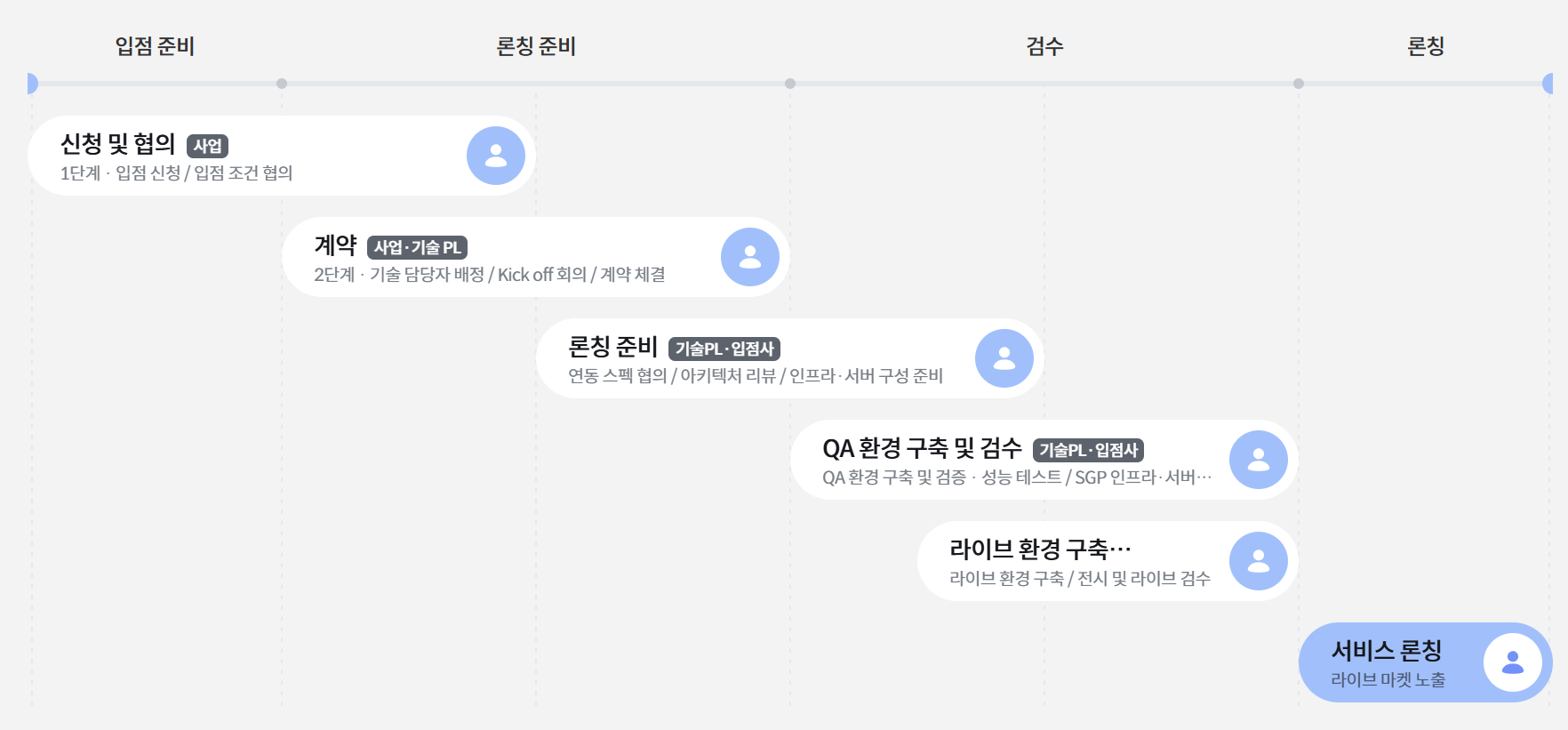
입점 절차 한눈에 보기 — 입점 준비·론칭 준비·검수·론칭 단계별 흐름

Detailed workflows vary depending on the service onboarding contract and platform type.
Required preparation items and the scope of inspection may vary based on contract terms and platform type.

Service Infrastructure and Game Server Setup

If the contract terms include SGP infrastructure and server setup, server infrastructure construction and performance testing procedures are added to the mobile, PC online, and multi-platform onboarding processes.

INFRA 1
Architecture Review
Verification of service configuration and integration structure
We review traffic volume, server configuration, integration points, and disaster recovery standards together.
INFRA 2
QA Environment Setup
QA environment infrastructure and server setup
We configure the infrastructure and game servers required for inspection and conduct performance and functional tests.
INFRA 3
Live Environment Setup
Application and inspection of the production environment
We apply the infrastructure and server configuration to the live environment and conduct exhibition and live inspections.

This is a conditional procedure added to specific onboarding types.
In this case, we first confirm the construction scope and performance test standards through an architecture review, then proceed with construction and verification tailored to the QA and live environments.

Mobile Onboarding

This is the onboarding workflow based on Android and iOS market releases.

For contracts that include SGP infrastructure and server setup
In addition to this onboarding workflow, architecture review, server infrastructure construction, QA environment verification, and performance testing are additionally conducted.

1
Onboarding Phase+
2
Integration Phase+
3
Development and Verification Phase+
4
Service Launch Phase
After the onboarding application, review the vendor information and target game to determine approval for onboarding.
Discuss requirements through technical meetings, provide development guides, and proceed with feature implementation.
QA environment setup and verification · Performance testing
Perform performance testing if SGP infrastructure/server setup is included in the contract terms.
Discuss live market exposure schedule
Application for Entry
·Application for Entry
·Submission of information for games to be entered
Review of Entry
·Review of entering company
·Review of games to be entered
·Consultation and approval for entry
Contract signing and assignment of manager
·Business and Technical PL Assignment
·Service Terms Negotiation
·Non-Disclosure Agreement
·Service Agreement
Delivery of Integration Guide
·Technical Meeting and Integration Requirements Negotiation
·Delivery of Integration Guide
·Implementation of Integration Features
Integration Environment Setup
·ACL Opening based on IP Information
·Sandbox Access Grant
·AD Account Provisioning
·Wiki/Jira/Sharepoint Access Grant
Partners (Operation Tool) Authorization
·Provision of Partners User Guide
·Stove Membership Registration and Partners Registration
·Partners Onboarding Approval Processing
Launch Information Setup
·Game ID Creation
·Registration of Basic Game Information
·Integration Key Creation, Market Setup
·Game Display Settings
Integration
·STOVE SDK Integration
·Authentication, Billing (IAP)
·Character, Push, Popup (Coupon)
·Community, Metrics
·Security Module Integration
·Service Market Settings
Service Infrastructure & Server Setup
·QA and Live Environment Infrastructure & Server Setup
·Performance Testing
STOVE Display Settings
·Sandbox Game Display
Game Upload
·Direct Market Upload (SB Environment)
Review and Live Integration
·Sandbox Testing
·Vulnerability Review
·Live Integration
·Live Environment Information Application
·Same as Sandbox Integration Process
Live Review
·Live Testing
·Live Data Initialization
·Market Review
STOVE Display Settings ON
·Live Game Display
Service Launch
·Live Market Exposure

Implementing integration features is a mandatory step
This is the stage where the STOVE technical team and the partner company review the platform integration specifications together. If the contract includes infrastructure/server construction, an architecture review will be conducted during the technical meeting, and the scope of construction and performance test criteria will be finalized.

PC Online Onboarding

This is the PC game onboarding flow based on the STOVE launcher.

For contracts that include SGP infrastructure/server construction
In addition to this onboarding flow, architecture review, server infrastructure construction, QA environment verification, and performance testing are additionally conducted.

1
Onboarding Phase+
2
Integration Phase+
3
Construction and Verification Phase+
4
Service Launch Phase
Review partner company information and target games after onboarding application, and confirm onboarding approval
Discuss requirements through technical meetings and proceed with feature implementation after delivering the development guide
QA environment construction and verification · Performance testing
If the contract includes SGP infrastructure/server construction, proceed with performance testing
Live game display exposure
Application for entry
·Application for entry
·Delivery of information on games for entry
Entry review
·Review of entering companies
·Review of games for entry
·Entry consultation and approval
Contract signing and manager assignment
·Assignment of Business and Technical PL
·Discussion of service terms
·Non-disclosure agreement
·Service agreement
Delivery of integration guide
·Technical meeting and discussion of integration requirements
·Delivery of integration guide
·Implementation of integration features
Integration environment setup
·ACL opening based on IP information
·Sandbox access permission
·Provision of AD account
·Wiki/Jira/Sharepoint access permission
Granting Partners (operation tool) permissions
·Provision of Partners user guide
·Stove membership registration and Partners registration
·Partners entry approval processing
Launch information setup
·Game ID creation
·Registration of basic game information
·Integration key generation, market setup
·Game display settings
Integration
·STOVE SDK Integration
·Authentication, Billing (IAP)
·Character, Popup (Coupon)
·Community, Metrics
·Security Module Integration
Service Infrastructure & Server Setup
·QA and Live Environment Infrastructure & Server Setup
·Performance Testing
STOVE Display Settings
·Sandbox Game Display
Inspection
·Sandbox Testing
·Vulnerability Inspection
Live Integration
·Live Integration
·Apply Live Environment Information
·Same as Sandbox Integration Process
Live Inspection
·Live Testing
·Live Data Initialization
·Market Review
STOVE Display Settings ON
·Live Game Display
Service Launch
·Live Market Exposure
Multi-platform Onboarding

Operate on mobile and PC online simultaneously, with a structure where the PC integration process is added to the mobile development workflow.

For contracts that include SGP infrastructure and server setup
In addition to the onboarding flow, architecture review, server infrastructure setup, QA environment verification, and performance testing are also conducted.

Mobile
SDK · Billing · Common API
Add PC
SDK · Billing
Proceed by adding PC integration after mobile onboarding is complete. Common GUID is used to connect both platforms, sharing characters and currency regardless of the environment.
CategoryDescription
WorkflowFor simultaneous operation via mobile + PC online expansion. A structure where the PC integration process is added to the mobile development workflow.
Platform Type SettingsThe platform type in the basic service information must be registered as a mobile game only. Please be careful not to select other game types.
Integration OrderMobile integration first, followed by PC integration is recommended. ① Mobile area (SDK + Mobile Billing + Common APIs) integration first → ② PC area (SDK + Billing) integration.

Caution when setting platform type
The platform type in the basic service information must be registered as Mobile Game only. Please be careful not to select other game types.

Step-by-Step Guide

All 12 steps of the onboarding process are grouped into 4 phases.

STEP 1–5
Consultation & Setup
1Onboarding Consultation
Determine onboarding environment (mobile, PC, multi-platform) and assign a dedicated Game Tech contact.
2Technical Meeting
Review provided features and discuss specs and support scope for each environment.Based on the pre-environment survey
3App Store Settings
Register developer consoles for each launch market and set up 3rd-party authentication methods
4Onboarding Settings
Register for STOVE Partners, issue VPN accounts, and issue API keys
5STOVE Partners Registration
Partner registration, approval, and registration of app information and environment information (Sandbox/Live)
STEP 6–8
SDK Integration
6STOVE SDK/API Integration
Integrate features such as authentication, payment, characters, and push notifications according to the platform and development environment
7Web Development
Integrate web services such as pre-registration, official website, and coupons. Conducted in parallel with game integration
8Client/Server Preparation
Prepare Sandbox builds for QA and Live builds for operation
STEP 9–10
QA Verification
9QA Verification
Verify platform features (including vulnerability testing). Game content verification is excluded
10App Store Review
Market review conducted for mobile only. Not applicable for PC-only
STEP 11–12
Launch
11Launch Readiness Meeting
Evaluate launch readiness based on QA and preparation results. Launch schedule may be adjusted based on results
12Service Launch
Expose the game and lift in-game maintenance to allow user access. Monitor the service afterwards
Go to App Store Console

These are the developer consoles for each launch market.

Go to Console by Market5
What is STOVE Partners?

It is a back-office for partners where vendors manage service registration and environment settings.

SERVICE
Service Information Management
Register information required for service operations, such as basic game info, terms and conditions, market info, display info, and SDK Config.
ENVIRONMENT
Environment-specific Settings
Separate Sandbox and Live environments to manage access rights, integration keys, environment info, and test/operation settings.
PERMISSION
Account & Permission Management
Assign service registration, integration settings, community, and CS permissions based on the roles of vendor administrators and staff.
STOVE Partners Account Permissions

Permissions are managed based on roles.

View Permissions by Role4
Master (Vendor Administrator)
Access to all menus. Responsible for inviting members, granting permissions, registering services, SDK Config, and game info. Automatically created upon completion of the entry application.
Game Integration Manager
Access to technical menus such as SDK Config, payment info, and service integration settings. Assigned to vendor developers.
Community Manager
Can access service operation menus such as community settings, board management, and event operations.
CS Manager
Can access CS-related menus such as handling customer inquiries, game sanction management, and responding to reports.
Access URL by Environment

Operated by separating into two environments: Sandbox and Live.

SANDBOX
Development/QA
https://partners.gate8.com
LIVE
Operation
https://partners.onstove.com


Need to contact us directly? stove.developers@smilegate.com