
- Last Updated

Game Cancellation
 STOVE Sign-up
 STOVE Login
 Device
 Game Entry
 Payment
 Other Settings
 Cancellation
 Withdrawal
Service Overview
When users want to clean up a game they no longer play, they can cancel the game (cancel use) in-game or withdraw their STOVE account on the platform. Game cancellation deletes only the information linked to the current game (character, currency, world data, etc.) while keeping the STOVE integrated account, whereas STOVE account withdrawal deletes the account itself. This document focuses on the flow where a user requests and cancels a game cancellation in-game.
When a user requests cancellation, the game studio only needs to call the game cancellation request API. After that, STOVE handles the completion after the grace period and the callback notification. The in-game cancel button is implemented by the game studio, but the actual cancellation feature is provided by STOVE, and users can request cancellation from the game info screen on STOVE web or the in-game menu.
Sign-up vs. Cancellation Concepts
In STOVE integration, 'sign-up' and 'cancellation' are divided into the STOVE account level and the game level. The game cancellation covered in this document cleans up only that game while keeping the STOVE account, whereas STOVE withdrawal deletes the account itself and ends the use of all games. It is easier to understand by viewing game cancellation as the opposite action of game sign-up (agreeing to the game terms of service).
| Category | Level | Meaning | Identifier |
|---|---|---|---|
| STOVE sign-up | STOVE account | Create a STOVE account via email or SNS | MemberNo issued |
| Game sign-up | Game | Agree to the game terms of service on game entry | GUID issued |
| Game cancellation | Game | Cancel game use; delete game data and character (the STOVE account is kept) | GUID deleted |
| STOVE withdrawal | STOVE account | Delete the STOVE account itself (cancel use of all games) | MemberNo deleted |
Keep this in mind
ㆍ Game sign-up (agreeing to the game terms) and login are covered in the Signing In document, while game cancellation and STOVE withdrawal are covered here.
ㆍ The 'Withdraw service consent' step in the game cancellation process is the action of withdrawing the game terms of service agreed to at game sign-up.
Game Cancellation Request Process
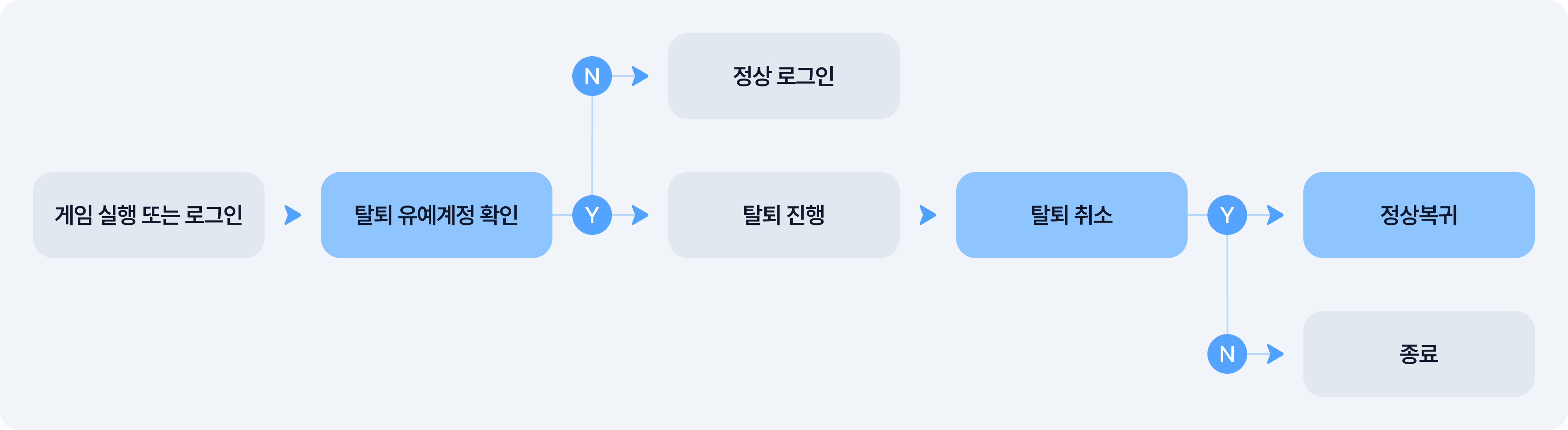
This is the flow where a user requests cancellation in-game or on STOVE web. To prevent mistakes, a warning notice and a confirmation step are always included.

Game Cancellation Request Cancel Process
If the user reconnects to the game during the grace period, they can cancel the cancellation. Once canceled, the account returns to normal and they can keep using the game.
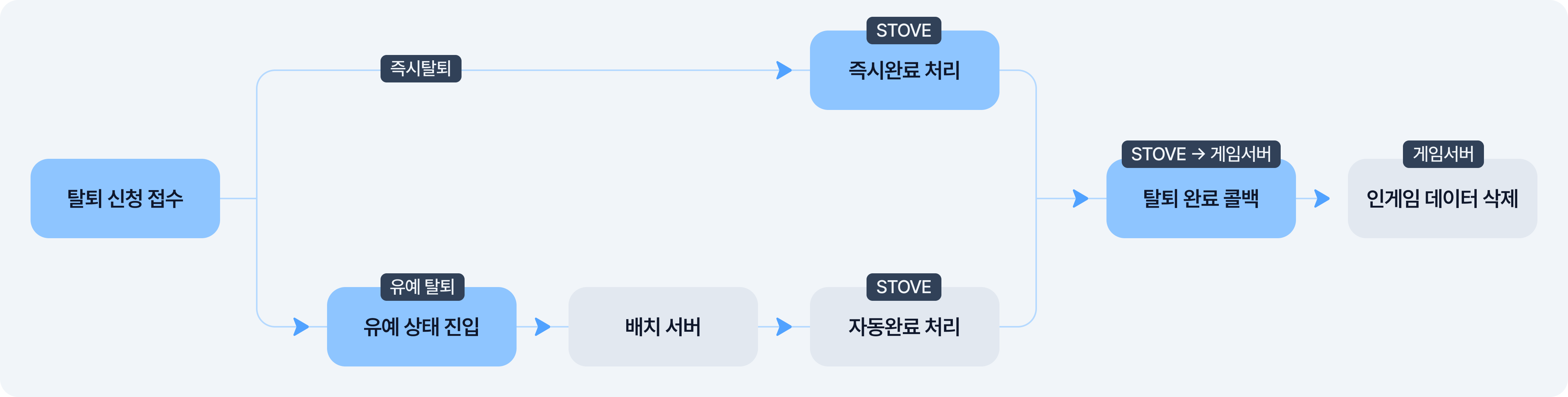
Processing Flow from Request to Completion
This is the flow, split between the game studio and STOVE, from when a cancellation request is received to actual completion. Immediate cancellation completes at the moment of request, while grace-period cancellation is completed automatically by the STOVE batch server after the grace period, then the result is delivered to the game server.
Keep this in mind
· Do not use game cancellation for rerolling or account resets. On cancellation, the GUID is deleted, so re-registering is treated as a new user.
If an account reset is needed, use the STOVE character delete API and consult the contact in advance.
· STOVE account withdrawal is handled by STOVE directly, so the game studio can receive the cancellation-complete event and clean up the in-game data.
Key Concepts
Before integrating game cancellation, understanding the concepts below first makes the rest easier to grasp.
| Term | Details |
|---|---|
| Game cancellation request | A feature that cancels the user immediately or puts them into a cancellation-requested (grace) state. The only cancellation API the game studio calls Called separately for immediate and grace cancellation Requires a User Access Token (no caching or server storage; retrieved in real time at call time) |
| Grace period | The period after a cancellation request, before data is deleted, during which the user can cancel the request. Set to 0–30 days per game If 0 days, it completes immediately upon request An in-progress notice screen appears if the game is accessed during the grace period |
| Cancellation completion batch | A batch in which STOVE automatically completes cancellation for those past the grace period. The game studio does not perform completion directly Processing time: daily at 00:00 Korea time |
| Cancellation completion callback | A notification STOVE sends to the game server when cancellation completes. The game studio receives it and deletes the game data Integrating the STOVE Event feature is required to receive the notification Supported for GUID-based games (for MemberNo-based, check with the publishing technical contact) |
| Re-registration after cancellation | Once cancellation completes, the GUID and character information are deleted and cannot be recovered. Recovery is only possible by canceling the cancellation within the grace period Re-registering with the same STOVE account after completion is treated as a new user (a new GUID is issued for GUID-based games) |
Keep this in mind
GUID and MemberNo are STOVE's numbering systems for identifying game users; one of the two is used depending on the game integration method.
· GUID — issued per device and game. Deleted on cancellation, and a new GUID is issued on re-registration. Supports STOVE Event callbacks
· MemberNo — kept per STOVE account. The same number is kept even after re-registration. Callbacks not supported (check with the publishing technical contact)
Usage Scenarios
Cancellation Request (Immediate)
When a user requests cancellation from the in-game settings, the game data is deleted immediately. Since recovery is impossible after cancellation, a warning notice and a confirmation step must always be provided.
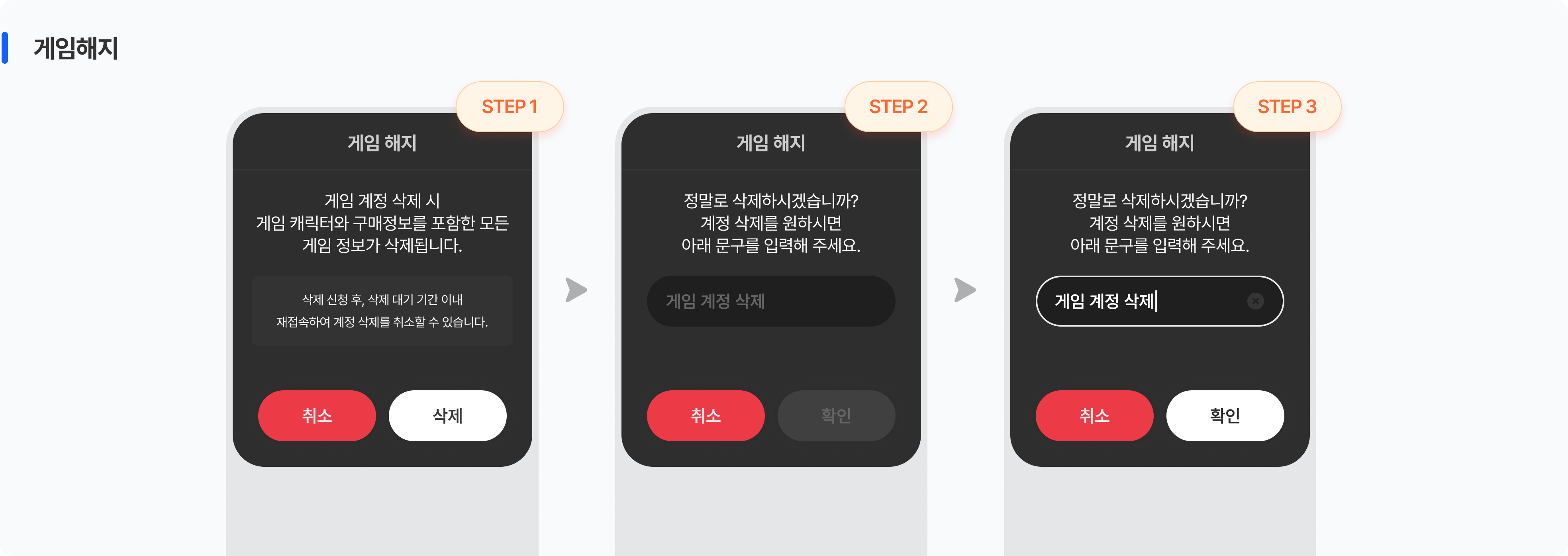
| Step | Actor | Details | Notes |
|---|---|---|---|
| 1 | User → game client | Enter the cancellation menu in the in-game settings | Common |
| 2 | Game client | Show a warning notice popup (deletion scope and no-recovery notice) | Common |
| 3 | Game client | Show a confirmation popup (implemented by the game studio, e.g., prompting an intentional action such as entering the character name) | Common |
| 4 | Game server → STOVE API | Call the game cancellation request API as immediate cancellation; STOVE completes it immediately | Immediate flow |
| 5 | STOVE API → game server | Cancellation-complete response; delete STOVE character, terms, sanction, and device information | Immediate flow |
| 6 | Game server | Delete in-game user data in the game DB (STOVE does not manage the game DB) | Immediate flow |
| 7 | Game client | Auto logout after completion → end the game session or move to the initial screen | Immediate flow |
Keep this in mind
The game cancellation request API requires a User Access Token retrieved and passed in real time. Caching the token or storing it on the server may cause errors due to expiration.
STOVE currency (cash) is deleted together on cancellation completion and cannot be recovered. Users must be notified in advance.
Cancellation Request (With Grace Period)
Even after a cancellation request, data is not deleted right away; the user can cancel during the grace period. The grace period can be set to 0–30 days per game. Once the grace period passes, STOVE completes the cancellation automatically and notifies the game server of the result via callback. The game studio can receive this callback and clean up the game data.
In-progress notice screen
If the user reconnects to the game during the grace period, a screen appears notifying that cancellation is in progress and guiding them to cancel it. Since STOVE provides this notice screen as a popup suited to the environment, the game studio does not need to implement a separate screen.
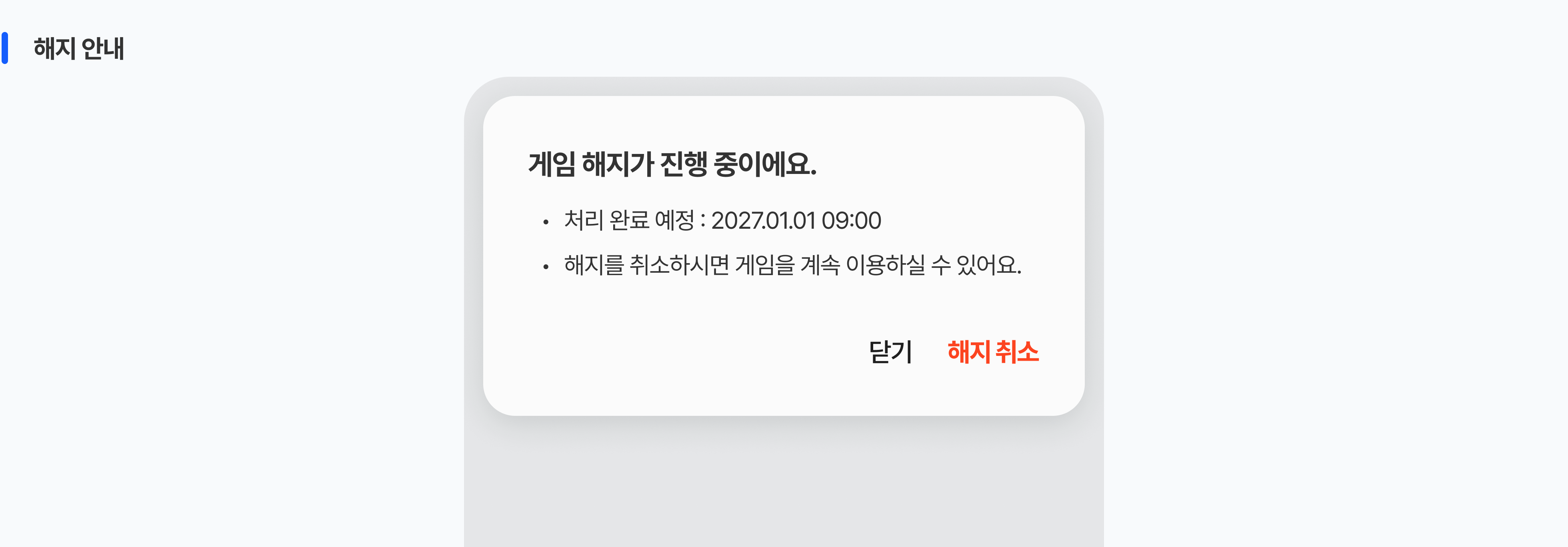
Grace-period cancellation request flow
| Step | Actor | Details | Notes |
|---|---|---|---|
| 1 | User → game client | Enter the cancellation menu in the in-game settings | Common |
| 2 | Game client | Show a warning notice popup (deletion scope and grace-period notice) | Common |
| 3 | Game client | Show a confirmation popup (implemented by the game studio, e.g., prompting an intentional action such as entering the character name) | Common |
| 4 | Game server → STOVE API | Call the game cancellation request API as grace cancellation | Grace flow |
| 5 | STOVE API → game server | Respond with request success and the scheduled cancellation date; log out due to auth-token expiration | Grace flow |
| 6 | User → game client | On reconnect during the grace period, show the in-progress notice screen; cancellation possible | Grace flow |
| 7 | STOVE batch server | Auto-complete for those past the grace period and delete related information (00:00 Korea time) | Grace flow |
| 8 | STOVE batch server → game server | Deliver cancellation-complete information via callback (STOVE Event integration required) | Grace flow |
| 9 | Game server | Delete game DB data after receiving the callback (changing a flag before deletion is recommended) | Grace flow |
Cancellation-cancel flow
If the user cancels the cancellation within the grace period, they can use the game normally again.
| Step | Actor | Details |
|---|---|---|
| 1 | User → game client | Access the game during the grace period and select 'Cancel cancellation' on the notice screen |
| 2 | STOVE SDK | Automatically looks up the cancellation-request status and shows the cancel UI; when the user chooses to cancel, it processes the cancellation with STOVE (no separate game-studio implementation needed) |
| 3 | STOVE platform | Delivers the cancellation-cancel (GAME_WITHDRAW_CANCEL) event (for server-to-server synchronization) |
| 4 | Game server | Synchronize to the cancellation-canceled state → the user can play normally |
Keep this in mind
- To receive cancellation-complete information after the grace period, the STOVE Event feature must be integrated. Cancellation completion is performed automatically by the STOVE batch server.
- If operating with individual world servers rather than in-game batches (common server synchronization), server-to-server synchronization for cancellation-cancel must be implemented.
- Once cancellation is complete, platform data (GUID, character, etc.) cannot be recovered. Users who need recovery must cancel the cancellation within the grace period.
STOVE Account Withdrawal
This is the flow for deleting the STOVE platform account itself. STOVE performs the cancellation directly, and the game studio can receive the cancellation-complete event from STOVE and clean up the in-game data.
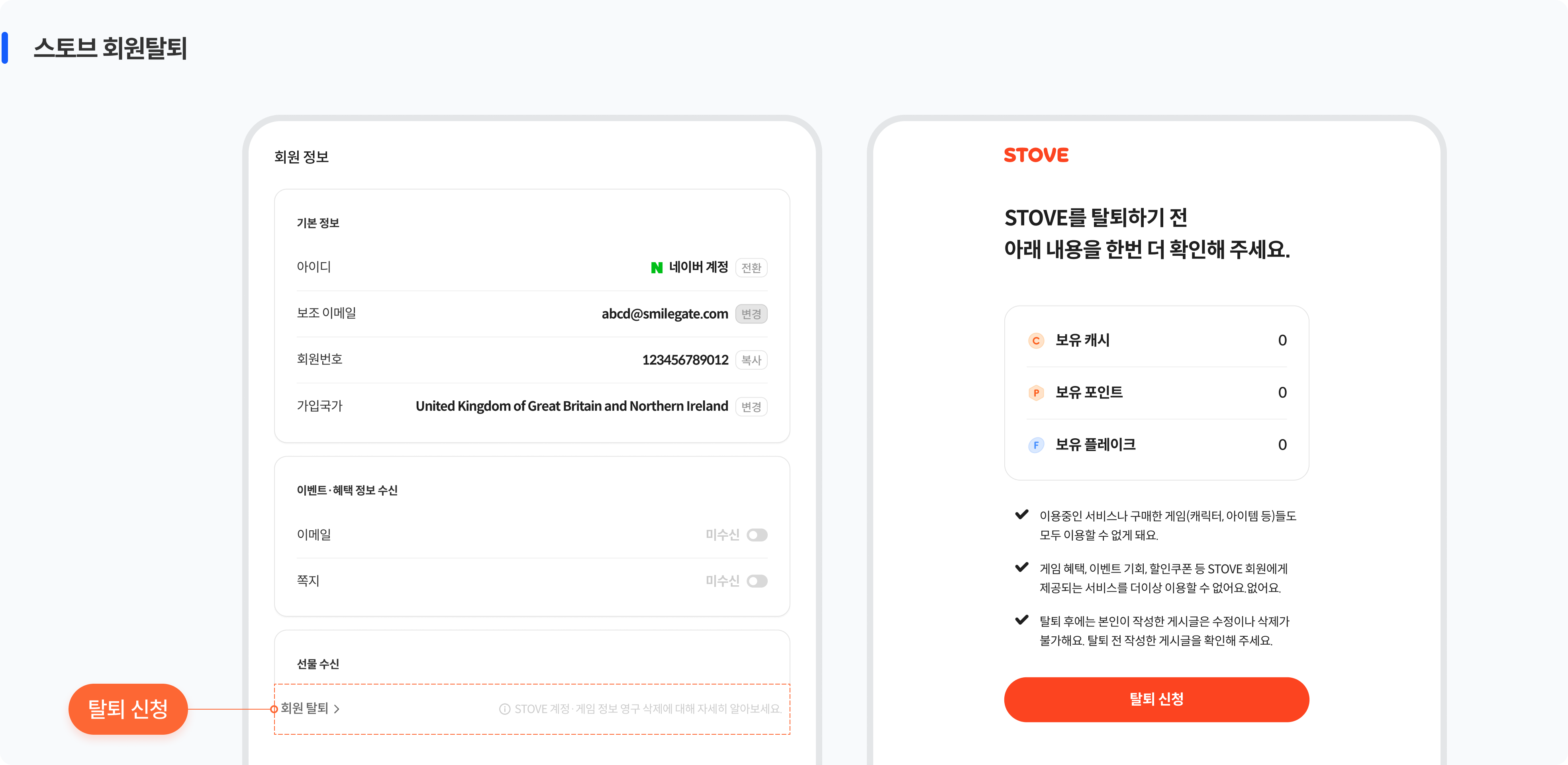
STOVE account withdrawal guide
Users can request withdrawal under STOVE Account Management > Account Withdrawal. STOVE provides all screens and processing — cancellation guidance and precaution review, identity verification, the withdrawal request, and request completion. The game studio can receive the cancellation-complete event and clean up the in-game data.
Data handling when re-registering after cancellation
If the user re-registers with the same account or the same device after cancellation, the link to the previous game data is broken. This must be accounted for in advance.
| Situation | Details |
|---|---|
| Restart the game with the same STOVE account | The account is kept, but the character, currency, and world data are deleted; starts as a new user |
| GUID-based game, re-registration on the same device | A new GUID is issued, making it hard to distinguish from the previous user (the character delete API is recommended if metrics management is needed) |
| Re-registration with the same email after STOVE account withdrawal | A new MemberNo is issued; not linked to previous data; no recovery |
Keep this in mind
· Cancellation-complete information is delivered via a STOVE Event callback. (For MemberNo-based, contact the publishing technical contact)
· Personal data must be deleted, as it may create legal liability.
Integration Overview
Decisions to Make Before Starting
Before starting cancellation feature integration, please decide the items below internally within the game team first.
| Decision item | Options and details |
|---|---|
| ① Game cancellation method | Immediate cancellation — completes upon request (0-day grace period) Grace-period cancellation — enters a grace state after request and auto-completes when it passes. Requires implementing the grace period (0–30 days) and the cancellation-cancel flow |
| ② User identification method | GUID-based — can use STOVE Event callbacks MemberNo-based — STOVE Event not supported. The cancellation handling method must be checked with the publishing technical contact in advance |
| ③ Game DB deletion timing | Immediate deletion — delete game DB data right after cancellation completes Batch deletion after a flag change (recommended) — change a flag, then back up and fully delete during maintenance. Personal data must be deleted |
| ④ GUID re-registration scenario | In a GUID-based game, re-registering on the same device after cancellation issues a new GUID, making it hard to distinguish from the previous user. No metrics management needed — implement the default flow as-is Metric-distortion prevention needed — consider implementing cancellation using the STOVE character delete API |
Keep this in mind
The STOVE Event callback for receiving cancellation-complete information is supported for GUID-based games. For MemberNo-based games, check the cancellation handling method with the publishing technical contact in advance.
Roles and Responsibilities
These are the areas STOVE handles and the areas the game studio implements directly for cancellation integration.
 What the STOVE platform provides
 What the game studio must implement
Environment Guide
Integration testing must always be done first in the Sandbox environment, and applied to the Live environment only after verification is complete.
| Category | Sandbox | Live (Production) |
|---|---|---|
| API Host | https://api.gate8.com | https://api.onstove.com |
| Purpose | For development and QA testing only. Does not affect real user data. | The actual production environment. Deployed after QA is complete. |
Checklist
Before the game launch, check the items the game studio implemented or configured directly. Since STOVE handles cancellation request processing, grace completion, and callback sending, you only need to check the items below.
| Category | Role | Check item |
|---|---|---|
| Required | Game client | Cancellation UI — verify the warning notice and confirmation popups are provided
|
| Required | Game client | Verify logout and flow handling after cancellation completes
|
| Required | Game server | Verify game cancellation request API integration
|
| Required | Game server | Verify in-game data deletion in the game DB is implemented
|
| Required | Game server | Verify grace-period cancellation callback receipt and cancel synchronization
|
| Required | Game server | Verify receipt of the STOVE account withdrawal event
|
| Recommended | Game server | Verify new-user handling on GUID-based re-registration
|