This is an example of language detection by priority. Fill in the service language coverage (`langCoverage`) according to each service.```javascript
// 1) URL 패스의 언어
const getLangByPath = () => {
const langCoverage = []; // 서비스 언어 커버리지
const lang = window.location.pathname.split('/')[1];
if (!lang) return null;
const lowerCaseLang = lang.toLowerCase();
return langCoverage.some((c) => c === lang) ? lowerCaseLang : null;
};
// 2) LOCALE cookie language (when there is no language in the URL path)
const getLangByCookie = () => {
const GNBLanguageCoverage = ; // GNB service language coverage
const lang = Cookies.get('LOCALE'); // Use external library for cookie lookup
if (!lang) return null;
const lowerCaseLang = lang.toLowerCase();
return GNBLanguageCoverage.includes(lowerCaseLang) ? lowerCaseLang : null;
};
// 3) Browser language (when not in cookies either)
const getNavigatorLang = () => {
const lang = window.navigator.language;
return lang.startsWith('zh') ? lang : lang.replace(/-\S+/g, '');
};
</div>
</details>

<p style="color:#314158;font-family:'Spoqa Han Sans Neo';font-size:16px;font-weight:400;line-height:26px;letter-spacing:-0.48px;"><code>customChangeLanguage</code>를 <code>true</code>로 두면 언어 변경 시 쿠키를 바꾼 뒤 <code>change-language</code> 이벤트를 전달해요. <code>false</code>(기본)면 쿠키를 바꾼 뒤 <code>useLanguageCodeFromPath</code>가 <code>true</code>면 URL 언어 패스를 바꿔 이동하고, 아니면 페이지를 새로고침해요. 이벤트 처리 예시는 아래 [샘플 코드]의 이벤트 수신 탭을 참고해요.</p>

<div style="font-size:1.0em;font-weight:bold;margin:24px 0 12px;">옵션</div>

<p style="color:#314158;font-family:'Spoqa Han Sans Neo';font-size:16px;font-weight:400;line-height:26px;letter-spacing:-0.48px;"><code>mount()</code>에 전달하는 옵션이에요. 서비스에 필요한 옵션만 선택해 지정해요.</p>

<table style="width:100%;table-layout:fixed;border-collapse:collapse;border-top:1px solid rgba(0,0,0,0.08);border-bottom:1px solid rgba(0,0,0,0.08);">
  <thead>
    <tr>
      <th style="padding:12px;text-align:left;font-weight:normal;color:#314158;border-bottom:1px solid rgba(0,0,0,0.08);background-color:#F8FAFC;width:26%;">옵션</th>
      <th style="padding:12px;text-align:left;font-weight:normal;color:#314158;border-bottom:1px solid rgba(0,0,0,0.08);background-color:#F8FAFC;width:10%;">필수</th>
      <th style="padding:12px;text-align:left;font-weight:normal;color:#314158;border-bottom:1px solid rgba(0,0,0,0.08);background-color:#F8FAFC;width:16%;">기본값</th>
      <th style="padding:12px;text-align:left;font-weight:normal;color:#314158;border-bottom:1px solid rgba(0,0,0,0.08);background-color:#F8FAFC;">설명</th>
    </tr>
  </thead>
  <tbody>
    <tr>
      <td style="padding:12px;vertical-align:top;border-bottom:1px solid rgba(0,0,0,0.08);color:#314158;font-size:14px;font-weight:500;"><code>logArea</code></td>
      <td style="padding:12px;vertical-align:top;border-bottom:1px solid rgba(0,0,0,0.08);color:#314158;font-size:14px;font-weight:400;">필수</td>
      <td style="padding:12px;vertical-align:top;border-bottom:1px solid rgba(0,0,0,0.08);color:#314158;font-size:14px;font-weight:400;">""</td>
      <td style="padding:12px;vertical-align:top;border-bottom:1px solid rgba(0,0,0,0.08);color:#314158;font-size:14px;font-weight:400;">로그 수집용 로그 영역. 서비스 메인 주소를 기입 (예: <code>https://store.onstove.com</code>)</td>
    </tr>
    <tr>
      <td style="padding:12px;vertical-align:top;border-bottom:1px solid rgba(0,0,0,0.08);color:#314158;font-size:14px;font-weight:500;"><code>useLanguageCodeFromPath</code></td>
      <td style="padding:12px;vertical-align:top;border-bottom:1px solid rgba(0,0,0,0.08);color:#314158;font-size:14px;font-weight:400;">선택</td>
      <td style="padding:12px;vertical-align:top;border-bottom:1px solid rgba(0,0,0,0.08);color:#314158;font-size:14px;font-weight:400;">false</td>
      <td style="padding:12px;vertical-align:top;border-bottom:1px solid rgba(0,0,0,0.08);color:#314158;font-size:14px;font-weight:400;"><code>true</code> 시 URL Path의 언어코드를 감지해 언어 설정</td>
    </tr>
    <tr>
      <td style="padding:12px;vertical-align:top;border-bottom:1px solid rgba(0,0,0,0.08);color:#314158;font-size:14px;font-weight:500;"><code>serviceTitle.pc / .mobile</code></td>
      <td style="padding:12px;vertical-align:top;border-bottom:1px solid rgba(0,0,0,0.08);color:#314158;font-size:14px;font-weight:400;">선택</td>
      <td style="padding:12px;vertical-align:top;border-bottom:1px solid rgba(0,0,0,0.08);color:#314158;font-size:14px;font-weight:400;">""</td>
      <td style="padding:12px;vertical-align:top;border-bottom:1px solid rgba(0,0,0,0.08);color:#314158;font-size:14px;font-weight:400;">스토브 로고 우측 서비스 타이틀 (HTML string). PC·모바일 개별 지정</td>
    </tr>
    <tr>
      <td style="padding:12px;vertical-align:top;border-bottom:1px solid rgba(0,0,0,0.08);color:#314158;font-size:14px;font-weight:500;"><code>widget.notification</code></td>
      <td style="padding:12px;vertical-align:top;border-bottom:1px solid rgba(0,0,0,0.08);color:#314158;font-size:14px;font-weight:400;">선택</td>
      <td style="padding:12px;vertical-align:top;border-bottom:1px solid rgba(0,0,0,0.08);color:#314158;font-size:14px;font-weight:400;">true</td>
      <td style="padding:12px;vertical-align:top;border-bottom:1px solid rgba(0,0,0,0.08);color:#314158;font-size:14px;font-weight:400;">알림 노출 여부</td>
    </tr>
    <tr>
      <td style="padding:12px;vertical-align:top;border-bottom:1px solid rgba(0,0,0,0.08);color:#314158;font-size:14px;font-weight:500;"><code>widget.stoveDownload</code></td>
      <td style="padding:12px;vertical-align:top;border-bottom:1px solid rgba(0,0,0,0.08);color:#314158;font-size:14px;font-weight:400;">선택</td>
      <td style="padding:12px;vertical-align:top;border-bottom:1px solid rgba(0,0,0,0.08);color:#314158;font-size:14px;font-weight:400;">false</td>
      <td style="padding:12px;vertical-align:top;border-bottom:1px solid rgba(0,0,0,0.08);color:#314158;font-size:14px;font-weight:400;">스토브 설치 버튼 노출 여부</td>
    </tr>
    <tr>
      <td style="padding:12px;vertical-align:top;border-bottom:1px solid rgba(0,0,0,0.08);color:#314158;font-size:14px;font-weight:500;"><code>widget.languageSelect</code></td>
      <td style="padding:12px;vertical-align:top;border-bottom:1px solid rgba(0,0,0,0.08);color:#314158;font-size:14px;font-weight:400;">선택</td>
      <td style="padding:12px;vertical-align:top;border-bottom:1px solid rgba(0,0,0,0.08);color:#314158;font-size:14px;font-weight:400;">true</td>
      <td style="padding:12px;vertical-align:top;border-bottom:1px solid rgba(0,0,0,0.08);color:#314158;font-size:14px;font-weight:400;">언어 선택 노출 여부</td>
    </tr>
    <tr>
      <td style="padding:12px;vertical-align:top;border-bottom:1px solid rgba(0,0,0,0.08);color:#314158;font-size:14px;font-weight:500;"><code>widget.themeSelect</code></td>
      <td style="padding:12px;vertical-align:top;border-bottom:1px solid rgba(0,0,0,0.08);color:#314158;font-size:14px;font-weight:400;">선택</td>
      <td style="padding:12px;vertical-align:top;border-bottom:1px solid rgba(0,0,0,0.08);color:#314158;font-size:14px;font-weight:400;">true</td>
      <td style="padding:12px;vertical-align:top;border-bottom:1px solid rgba(0,0,0,0.08);color:#314158;font-size:14px;font-weight:400;">테마 선택 노출 여부</td>
    </tr>
    <tr>
      <td style="padding:12px;vertical-align:top;border-bottom:1px solid rgba(0,0,0,0.08);color:#314158;font-size:14px;font-weight:500;"><code>widget.stoveMenu.active / .mobile</code></td>
      <td style="padding:12px;vertical-align:top;border-bottom:1px solid rgba(0,0,0,0.08);color:#314158;font-size:14px;font-weight:400;">선택</td>
      <td style="padding:12px;vertical-align:top;border-bottom:1px solid rgba(0,0,0,0.08);color:#314158;font-size:14px;font-weight:400;">false / true</td>
      <td style="padding:12px;vertical-align:top;border-bottom:1px solid rgba(0,0,0,0.08);color:#314158;font-size:14px;font-weight:400;">기본 메뉴 노출 여부. <code>mobile</code>은 <code>active=true</code>일 때만 적용</td>
    </tr>
    <tr>
      <td style="padding:12px;vertical-align:top;border-bottom:1px solid rgba(0,0,0,0.08);color:#314158;font-size:14px;font-weight:500;"><code>global.languageCoverages</code></td>
      <td style="padding:12px;vertical-align:top;border-bottom:1px solid rgba(0,0,0,0.08);color:#314158;font-size:14px;font-weight:400;">Select</td>
      <td style="padding:12px;vertical-align:top;border-bottom:1px solid rgba(0,0,0,0.08);color:#314158;font-size:14px;font-weight:400;">['en','zh-cn','zh-tw','ja','ko']</td>
      <td style="padding:12px;vertical-align:top;border-bottom:1px solid rgba(0,0,0,0.08);color:#314158;font-size:14px;font-weight:400;">List of languages to display in the language button. If the default language (en) is missing, it will be added automatically.</td>
    </tr>
    <tr>
      <td style="padding:12px;vertical-align:top;border-bottom:1px solid rgba(0,0,0,0.08);color:#314158;font-size:14px;font-weight:500;"><code>global.defaultSelectedLanguage</code></td>
      <td style="padding:12px;vertical-align:top;border-bottom:1px solid rgba(0,0,0,0.08);color:#314158;font-size:14px;font-weight:400;">Select</td>
      <td style="padding:12px;vertical-align:top;border-bottom:1px solid rgba(0,0,0,0.08);color:#314158;font-size:14px;font-weight:400;">'en'</td>
      <td style="padding:12px;vertical-align:top;border-bottom:1px solid rgba(0,0,0,0.08);color:#314158;font-size:14px;font-weight:400;">The default language selected when no other language is available according to language policy.</td>
    </tr>
    <tr>
      <td style="padding:12px;vertical-align:top;border-bottom:1px solid rgba(0,0,0,0.08);color:#314158;font-size:14px;font-weight:500;"><code>global.customChangeLanguage</code></td>
      <td style="padding:12px;vertical-align:top;border-bottom:1px solid rgba(0,0,0,0.08);color:#314158;font-size:14px;font-weight:400;">Select</td>
      <td style="padding:12px;vertical-align:top;border-bottom:1px solid rgba(0,0,0,0.08);color:#314158;font-size:14px;font-weight:400;">false</td>
      <td style="padding:12px;vertical-align:top;border-bottom:1px solid rgba(0,0,0,0.08);color:#314158;font-size:14px;font-weight:400;"><code>true</code> Send custom event after changing language when set to true.</td>
    </tr>
    <tr>
      <td style="padding:12px;vertical-align:top;border-bottom:1px solid rgba(0,0,0,0.08);color:#314158;font-size:14px;font-weight:500;"><code>loginMethod.redirectCurrentPage</code></td>
      <td style="padding:12px;vertical-align:top;border-bottom:1px solid rgba(0,0,0,0.08);color:#314158;font-size:14px;font-weight:400;">Select</td>
      <td style="padding:12px;vertical-align:top;border-bottom:1px solid rgba(0,0,0,0.08);color:#314158;font-size:14px;font-weight:400;">true</td>
      <td style="padding:12px;vertical-align:top;border-bottom:1px solid rgba(0,0,0,0.08);color:#314158;font-size:14px;font-weight:400;">Redirect location after login. <code>true</code> is the current page, <code>false</code> is the default account domain page.</td>
    </tr>
    <tr>
      <td style="padding:12px;vertical-align:top;border-bottom:1px solid rgba(0,0,0,0.08);color:#314158;font-size:14px;font-weight:500;"><code>mode.theme.support / .default</code></td>
      <td style="padding:12px;vertical-align:top;border-bottom:1px solid rgba(0,0,0,0.08);color:#314158;font-size:14px;font-weight:400;">Select</td>
      <td style="padding:12px;vertical-align:top;border-bottom:1px solid rgba(0,0,0,0.08);color:#314158;font-size:14px;font-weight:400;">["light"] / "light"</td>
      <td style="padding:12px;vertical-align:top;border-bottom:1px solid rgba(0,0,0,0.08);color:#314158;font-size:14px;font-weight:400;">List of supported themes and the default theme. Specify a combination of <code>light</code>·<code>dark</code>.</td>
    </tr>
    <tr>
      <td style="padding:12px;vertical-align:top;border-bottom:1px solid rgba(0,0,0,0.08);color:#314158;font-size:14px;font-weight:500;"><code>mode.mini</code></td>
      <td style="padding:12px;vertical-align:top;border-bottom:1px solid rgba(0,0,0,0.08);color:#314158;font-size:14px;font-weight:400;">Select</td>
      <td style="padding:12px;vertical-align:top;border-bottom:1px solid rgba(0,0,0,0.08);color:#314158;font-size:14px;font-weight:400;">false</td>
      <td style="padding:12px;vertical-align:top;border-bottom:1px solid rgba(0,0,0,0.08);color:#314158;font-size:14px;font-weight:400;">Whether to use the mini version (reduced vertical width, 48px height).</td>
    </tr>
    <tr>
      <td style="padding:12px;vertical-align:top;border-bottom:1px solid rgba(0,0,0,0.08);color:#314158;font-size:14px;font-weight:500;"><code>mode.layout</code></td>
      <td style="padding:12px;vertical-align:top;border-bottom:1px solid rgba(0,0,0,0.08);color:#314158;font-size:14px;font-weight:400;">Select</td>
      <td style="padding:12px;vertical-align:top;border-bottom:1px solid rgba(0,0,0,0.08);color:#314158;font-size:14px;font-weight:400;">"wide"</td>
      <td style="padding:12px;vertical-align:top;border-bottom:1px solid rgba(0,0,0,0.08);color:#314158;font-size:14px;font-weight:400;">Layout style. <code>wide</code> / <code>fix</code></td>
    </tr>
    <tr>
      <td style="padding:12px;vertical-align:top;border-bottom:1px solid rgba(0,0,0,0.08);color:#314158;font-size:14px;font-weight:500;"><code>mode.fixed</code></td>
      <td style="padding:12px;vertical-align:top;border-bottom:1px solid rgba(0,0,0,0.08);color:#314158;font-size:14px;font-weight:400;">Select</td>
      <td style="padding:12px;vertical-align:top;border-bottom:1px solid rgba(0,0,0,0.08);color:#314158;font-size:14px;font-weight:400;">true</td>
      <td style="padding:12px;vertical-align:top;border-bottom:1px solid rgba(0,0,0,0.08);color:#314158;font-size:14px;font-weight:400;">Whether to fix the top bar. If fixed, the GNB remains at the top during scrolling.</td>
    </tr>
    <tr>
      <td style="padding:12px;vertical-align:top;color:#314158;font-size:14px;font-weight:500;"><code>userMenu.coupon</code></td>
      <td style="padding:12px;vertical-align:top;color:#314158;font-size:14px;font-weight:400;">Select</td>
      <td style="padding:12px;vertical-align:top;color:#314158;font-size:14px;font-weight:400;">true</td>
      <td style="padding:12px;vertical-align:top;color:#314158;font-size:14px;font-weight:400;">Whether to display the coupon box in the user information menu.</td>
    </tr>
  </tbody>
</table>

<div style="font-size:1.0em;font-weight:bold;margin:24px 0 12px;">Option Preview</div>

<p style="color:#314158;font-family:'Spoqa Han Sans Neo';font-size:16px;font-weight:400;line-height:26px;letter-spacing:-0.48px;">These are examples of how the main options appear.</p>

<p style="color:#314158;font-family:'Spoqa Han Sans Neo';font-size:14px;font-weight:500;margin-bottom:4px;"><code>serviceTitle</code> — Service title to the right of the Stove logo (PC / Mobile)</p>
<img src="https://d2x8kymwjom7h7.cloudfront.net/live/application_no/STATIC/developer-center/WEB/ko_web_gnb_img_pc_title.png" width="600">
<img src="https://d2x8kymwjom7h7.cloudfront.net/live/application_no/STATIC/developer-center/WEB/ko_web_gnb_img_mobile_title.png" width="450">

<div style="margin-top:12px;"></div>

<p style="color:#314158;font-family:'Spoqa Han Sans Neo';font-size:14px;font-weight:500;margin-bottom:4px;"><code>widget</code> — Notifications / Install Stove / Language Selection / Theme Selection</p>
<img src="https://d2x8kymwjom7h7.cloudfront.net/live/application_no/STATIC/developer-center/WEB/ko_web_gnb_img_alert_menu.png" width="75">
<img src="https://d2x8kymwjom7h7.cloudfront.net/live/application_no/STATIC/developer-center/WEB/ko_web_gnb_img_stove_download.png" width="150">
<img src="https://d2x8kymwjom7h7.cloudfront.net/live/application_no/STATIC/developer-center/WEB/ko_web_gnb_img_lang_menu_btn.png" height="375">
<img src="https://d2x8kymwjom7h7.cloudfront.net/live/application_no/STATIC/developer-center/WEB/ko_web_gnb_img_theme_menu_btn.png" height="375">

<div style="margin-top:12px;"></div>

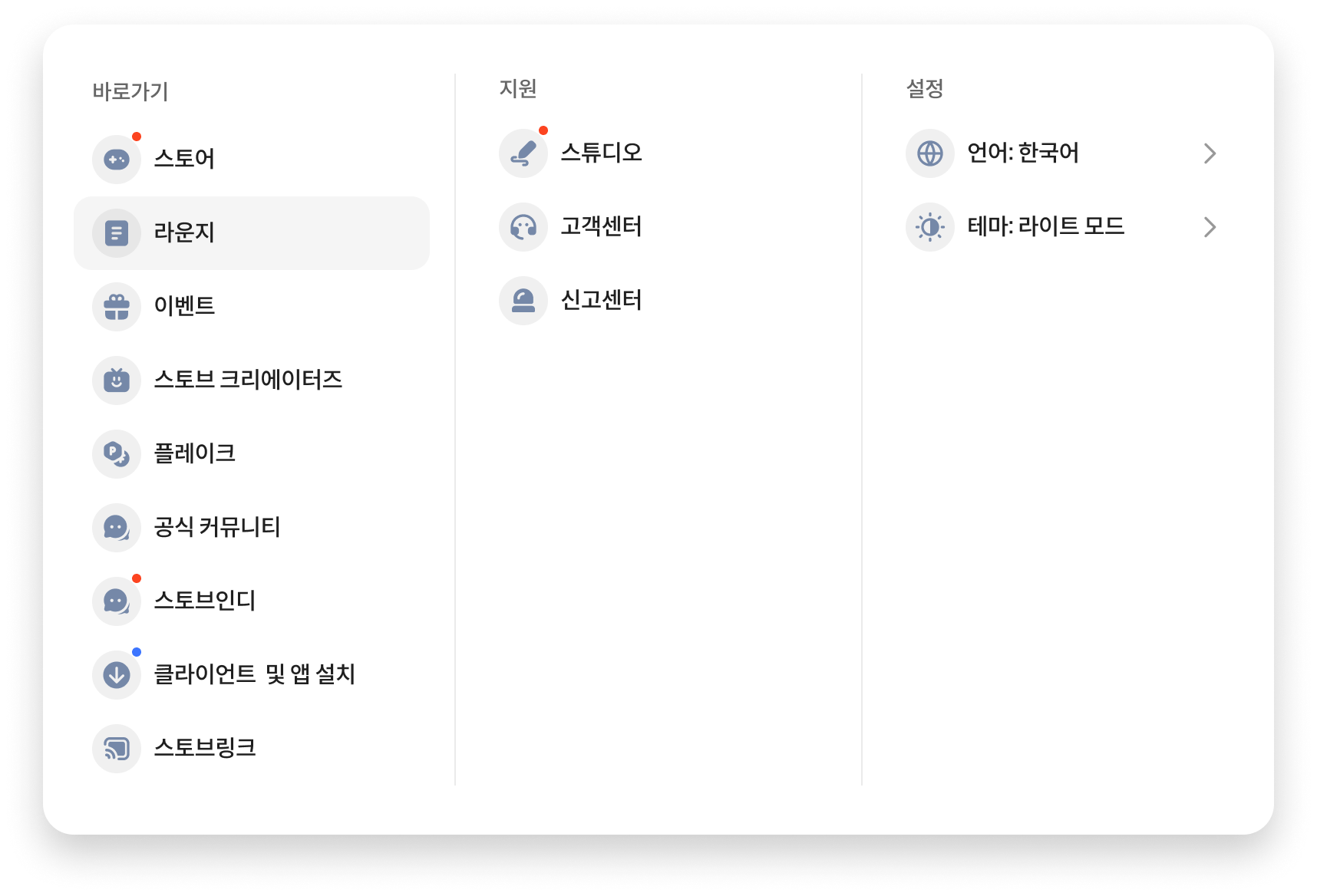
<p style="color:#314158;font-family:'Spoqa Han Sans Neo';font-size:14px;font-weight:500;margin-bottom:4px;"><code>widget.stoveMenu</code> — Basic menu (PC / Mobile)</p>
<img src="https://d2x8kymwjom7h7.cloudfront.net/live/application_no/STATIC/developer-center/WEB/ko_web_gnb_img_stove_menu.png" width="1000">
<img src="https://d2x8kymwjom7h7.cloudfront.net/live/application_no/STATIC/developer-center/WEB/ko_web_gnb_img_stove_menu_mobile.png" height="500">

<div style="margin-top:12px;"></div>

<p style="color:#314158;font-family:'Spoqa Han Sans Neo';font-size:14px;font-weight:500;margin-bottom:4px;"><code>global.languageCoverages</code> / <code>mode.theme</code> — Language list / Theme settings popup</p>
<img src="https://d2x8kymwjom7h7.cloudfront.net/live/application_no/STATIC/developer-center/WEB/ko_web_gnb_img_lang_select_menu.png" height="225">
<img src="https://d2x8kymwjom7h7.cloudfront.net/live/application_no/STATIC/developer-center/WEB/ko_web_gnb_img_theme_popup.png" height="225">

<div style="margin-top:12px;"></div>

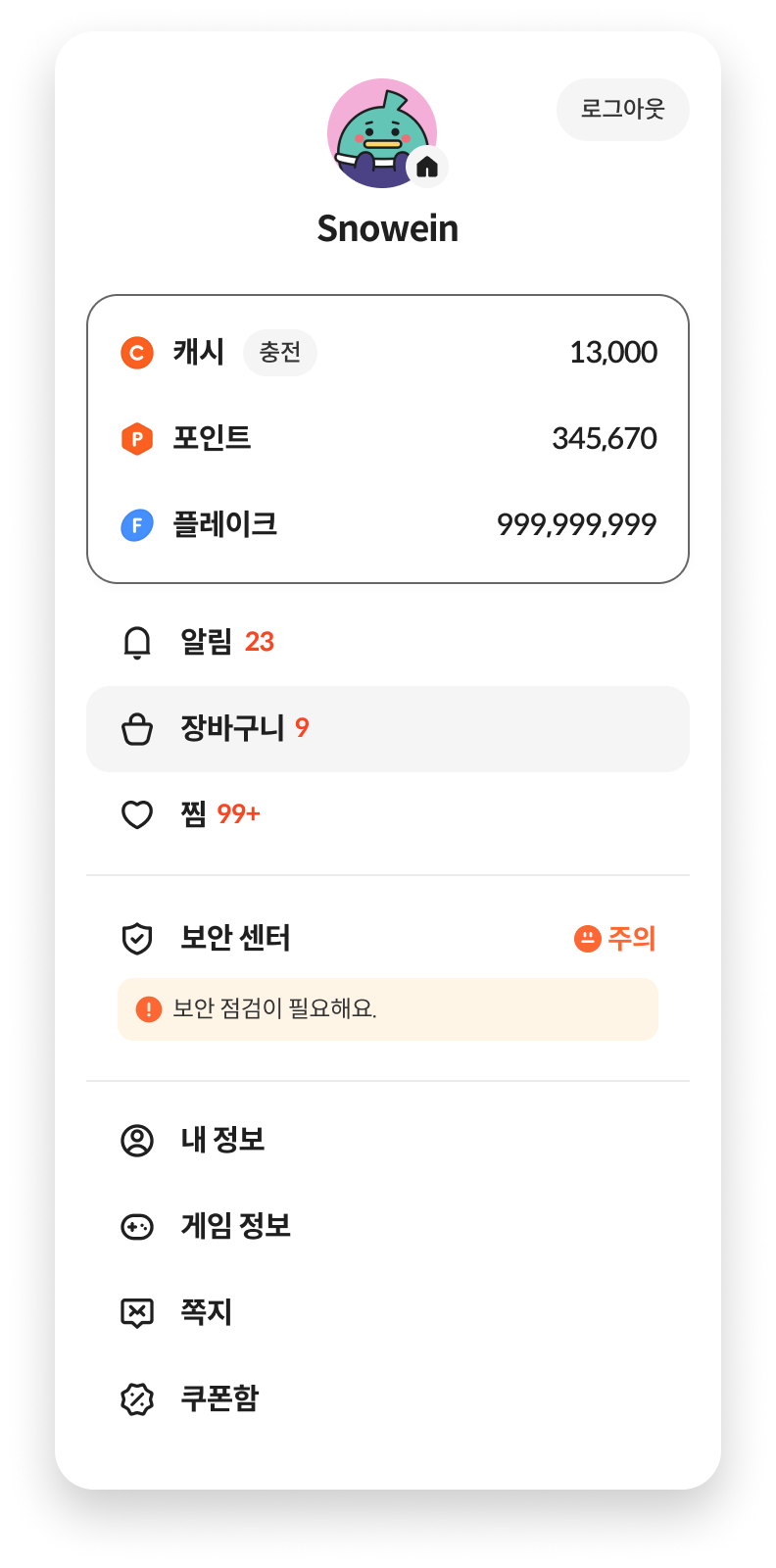
<p style="color:#314158;font-family:'Spoqa Han Sans Neo';font-size:14px;font-weight:500;margin-bottom:4px;"><code>mode.layout</code> / <code>userMenu.coupon</code> — Layout / My Info coupon box</p>
<img src="https://d2x8kymwjom7h7.cloudfront.net/live/application_no/STATIC/developer-center/WEB/ko_web_gnb_img_layout.png" height="375">
<img src="https://d2x8kymwjom7h7.cloudfront.net/live/application_no/STATIC/developer-center/WEB/ko_web_gnb_img_userMenu.png" height="375">

<div style="font-size:1.0em;font-weight:bold;margin:24px 0 12px;">Theme option details</div>

<p style="color:#314158;font-family:'Spoqa Han Sans Neo';font-size:16px;font-weight:400;line-height:26px;letter-spacing:-0.48px;">Set the list of themes supported by the service and the default theme using <code>mode.theme</code>. Configure it as shown below according to the supported combinations.</p>

```js
// 다크·라이트 모두 지원
mode: {
    theme: {
        support: ["dark", "light"],
        default: "dark"   // default는 서비스 기획에 따라 설정
    }
}

// 다크만 지원
mode: { theme: { support: ["dark"], default: "dark" } }

// 라이트만 지원
mode: { theme: { support: ["light"], default: "light" } }
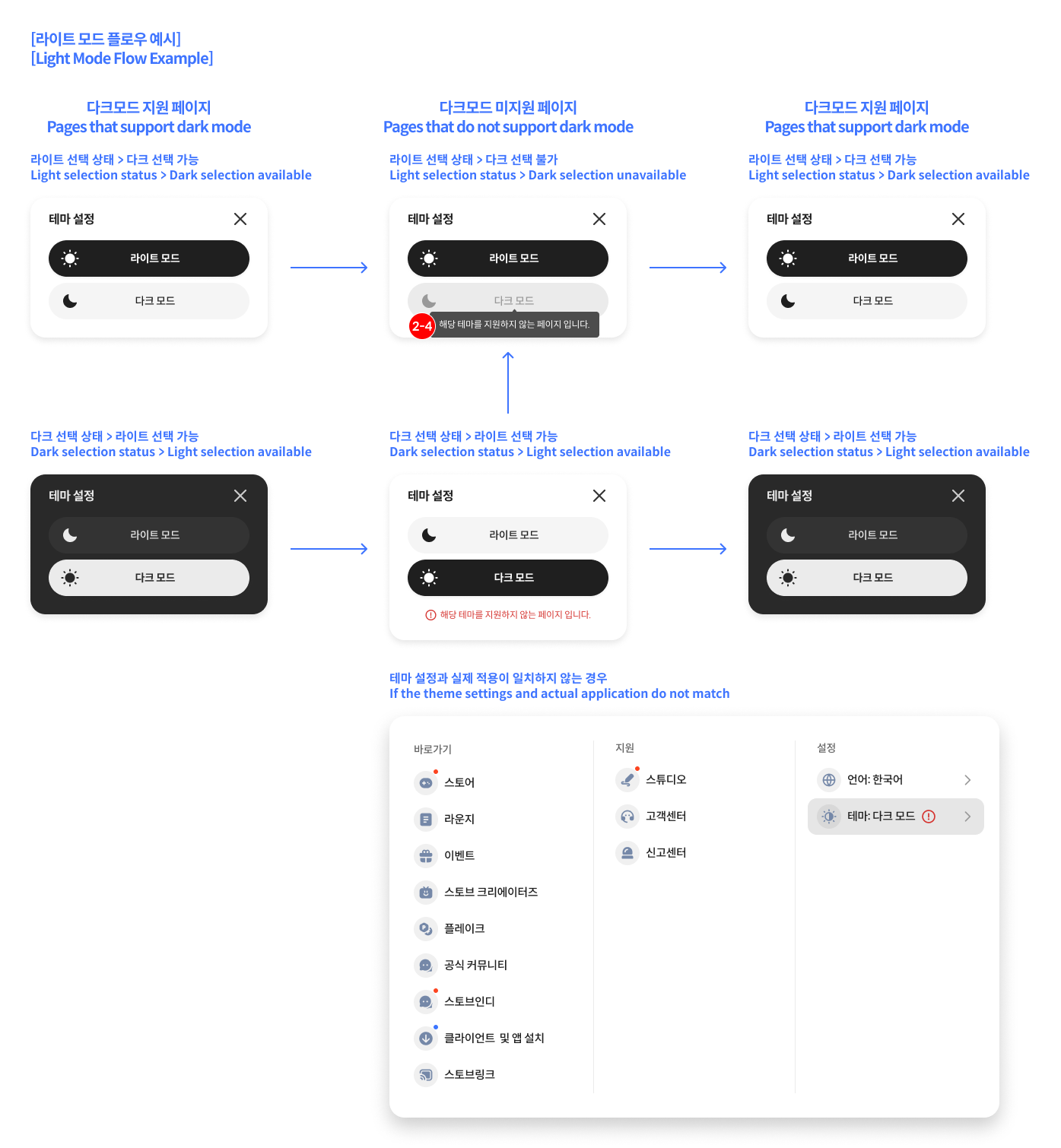
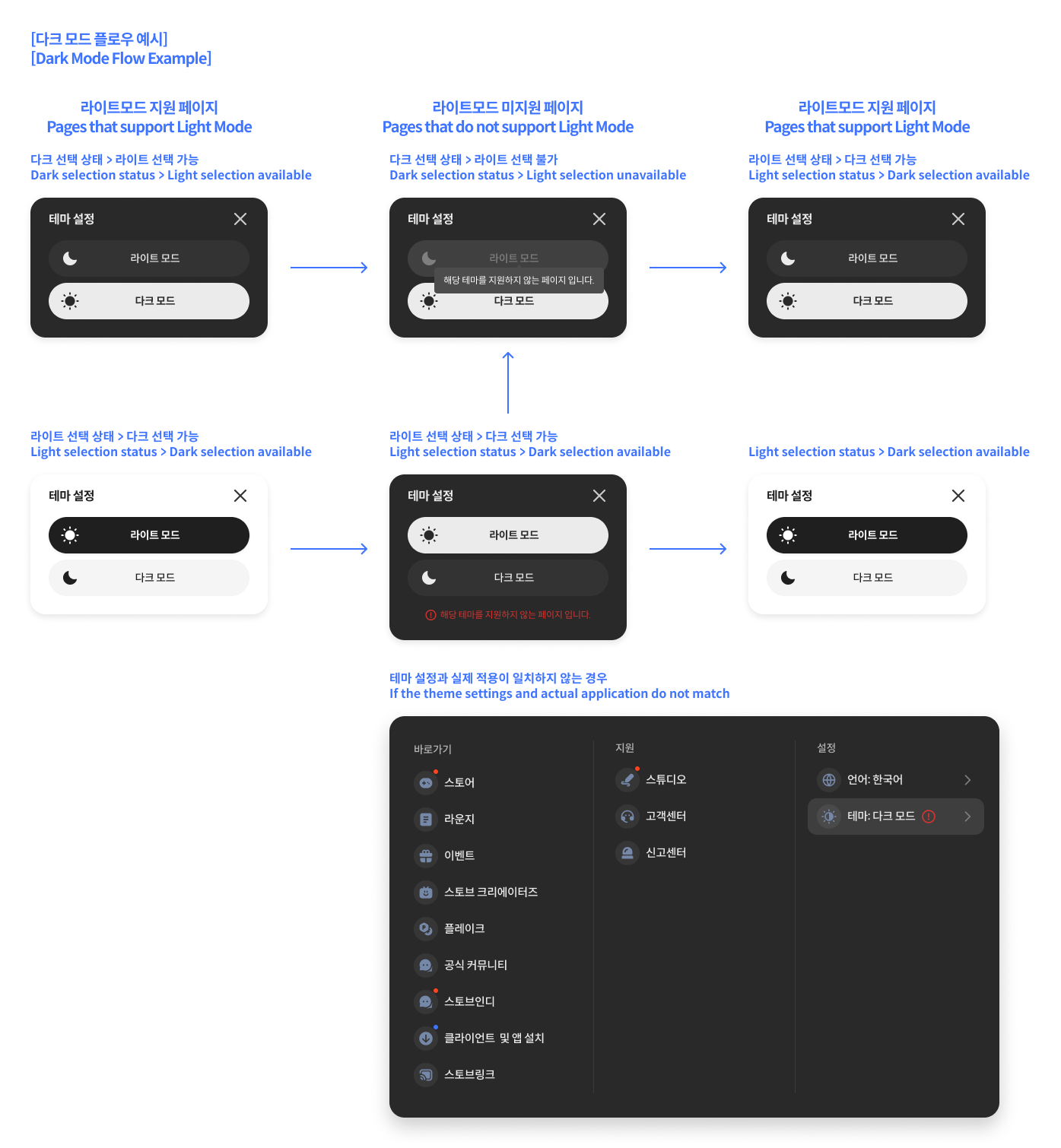
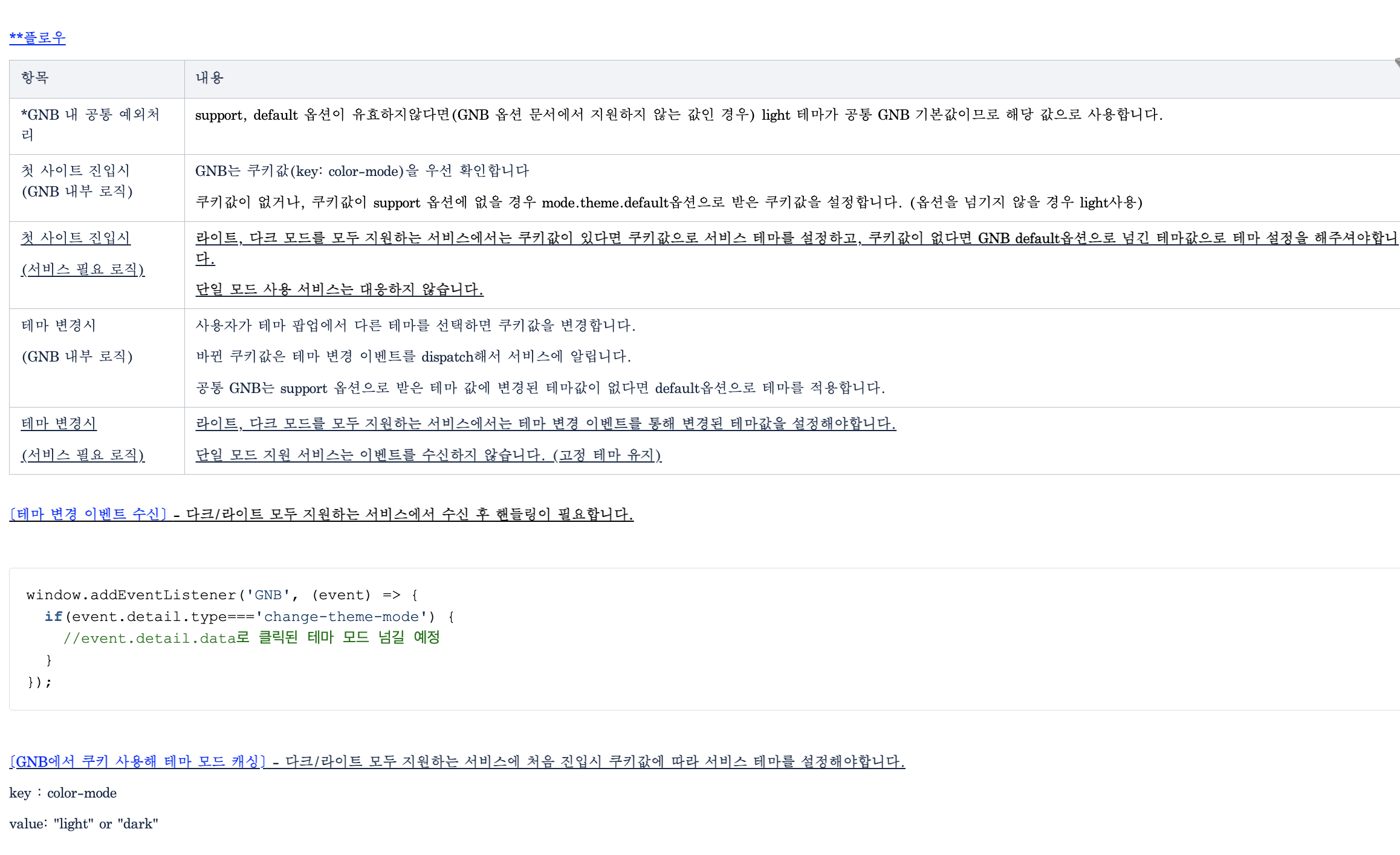
This is the theme application flow based on the presence of a theme cookie and the support list (support).
This is an example of loading the GNB module, mounting it with options, and receiving mount, language, and theme events. Please apply the module host address according to your environment.
This method involves linking directly to the Stove login page without using the GNB. The web service generates and calls the login page URL, and handles account login using the cookies (token, country, language information, etc.) issued after login is complete.
Generate and call the Stove login page URL including parameters, and once login is complete, redirect to redirect_url. The web service checks for tokens such as SUAT in the response cookies to process the login status.
<div style="font-size:1.0em;font-weight:bold;margin:24px 0 12px;">Request Parameters</div>

<table style="width:100%;table-layout:fixed;border-collapse:collapse;border-top:1px solid rgba(0,0,0,0.08);border-bottom:1px solid rgba(0,0,0,0.08);">
  <thead>
    <tr>
      <th style="padding:12px;text-align:left;font-weight:normal;color:#314158;border-bottom:1px solid rgba(0,0,0,0.08);background-color:#F8FAFC;width:20%;">Parameter</th>
      <th style="padding:12px;text-align:left;font-weight:normal;color:#314158;border-bottom:1px solid rgba(0,0,0,0.08);background-color:#F8FAFC;width:12%;">Required</th>
      <th style="padding:12px;text-align:left;font-weight:normal;color:#314158;border-bottom:1px solid rgba(0,0,0,0.08);background-color:#F8FAFC;width:26%;">Example</th>
      <th style="padding:12px;text-align:left;font-weight:normal;color:#314158;border-bottom:1px solid rgba(0,0,0,0.08);background-color:#F8FAFC;">Description</th>
    </tr>
  </thead>
  <tbody>
    <tr>
      <td style="padding:12px;vertical-align:top;border-bottom:1px solid rgba(0,0,0,0.08);color:#314158;font-size:14px;font-weight:500;"><code>game_no</code></td>
      <td style="padding:12px;vertical-align:top;border-bottom:1px solid rgba(0,0,0,0.08);color:#314158;font-size:14px;font-weight:400;">Required</td>
      <td style="padding:12px;vertical-align:top;border-bottom:1px solid rgba(0,0,0,0.08);color:#314158;font-size:14px;font-weight:400;">45</td>
      <td style="padding:12px;vertical-align:top;border-bottom:1px solid rgba(0,0,0,0.08);color:#314158;font-size:14px;font-weight:400;">Game number issued upon entry</td>
    </tr>
    <tr>
      <td style="padding:12px;vertical-align:top;border-bottom:1px solid rgba(0,0,0,0.08);color:#314158;font-size:14px;font-weight:500;"><code>inflow_path</code></td>
      <td style="padding:12px;vertical-align:top;border-bottom:1px solid rgba(0,0,0,0.08);color:#314158;font-size:14px;font-weight:400;">Required</td>
      <td style="padding:12px;vertical-align:top;border-bottom:1px solid rgba(0,0,0,0.08);color:#314158;font-size:14px;font-weight:400;">STOVE_GAMEID (Uppercase)</td>
      <td style="padding:12px;vertical-align:top;border-bottom:1px solid rgba(0,0,0,0.08);color:#314158;font-size:14px;font-weight:400;">User inflow path identifier. Issued via Technical PM upon Stove entry</td>
    </tr>
    <tr>
      <td style="padding:12px;vertical-align:top;color:#314158;font-size:14px;font-weight:500;"><code>redirect_url</code></td>
      <td style="padding:12px;vertical-align:top;color:#314158;font-size:14px;font-weight:400;">Required</td>
      <td style="padding:12px;vertical-align:top;color:#314158;font-size:14px;font-weight:400;">https://test.game.onstove.com/</td>
      <td style="padding:12px;vertical-align:top;color:#314158;font-size:14px;font-weight:400;">URL to redirect to after login (URL-encoded). <code>xxxx.onstove.com</code> domains only allowed</td>
    </tr>
  </tbody>
</table>

<br />

**Request Format Example**

```text
https://accounts.onstove.com/login
    ?inflow_path={INFLOW_PATH}
    &game_no={GAME_NO}
    &redirect_url={REDIRECT_URL}
Once login is complete, an authentication cookie is set. The web service identifies the login status via SUAT. In addition to SUAT, various cookies are transmitted depending on the pre-login or post-login status.
This is an example of generating and calling a STOVE login page URL by specifying parameters. Please apply the domain according to your environment.