
- Last Updated

STOVE Events
Understanding
STOVE Events are system events that deliver user status changes occurring on the STOVE platform to your game server in real time.
This includes changes that affect account operations and policy processing, such as ID/password changes, login method changes, country of residence changes, sanctions, withdrawal requests, and game unsubscription requests/cancellations/completions. Game companies can receive all events through a single Callback API and process user statuses according to their operational policies based on the event type.
| Item | Description |
|---|---|
| Delivery Method | STOVE Event Broker → Game Company Callback API (HTTPS POST, JSON) |
| Receiving Endpoint | 1 per game (Sandbox/Live separated) |
| Event Classification | The event_reason value in the Body |
| Applicable Targets | GUID-based service games |
| Related Guides | Game Sanctions · Game Unsubscription |
Applicable Targets and Restrictions
ㆍThis STOVE Event feature is only supported for GUID-based service games.
ㆍMember_no-based games are not supported by default. If you need to use this, please check with your technical representative in advance.
Provided Events
The currently provided events are as follows. As events will continue to be added in the future, please implement your Callback API to respond with 200 without errors even if it receives an unknown event_reason value.
| Event Information | Event Occurrence Situation | CP Response Guide |
|---|---|---|
① Account Information ChangedACCOUNT_INFO_CHANGED |
When the user changes their login method (account switch) When the user changes their ID (alphanumeric ID → email ID, unverified email → other verified email, uppercase ID → lowercase substitution, etc.) When the user changes their country of registration |
Process user logout and game restart |
② Password ChangedRESET_PASSWORD |
When the user changes their password | Process user logout and game restart |
③ Stove RestrictionPLATFORM_RESTRICT |
When the user is restricted on the Stove platform | Process user logout and game restart |
④ Stove Membership Withdrawal RequestPLATFORM_WITHDRAW |
When the user requests withdrawal from the Stove platform | Process user logout and game restart For data cleanup after withdrawal, please refer to Game Unsubscription / Stove Membership Withdrawal Integration. |
⑤ Remote LogoutREMOTE_LOGOUT |
When the user executes the remote logout function | Process user logout and game restart |
⑥ Game RestrictionGAME_RESTRICT |
When the user is restricted in the game | Process user logout and game restart Details: Game Restriction |
⑦ Game Unsubscription RequestGAME_WITHDRAW |
When the user requests game unsubscription | Update user status on the game server to unsubscription requested, terminate session Details: Game Unsubscription |
⑧ Cancel Game Unsubscription RequestGAME_WITHDRAW_CANCEL |
When the user cancels the game unsubscription request | Update user status on the game server to normal available status (unsubscription requested → normal) Details: Game Unsubscription |
⑨ Game Unsubscription CompleteGAME_WITHDRAW_COMPLETE |
When the user completes game unsubscription When the user completes platform membership withdrawal — all games the user is subscribed to are unsubscribed upon withdrawal. This includes games that were automatically subscribed without the user going through the sign-up process, so events for users who have no record of sign-up/unsubscription requests on the game server may also be delivered. |
Update the user status on the game server to 'cancellation complete' and terminate the session. Data deletion is not processed immediately but is performed according to operational policies such as batch processing. Details: Game Cancellation |
Basic Principles of the Response Guide
ㆍFor events where the user account status has changed (①–⑥), do not leave the current session as is; process the user to log out and restart the game.
ㆍGame cancellation events (⑦–⑨) are intended to synchronize the user status on the game server. The timing and method of data deletion depend on game policies and consultations with technical staff.
ㆍIn a normal flow, the user is already in an inaccessible state, but server-side blocking is also recommended to prepare for failures or synchronization issues.
Event Processing Flow
Regardless of the cause of the user status change, the processing flow is the same. Once the Stove platform processes the status change, the Event Broker calls the game server's Callback API, and the game server processes the user according to the event type.
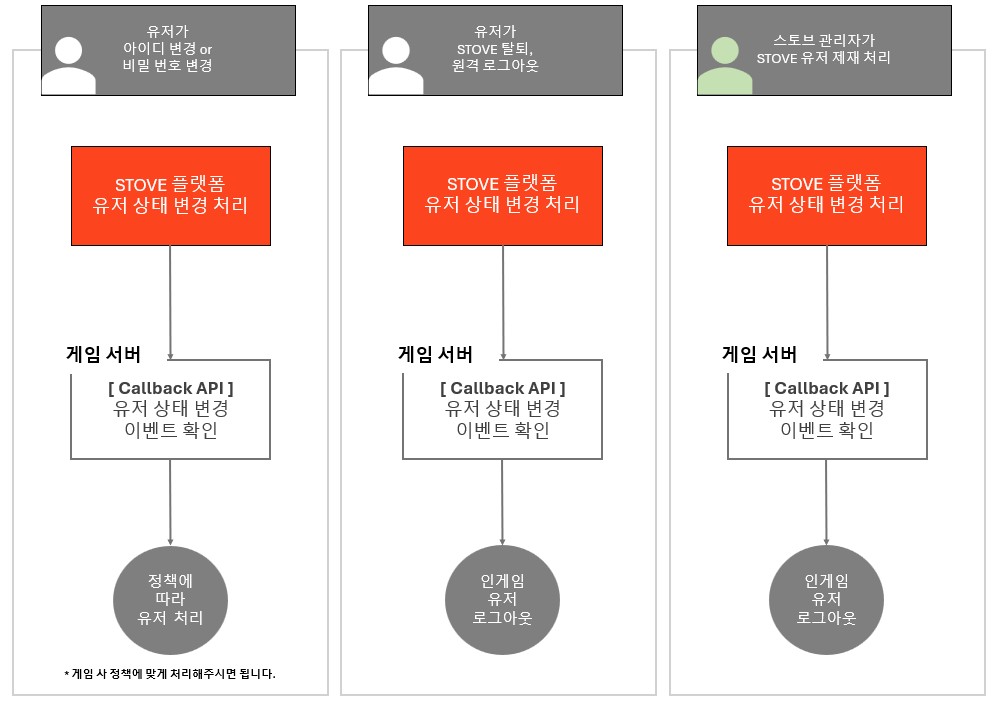
In-game Event Handling
ㆍChanges to ID/password, account deletion requests, remote logouts, and sanctions are all delivered via the same Callback API and processed in the same manner.
ㆍEvents that require handling based on game policy (such as account information changes) should be processed according to your game's specific policies.
Integration Guide
Prerequisites
| Item | Description |
|---|---|
| Verify User Identification Method | Only supports GUID-based services. If using Member_no, check with the technical representative in advance. |
| Implement Callback API | Implement an HTTPS POST receiving endpoint. Prepare separate domains for Sandbox and Live environments. |
| Register Callback URL | Request registration of URLs for each environment to the technical representative. |
| Network Allowlisting | If there is an Inbound ACL or firewall, allow the NAT IP of the STOVE Event Broker for each environment (inquire with the technical representative for the IP). |
| Determine Events to Process | The principle is to process all events. If specific event on/off toggles are needed due to game policy, consult with the technical representative in advance. |
Sandbox Verification Procedure
- The game company provides the Sandbox Callback URL and authentication settings to the technical representative for registration.
- Trigger events using the test account and sanction/revocation paths discussed with the technical representative.
- The game server verifies
event_reason, GUID, HTTP 200 response, and the reflection of the target world's status.
Basic Integration Structure
- Receive all events with 1 Callback API
- Only one Callback URL can be registered per game in STOVE. All events are delivered to this URL, and you select and process the necessary events using the
event_reasonvalue. - If propagation to multiple servers (such as individual world servers) is required, we recommend a structure where the game company operates a broker server: STOVE → Broker → Each Server.
- Only one Callback URL can be registered per game in STOVE. All events are delivered to this URL, and you select and process the necessary events using the
- Response and Retransmission
- The game server should respond with HTTP 200 after successfully processing or saving the event for reprocessing. STOVE will retransmit according to the registered policy in case of communication failure, error response, or timeout.
- The same event may be delivered multiple times. The game server must ensure idempotent processing by checking the processing history and current status for each event type and GUID.
- Event Handling Policy
- The principle is to process all delivered events. If you need to turn specific events on or off based on game policy, discuss the scope and processing method with the technical representative in advance.
Events are delivered per user (GUID)
ㆍThe callback body (event_reason, event_message, event_time, target_users) does not contain world or character identifiers. The game server must determine the world or character to which the target user belongs using the GUID in target_users.
ㆍEven for games operating with world servers by region (e.g., world_id per region), there is only one Callback URL. We recommend a structure where the game company's broker server receives the event and propagates it to the corresponding region/world server.
Event Processing Sequence (Example)
Important Notes
ㆍIf there is an Inbound ACL between the STOVE server and the game server, you must allow the NAT IP of the STOVE Event Broker for each environment. Please inquire with the technical representative for the IP.
ㆍCallback domains for Sandbox and Live environments must be registered separately.
ㆍRequest authentication is verified during registration according to the Request Authentication in Development guide.
Development
Callback API Configuration Guide
This is an endpoint implemented and operated directly by the game company. The STOVE Event Broker calls this URL when an event occurs.
Prerequisites
| Item | Content |
|---|---|
| URL | Provided by CP (e.g., https://{server-domain}/callback). Path can be defined freely |
| Method | POST |
| Protocol | HTTPS (TLS 1.2 or higher) |
| Content-Type | application/json |
| Registration Method | After providing the environment-specific URL and authentication settings to the technical manager, Sandbox verification proceeds |
| Number of Registrations | 1 per game. Since there is no world information in the body, the game server identifies and propagates the target world via GUID. |
| Retry Policy | In case of failure, retry up to 3 times at 3-second intervals by default (excluding initial transmission). Confirm actual intervals and counts with the technical manager upon registration. |
| Request Authentication | Depending on registration settings, Authorization header is passed. Usage and authentication values should be discussed during registration and verified by the game server. |
| Communication Timeout | 3 seconds each for connection, read, and write (different from the upper limit of total processing time). The game server should respond with HTTP 200 quickly after completing processing and storage. |
| Additional Retry (Optional) | After default retry failure, additional transmissions occur at 30-second intervals during the validity period. DLQ settings by environment, game, and event |
Development Flow
- Reception/Verification: The game server checks the registered authentication settings and JSON body.
- Storage/Response: The game server stores the event for reprocessing and responds with HTTP 200. If storage fails, it responds with an error to trigger a retry.
- User Processing: The game server checks
event_reason, processing history, and current status by GUID to process idempotently. Unknown types are only logged. - Internal Reprocessing: Processing failures after the response are managed by the game server's reprocessing queue.
Duplication, Order, and Delivery Failure
ㆍEvents may arrive duplicated or out of order. Process target_users and do not assume a fixed batch of 100 people per request.
ㆍIf all default retries fail, additional transmissions occur during the validity period from the activated DLQ. Please refer to DLQ setup method.
Request — Body Specification
| Name | Type | Required | Description |
|---|---|---|---|
| event_reason | String | Y | Event type. Code value from the provided event table (e.g., REMOTE_LOGOUT). |
| event_message | String | Y | Message for user notification. May differ from the game language, so display it according to the game's language and operational policies. |
| event_time | Long | Y | Time of event occurrence. Milliseconds based on Unix epoch (1970-01-01 00:00:00 UTC). |
| target_users | Long Array | Y | List of target GUIDs (up to 100). World/character information is determined by the game server. |
Response
The response format can be implemented freely to suit the game server structure. However, you must respond with an HTTP Status Code 200 upon successful receipt.
Please respond after saving
ㆍThe game server should respond with HTTP 200 after successfully processing or saving the data for potential reprocessing. Do not respond with success if you failed to save the received data.
Additional Retransmission (Optional)
The additional retransmission DLQ (Dead Letter Queue) is a feature that stores events for which all default retransmissions have failed in a separate queue and automatically retransmits them to the game server's Callback API.
- Retransmission: Retransmits the original event at 30-second intervals for the configured validity period.
- Termination: Terminates upon successful transmission, and records as a final failure if the validity period expires.
- Processing: The game server receives it via the same Callback API as regular events and processes it idempotently, considering duplication and order changes.
Configuration Method
- The game company provides the application environment (Sandbox/Live),
game_id, event type, Callback URL, and DLQ validity period (seconds) to the technical representative. - The STOVE technical representative enables DLQ in the Callback settings for each environment, game, and event, and registers the validity period. For example, if set to 3,600 seconds, additional retransmissions will occur for 1 hour from the initial entry into the DLQ.
- Verify DLQ transmission after default retransmission by responding with an error to the Callback API in the Sandbox, and confirm that retransmission terminates upon switching to an HTTP 200 response.
DLQ handles transmission failures from STOVE to the Callback API. Processing failures within the game server after an HTTP 200 response are managed by the game server's own reprocessing queue.
Troubleshooting
| Situation | Cause | Solution |
|---|---|---|
| Events are not being received | Callback URL not registered or incorrect URL registered | Request the technical representative to re-verify the registered URL and environment (Sandbox/Live) |
| Events are not being received | Stove NAT IP blocked by ACL/firewall | Check if the NAT IP for each environment is in the Inbound allow list |
| The same event is received multiple times | Retransmitted due to communication failure, 4xx/5xx errors, or timeouts | Return HTTP 200 upon successful processing/storage. Manage subsequent processing failures with an internal retry queue |
| The same event is received multiple times | Duplicate transmission due to network issues | Check processing history and current status by event type/GUID to perform idempotent processing |
| I only want to process some events | All events are delivered to a single Callback | event_reasonBranch by event_reason to process only necessary events. Return 200 even for unprocessed events |
| I need to propagate to multiple world servers | Only one Callback URL can be registered in STOVE | The game server identifies the target region/world by GUID and propagates it to the corresponding server via a broker |
| Retransmitted due to response delay | Connection/read/write timeout (3 seconds each) exceeded | The game server should store the received event, return HTTP 200, and separate the actual processing |
| All default retries have failed | Persistent game server failure or connection error | Enable DLQ for additional transmission during the validity period. Upon expiration, request follow-up processing from the technical representative with the environment, game_id, GUID, event type, and occurrence time |
Sample Code
The sample is an example of event branching. In a production environment, please implement request authentication, received event storage/re-processing, and idempotent processing.
curl --location 'https://{server-domain}/callback' \
--header 'Content-Type: application/json' \
--data '{
    "event_reason": "REMOTE_LOGOUT",
    "event_message": "원격 로그아웃되었어요. 다시 로그인해 주세요.",
    "event_time": 1765953754000,
    "target_users": [20005069331]
}'
- Developer Center Usage / Smilegate Publishing Game Related: stove.developers@smilegate.com
- Stove Store Entry / Stove Studio Related: store.support@smilegate.com