
- Last Updated

Pop-up
Understanding
An SDK pop-up service that shows screens such as notices, events, and coupons to users inside the game. Each screen can be configured in various ways in Partners.
It supports both Mobile (Android/iOS) and PC, and the delivery method differs by platform.
Pop-up Types
| Type | Description | Mobile | PC |
|---|---|---|---|
| Auto pop-up | Shows full-screen pop-ups in sequence without any user action on lobby entry. For ads/events. | ✅ | ✅ |
| Manual pop-up | Shows the registered screen when the specified location is called. Used to display it under specific actions/conditions. | ✅ | ✅ |
| News pop-up | Collects and shows notice posts. If there's no content, it shows "Coming soon". | ✅ | ✅ |
| Coupon pop-up | Uses the coupon feature with an issued coupon number. (On PC, multi-platform games only) | ✅ | ✅ |
| Community | Shows the STOVE Community as a pop-up. Called while keeping the user logged in. | ✅ | — |
| Custom URL | Shows a web page you built yourself in the built-in WebView. | ✅ | — |
| Identity-verification pop-up | Runs the in-game identity-verification procedure as a pop-up. (Korea only) | — | ✅ |
Coupon pop-up integration is covered on a separate page
For how to integrate the coupon pop-up, see the Coupon page in the Feature Guides.
Mobile / PC Comparison
| Item | Mobile | PC |
|---|---|---|
| SDK | Mobile SDK | PCSDK View SDK (v3.1.0 or higher) |
| Pop-up display method | Shows the pop-up in the SDK's built-in WebView | Shows the pop-up in the View SDK's built-in WebView (Windows only) |
| Initialization order | Pop-ups can be called after the user login completes | Base SDK initialization → View SDK initialization order is required |
| Supported platforms | Android (Kotlin/Java), iOS, Unity, Unreal | Native C/C++, Unity, Unreal |
| Pop-up management | Configured per event screen via Partners | Configured per event screen via Partners (all game types supported) |
| Overlay feature | Requires a separate setting to use the Overlay UI in View 2.8.2 or higher | Not applicable |
PC — be careful with the View SDK initialization order
ㅁ You must complete Base SDK integration and initialization before View SDK initialization (otherwise View SDK features can't be used).
ㅁ Perform View SDK initialization before using any other View SDK features.
Common Pop-up Settings
The items below can be configured in common for news, auto, and manual pop-ups.
| Setting item | Description |
|---|---|
| Close button | Choose a custom image or a preset template (news/auto: 6 kinds, manual: 3 kinds). |
| Bottom navigation | Can be turned ON/OFF. (Back, Forward, Refresh, Home ON/OFF) |
| Don't show today | The button can be turned ON/OFF and set to 1 day / 7 days. (Supported for news/auto pop-ups only; not supported for manual pop-ups) |
Integration Guide
Integration Preparation
Mobile
| Item | Details |
|---|---|
| User login | User login must be completed. |
| Register the pop-up in Partners | Register pop-up info in Partners (except for the direct-call method). |
| Overlay UI setting (optional) | A separate setting when using Overlay (View 2.8.2 or higher). |
PC (PCSDK)
| Item | Details |
|---|---|
| Base SDK integration and initialization | Complete Base SDK integration and initialization before View SDK initialization. |
| Register the pop-up in Partners | Register basic info (world id) in Partners, then configure display. |
| Game-profile setup | ㅁ When using field/character info, the game profile must be set before using pop-up features ㅁ Use BaseSDK's Base_SetGameProfile API |
| Check pop-up-supported games | ㅁ Register pop-up metadata in Partners before calling the PC SDK pop-up API ㅁ Usable by both multi-platform games and PC-only games |
Development
Mobile
This is how to call each pop-up API of the STOVE SDK View module. The code is separated into tabs by platform, so pick only the platform you use.
News Pop-up
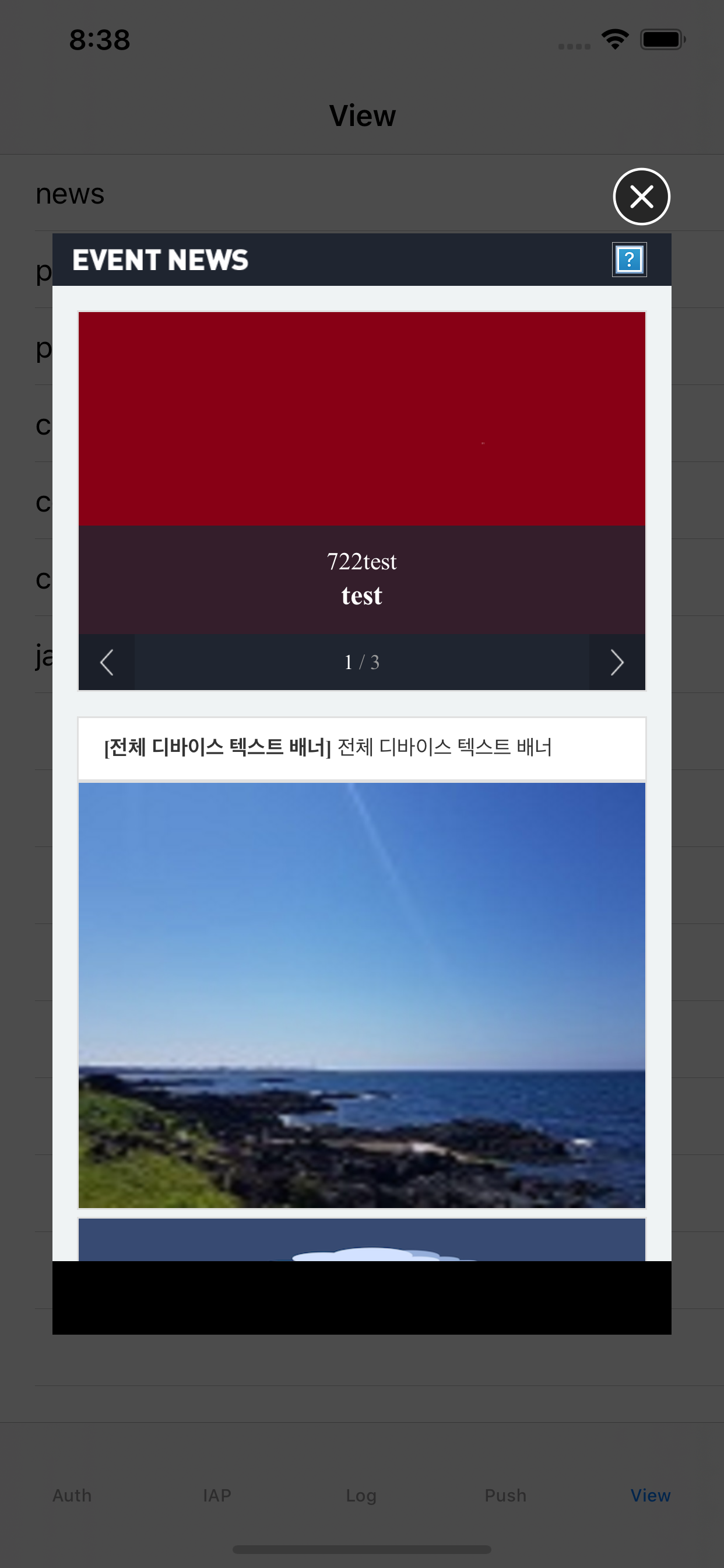
A pop-up that collects and shows notice posts at once. You can configure the details per event screen in Partners.
- Close button: a custom image or one of 6 preset templates
- Bottom navigation (Back/Forward/Refresh/Home) ON/OFF
- "Don't show today" button ON/OFF (1 day / 7 days)
public void News()
{
    ViewUI.News((Result result, Dictionary<string, string> dictionary) =>
    {
        if (result.IsSuccessful)
        {
        }
        else
        {
            OperationUI.HandleResult(result, (Result operationResult) =>
            {
                /** ex) keep the current screen **/
            });
        }
    });
}
private fun newsPopup(activity: Activity) {
    ViewUI.news(activity) { result, map ->
        //closed view
    }
}
ErrorCodes
| Domain | ErrorCode | Description |
|---|---|---|
| com.stove.success | 0 | Success |
| com.stove.server | 404 | The path variable wasn't provided, or the API address was wrong |
| com.stove.base.network | 10001 | NoConnectionError |
| com.stove.base.network | 10002 | TimeoutError |
Auto Pop-up
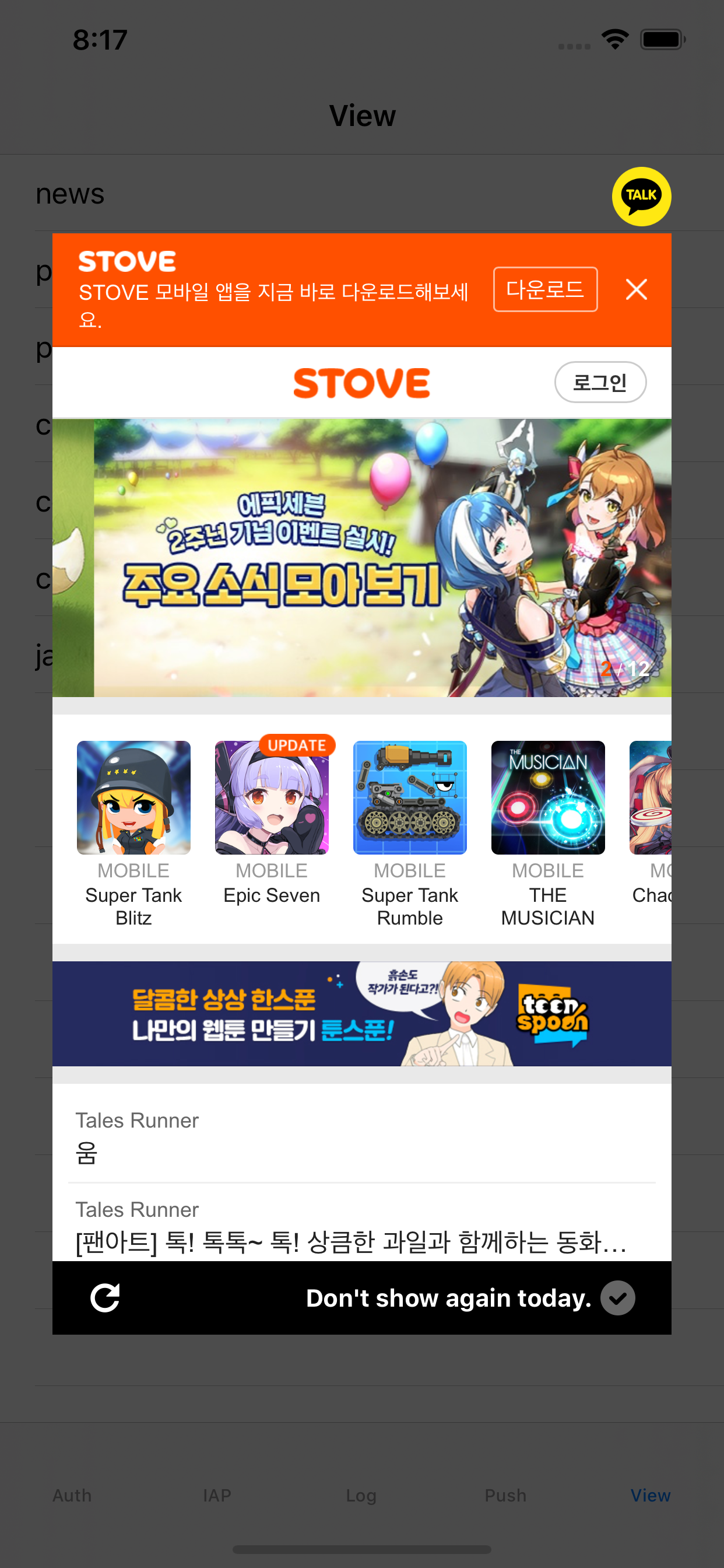
The ad/event pop-up shown most on the game lobby screen. On in-game entry, full-screen pop-ups are shown in sequence without any user touch.
- Close button: a custom image or one of 6 preset templates
- Bottom navigation (Back/Forward/Refresh/Home) ON/OFF
- "Don't show today" button ON/OFF (1 day / 7 days)
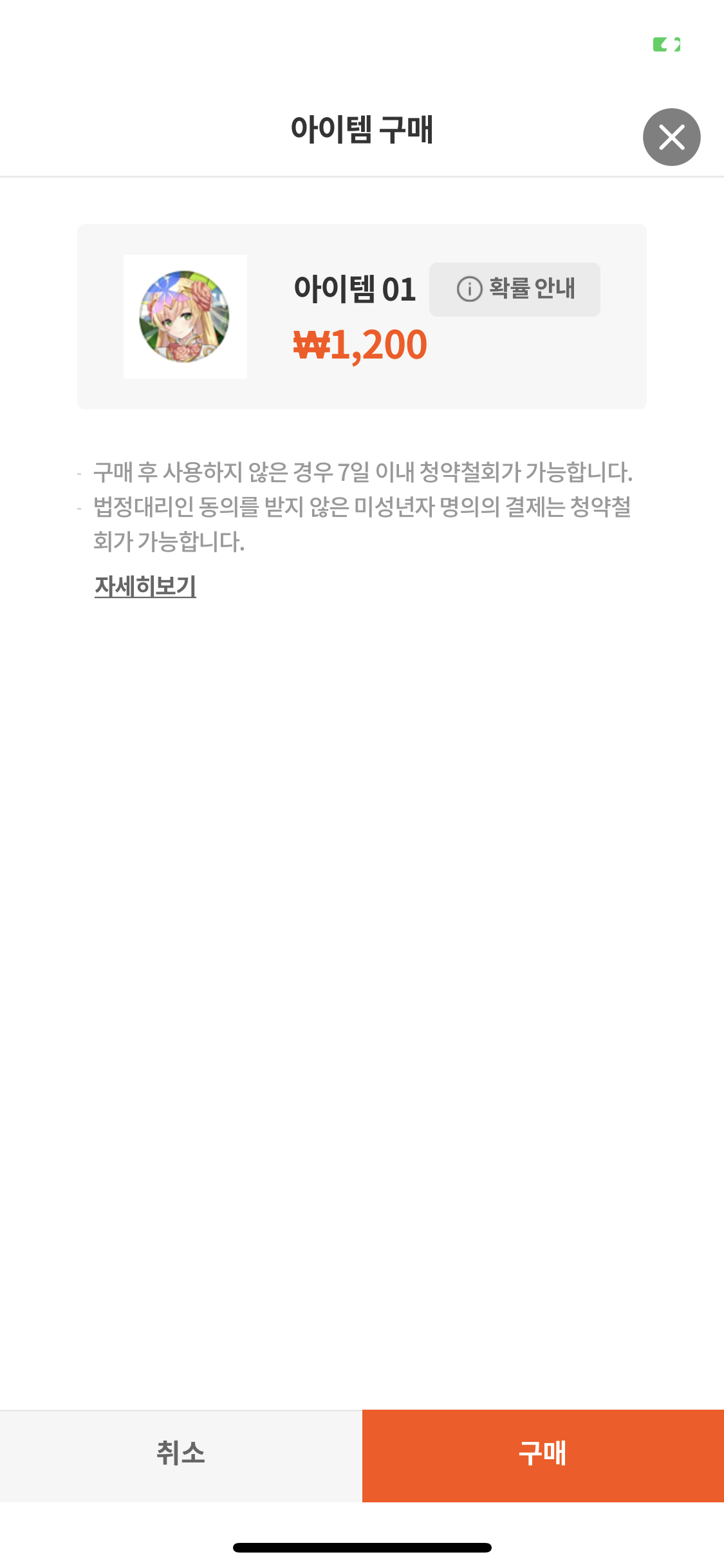
- During auto pop-ups, depending on Partners settings, a store pop-up may be shown, and item payment is possible within the web view.
Result-handling guide
Auto pop-ups are an ad area shown without user touch, so don't block the game flow at the callback. In the success callback, keep the screen as-is, and if payment occurred via a store pop-up, separately request the game server to sync the payment result. Delegate failures to OperationUI.HandleResult(result, ...) so the SDK shows the appropriate guidance screen.
public void AutoPopup()
{
    ViewUI.Popup((Result result, Dictionary<string, string> dictionary) =>
    {
        if (result.IsSuccessful)
        {
        }
        else
        {
            OperationUI.HandleResult(result, (Result operationResult) =>
            {
                /** ex) keep the current screen **/
            });
        }
    });
}
private fun autoPopup(activity: Activity) {
    ViewUI.popup(activity) { result, map ->
        //closed view
    }
}
ErrorCodes
| Domain | ErrorCode | Description |
|---|---|---|
| com.stove.success | 0 | Success |
| com.stove.server | 1000 | WRONG_API_USAGE |
| com.stove.server | 2000 | SERVICE_ERROR |
| com.stove.server | 90000 | Error: request accessToken is not exists. |
| com.stove.server | 90001 | Error: accessToken invalid. |
| com.stove.base.network | 10001 | NoConnectionError |
| com.stove.base.network | 10002 | TimeoutError |
Manual Pop-up
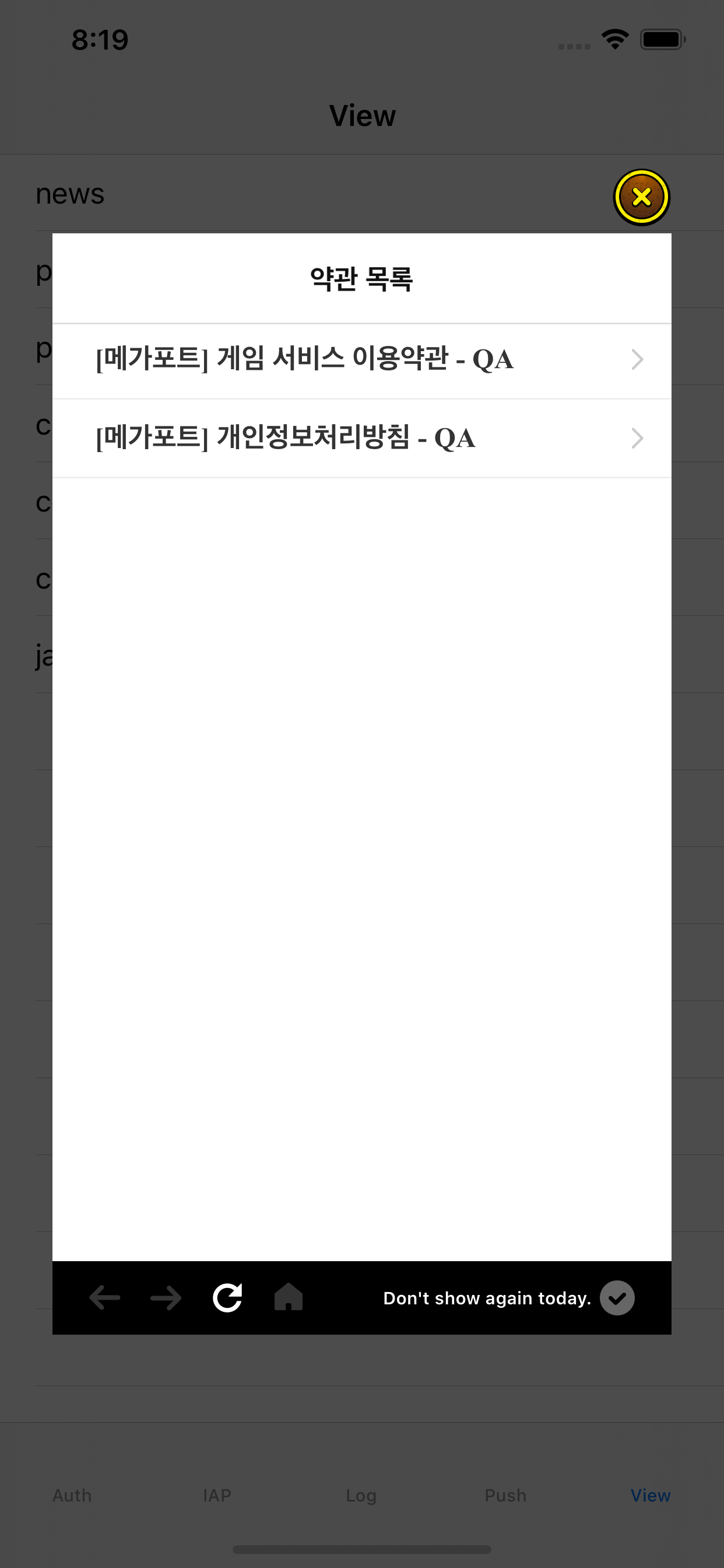
When you call a manual pop-up with a defined location at the desired place in the game, the registered event screen is shown. Used to conditionally show a pop-up on a specific in-game UI touch or screen entry.
- Close button: a custom image or one of 6 preset templates
- Bottom navigation (Back/Forward/Refresh/Home) ON/OFF
Parameters
| Parameter | Type | Description |
|---|---|---|
| location | int | Pop-up location (1–5) |
public void ManualPopup()
{
    /**
     * location : pop-up location (int)
     **/
    ViewUI.Popup("location", (Result result, Dictionary<string, string> dictionary) =>
    {
        if (result.IsSuccessful)
        {
        }
        else
        {
            OperationUI.HandleResult(result, (Result operationResult) =>
            {
                /** ex) keep the current screen **/
            });
        }
    });
}
private fun manualPopup(activity: Activity) {
    ViewUI.popup(activity, 1) { result, map ->
        //closed view
    }
}
ErrorCodes
| Domain | ErrorCode | Description |
|---|---|---|
| com.stove.success | 0 | Success |
| com.stove.server | 404 | The path variable wasn't provided, or the API address was wrong |
| com.stove.server | 70004 | When the ui_location value is 0 |
| com.stove.base.network | 10001 | NoConnectionError |
| com.stove.base.network | 10002 | TimeoutError |
Using Coupons
Use the coupon feature by passing a coupon number issued in Partners. On Android, using ViewUI.coupon on the in-game screen shows the STOVE coupon-input window.
- How to register coupons: see the Partners Coupon Management manual
- Server development guide: when a user enters a coupon and the grant conditions are met, the grant info is stored in STOVE ItemBox. The game server can implement either real-time delivery (Notification) or request (API Call). See Integrating ItemBox.
Branching by error-code group
Coupon errors differ in the user-notice message and whether retry is possible. Write the callback branches by the groups below.
- Prompt re-entry (
5105invalid coupon /5031daily verification-count exceeded /6026usage-count exceeded): show the message and keep the input window open to accept input again. - Close the input window + notice (
5125already used /5130disabled /5135expired /5161registration period ended /5169not within usage period /5202already registered): show the message and close the input window. Retrying the same coupon is meaningless. - Eligibility notice (
5162country /5164world /5200usage target /5165coupon-box only /100PC-cafe only /2605membership not usable): inform the user they're ineligible and close the input window. - Re-authenticate (
997Not Verify /998Expired): re-fetchAuth.accessTokenor guide the user into the re-login flow. Delegate other system errors (999,6002) toOperationUI.HandleResult.
public void UseCoupon()
{
    /**
     * code : coupon input (string)
     **/
    View.UseCoupon("code", (Result result) =>
    {
        if (result.IsSuccessful)
        {
        }
        else
        {
            OperationUI.HandleResult(result, (Result operationResult) =>
            {
                /** ex) keep the current screen **/
            });
        }
    });
}
fun useCoupon(context: Context, code: String) {
    View.useCoupon(context, code) { result, map ->

    }
}
ErrorCodes
| Domain | ErrorCode | Description |
|---|---|---|
| com.stove.server | 100 | This coupon can only be used in a PC cafe. |
| com.stove.server | 997 | Not Verify AccessToken |
| com.stove.server | 998 | Expired AccessToken |
| com.stove.server | 999 | System Error |
| com.stove.server | 2605 | This membership account cannot use it. |
| com.stove.server | 5031 | You've exceeded the daily verification count. |
| com.stove.server | 5105 | Invalid coupon number. |
| com.stove.server | 5125 | This coupon has already been used. |
| com.stove.server | 5130 | This coupon has been disabled. |
| com.stove.server | 5135 | This coupon has expired. |
| com.stove.server | 5155 | You've exceeded this coupon's usage limit. |
| com.stove.server | 5161 | This coupon's registration period has expired. |
| com.stove.server | 5162 | This coupon can't be used in your country. |
| com.stove.server | 5164 | This coupon can't be used in this world. |
| com.stove.server | 5165 | This coupon can only be used from the coupon box. |
| com.stove.server | 5169 | It's not within this coupon's usage period. |
| com.stove.server | 5200 | You're not an eligible target for this coupon. |
| com.stove.server | 5202 | This coupon is already registered in the coupon box. |
| com.stove.server | 6002 | This coupon number can no longer be used. |
| com.stove.server | 6026 | The usage count has been exceeded. |
Community
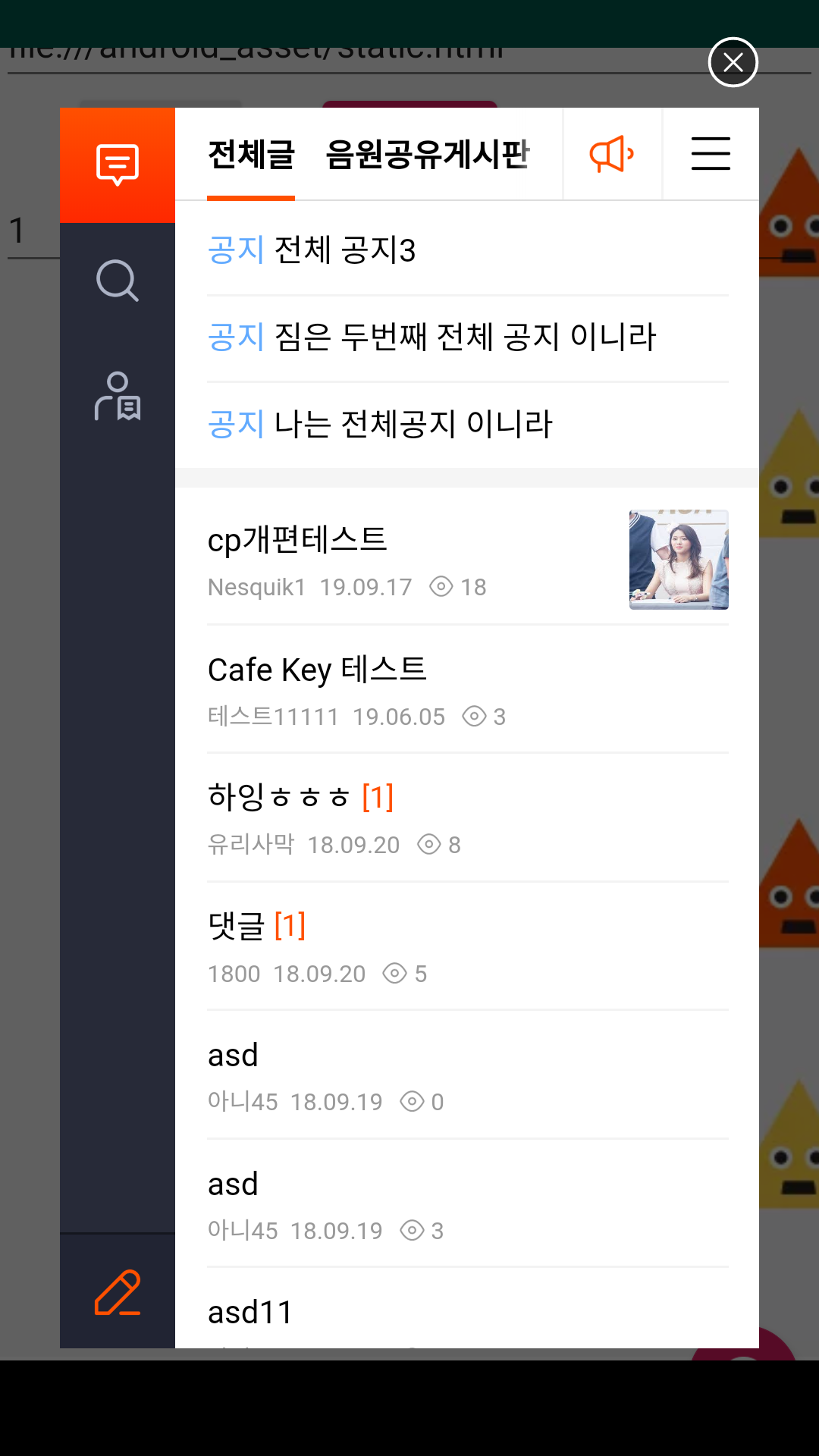
Shows the STOVE Community as a pop-up in-game. For the community to display correctly, the community must be pre-configured in Partners and the Partners key value must be registered in VIEW > community_id of the SDK Config.
public void Community()
{
    ViewUI.Community((Result result, Dictionary<string, string> dictionary) =>
    {
        if (result.IsSuccessful)
        {
            if (dictionary != null && dictionary.ContainsKey("received_data"))
            {
                string receivedData = dictionary["received_data"];
                Dictionary<string, object> data = Json.Deserialize(receivedData) as Dictionary<string, object>;

                if (data != null)
                {
                    if (data.TryGetValue("code", out object codeObj) && codeObj is long errorCode)
                    {
                        if (errorCode == 40104) {
                            /** SDK auth token expired — log out and go to the initial screen **/
                        }
                    }
                }
            }
        }
        else
        {
            OperationUI.HandleResult(result, (Result operationResult) => { });
        }
    });
}
private fun community(activity: Activity) {
    ViewUI.community(activity) { result, map ->
        //closed view
    }
}
ErrorCodes
| Domain | ErrorCode | Description |
|---|---|---|
| com.stove.success | 0 | Success |
| com.stove.server | 11236 | Error : Access token is wrong. |
| com.stove.base.network | 10001 | NoConnectionError |
| com.stove.base.network | 10002 | TimeoutError |
Calling a Community URL Directly
Calling a specific URL within the community the ordinary way results in a logged-out call. Using the interface below, you can call it while keeping the user logged in.
Handling the received_data response
The success callback's userInfo["received_data"] is a JSON string. After parsing, if code == 40104, the SDK auth token has expired, so guide the user into the re-login flow. Other codes can be handled per your game's defined format or ignored. Delegate the failure callback to OperationUI.HandleResult(result, ...).
public void CommunityWithURL()
{
    /**
     * url : url input (string)
     **/
    ViewUI.Community("url", (Result result, Dictionary<string, string> dictionary) =>
    {
        if (result.IsSuccessful)
        {
            if (dictionary != null && dictionary.ContainsKey("received_data"))
            {
                string receivedData = dictionary["received_data"];
                Dictionary<string, object> data = Json.Deserialize(receivedData) as Dictionary<string, object>;

                if (data != null)
                {
                    if (data.TryGetValue("code", out object codeObj) && codeObj is long errorCode)
                    {
                        if (errorCode == 40104) {
                            /** SDK auth token expired **/
                        }
                    }
                }
            }
        }
        else
        {
            OperationUI.HandleResult(result, (Result operationResult) => { });
        }
    });
}
private fun community(activity: Activity, url: String) {
    ViewUI.community(activity, url) { result, map ->
        //closed view
    }
}
ErrorCodes
| Domain | ErrorCode | Description |
|---|---|---|
| com.stove.success | 0 | Success |
| com.stove.server | 11236 | Error : Access token is wrong. |
| com.stove.base.network | 10001 | NoConnectionError |
| com.stove.base.network | 10002 | TimeoutError |
Custom URL
Shows a URL of your choice in a WebView. With ViewConfiguration, you can choose partial-screen or full-screen display.
Parameters
| Parameter | Type | Description |
|---|---|---|
| viewRequest | ViewRequest | The config item for showing the View |
Per-platform implementation — partial screen
public void Load()
{
    ViewConfiguration viewConfiguration = ViewConfiguration.Partial();
    ViewRequest viewRequest = new ViewRequest("url", viewConfiguration);
    ViewUI.Load(viewRequest, (Result result, Dictionary<string, string> dictionary) =>
    {
        if (result.IsSuccessful)
        {
            if (result.UserInfo != null && result.UserInfo.TryGetValue("userAction", out string userAction))
            {
                if (!string.IsNullOrEmpty(userAction) && userAction.Equals("withdraw_complete"))
                {
                    /** ex) game withdrawal complete **/
                }
            }
        }
        else
        {
            OperationUI.HandleResult(result, (Result operationResult) => { });
        }
    });
}
private fun load(activity: Activity) {
    val url = "https://www.onstove.com/"
    val viewConfiguration = ViewConfiguration.partial()
    val viewRequest = ViewRequest(url, viewConfiguration = viewConfiguration)
    ViewUI.load(activity, viewRequest) { result, map ->
        if (result.isSuccessful()) {
            result.userInfo?.let { userInfo ->
                when (userInfo["userAction"]) {
                    "withdraw_complete" -> {
                        // Withdrawn state
                    }
                }
            }
        }
    }
}
Per-platform implementation — full screen
public void Load()
{
    ViewConfiguration viewConfiguration = ViewConfiguration.Full();
    ViewRequest viewRequest = new ViewRequest("url", viewConfiguration);
    ViewUI.Load(viewRequest, (Result result, Dictionary<string, string> dictionary) =>
    {
        if (result.IsSuccessful)
        {
            if (result.UserInfo != null && result.UserInfo.TryGetValue("userAction", out string userAction))
            {
                if (!string.IsNullOrEmpty(userAction) && userAction.Equals("withdraw_complete"))
                {
                    /** ex) game withdrawal complete **/
                }
            }
        }
        else
        {
            OperationUI.HandleResult(result, (Result operationResult) => { });
        }
    });
}
WebView Common Guide
This covers the header info, URI schemes, JavascriptInterface, and data send/receive patterns commonly used when showing a web page you built in the SDK WebView (news/auto/manual pop-ups, community, custom URL, etc.).
Info the SDK passes in the header when calling the WebView
If you build a web page yourself for game operations, you can use the following data. The data below is included in the header.
| Key | Description |
|---|---|
| authorization | The token issued by the STOVE authentication server |
| characterno | The user's character number (included only if the game uses it) |
| ServerID | The user's world (included only if the game uses it) |
| SDK-Version | The View module's version (e.g., 2.0.0) |
| Accept-Language | The language set by the device or game (e.g., ko) |
Communicating with the Web
The STOVE SDK supports predefined JavascriptInterface and URI schemes.
URI: Common
| Definition | Details | Example | Available version |
|---|---|---|---|
stovewebs:// | Goes to an external link (Safari, Chrome) | stovewebs://naver.com → opens https://naver.com in the browser | 2.0.0 |
stovecommunitys:// | Opens the STOVE Community | Converts stovecommunitys to https, then goes to the community view | 2.0.0 |
URI: Android only
| Definition | Details | Example | Available version |
|---|---|---|---|
intent:// | Goes to an external link | stovewebs://naver.com → goes to https://naver.com | 2.0.0 |
| A scheme other than http/https | Starts an Activity that can receive an ACTION_VIEW Intent | market://details?id=com.stove.mstove.google → PlayStore, twitch://open?link_click_id=... → Twitch | 2.0.0 |
JavascriptInterface
| Definition | Details |
|---|---|
closeWebview | Closes the current view (can pass data to the SDK) |
getDeviceInfo | Looks up device info (received via StoveJSBridge.callback) |
getValue | Looks up a game property. Pass the key as a parameter (received via StoveJSBridge.callback) |
Code example
function closeWebview(){
    if (window._StoveJSBridge) {
        window._StoveJSBridge.invoke("closeWebview", "data to pass to the game client", null);
    } else if (window.webkit && window.webkit.messageHandlers && window.webkit.messageHandlers.StoveJS) {
        var message = { method: 'closeWebview', parameter: 'data to pass to the game client' };
        window.webkit.messageHandlers.StoveJS.postMessage(message);
    }
}
function getDeviceInfo(){
    if (window._StoveJSBridge) {
        window._StoveJSBridge.invoke("getDeviceInfo", null, "getDeviceInfoCallbackId");
    } else if (window.webkit && window.webkit.messageHandlers && window.webkit.messageHandlers.StoveJS) {
        var message = { method: 'getDeviceInfo', callbackId: 'getDeviceInfoCallbackId' };
        window.webkit.messageHandlers.StoveJS.postMessage(message);
    }
}
function getValue(){
    if (window._StoveJSBridge) {
        window._StoveJSBridge.invoke("getValue", '{"key":"fetchKey"}', "getValueCallbackId");
        //If you need to specify a default, use the form '{"key":"fetchKey", "default":"testValue"}'
    } else if (window.webkit && window.webkit.messageHandlers && window.webkit.messageHandlers.StoveJS) {
        var message = { method: 'getValue', callbackId: 'getValueCallbackId' };
        window.webkit.messageHandlers.StoveJS.postMessage(message);
    }
}

var StoveJSBridge = {
    callback: function(callbackId, error, result) {
        if(callbackId === "getDeviceInfoCallbackId") {
            const resultJSON = JSON.parse(result);
            const marketGameId = resultJSON.market_game_id;
            const deviceId = resultJSON.device_info.device_id;
            const osName = resultJSON.device_info.os_name;
            const adid = resultJSON.device_info.adid;
        } else if(callbackId === "getValueCallbackId") {
            const resultJSON = JSON.parse(result);
            const returnCode = resultJSON.return_code;
            if(returnCode === 0){
                const key = resultJSON.key;
                const value = resultJSON.value;
            } else if(returnCode === 39403) {
                //Not Exist Key
            } else if(returnCode === 39002) {
                //Invalid Params
            }
        }
    }
};
Receiving data from the JavascriptInterface in the SDK
You can receive the data passed via closeWebview from the web page through the received_data key of the SDK callback.
private void News()
{
    ViewUI.News((Result result, Dictionary<string, string> dictionary) =>
    {
        if (dictionary != null && dictionary.ContainsKey("received_data"))
        {
            string value = dictionary["received_data"];
        }
    });
}
Setting properties in the SDK for the web page to look up
Used for storing and looking up data between Game Client ↔ SDK ↔ Web. @since 2.1.0
public void SetProperties()
{
    AccessToken accessToken = Auth.AccessToken;
    if (accessToken == null) { return; }
    Dictionary<string, object> properties = new Dictionary<string, object>();
    properties.Add("testKey", "testValue");
    GameProfile gameProfile = accessToken.User.GameProfile;
    if (gameProfile == null)
    {
        accessToken.User.GameProfile = new GameProfile();
    }
    accessToken.User.GameProfile.Properties = properties;
}
Opening an External Browser (+SSO Integration)
Opens ON STOVE pages (coupon/community/customer support, etc.) in an external browser while keeping the authentication session.
⚠️ Caution
Guest accounts cannot use this feature.
Accounts logged in with a certificate (signing key) other than STOVE's are also prohibited from SSO external-browser calls. Always complete 'switch to STOVE account' before calling.
/**
 * url : "the url to open in the external browser: coupon or community, etc.";
 **/
public void OpenExternalUrl()
{
    AccessToken accessToken = Auth.AccessToken;
    if (accessToken == null) { return; }

    string url = "the url to open in the external browser: coupon or community, etc.";

    ViewUI.OpenExternalUrl(url, (Result result) =>
    {
        if (result.IsSuccessful)
        {
            // External-browser integration success
        }
        else
        {
            OperationUI.HandleResult(result, (Result operationResult) => { });
        }
    });
}
PC (PCSDK)
Prerequisites
- Initialize ViewSDK with
View_Initializeafter Base SDK initialization completes. To specify the parent HWND for internal-mode pop-ups, useView_InitializeWithWndInfo(hwnd). If you use only external-browser mode, you can callView_Initializewithout a parent HWND. Base_RunCallback()must be called periodically in the game loop for async callbacks to work.- If you use character/field info in Partners settings, set the game profile first with
Base_SetGameProfile. - The identity-verification pop-up returns
NOT_SUPPORTED_COUNTRY(31) outside Korea. - The coupon pop-up is covered on a separate page. (See Coupon (Itembox))
- Opening ON STOVE pages (community/customer support, etc.) in an external browser is an API of the BaseSDK module (
Base_OpenExternalUrl), not the ViewSDK (pop-up) module. So it can be called onceBase_Initializecompletes. Only STOVE-related domains are allowed, and SSO login is kept.
Development Flow
- Initialization: after completing Base SDK initialization (
Base_InitializeorBase_InitializeEx), initialize ViewSDK withView_Initialize. To use internal-mode pop-ups, useView_InitializeWithWndInfo, passing the game's main HWND. - Show the pop-up: call the API that fits the timing/requirements. Every pop-up API takes
WebViewMode(EXTERNAL: external browser /INTERNAL: SDK built-in webview) as its first argument. For auto/manual/news pop-ups, using the Ex-version API lets you also receive the pop-up-close callback (OnViewPopupDestroyFinished) separately from the display-complete callback.- Auto pop-up:
View_AutoPopup(mode, onFinished)(useView_AutoPopupExif you need the close event) - Manual pop-up:
View_ManualPopup(resourceKey, mode, onFinished)(specify the pop-up to show withresourceKey; useView_ManualPopupExif you need the close event) - News pop-up:
View_NewsPopup(mode, onFinished)(useView_NewsPopupExif you need the close event) - Identity-verification pop-up:
View_VerifyIdentificationPopup(compareIdentifier, mode, onFinished, onDestroy)(specifycompareIdentifier; Korea only) - Coupon pop-up: see the Coupon (Itembox) page
- Auto pop-up:
- Event handling: receive the display-complete callback and the pop-up-close callback to branch game progress. If you need to resume the game flow after the pop-up closes, handle it in the Ex-version API's close callback.
- Additional control: if needed, use
View_SetPopupDisallowedfor the don't-show-again setting andView_CloseAllPopupsto close all at once. - External-browser integration (BaseSDK): to open ON STOVE pages (community/customer support, etc.) in an external browser while keeping the auth session, call
Base_OpenExternalUrlof the BaseSDK module, not ViewSDK. Only STOVE-related domains are allowed, and SSO login is kept. It's an async API, so the result comes via a callback atBase_RunCallback()time. - Cleanup: just before the game exits, clean up ViewSDK with
View_UnInitialize(), then callBase_UnInitialize().
Troubleshooting
| Situation | Cause | Solution |
|---|---|---|
| You launched an auto pop-up after game start but no window appears | You called a pop-up API before View_Initialize completed. ViewSDK features can be used only after initializing ViewSDK with View_Initialize (for internal-mode pop-ups, View_InitializeWithWndInfo) following Base SDK initialization. | After completing Base SDK initialization, finish ViewSDK initialization with View_Initialize (for internal-mode pop-ups, View_InitializeWithWndInfo, passing the game's main HWND), then call the pop-up API to avoid issues. |
| The pop-up result callback isn't called for a long time | If you don't call Base_RunCallback() in the main loop, the SDK can't find a point to deliver results to the game. Callbacks are designed to run on the thread that called Base_RunCallback(). | Call Base_RunCallback() every frame or at a regular interval in the game main loop (render loop). Usually calling it once between input handling and rendering avoids issues. |
The identity-verification pop-up fails with NOT_SUPPORTED_COUNTRY (31) in non-Korea builds | The identity-verification pop-up is a Korea-service-only feature, so it always returns error 31 outside Korea. Calling it as-is in a global build shows a meaningless failure message to users. | First check the nation value (ISO 3166-1 ALPHA-2, "KR" for Korea) of StovePCGds obtained via Base_GetGds, and skip the identity-verification pop-up call when it's not Korea. Adding a branch so only Korea builds enter the call flow avoids issues. |
| When I open a new pop-up, the previously open pop-up suddenly closes | On a new pop-up call, ViewSDK closes all existing windows open on the same channel. This is intended behavior to prevent two pop-ups from showing at once. | Simultaneous display isn't supported, so the previous pop-up closing is normal. Just proceed with the new pop-up call without extra handling to avoid issues. |
| The pop-up is hidden behind the game window and can't be clicked | If you don't set the parent window handle at ViewSDK initialization, the pop-up appears as a separate window and can go behind the game window. In exclusive fullscreen mode, internal-mode pop-ups can't come above the game window due to Windows API limits. | Initialize ViewSDK by passing the game's main HWND to View_InitializeWithWndInfo. For exclusive-fullscreen games, always set the pop-up's WebViewMode to external mode to avoid issues. |
The external-browser API (Base_OpenExternalUrl) won't compile/link or isn't called | External-browser integration is a BaseSDK module API, not ViewSDK, so including only the ViewSDK header won't find the symbol. | Include the BaseSDK header (BaseSDK.h) and call it after BaseSDK initialization completes. It's independent of ViewSDK initialization. |
| Login (SSO) drops on a page opened in the external browser | For external-browser integration, SSO login is kept only on STOVE-related domains. Navigating from the opened page to a page requiring a different SSO login can drop the session. | Pass only STOVE-related web page (community/customer support, etc.) URLs, and avoid flows that navigate to external domains. |
To resume the game flow after the pop-up closes, use the Ex-version API's close callbackView_AutoPopupEx, View_ManualPopupEx, and View_NewsPopupEx also receive the OnViewPopupDestroyFinished callback, called when the pop-up window closes, separately from the display-complete callback. If you need to resume the game flow at close time (e.g., entering the next screen), handle it in this close callback.
Sample Code
#include "ViewSDK.h"

using namespace Stove::PCSDK;
using namespace Stove::PCSDK::Base;
using namespace Stove::PCSDK::View;

// 1) Initialize ViewSDK (after Base_Initialize completes)
auto initResult = View_Initialize();
if (!initResult.IsSuccessful())
{
    // Implement the logic for initialization failure.
    return;
}

// 2) Auto pop-up (use Ex if you need the close event)
//    The first argument is WebViewMode (EXTERNAL: external browser / INTERNAL: SDK built-in webview)
View_AutoPopupEx(
    WebViewMode::EXTERNAL,
    [](CallbackResult openResult) {
        if (openResult.GetResult().IsSuccessful())
        {
            // Handle pop-up open
        }
    },
    [](CallbackResult destroyResult) {
        // Resume the game flow when the pop-up closes
    }
);

// 3) Manual pop-up (specify the pop-up to show with resourceKey)
View_ManualPopup(L"your_resource_key", WebViewMode::EXTERNAL, /* onFinished */ nullptr);

// 4) Identity-verification pop-up (Korea only)
//    compareIdentifier=true: SDI validation / false: deliver simKey
View_VerifyIdentificationPopup(
    true, WebViewMode::INTERNAL,
    [](CallbackResult result) {
        if (!result.GetResult().IsSuccessful())
        {
            // Logic for failures such as NOT_SUPPORTED_COUNTRY(31)
        }
    },
    [](CallbackResult result, const wchar_t* simKey) {
        // Handle pop-up close (simKey delivered when compareIdentifier=false)
    });

// 5) Open external browser (BaseSDK module API — not ViewSDK, BaseSDK.h)
//    Only STOVE-related domains allowed; SSO kept.
{
    std::wstring url = L"https://www.onstove.com";
    Base_OpenExternalUrl(url.c_str(), [](CallbackResult callbackResult) {
        if (callbackResult.GetResult().IsSuccessful())
        {
            // Handle external-browser integration success
        }
    });
}

// 6) Clean up on exit
View_UnInitialize();
// Then call Base_UnInitialize