
- Last Updated

Payment
Understanding
Payment-Support Overview
STOVE supports two payment types: PC online payment and mobile-market payment.
The supported currencies, payment methods, limits, and cancellation methods differ by payment type.
| Payment type | Description |
|---|---|
| PC online payment | Payment in a PC-version game's web shop / in-game shop (using the STOVE-provided payment window). |
| Mobile-market payment | Payment for games launched on app markets such as Google/Apple (using the market-provided IAP (in-app purchase) payment window). |
Payment-account identity confirmation
ㆍ Only accounts with minimal identity confirmation can pay
ㆍ Korea: identity verification / global: email verification
Payment for games distributed via the Steam launcher
Payment in a game launched through the Steam launcher also falls under PC online payment, but the payment window is replaced by the Steam payment overlay. For the detailed flow, see Development → PC IAP → Steam Payment.
Supported Payment Currencies
| Category | Currency | Description | Accounts paying in this currency |
|---|---|---|---|
| PC online payment | KRW | South Korean won | Korea-registered accounts |
| USD | US dollar | US-registered accounts, and accounts registered in countries with no supported currency | |
| JPY | Japanese yen | Japan-registered accounts | |
| EUR | Euro | Accounts registered in designated euro-using countries (see the list below) | |
| THB | Thai baht | Thailand-registered accounts | |
| PHP | Philippine peso | Philippines-registered accounts | |
| TWD | Taiwan dollar | Taiwan-registered accounts | |
| Mobile-market payment | - | Market-payment supported currency | Pay in the supported currency set on each user's market account |
Payment-currency notes
ㆍ Bulgaria: USD payment and point accrual provided
ㆍ The payment currency of the same product must be registered identically in the shop and the billing system for payment to work (e.g., registering differently like shop EUR / billing USD makes payment impossible)
Supported Payment Methods
| Category | Country | Description |
|---|---|---|
| PC online payment | Korea | STOVE Pay (default): bank transfer / credit-card easy payment, with a large per-transaction limit and high point accrual Others: easy payments such as KakaoPay, Naver Pay, Toss, and Payco, plus mobile-phone and gift-certificate types |
| Global | Main payment methods: PayPal, Credit/Debit Card, ApplePay, etc. Country-specific leading payment methods are additionally provided (e.g., PayPay in Japan) | |
| Mobile-market payment | All countries | Pay with the payment method the user registered on their market account (the method composition is decided by the market; STOVE and the listing company can't intervene) |
Payment-provider (PG) redundancy
ㆍ Main payment methods integrate 2 or more PGs → auto-switch on failure
Minor payment
ㆍ By default only gift-certificate types are usable; all methods require guardian consent
ㆍ Guardian consent: confirm an age difference of 20+ years via identity verification (the guardian need not be a member; valid for 12 months)
Payment Limits
The amount payable in a game has a monthly per-game limit, and the criteria differ by country/platform.
| Category | Country | Description |
|---|---|---|
| PC online payment | Korea | A PC online-game limit applies per the Ministry of Culture's self-regulation ㆍ Adults: self-set from KRW 100,000 to 30,000,000 (3 times per month, changed after mobile-phone identity verification) ㆍ The set limit is summed by account holder (resident registration number) and applied per game each month ㆍ Minors: a monthly limit of KRW 70,000, not changeable |
| Global | No default limit (though the payment method itself may have a limit) ㆍ Per-game per-transaction / per-day / per-month limits can be set per currency |
|
| Mobile-market payment | All countries | No payment limit (though the payment method itself may have a limit) |
| PC online + market payment | Japan | Purchase limits by age bracket Applies to games serviced in Japan (a de facto regulation under the Act on Electronic Financial Transactions) ㆍ Multi-platform games sum PC and mobile-market purchase amounts ㆍ Age 15 or under: JPY 5,000/month ㆍ Age 16–17: JPY 30,000/month ㆍ Age 18 or older: no limit ㆍ * In April 2022, the adult age under Japanese civil law changed from 20 to 18 |
How Japan's payment limit is calculated
ㆍ Sum of cumulative "yen" payment amounts from the 1st to the last day of the month (excluding coupons/points)
ㆍ Regular member on PC: when the sign-up country is Japan (Japan sign-up = yen payment)
ㆍ Regular member on mobile: only when the sign-up country is Japan and the payment currency is yen, the actual yen payment amount is summed
ㆍ Guest on PC: not applicable, as there are no guest members on PC
ㆍ Guest on mobile: since the sign-up country is unknown, the actual yen payment amount is summed only when the payment currency is yen
ㆍ Sum all payment amounts in the game (including all products, not just currency-type products)
ㆍ If the product amount exceeds the remaining limit, that product can't be purchased (only products affordable within the remaining limit are possible)
Per-user special limit
ㆍ A special limit can be granted to specific users (based on member number) (marketing, influencers, etc.)
ㆍ When it conflicts with the game limit, the user's special limit takes precedence
Payment Confirmation and Proof
| Category | Description |
|---|---|
| PC online payment | Check on the STOVE platform ㆍ Email notice on payment/purchase completion (not sent if there's no info) ㆍ Real-time: your own payment history (guardians can also check their child's payment history) ㆍ Monthly: your own payment history for the previous month (guardians can also check their child's) ㆍ Check payment history and accrued-point history in 'My Info' |
| Mobile-market payment | Check on each market ㆍ Check payment info via payment-notification history, invoices, and receipts |
Cash-receipt handling
ㆍ PC online payment: handled by the payment provider (PG), checkable on the National Tax Service website
ㆍ Mobile market (Google Wallet): STOVE auto-issues cash receipts
Payment Cancellation
| Category | Description |
|---|---|
| PC online payment | Shop/item payment (Korean payment methods) Refunds are judged by whether the withdrawal period has passed and whether the product's value is impaired (the period differs per game) ㆍ Within period + unused: approval cancellation of the original payment method ㆍ Within period + used: partial refund ㆍ Period passed + unused: partial refund after deducting the greater of KRW 1,000 or a 10% fee ㆍ Period passed + used: refunds may be restricted per game policy Shop/item payment (global payment methods) ㆍ Within the approval-cancellation period: approval cancellation of the original payment method ㆍ After the approval-cancellation period: cancellation not possible Store games ㆍ Purchase can be canceled within 14 days of purchase and before 2 hours of cumulative playtime ㆍ On cancellation, STOVE Cash is refunded, and the refunded cash can be separately requested as a cash refund |
| Mobile-market payment | Refunds are judged by whether the withdrawal period has passed and whether the product's value is impaired |
Billing System and Integration
This explains how to integrate payment (IAP) into your game via the STOVE SDK.
It integrates in-app purchases on major markets such as Google Play and Apple App Store with PC online payment, and provides the full payment flow including subscription products and abnormal-refund handling.
Billing-System Composition
The STOVE billing system consists of a client SDK and server middleware.
| System name | Description |
|---|---|
| MultiPlatform-Middleware (cross-platform middleware) |
The GATEWAY server that handles communication between the game and billing (online/mobile). |
| IAP | The mobile billing server. |
| Bill-WEB API | The online billing server. |
| Game Server | The game server. |
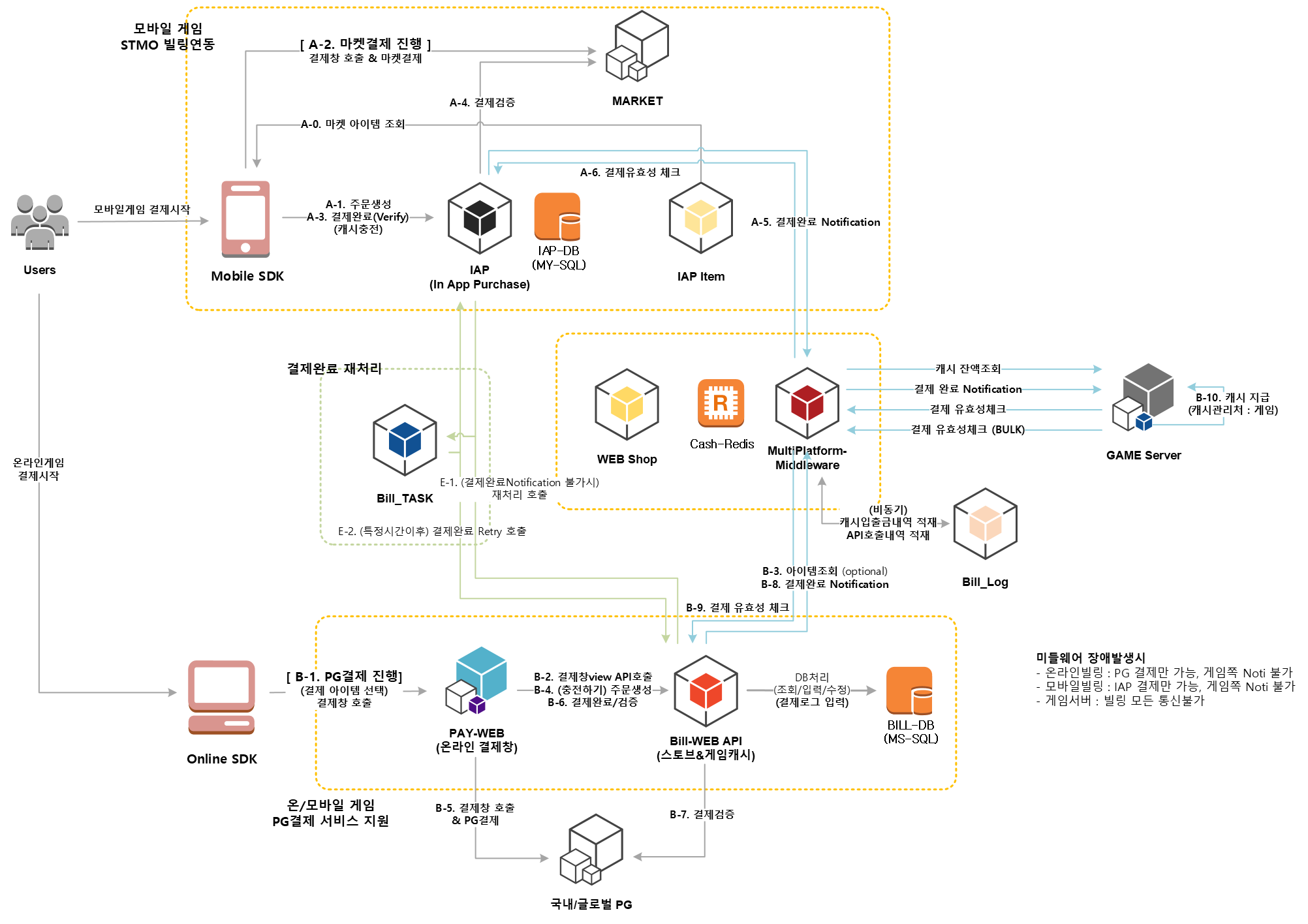
Supported Features
| Feature | Description |
|---|---|
| Payment-completion notification | On payment (online/mobile) completion, STOVE billing sends a notification to the game server. A completion response is required after validity is confirmed via the middleware. |
| Payment-validity confirmation | STOVE billing verifies the source of the received payment notification. BULK (list) processing is supported. |
| Game-cash balance check | Looks up the paid-cash balance managed by the game. |
| Abnormal-refund handling | Collects records of refunds the user made directly through the market and delivers them to the game server. Google and Apple markets are supported. |
| Subscription products | STOVE SDK v2.6.0 or higher supports auto-renewing subscription products on Google Play and Apple App Store. |
Prerequisites
For billing to work correctly, all the info below must be registered in Partners.
If any one is missing, payment won't work correctly.
| Category | Registration content |
|---|---|
| Billing-integration info | Billing version (V4), service type, whether to use GUID, payment-completion notification URL, cash-lookup URL |
| Per-market IAP info | Google/Apple market authentication info |
| Market-product info | Per-market product ID |
| World info | Default world (world_id) for the Noti URL |
Market-integration info caution
ㆍ Apple IAP Key: can't be re-downloaded after the first download (reissue if lost)
ㆍ When regenerating the Apple shared secret, all in-use app info must be updated
Abnormal-Refund Handling
This feature stops a user from continuing to use received items when they refund (cancel) directly through the market without going through an operator.
STOVE billing collects these refund (voided) records and delivers them to the game server every 5 minutes, and the game guides the affected user to re-pay or restricts content use.
Re-payment doesn't grant the item again but only recovers the refunded amount, and the original refund is identified via the voided_tid field.
Abnormal-refund collection targets
ㆍ Refunds of general products on Google Play and Apple App Store
ㆍ Mobile subscription products and PC online payment: excluded because abnormal refunds can't be determined
ㆍ Info is also delivered when a refund occurs for a user who has left the game
Delivery-method guidance
ㆍ It's currently delivered every 5 minutes, and the delivery/re-payment method may change later
Development
Partners and Console Settings
- Google Console API setup
- Get Google Play Console API access permission
- Create a Google Cloud project (create project / add API / set up OAuth consent screen and create client ID)
- Generate an OAuth 2.0 Playground Refresh Token
- Enter STOVE Partners billing-settings info
- Billing-info entry guide
- Register Google Play billing info (market verification key / OAuth Client ID / OAuth Client Secret / Refresh Token / Bucket Name / Credential json)
- Register Apple App Store billing info (Issuer ID / Key ID / IAP Key / shared secret)
- Setup for receiving unapproved-refund product records
- iOS App Store notification setup (QA/production server URL / change to version 2 notifications)
- Android notification setup
SDK Integration
Mobile IAP
Android uses PlayBilling and iOS uses StoreKit to handle the payment flow. The SDK connects the market calls through to STOVE billing-server verification, but receiving the payment notification (Noti) on the game server, re-verifying, and granting must be implemented separately.
Prerequisites
- Module dependencies
- Android (
build.gradle): add the repositories/dependencies below. (check the latest release version and apply it.)groovyrepositories { google() jcenter() maven { // The repository location changed as of SDK 2.6.1. url "https://externalnexus.iam0.com/repository/mvp" // Add the option below when using Android Gradle Plugin 7.0 or higher allowInsecureProtocol = true } mavenCentral() } dependencies { implementation 'com.stove:iap-google:2.6.1' } - iOS (Xcode Capabilities): in Build Settings → Capabilities, search for and add In-App Purchase and confirm it's active.
- Android (
- Register Partners billing info: the Google Play / Apple App Store billing keys/secrets must be registered in Partners. (see
2. Integration Guide > Google Play Integration/Apple App Store Integration) - Register the payment-notification URL: register the game-server URL for receiving payment notifications in Partners. After SDK payment completes, a grant request is sent to this URL. (mobile retries up to 100 times)
- User login complete: all IAP calls work only after
Auth.logincompletes. Calling while not logged in returnsAuth.UnauthorizedError(30002). - When using multi-character (multi-currency): in Partners SDK Config, set
iap_delivery_method(NOTIorALL) anduse_custom_billing_guid(true). The client must callsetCustomBillingGUIDright after IAP initialization and when world/character selection is complete. (for code, see the Required Multi-character (multi-currency) management setup paragraph in the sample code below)
Development Flow
- Initialization: after login completes, call
IAP.initialize. On failure, guideAuth.UnauthorizedError(30002) into the login flow, and forIAPError.InitializeError(40003), use theresponseCode(BillingClient.BillingResponseCode) anddebugMessageinuserInfoto guide a market-environment check. - Register the payment listener: inside the initialization-success callback, register the payment-result callback with
IAP.setListener. Normal purchase, cancellation, account mismatch, verification pending, grant pending, and market error are all delivered to this listener. - Compose the shop: look up the product list with
IAP.fetchProducts, and branch the purchase button's enabled/disabled state by theProductState(Available/Waiting/Purchased) of the returnedIAPProduct. - Proceed with purchase: call
IAP.startPurchaseonly forAvailableproducts.Waitingis in progress, so disable the button;Purchasedis ungranted, so re-grant it withIAP.flush. - flush: when there's a paid-but-ungranted product or on app restart, call
IAP.flushto proceed with consume/re-grant requests. The result comes back via thesetListenercallback. - (Optional) add-on features: use the
serviceOrderIdargument to pass a developer payload,IAP.handleVoidedPurchasesto look up refund history, andpurchasePromotionfor iOS App Store promotion-product payment.
Perform payment verification on the game server
Don't grant items based only on the SDK callback's isSuccessful. The client can be tampered with, so grant currency/items after the game server receives the payment notification (Noti) and does a second verification via the STOVE payment-validity check API.
Troubleshooting
Payment-verification pending and grant pending are part of the normal flowIAPError.PurchasedError (40006) and IAPError.WaitingError (40001) are normal states where payment/grant is processed asynchronously by the billing server. Don't present them to the user as errors; instead show a progress screen like "Your payment is being processed; we'll notify you shortly via push." After some time the billing server processes it automatically and the result is delivered via push.
Handling account mismatch (SuccessButUserMissMatch, 40000)
This occurs when the user changes account or moves worlds before payment verification finishes. Guide a re-login flow based on the currently logged-in account, and inform the user that the previous payment result will be handled later via the game-server notification (Noti).
| Situation | Cause | Action |
|---|---|---|
Auth.UnauthorizedError (30002) | Login incomplete or token expired | Run the re-login flow with AuthUI.login or Auth.login, then retry the IAP call. |
IAPError.InitializeError (40003) | Android market (PlayBilling) initialization failed | Check the responseCode (BillingClient.BillingResponseCode) and debugMessage in userInfo and guide the user to check store-app installation, login state, and market support. |
IAPError.InvalidProduct (40004) | Payment attempted with an arbitrarily created product object or a product not from fetchProducts | Always pass the object received from IAP.fetchProducts directly to startPurchase. Don't use a directly instantiated product. |
IAPError.MarketError (40002) | Market-client error during a payment attempt | Branch by userInfo.responseCode (BillingResponseCode) on Android and SKError.code on iOS and guide the user. Retry for a temporary error; for an environment problem, guide a market-app/account check. |
iOS pay country code nil (40010) | Missing payment-country info on the Apple account | Guide the user to register their country/region and payment info in App Store settings. |
Server billing verification failed (30000 verify fail / 30015 sandbox transaction) | Payment-receipt verification failed or a test account isn't registered in the LIVE environment | In the LIVE environment, check whether the test account is registered in Partners. For general cases, check the game server's receipt re-verification logic. |
Already-subscribed product (93106) | The user already holds the same subscription product | Inform the user they're already subscribed and disable the purchase button. |
| Grant missing after payment | The game-server notification (Noti) URL failed to respond or processing was missed | Check that the notification URL registered in Partners always returns a 200 response. Mobile attempts re-grant up to 100 times, so also implement idempotent handling on the game server. |
| Granted to the wrong character in multi-character | setCustomBillingGUID not called or called at the wrong time | Call setCustomBillingGUID("{STOVE_guid}_{STOVE_character_no}") after IAP initialization and when world/character selection is complete. |
40303 returned in the refund-history lookup UI | Authentication token expired | Delegate to OperationUI.HandleResult, then force logout with Auth.logout to guide re-login. |
The detailed ErrorCode table for each function is included in the sample code below.
Sample Code
Initialization
Initialize the Market SDK (PlayBilling/StoreKit). Product lookup and purchase calls are possible only after initialization completes.
- Recommended timing: after login succeeds
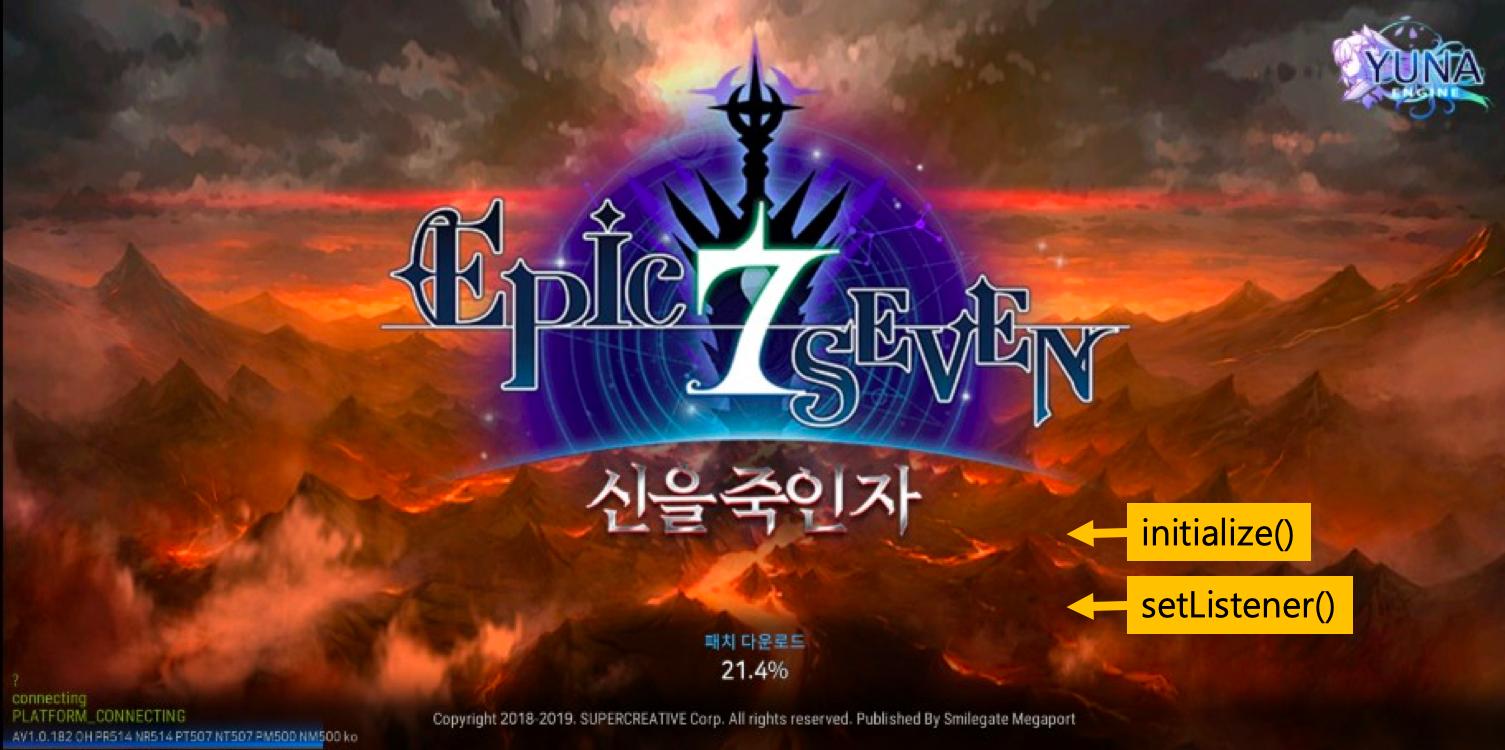
#if UNITY_ANDROID
using Stove.StoveSDK.IAP.Google;
#endif

public void Initialize()
{
    IAP.Initialize((Result result) =>
    {
        if (result.IsSuccessful)
        {
            SetListener(); // call setListener
        }
        else if (result.ErrorCode == Auth.UnauthorizedError)
        {
            //TODO : login
        }
        else
        {
            //InitializeError. Android Only
            // see https://developer.android.com/reference/com/android/billingclient/api/BillingClient.BillingResponseCode
        }
    });
}
ErrorCodes
| Domain | ErrorCode | Description |
|---|---|---|
| com.stove.success | 0 | Success |
| com.stove.auth | 30002 | UnauthorizedErrorResult |
| com.stove.iap | 40003 | InitializeError. For Android PlayBilling, see 'responseCode' and 'debugMessage' in userInfo |
| com.stove.iap | 40010 | Only on iOS, when the pay country code is nil |
| com.stove.server | 20001 | initialize fail on precheck |
| com.stove.server | 20002 | initialize fail on afterCheck |
| com.stove.server | 20003 | initialize fail on send tid |
| com.stove.server | 20004 | initialize fail on send tid : error parsing response |
setListener
After IAP initialization succeeds, set the listener that receives payment results. The result of flush is also delivered to this listener.
- Recommended timing: right after initialization completes
- If there's a
productvalue, change the attempted-purchase product's state to the returned state. In certain situations a state other thanAvailablemay arrive.
public void SetListener()
{
    IAP.SetListener((Result result, IAPProduct product, IAPPurchaseDetail purchaseDetail) =>
    {
        if (result.IsSuccessful)
        {
            //purchase success
        }
        else if (result.IsCanceled)
        {
            //purchase cancellation
        }
        else if (result.ErrorCode == IAPError.SuccessButUserMissMatchError)
        {
            //purchase success (account mismatch)
            //can occur when the account changes or the world moves before payment verification completes
        }
        else if (result.ErrorCode == IAPError.PurchasedError)
        {
            //payment verification pending - later auto-processed by the billing server, notified via push
        }
        else if (result.ErrorCode == IAPError.WaitingError)
        {
            //grant pending - later auto-processed, notified via push
        }
        else if (result.ErrorCode == IAPError.MarketError)
        {
            //Android: BillingClient.BillingResponseCode
            //iOS: SKError.Code
        }
    });
}
ErrorCodes
| Domain | ErrorCode | Description |
|---|---|---|
| com.stove.success | 0 | Success |
| com.stove.cancel | 10 | Canceled |
| com.stove.iap | 40000 | SuccessButUserMissMatch |
| com.stove.iap | 40001 | Waiting |
| com.stove.iap | 40002 | MarketError (Android: BillingResponseCode / iOS: payment failure) |
| com.stove.iap | 40006 | Purchased |
| com.stove.server | 10001 | invalid parameters |
| com.stove.server | 10004 | not exists noti-api |
| com.stove.server | 10007 | is not supported environment |
| com.stove.server | 30000 | verify fail |
| com.stove.server | 30006 | canceled transaction - verify fail |
| com.stove.server | 30007 | revoked transaction - verify fail |
| com.stove.server | 30011 | completed transaction |
| com.stove.server | 30012 | duplicate store receipt |
| com.stove.server | 30014 | failed transaction |
| com.stove.server | 30015 | sandbox transaction (occurs when a test account isn't registered in LIVE) |
| com.stove.server | 40001 | supply server response is 'fail' |
| com.stove.server | 40005 | noti api call fail |
| com.stove.server | 40006 | cash api call fail |
| com.stove.server | 40007 | itembox api call fail |
Composing the shop
Look up products from the market to compose the shop. The main fields of the lookup response IAPProduct are as follows.
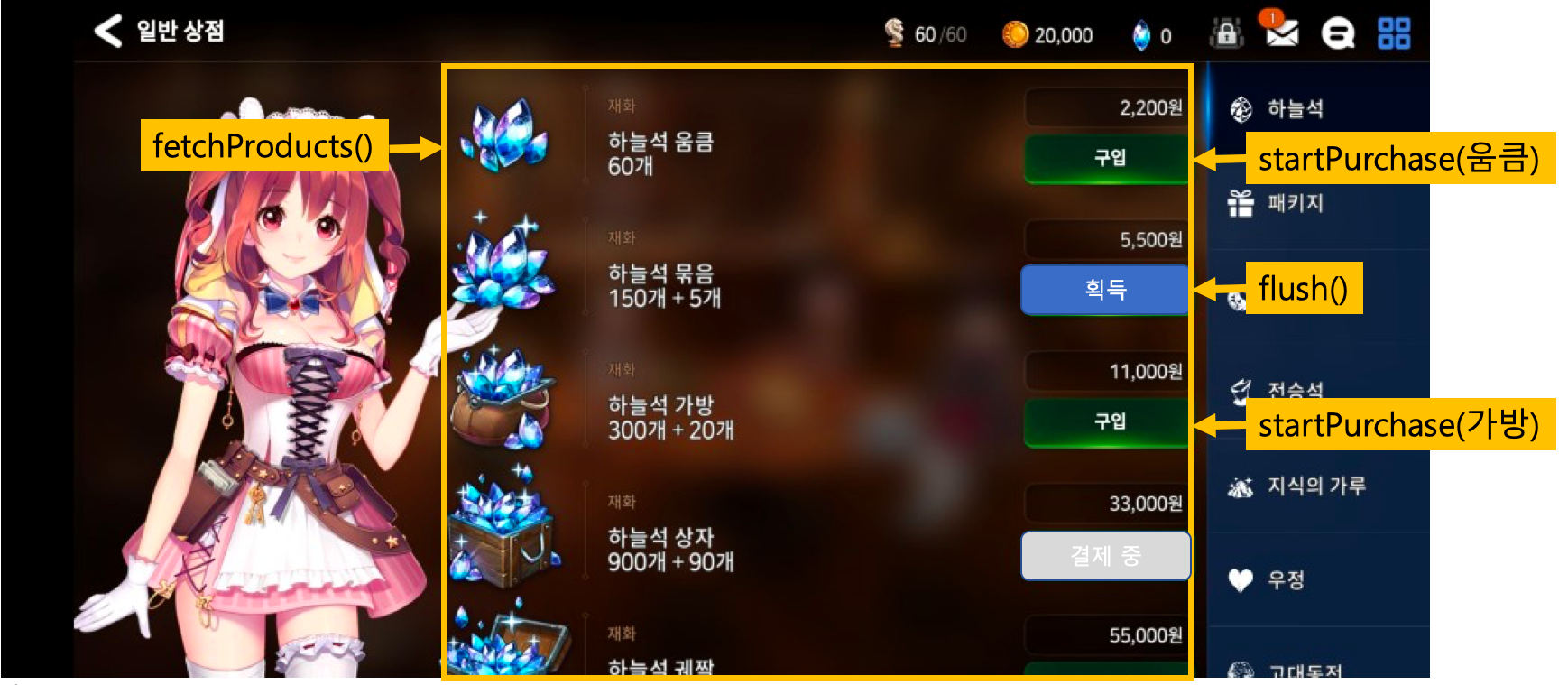
IAPProduct fields
| Field name | Description | Example |
|---|---|---|
| ProductType | Product type (inapp/subs) | inapp |
| productIdentifier | Market-registered product ID (passed at purchase request) | google_item01 |
| stoveProductId | Product ID registered in STOVE Partners | stove_item01 |
| localizedTitle | Market product name | Battle Shield |
| localizedDescription | Market product description | Product description... |
| price | Price (display amount) | ₩1,100 |
| priceCurrencyCode | Currency code | KRW, JPY, USD |
| priceAmountMicros | Price in micro units (÷1,000,000 = actual amount) | 1100000000 |
| ProductState | Product state | Available / Waiting / Purchased |
| isLimit | Whether purchase is limited | false |
| subscriptionPeriod | Subscription period (ISO 8601) | P1M |
| freeTrialPeriods | Free-trial period (ISO 8601) | P7D |
Recommendation: display the purchase button differently by product state.
- Available: purchasable state
- Waiting: waiting for payment to proceed (purchase in progress)
- Purchased: purchased but not yet granted (re-grant via flush)
#if UNITY_ANDROID
using Stove.StoveSDK.IAP.Google;
#endif

public void FetchProducts()
{
    IAP.FetchProducts((Result result, List<IAPProduct> products) =>
    {
        if (result.IsSuccessful)
        {
            foreach (IAPProduct product in products)
            {
                IAPProduct.ProductState state = product.State;
                if (state == IAPProduct.ProductState.Available) { /* purchasable */ }
                else if (state == IAPProduct.ProductState.Waiting) { /* paying */ }
                else if (state == IAPProduct.ProductState.Purchased) { /* flush needed */ }
                string localizedTitle = product.LocalizedTitle;
                string price = product.Price;
            }
        }
        else if (result.IsServerError) { /* billing-server error */ }
        else { /* network error */ }
    });
}
ErrorCodes
| Domain | ErrorCode | Description |
|---|---|---|
| com.stove.success | 0 | Success |
| com.stove.server | 20000 | not exists value |
| com.stove.server | 21000 | No content |
| com.stove.server | 21001 | not exists game |
| com.stove.server | 21002 | Not exists marketCode |
| com.stove.base.network | 10001 | NoConnectionError |
| com.stove.base.network | 10002 | TimeoutError |
Making a purchase
Handle differently by the product's ProductState. Call startPurchase only when Available, and re-grant Purchased via flush.
#if UNITY_ANDROID
using Stove.StoveSDK.IAP.Google;
#endif

public void StartPurchase(IAPProduct product)
{
    IAPProduct.ProductState state = product.State;
    if (state == IAPProduct.ProductState.Waiting) { /* paying - disable the button */ }
    else if (state == IAPProduct.ProductState.Available)
    {
        IAP.StartPurchase(product, (Result result) =>
        {
            if (result.IsSuccessful) { /* payment started */ }
            else if (result.IsServerError)
            {
                if (result.ErrorCode == 93106) { /* already-subscribed product */ }
            }
            else if (result.ErrorCode == Auth.UnauthorizedError) { /* AuthUI.login */ }
            else if (result.ErrorCode == IAPError.InvalidProductError) { /* use the fetchProducts result */ }
            else { /* network error */ }
        });
    }
    else if (state == IAPProduct.ProductState.Purchased)
    {
        IAP.Flush(); //re-grant handling
    }
}
ErrorCodes
| Domain | ErrorCode | Description |
|---|---|---|
| com.stove.success | 0 | Success |
| com.stove.auth | 30002 | UnauthorizedError |
| com.stove.iap | 40003 | InitializeError |
| com.stove.iap | 40004 | InvalidProduct |
| com.stove.iap | 40006 | PurchasedNeedFlush |
| com.stove.iap | 40008 | ListenerError |
| com.stove.iap | 40009 | InvalidUser |
| com.stove.iap | 40010 | iOS pay country code nil |
| com.stove.server | 20005 | initialize fail on already purchased split product |
| com.stove.server | 93102 | invalid product info |
| com.stove.server | 93103 | is not sales product |
| com.stove.server | 93104 | limit purchase |
| com.stove.server | 93106 | exists purchased subscript product |
| com.stove.server | 93107 | not subscript product |
| com.stove.server | 93108 | product is subscript and limit |
| com.stove.server | 93110 | over limit on purchase of payment amount |
| com.stove.base.network | 10001 | NoConnectionError |
| com.stove.base.network | 10002 | TimeoutError |
flush
This is for consuming paid-but-ungranted products and requesting re-grant. The result is delivered to the listener set in IAP.setListener.
public void Flush()
{
    IAP.Flush();
    // the result is delivered via the setListener callback
}
Setting a developer payload at payment
If you set serviceOrderId at the payment call, you can check it in the payment response.
⚠️ Caution
The payload value isn't guaranteed to be 100% delivered in some re-grant cases (app deletion, etc.).
Be careful not to use it as key info affecting grants.
string serviceOrderId = "set your developer payload";
IAP.StartPurchase(product, serviceOrderId, null, (Result result) => { });
Refund-history lookup UI
Display the user's market refund history on screen. If a refund payment is needed, it can be handled on this screen.
#if UNITY_ANDROID
using Stove.StoveSDK.IAP.Google;
#endif

public void HandleVoidedPurchases()
{
    IAP.HandleVoidedPurchases((Result result) =>
    {
        if (result.IsSuccessful)
        {
            /** game entry allowed **/
        }
        else if (result.IsCanceled)
        {
            if (result.UserInfo != null && result.UserInfo.TryGetValue("userAction", out string userAction))
            {
                if (!string.IsNullOrEmpty(userAction) && userAction.Equals("customerSupport"))
                {
                    ViewUI.CustomerSupport((Result result, Dictionary<string, string> dictionary) =>
                    {
                        HandleVoidedPurchases();
                    });
                    return;
                }
            }
            HandleVoidedPurchases();
        }
        else
        {
            OperationUI.HandleResult(result, (Result operationResult) =>
            {
                if (result.ErrorCode == 40303)
                {
                    Auth.Logout();
                }
            });
        }
    });
}
Required Multi-character (multi-currency) management setup
Required application targets
If any one of the following applies, the multi-character setting is required.
- Games serviced with multiple worlds (per-world character/item grants)
- A single server but with internal characters where per-character payment/grant is needed
- When the Partners world setting has 2 or more
- When using the STOVE secondary-currency system together with the payment (IAP) feature
Partners (SDK Config) settings
You must set the items below in Partners SDK Config > IAP.
iap_delivery_method=NOTIorALL- ALL: notify the game server of the payment result via Noti + manage currency with the STOVE CASH system
- NOTI: the game's own CASH system + receive the payment result via Noti and grant currency directly
use_custom_billing_guid=true
Client work - setting the user's unique identifier
- Timing: right after creating (initializing) the SDK IAP object, you must set the user to grant products to (
setCustomBillingGUID). But be careful to set it after the world or character is selected. - Method (when using the STOVE game-character feature, the standard recommended way): set it in the combined form
{STOVE_guid}_{STOVE_character_no}. Even with this method, thecharacter_nofield is delivered correctly in the billing-server grant request after payment completes.
Notice (2025.05.15)
For new games, to flexibly support various features such as 'account gifting', the guide changed to the combined form {STOVE_guid}_{STOVE_character_no}. This setting applies only in the mobile environment.
IAP.SetCustomBillingGUID("{STOVE_guid}_{STOVE_character_no}");
iOS Promoted
This is the integration for App Store promotion-product payment.
- Available from iOS 11 or higher
- Call
purchasePromotionafter initialization and login complete
Code example (iOS)
#import <SGSIAP/SGSIAP.h>
#import <StoreKit/StoreKit.h>

@interface AppDelegate () <SKPaymentTransactionObserver>
@property (nonatomic) NSString *promotionProductID;
@end

@implementation AppDelegate

- (BOOL)application:(UIApplication *)application didFinishLaunchingWithOptions:(NSDictionary *)launchOptions {
    [[SKPaymentQueue defaultQueue] addTransactionObserver:self];
    return YES;
}

- (void)paymentQueue:(SKPaymentQueue *)queue updatedTransactions:(NSArray<SKPaymentTransaction *> *)transactions
{
}

- (BOOL)paymentQueue:(SKPaymentQueue *)queue shouldAddStorePayment:(SKPayment *)payment forProduct:(SKProduct *)product {
    //store promotion-item info
    self.promotionProductID = product.productIdentifier;
    return NO;
}

//check whether the promotion product is stored
- (BOOL)isExistPromotion {
    return (self.promotionProductID != nil);
}

//pay for the promotion product
- (void)purchasePromotion {
    [SGSIAP fetchProductsWithCompletionHandler:^(SGSResult * _Nonnull result, NSArray<SGSIAPProduct *> * _Nullable products) {
        if ([result isSuccessful]) {
            for (SGSIAPProduct *product in products) {
                if ([product.productIdentifier isEqualToString:self.promotionProductID]) {
                    [SGSIAP startPurchaseWithProduct:product completionHandler:^(SGSResult * _Nonnull result) {
                        if (result.isSuccessful) { /* payment success */ }
                        else { /* payment failure */ }
                    }];
                    break;
                }
            }
        } else if ([result isServerError]) {
            //billing-server error
        } else {
            //network error
        }
    }];
}

@end
PC IAP
Prerequisites
- BaseSDK initialization (
Base_Initialize) and user login must precede this. Then initialize the IAPSDK withIAP_Initialize(shopKey). - The callback runner (
Base_RunCallback()) must be called periodically in the game loop for async callbacks to work. - If you need to specify a parent window, use
IAP_InitializeWithWndInfoinstead ofIAP_Initialize. - The payment-notification receiving URL and per-market billing info (Google/Apple/Steam) must be registered in Partners.
- When using multi-character (multi-currency), first set the user identifier via the game-profile setup API.
- Games distributed via the Steam launcher must have completed STOVE authentication through the External Platform Integration Module (APIModule) with PCSDK3 launched, and the game must integrate and initialize the Steamworks SDK itself. For the detailed flow, see Steam Payment below.
Development Flow
- Initialization: after
Base_Initializecompletes, initialize the IAP module withIAP_Initialize(shopKey)(orIAP_InitializeWithWndInfoif a parent window is needed). - Check terms agreement: look up whether required terms are agreed via the terms-agreement lookup API. (
IAP_FetchTermsAgreement) If not agreed, proceed with the terms-agreement flow. - Compose the shop: get the product list via category lookup (
IAP_FetchShopCategories) and product-list lookup (IAP_FetchProducts) and build the UI. - Proceed with purchase: call the purchase-start API on user selection. (
IAP_StartPurchase/IAP_StartPurchaseEx— control the payment UI/closing behavior withStovePCPurchaseOption.operation) - Purchase confirmation/verification: when a notification reaches the game server after payment completes, call the purchase-confirmation API (
IAP_ConfirmPurchase) for client-side confirmation, and the game server does a second verification via the payment-validity check API. - Inventory/refunds: use inventory lookup (
IAP_FetchInventory) as needed. Refund-history lookup (IAP_FetchVoidedPurchases) can also be used as needed. - Add-on actions: use
IAP_WithdrawGamefor the game-cancellation (terms-withdrawal) UI andIAP_CloseAllPopupsto close all open payment windows at once. - Cleanup: right before the game exits, clean up the IAP module with
IAP_UnInitialize(), then callBase_UnInitialize().
Steps 4–7 differ for games distributed via the Steam launcher
ㆍ Steps 4–5: the SDK doesn't show a payment window. Payment is handled by the Steam payment overlay that the Steam launcher injects into the game, and the payment-completion signal arrives via a Steamworks callback rather than from the SDK. There's no auto purchase-confirmation path, so calling IAP_ConfirmPurchase is mandatory.
ㆍ Steps 6–7: refund-history lookup (IAP_FetchVoidedPurchases) and game withdrawal (IAP_WithdrawGame) aren't supported in the Steam flow. Inventory lookup (IAP_FetchInventory) is used as-is.
For details, see Steam Payment below.
Steam Payment
This is the payment flow for games distributed and launched through the Steam launcher. If you distribute only through the STOVE launcher, skip this paragraph and follow the flow above as-is.
This flow assumes the game has completed STOVE authentication through the External Platform Integration Module (APIModule) and has PCSDK3 launched. Module integration and Steam game-terms agreement are covered in the Steam Integration Guide; this paragraph explains only the payment part that follows.
Differences from standard PC payment
| Category | Standard PC payment | Steam payment |
|---|---|---|
| Payment window | The SDK shows the STOVE payment webview. | Handled by the Steam payment overlay the Steam launcher injects into the game. |
| Payment option | StovePCPurchaseOption.operation controls the payment-UI display method and whether confirmation is automatic. |
The option value isn't being applied — no matter what value you set, it's automatically overridden to the DEFAULT option value. |
| Payment-completion signal | Delivered via the IAP_StartPurchase callback. |
Arrives via Steamworks' MicroTxnAuthorizationResponse_t callback. |
| Purchase confirmation | With WITH_WEBVIEW_AND_CONFIRM_RESULT the SDK confirms automatically. |
There's no auto-confirmation, so calling IAP_ConfirmPurchase is mandatory. |
| Callback pump | Base_RunCallback() alone is enough. |
You must run both Base_RunCallback() and SteamAPI_RunCallbacks(). |
Flow
- Compose the shop: look up categories with
IAP_FetchShopCategoriesand the product list withIAP_FetchProducts, then build the shop UI. This is the same as the standard flow. - Start the purchase: when the user selects a product, call
IAP_StartPurchase. Fill in only the product info (productId,salePrice,quantity) and leaveStovePCPurchaseOptionat its default. - Two things happen at once: (1) the transaction master number (
transactionMasterNumber) arrives via theIAP_StartPurchasecallback, and (2) the Steam launcher shows the Steam payment overlay over the game. The order of the two isn't guaranteed, so keep the transaction master number in a variable. - User payment: the user approves or cancels the purchase in the overlay. Steam draws this screen, so there's no UI for the developer to build.
- Receive the result: the approval/cancellation result arrives via Steamworks'
MicroTxnAuthorizationResponse_tcallback, not from the SDK. Registering and handling this callback belongs to the Steamworks SDK the game integrated. - Confirm the purchase: on approval, call
IAP_ConfirmPurchasewith the kept transaction master number. The Steam flow has no auto-confirmation, so skipping this call means the item isn't granted. - Check the grant: check the granted items with
IAP_FetchInventory.
For the actual implementation code, see Sample Code → Steam payment (games distributed via the Steam launcher) below. The (1)–(3) operation examples in that same Sample Code section cover the STOVE payment-window flow and don't apply to the Steam flow.
Payment overlay screen
When the user starts a purchase, the Steam launcher shows a purchase-approval screen like the one below over the game. The product name, quantity, and amount are composed from the product info registered in STOVE, which the backend passes to Steam.
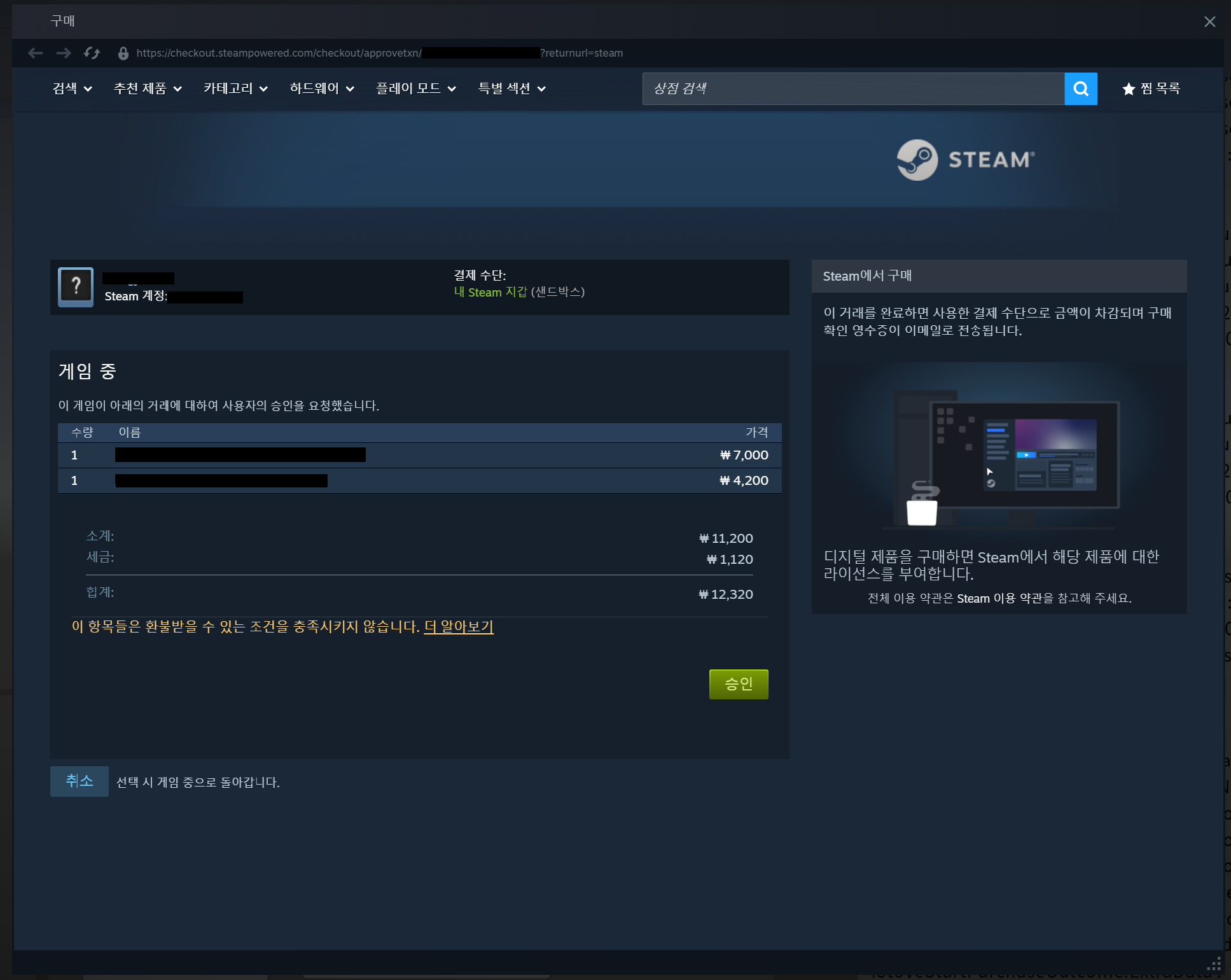
Features not used in the Steam payment flow
| Feature | Handling in the Steam payment flow |
|---|---|
Terms agreementIAP_FetchTermsAgreement |
Not used. It's for STOVE platform terms agreement, and Steam game-terms agreement is already handled in the External Platform Integration Module flow. |
Game withdrawal (terms withdrawal)IAP_WithdrawGame |
Not supported. |
Refund-history lookupIAP_FetchVoidedPurchases |
Not supported. Refund history is planned to be integrated via a server-to-server API on the developer's server. |
Calling purchase confirmation (IAP_ConfirmPurchase) is mandatory
The Steam payment flow has no path equivalent to SDK auto-confirmation (WITH_WEBVIEW_AND_CONFIRM_RESULT). Even when payment is approved in the Steam overlay, the purchase isn't confirmed and the item isn't granted unless you call IAP_ConfirmPurchase.
Use only the transaction master number from the callback values
The values returned by payment API callbacks are info needed for STOVE's own payment, so in the Steam payment flow only the transaction master number (transactionMasterNumber) is valid; the rest come back as defaults (false, 0, empty array, empty string). Don't reference the payment URL, purchase progress (purchaseProgress), purchased-product array, charge info, or purchased flag. The NOT_NEED_PAYMENT_WINDOW branch that appears in the DEFAULT sample code isn't needed in the Steam flow either. Judge success/failure by CallbackResult alone.
Run both callback pumps together
The SDK callback runner (Base_RunCallback()) and the Steamworks callback pump (SteamAPI_RunCallbacks()) are separate. If either one isn't called, the payment flow stalls midway.
Troubleshooting
| Situation | Cause | Solution |
|---|---|---|
| IAP features don't work right after game entry | An IAP API was called before BaseSDK initialization (Base_Initialize) or user login finished. | Initialize the IAPSDK with IAP_Initialize after Base_Initialize completes, finish login, then call IAP APIs. |
| Payment started but a terms-not-agreed response comes back | The user hasn't agreed to the STOVE payment terms, so payment is blocked. This often happens for new users or right after a terms revision. | First check for non-agreement via the terms-agreement lookup API (IAP_FetchTermsAgreement), and if required terms aren't agreed, show the terms-agreement pop-up. Returning to the payment flow after agreement resolves it. |
| Product lookup returns an empty product list | Products aren't registered in Partners yet, or they are but the market key (product ID) doesn't match the value the game uses. This often happens when operating different product IDs per build. | Check the product-registration state and market key in the Partners billing console and verify the game client sends the same product ID. If product IDs are separated per environment (dev/stage/live), checking that they match the build environment resolves it. |
| The payment window suddenly closes during payment | Calling a new IAP API closes all previously open payment/terms windows at once. This is intended behavior to prevent two payment flows from showing at once. | Block additional calls on the game side at payment start so only one IAP flow proceeds at a time. Disabling the payment button until you receive the payment-close callback resolves it. |
| The payment-result callback isn't called | If the callback runner (Base_RunCallback()) isn't called in the game's main loop, payment-result events aren't delivered to the game. | Call the callback runner every frame or at a fixed interval in the main loop. Verifying it's being called the same as the game's normal loop during payment resolves it. |
Payment succeeded but the item isn't granted in-game and a 50052 (item-send failure) error is logged in STOVE | Payment completes via STOVE → sending a payment notification (webhook) to the game server → receiving the game server's response → grant processing. If the game-server notification URL is unregistered/has a wrong path, or the game-server response is missing, STOVE judges the notification send as failed, logs a 50052 error, and the grant is missed. | Check that the payment-notification URL is correctly registered in the Partners billing settings, and implement the game server to synchronously return a normal response right after receiving the notification. Checking the notification URL and server response first prevents the 50052 error. |
| Items are granted to the wrong character in a multi-character game | If you don't set the current character's identifier (nickname_no) via the game-profile setup API before entering payment, the STOVE server can't know which character to grant to. | Call the game-profile setup API right after each character selection to update the current character in the SDK. For games with a character-change flow, calling it again at each change resolves it. |
| The Steam payment overlay doesn't appear | The Steamworks SDK isn't initialized, the in-game overlay is disabled in the Steam client, or the Steam market info registered in Partners doesn't match the actual app. | Check Steamworks SDK initialization and the Steam client's overlay setting first, then verify that the Steam market info registered in Partners billing matches the actual app. |
| Payment was approved in the Steam overlay but the game doesn't react | The Steamworks callback pump (SteamAPI_RunCallbacks()) isn't running, so MicroTxnAuthorizationResponse_t wasn't delivered to the game. | Call SteamAPI_RunCallbacks() in the game loop. It's separate from the SDK callback runner (Base_RunCallback()), so check that both are running. |
| Steam payment succeeded but the item isn't granted | The Steam flow has no SDK auto purchase-confirmation, but IAP_ConfirmPurchase wasn't called. | After receiving the approval result in MicroTxnAuthorizationResponse_t, be sure to call IAP_ConfirmPurchase. |
| The transaction master number is missing when confirming the purchase | The IAP_StartPurchase callback and the Steam overlay display aren't guaranteed to be ordered, and the transaction master number received in the callback wasn't kept. | Keep the transaction master number from the IAP_StartPurchase callback in a variable and retrieve it at the Steamworks callback moment. |
Control payment behavior with OperationIAP_StartPurchase sets the payment-UI display method via the StovePCPurchaseOption.operation value. DEFAULT doesn't show a payment UI and only passes a one-time payment URL (oneTimePaymentUrl), so the game opens it directly and calls IAP_ConfirmPurchase after payment; WITH_WEBVIEW opens the payment page in an SDK webview. WITH_WEBVIEW_AND_CONFIRM_RESULT auto-confirms on payment success, so no separate confirmation call is needed. If you need the pop-up-close moment, use the Ex version that receives the onDestroy callback.
Use the Ex version if you need the payment-close eventIAP_StartPurchase, IAP_StartPayment, etc. deliver only the payment-start result. If you need to resume the game flow at the pop-up-close moment, call the Ex versions (IAP_StartPurchaseEx, IAP_StartPaymentEx, IAP_FetchTermsAgreementEx, IAP_FetchProductsEx, IAP_FetchVoidedPurchasesEx) to receive the close event.
Perform payment-validity verification on the game server
The client's purchase confirmation (IAP_ConfirmPurchase) alone doesn't guarantee tamper protection. The game server must grant currency/items after receiving the payment notification and doing a second verification via the STOVE payment-validity check API.
Sample Code
Examples are provided split per function. The full payment path proceeds in the order initialization/terms → shop composition → purchase → verification → inventory.
Initialization and shutdown
After Base_Initialize completes, initialize the IAPSDK with IAP_Initialize(shopKey) (or IAP_InitializeWithWndInfo if a parent window is needed). On shutdown, call IAP_UnInitialize, then clean up with Base_UnInitialize. For details on BaseSDK initialization/shutdown, see the Basic Integration Guide.
#include "IAPSDK.h"
using namespace Stove::PCSDK;
using namespace Stove::PCSDK::Base;
using namespace Stove::PCSDK::IAP;

// 1) Initialization — call after Base_Initialize completes.
std::wstring shopKey = L"YOUR_SHOP_KEY";
auto initResult = IAP_Initialize(shopKey.c_str());
// If a parent window is needed: IAP_InitializeWithWndInfo(shopKey.c_str(), mainWindowHandle);
if (!initResult.IsSuccessful())
{
    // Implement the logic for initialization failure.
    return;
}

// 2) Shutdown — clean up in the order IAP_UnInitialize then Base_UnInitialize.
IAP_UnInitialize();
// then call Base_UnInitialize()
Terms agreement
After initialization, first check whether required terms are agreed with IAP_FetchTermsAgreement. If not agreed, show the terms-agreement flow (the passed URL or the SDK webview).
#include "IAPSDK.h"
using namespace Stove::PCSDK;
using namespace Stove::PCSDK::Base;
using namespace Stove::PCSDK::IAP;

// Look up required-terms agreement (after IAP_Initialize completes)
StovePCTermsOption termsOption;
termsOption.SetOperation(StovePCTermsOperation::WITH_WEBVIEW);
termsOption.SetWebviewMode(Base::WebViewMode::INTERNAL);
termsOption.SetWebviewRect(0, 0, 800, 600);
IAP_FetchTermsAgreement(&termsOption,
    [](CallbackResult callbackResult, bool agreed, const wchar_t* url)
    {
        if (callbackResult.GetResult().IsSuccessful() && !agreed)
        {
            // Show the terms-agreement flow.
        }
    });
Shop composition
Get shop tabs via category lookup (IAP_FetchShopCategories) and each category's item list via product-list lookup (IAP_FetchProducts), then build the UI. The product list is looked up by category ID, page number, and page size; passing an empty category ID looks up the full range.
#include "IAPSDK.h"
using namespace Stove::PCSDK;
using namespace Stove::PCSDK::Base;
using namespace Stove::PCSDK::IAP;

// 1) Category lookup
IAP_FetchShopCategories(
    [](CallbackResult callbackResult, StovePCShopCategory* categories, uint32_t categoriesSize)
    {
        if (callbackResult.GetResult().IsSuccessful())
        {
            // Build shop-tab UI from categories[0..categoriesSize)
        }
    });

// 2) Product-list lookup
StovePCFetchProductParam fetchParams;
fetchParams.SetCategoryId(L"");   // empty value = all categories
fetchParams.SetPageNumber(1);
fetchParams.SetPageSize(20);
IAP_FetchProducts(&fetchParams,
    [](CallbackResult callbackResult, StovePCProduct* products, uint32_t productsSize)
    {
        if (callbackResult.GetResult().IsSuccessful())
        {
            // Build shop UI from products[0..productsSize)
        }
    });
In-game item purchase
Start a purchase with IAP_StartPurchase/IAP_StartPurchaseEx. The StovePCPurchaseOption.operation value determines the payment-UI display method and whether purchase verification is automated. Below are examples per operation, presented in the recommended order.
(1) WITH_WEBVIEW_AND_CONFIRM_RESULT — show payment window + auto purchase verification (recommended)
The SDK automatically handles everything: showing the payment window (Webview), detecting payment completion, and purchase verification (ConfirmPurchase). No separate ConfirmPurchase call is needed (calling it directly causes duplicate confirmation), and the purchase-completion result is delivered via StartPurchase's onFinished callback. The zero-cost item (NOT_NEED_PAYMENT_WINDOW) case is also auto-handled internally by the SDK and delivered the same way via onFinished.
#include "IAPSDK.h"
using namespace Stove::PCSDK;
using namespace Stove::PCSDK::Base;
using namespace Stove::PCSDK::IAP;
void IAP_StartPurchase_WITH_WEBVIEW_AND_CONFIRM_RESULT_Example()
{
// (1) Build product/parameters (in practice, pass the in-game item info the user selected)
StovePCOrderProduct product1; product1.SetProductId(123); product1.SetSalePrice(1000); product1.SetQuantity(3);
StovePCOrderProduct product2; product2.SetProductId(456); product2.SetSalePrice(5000); product2.SetQuantity(2);
StovePCOrderProduct product3; product3.SetProductId(789); product3.SetSalePrice(39800); product3.SetQuantity(1);
StovePCStartPurchaseParam params;
params.CreateOrderProduct(3); // create an internal array sized to the number of ordered products
params.SetOrderProduct(0, &product1);
params.SetOrderProduct(1, &product2);
params.SetOrderProduct(2, &product3);
// (2) Option: the SDK auto-handles showing the payment window + detecting completion + ConfirmPurchase (server confirmation)
StovePCPurchaseOption option;
option.SetOperation(StovePCPurchaseOperation::WITH_WEBVIEW_AND_CONFIRM_RESULT);
option.SetWebviewMode(Base::WebViewMode::INTERNAL);
// SetWebviewRect args: (x, y, width, height). Dead center is (-1, -1).
option.SetWebviewRect(0, 0, 420, 700);
params.SetPurchaseOption(option);
Game::ShopUI::SetPurchaseButtonEnabled(false); // (developer pseudo-function) prevent double-clicks during payment
// (3) Start payment — the payment window closes, so use the Ex API that receives onDestroy
// this path also has the SDK internally handle ConfirmPurchase for the zero-cost item (NOT_NEED_PAYMENT_WINDOW) case
// and deliver the result via onFinished. So a GetPurchaseProgress() branch or
// a manual IAP_ConfirmPurchase call is unnecessary (calling it directly causes duplicate confirmation).
IAP_StartPurchaseEx(¶ms,
// onFinished: the actual purchase-completion handling point (called once after the SDK finishes ConfirmPurchase)
[](CallbackResult callbackResult, StovePCPurchaseResult purchaseResult)
{
// (3-1) Payment failure/cancellation handling. All cases where the flow didn't end normally come here (purchased is always false).
// The cause is distinguished by ResultCode.
if (!callbackResult.GetResult().IsSuccessful())
{
if (callbackResult.GetResult().GetResultCode() == (uint32_t)SDKResultCode::WEBVIEW_CLOSED_BEFORE_PURCHASE)
{
// The user closed the payment window without completing payment (payment cancellation). Handle it as an intentional cancellation, not an error.
}
else
{
// Other errors: payment-window entry failure (VIEWUI_NOT_INITIALIZED / WEBVIEW_CREATE_FAIL / WEBVIEW_LOAD_URL_FAIL),
// parameter error, REST network/server error, ConfirmPurchase server-API failure, etc.
}
return; // no item grant in any case
}
// (3-2) This is the actual purchase-completion point.
// The result after the SDK finished ConfirmPurchase is in purchaseResult,
// so if IsPurchased()==true, grant the item right here (and only here).
// The zero-cost item (NOT_NEED_PAYMENT_WINDOW) case also comes in as purchased=true and is handled the same way.
if (purchaseResult.IsPurchased())
{
// Purchase-completion grant point. Apply code here to reflect purchasedProducts[0..purchasedProductSize) into inventory/currency.
// transactionMasterNumber is unique per transaction. Developers running a game server can
// use this value to prevent server-side duplicate grants, and also as a key to prevent
// duplicate handling (duplicate-grant display, etc.) in the UI.
for (uint32_t i = 0; i < purchaseResult.GetPurchasedProductCount(); ++i)
{
const StovePCPurchasedProduct* product = purchaseResult.GetPurchasedProduct(i);
int64_t detailNo = product->GetTransactionDetailNumber(); // purchase detail number (purchased-product TID)
int64_t productId = product->GetProductId(); // platform product ID
const wchar_t* categoryId = product->GetCategoryId(); // category ID
int32_t totalQty = product->GetTotalQuantity(); // total quantity sold
int32_t memberQty = product->GetMemberQuantity(); // member purchase quantity
int32_t guidQty = product->GetGuidQuantity(); // guid purchase quantity
// Implement handling per purchased item
}
// Info on the currency/payment method used (StovePCChargeInfo). Used for receipt display, settlement logging, etc.
for (uint32_t i = 0; i < purchaseResult.GetChargeInfoCount(); ++i)
{
const StovePCChargeInfo* charge = purchaseResult.GetChargeInfo(i);
int32_t type = charge->GetChargeType(); // 98: STOVE Cash, 99: points, others: PG payment method
const wchar_t* typeName = charge->GetChargeTypeName(); // payment-method name
double deductVal = charge->GetChargeDeductVal(); // payment price
double displayVal = charge->GetChargeDisplayDeductVal(); // cash-converted price of the payment price
// Implement handling per payment method
}
}
else
{
// The flow is normal (IsSuccessful()==true) but the server hasn't confirmed payment completion.
// (the rare case where ConfirmPurchase returns HTTP 200 but the server response status=false = payment state undetermined)
// Don't grant the item; hand off to a server-side purchase-state re-lookup or customer support.
// (user cancellation/payment failure is handled not here but in (3-1) above via IsSuccessful()==false.)
}
},
// onDestroy: called when the payment-window pop-up closes.
[](CallbackResult callbackResult)
{
// A UI-cleanup-only callback. (completion decision/grant is handled in onFinished above)
Game::ShopUI::SetPurchaseButtonEnabled(true); // (developer pseudo-function) re-enable the locked purchase button
Game::ShopUI::HideLoadingSpinner(); // (developer pseudo-function) clear the loading/overlay
});
}
(2) DEFAULT — no payment window (the developer implements the payment pop-up directly)
The SDK doesn't show a payment webview. The game directly shows its own payment page using the payment URL received from the StartPurchase result, and manually calls ConfirmPurchase to verify the purchase when it detects payment completion. The purchase-completion result is delivered via the ConfirmPurchase callback.
#include "IAPSDK.h"
using namespace Stove::PCSDK;
using namespace Stove::PCSDK::Base;
using namespace Stove::PCSDK::IAP;
// IAP_ConfirmPurchase result callback (shared by DEFAULT / NOT_NEED_PAYMENT_WINDOW)
// The point where status == true is the actual purchase-completion point.
static void OnConfirmPurchase(CallbackResult callbackResult, bool status,
StovePCPurchasedProduct* purchasedProducts, uint32_t purchasedProductSize,
StovePCChargeInfo* chargeInfos, uint32_t chargeInfoSize)
{
if (callbackResult.GetResult().IsSuccessful() && status)
{
// Purchase-completion grant point. Apply code here to reflect purchasedProducts[0..purchasedProductSize) into inventory/currency.
// transactionMasterNumber is unique per transaction. Developers running a game server can
// use this value to prevent server-side duplicate grants, and also as a key to prevent
// duplicate handling (duplicate-grant display, etc.) in the UI.
for (uint32_t i = 0; i < purchasedProductSize; ++i)
{
const StovePCPurchasedProduct* product = &purchasedProducts[i];
int64_t detailNo = product->GetTransactionDetailNumber(); // purchase detail number (purchased-product TID)
int64_t productId = product->GetProductId(); // platform product ID
const wchar_t* categoryId = product->GetCategoryId(); // category ID
int32_t totalQty = product->GetTotalQuantity(); // total quantity sold
int32_t memberQty = product->GetMemberQuantity(); // member purchase quantity
int32_t guidQty = product->GetGuidQuantity(); // guid purchase quantity
// Implement handling per purchased item
}
// Info on the currency/payment method used (StovePCChargeInfo). Used for receipt display, settlement logging, etc.
for (uint32_t i = 0; i < chargeInfoSize; ++i)
{
const StovePCChargeInfo* charge = &chargeInfos[i];
int32_t type = charge->GetChargeType(); // 98: STOVE Cash, 99: points, others: PG payment method
const wchar_t* typeName = charge->GetChargeTypeName(); // payment-method name
double deductVal = charge->GetChargeDeductVal(); // payment price
double displayVal = charge->GetChargeDisplayDeductVal(); // cash-converted price of the payment price
// Implement handling per payment method
}
}
else if (!callbackResult.GetResult().IsSuccessful())
{
// The ConfirmPurchase call itself failed (network/server error, parameter error, etc.). No item grant + failure log/retry/inquiry guidance.
}
else
{
// The call succeeded (IsSuccessful()==true) but the server didn't confirm payment completion (status==false).
// This covers a cancellation where the user closed the window without completing payment, or a payment-undetermined state.
// No item grant. If needed, re-look up the purchase state on the server / guide the user.
}
}
void IAP_StartPurchase_DEFAULT_Example()
{
// (1) Build product/parameters (in practice, pass the in-game item info the user selected)
StovePCOrderProduct product1; product1.SetProductId(123); product1.SetSalePrice(1000); product1.SetQuantity(3);
StovePCOrderProduct product2; product2.SetProductId(456); product2.SetSalePrice(5000); product2.SetQuantity(2);
StovePCOrderProduct product3; product3.SetProductId(789); product3.SetSalePrice(39800); product3.SetQuantity(1);
StovePCStartPurchaseParam params;
params.CreateOrderProduct(3); // create an internal array sized to the number of ordered products
params.SetOrderProduct(0, &product1);
params.SetOrderProduct(1, &product2);
params.SetOrderProduct(2, &product3);
// (2) Option: DEFAULT — the SDK doesn't show a payment webview (the game shows the payment URL directly).
// Since there's no SDK payment window, SetWebviewMode / SetWebviewRect settings are meaningless (omitted).
StovePCPurchaseOption option;
option.SetOperation(StovePCPurchaseOperation::DEFAULT);
params.SetPurchaseOption(option);
// (3) Start payment.
// DEFAULT has no SDK payment window so the onDestroy callback isn't called (internally POPUP_NOT_CREATED
// occurs but the C++ wrapper intercepts it and doesn't call the user onDestroy); for API consistency, use IAP_StartPurchaseEx.
IAP_StartPurchaseEx(¶ms,
// onFinished: the "payment URL issued" point (not purchase completion)
[](CallbackResult callbackResult, StovePCPurchaseResult purchaseResult)
{
// (3-1) Whether payment started. If it failed, the URL wasn't issued either. Notify the user of failure and end.
if (!callbackResult.GetResult().IsSuccessful())
return;
// (3-2) A case needing no payment window (zero-cost payment, etc.). Already payment-complete.
// Finalize with ConfirmPurchase to get the confirmed-grant list. (the completion result is OnConfirmPurchase)
if (purchaseResult.GetPurchaseProgress() == PurchaseProgress::NOT_NEED_PAYMENT_WINDOW)
{
IAP_ConfirmPurchase(purchaseResult.GetTransactionMasterNumber(), OnConfirmPurchase);
return;
}
// (3-3) This onFinished is only a signal that "the payment URL was issued", not purchase completion.
// The game opens its own payment page with this URL to let the user pay,
// and keeps the transaction number (txnNo) until the ConfirmPurchase call.
const wchar_t* paymentUrl = purchaseResult.GetOneTimePaymentUrl();
int64_t txnNo = purchaseResult.GetTransactionMasterNumber();
Game::SavePendingTransaction(txnNo); // (developer pseudo-function) keep the transaction number
Game::OpenOwnPaymentPage(paymentUrl, txnNo); // (developer pseudo-function) show the own payment page
},
// onDestroy: with DEFAULT there's no SDK payment window, so this callback isn't called.
[](CallbackResult callbackResult)
{
});
}
// (4) Called when the game detects payment completion on its own payment page. The purchase-completion result comes in via OnConfirmPurchase.
// Note: don't call it at the onFinished (URL-issued) point. At that point the user hasn't paid yet.
void Game_ConfirmOwnPurchase()
{
int64_t txnNo = Game::TakePendingTransaction(); // (developer pseudo-function) retrieve the kept transaction number
if (txnNo != 0)
IAP_ConfirmPurchase(txnNo, OnConfirmPurchase);
}
(3) WITH_WEBVIEW — show payment window + manual purchase verification
The SDK shows the payment window (Webview) but doesn't auto-call ConfirmPurchase. The game must directly call ConfirmPurchase at an explicit moment when it can be certain payment is complete, to verify the purchase. The purchase-completion result is delivered via the ConfirmPurchase callback.
onDestroy (payment window closed) is only a screen-cleanup event, not a payment-completion signal. Don't tie purchase verification to onDestroy.
#include "IAPSDK.h"
using namespace Stove::PCSDK;
using namespace Stove::PCSDK::Base;
using namespace Stove::PCSDK::IAP;
// IAP_ConfirmPurchase result callback (shared by WITH_WEBVIEW / NOT_NEED_PAYMENT_WINDOW)
// The point where status == true is the actual purchase-completion point.
static void OnConfirmPurchase(CallbackResult callbackResult, bool status,
StovePCPurchasedProduct* purchasedProducts, uint32_t purchasedProductSize,
StovePCChargeInfo* chargeInfos, uint32_t chargeInfoSize)
{
if (callbackResult.GetResult().IsSuccessful() && status)
{
// Purchase-completion grant point. Apply code here to reflect purchasedProducts[0..purchasedProductSize) into inventory/currency.
// transactionMasterNumber is unique per transaction. Developers running a game server can
// use this value to prevent server-side duplicate grants, and also as a key to prevent
// duplicate handling (duplicate-grant display, etc.) in the UI.
for (uint32_t i = 0; i < purchasedProductSize; ++i)
{
const StovePCPurchasedProduct* product = &purchasedProducts[i];
int64_t detailNo = product->GetTransactionDetailNumber(); // purchase detail number (purchased-product TID)
int64_t productId = product->GetProductId(); // platform product ID
const wchar_t* categoryId = product->GetCategoryId(); // category ID
int32_t totalQty = product->GetTotalQuantity(); // total quantity sold
int32_t memberQty = product->GetMemberQuantity(); // member purchase quantity
int32_t guidQty = product->GetGuidQuantity(); // guid purchase quantity
// Implement handling per purchased item
}
// Info on the currency/payment method used (StovePCChargeInfo). Used for receipt display, settlement logging, etc.
for (uint32_t i = 0; i < chargeInfoSize; ++i)
{
const StovePCChargeInfo* charge = &chargeInfos[i];
int32_t type = charge->GetChargeType(); // 98: STOVE Cash, 99: points, others: PG payment method
const wchar_t* typeName = charge->GetChargeTypeName(); // payment-method name
double deductVal = charge->GetChargeDeductVal(); // payment price
double displayVal = charge->GetChargeDisplayDeductVal(); // cash-converted price of the payment price
// Implement handling per payment method
}
}
else if (!callbackResult.GetResult().IsSuccessful())
{
// The ConfirmPurchase call itself failed (network/server error, parameter error, etc.). No item grant + failure log/retry/inquiry guidance.
}
else
{
// The call succeeded (IsSuccessful()==true) but the server didn't confirm payment completion (status==false).
// This covers a cancellation where the user closed the window without completing payment, or a payment-undetermined state.
// No item grant. If needed, re-look up the purchase state on the server / guide the user.
}
}
void IAP_StartPurchase_WITH_WEBVIEW_Example()
{
// (1) Build product/parameters (in practice, pass the in-game item info the user selected)
StovePCOrderProduct product1; product1.SetProductId(123); product1.SetSalePrice(1000); product1.SetQuantity(3);
StovePCOrderProduct product2; product2.SetProductId(456); product2.SetSalePrice(5000); product2.SetQuantity(2);
StovePCOrderProduct product3; product3.SetProductId(789); product3.SetSalePrice(39800); product3.SetQuantity(1);
StovePCStartPurchaseParam params;
params.CreateOrderProduct(3); // create an internal array sized to the number of ordered products
params.SetOrderProduct(0, &product1);
params.SetOrderProduct(1, &product2);
params.SetOrderProduct(2, &product3);
// (2) Option: WITH_WEBVIEW — the SDK shows the payment webview but doesn't auto-call ConfirmPurchase.
StovePCPurchaseOption option;
option.SetOperation(StovePCPurchaseOperation::WITH_WEBVIEW);
option.SetWebviewMode(Base::WebViewMode::INTERNAL); // display inside the game window
// SetWebviewRect args: (x, y, width, height). Dead center is (-1, -1).
option.SetWebviewRect(0, 0, 420, 700);
params.SetPurchaseOption(option);
// (3) Start payment — the payment window closes, so use the Ex API that receives onDestroy
Game::ShopUI::SetPurchaseButtonEnabled(false); // (developer pseudo-function) prevent double-clicks during payment
IAP_StartPurchaseEx(¶ms,
// onFinished: the "payment window shown" signal (not purchase completion)
[](CallbackResult callbackResult, StovePCPurchaseResult purchaseResult)
{
// (3-1) Whether payment-window entry succeeded. If it failed, the webview didn't open (UI recovery happens in onDestroy).
if (!callbackResult.GetResult().IsSuccessful())
return;
// (3-2) A situation like a zero-cost item purchase, so the payment window doesn't open. Receive the confirmed list via ConfirmPurchase.
if (purchaseResult.GetPurchaseProgress() == PurchaseProgress::NOT_NEED_PAYMENT_WINDOW)
{
IAP_ConfirmPurchase(purchaseResult.GetTransactionMasterNumber(), OnConfirmPurchase);
return;
}
// (3-3) This onFinished is only a signal that the webview URL finished loading, not purchase completion.
// The SDK doesn't notify payment completion, so to get the completion result the game must directly
// call IAP_ConfirmPurchase. Keep the transaction number.
Game::SavePendingTransaction(purchaseResult.GetTransactionMasterNumber()); // (developer pseudo-function) keep the transaction number
},
// onDestroy: when the payment-window pop-up closes. UI-cleanup only
[](CallbackResult callbackResult)
{
// (4) The "webview closed" screen event (unrelated to payment success/failure).
// Don't do payment decision, grant, or ConfirmPurchase here.
// (window closing isn't payment completion, and if the window isn't closed after payment it isn't even called)
Game::ShopUI::SetPurchaseButtonEnabled(true); // (developer pseudo-function) re-enable the locked purchase button
Game::ShopUI::HideLoadingSpinner(); // (developer pseudo-function) clear the loading/overlay
});
}
// (5) Called at an explicit moment when the game can be certain payment is complete (e.g., returning to the game after payment / checking purchase history).
// Note: don't tie it to onDestroy (window close). Window closing isn't a payment-completion signal, so it's risky.
void Game_ConfirmPendingPurchase()
{
int64_t txnNo = Game::TakePendingTransaction(); // (developer pseudo-function) retrieve the kept transaction number
if (txnNo != 0)
IAP_ConfirmPurchase(txnNo, OnConfirmPurchase); // the purchase-completion result goes to OnConfirmPurchase
}
Steam payment (games distributed via the Steam launcher)
This is the payment example for a game distributed via the Steam launcher. Leave StovePCPurchaseOption at its default, receive the payment-completion signal in Steamworks' MicroTxnAuthorizationResponse_t callback, and confirm with IAP_ConfirmPurchase. Since the SDK doesn't show a payment window there's no close event, so use IAP_StartPurchase rather than the Ex version. Registering the Steamworks callback and calling SteamAPI_RunCallbacks() belong to the Steamworks SDK the game integrated, so the example only marks the connection points. For the full flow description and the unsupported features, see Steam Payment above.
This example covers purchase confirmation and grant checking in one flow
The Steam flow requires calling IAP_ConfirmPurchase and continues through checking the result in the inventory, so to keep the flow unbroken this example includes both APIs that are covered separately in Purchase verification and Inventory lookup below. For each API's general usage and parameter descriptions, see those sections.
#include "IAPSDK.h"
using namespace Stove::PCSDK;
using namespace Stove::PCSDK::Base;
using namespace Stove::PCSDK::IAP;
// The StartPurchase callback and the Steam overlay display aren't guaranteed to be ordered.
// Keep the transaction master number from the callback and use it at the Steamworks callback moment.
static int64_t g_PendingTxnNo = 0;
// (4) Purchase-confirmation result callback
// In the Steam flow, status / purchasedProducts / chargeInfos come back as defaults,
// so judge success by CallbackResult alone.
void OnConfirmPurchase(CallbackResult callbackResult, bool status,
StovePCPurchasedProduct* purchasedProducts, uint32_t purchasedProductsSize,
StovePCChargeInfo* chargeInfos, uint32_t chargeInfosSize)
{
if (!callbackResult.GetResult().IsSuccessful())
{
// Confirmation failed — don't grant the item. Implement failure guidance or a retry.
return;
}
// Confirmation complete. Check the grant result via inventory lookup.
IAP_FetchInventory(
[](CallbackResult cb, StovePCInventoryItem* items, uint32_t itemsSize)
{
if (cb.GetResult().IsSuccessful())
{
// Refresh the inventory/currency UI from items[0..itemsSize)
}
});
}
// (1) Start the purchase — don't set PurchaseOption (it isn't applied in the Steam flow).
void StartSteamPurchase()
{
StovePCOrderProduct product; product.SetProductId(123); product.SetSalePrice(1000); product.SetQuantity(1);
StovePCStartPurchaseParam params;
params.CreateOrderProduct(1);
params.SetOrderProduct(0, &product);
// The Steam launcher injects the payment overlay, so leave StovePCPurchaseOption at its default.
Game::ShopUI::SetPurchaseButtonEnabled(false); // (developer pseudo-function) prevent double-clicks
IAP_StartPurchase(¶ms,
[](CallbackResult callbackResult, StovePCPurchaseResult purchaseResult)
{
// In the Steam flow, judge success/failure by CallbackResult alone.
if (!callbackResult.GetResult().IsSuccessful())
{
Game::ShopUI::SetPurchaseButtonEnabled(true); // (developer pseudo-function)
return;
}
// (2) Only the transaction master number is a valid value. The payment URL, purchase progress, etc.
// are defaults, so the DEFAULT sample's NOT_NEED_PAYMENT_WINDOW branch isn't needed here.
// Keep this number and use it when the Steam payment result arrives.
g_PendingTxnNo = purchaseResult.GetTransactionMasterNumber();
});
// Around this call the Steam launcher shows the payment overlay over the game (no developer UI needed).
}
// (3) Receive the Steam payment result — call this from Steamworks' MicroTxnAuthorizationResponse_t callback.
// Registering the callback and calling SteamAPI_RunCallbacks() belong to the game's Steamworks SDK.
void OnSteamMicroTxnAuthorized(bool authorized)
{
Game::ShopUI::SetPurchaseButtonEnabled(true); // (developer pseudo-function)
if (!authorized || g_PendingTxnNo == 0)
{
// The user canceled or it wasn't approved — no grant.
g_PendingTxnNo = 0;
return;
}
// Confirm the purchase with the kept transaction master number. The Steam flow has no auto-confirmation.
IAP_ConfirmPurchase(g_PendingTxnNo, OnConfirmPurchase);
g_PendingTxnNo = 0;
}
Purchase verification
In WITH_WEBVIEW or DEFAULT mode, and in the Steam payment flow, confirm the client-side purchase with IAP_ConfirmPurchase after payment completes. Pass the transaction master number (transactionMasterNumber), and the game server must do a second verification via the payment-validity check API.
#include "IAPSDK.h"
using namespace Stove::PCSDK;
using namespace Stove::PCSDK::Base;
using namespace Stove::PCSDK::IAP;

// Confirm the purchase with the transaction master number obtained from the StartPurchase result.
void IAP_ConfirmPurchase_Example(int64_t transactionMasterNumber)
{
    IAP_ConfirmPurchase(
        transactionMasterNumber,
        [](CallbackResult callbackResult, bool isPurchased,
           StovePCPurchasedProduct* purchasedProducts, uint32_t purchasedProductsSize,
           StovePCChargeInfo* chargeInfos, uint32_t chargeInfosSize)
        {
            if (callbackResult.GetResult().IsSuccessful() && isPurchased)
            {
                // Grant the item after the game server's second verification
            }
            else
            {
                // Purchase-verification failure handling
            }
        });
}
Inventory lookup
Look up the logged-in user's purchase history with IAP_FetchInventory. Call it with no extra parameters and build the inventory UI from the result array.
#include "IAPSDK.h"
using namespace Stove::PCSDK;
using namespace Stove::PCSDK::Base;
using namespace Stove::PCSDK::IAP;

IAP_FetchInventory(
    [](CallbackResult callbackResult, StovePCInventoryItem* inventoryItems, uint32_t inventoryItemSize)
    {
        if (callbackResult.GetResult().IsSuccessful())
        {
            // Build the inventory UI from inventoryItems[0..inventoryItemSize)
        }
    });
Game withdrawal and pop-up cleanup
Show the game-withdrawal (terms-withdrawal) UI with IAP_WithdrawGame. When you need to immediately close all open IAP payment windows, call IAP_CloseAllPopups.
#include "IAPSDK.h"
using namespace Stove::PCSDK;
using namespace Stove::PCSDK::Base;
using namespace Stove::PCSDK::IAP;

// 1) Show the game-withdrawal (terms-withdrawal) UI
StovePCWithdrawGameOption withdrawOption;
withdrawOption.SetWebviewMode(Base::WebViewMode::INTERNAL);
withdrawOption.SetWebviewRect(0, 0, 800, 600);
IAP_WithdrawGame(&withdrawOption,
    [](CallbackResult callbackResult, bool gameWithdraw)
    {
        if (callbackResult.GetResult().IsSuccessful() && gameWithdraw)
        {
            // Implement the logic for game-cancellation (terms-withdrawal) success.
        }
    },
    [](CallbackResult callbackResult)
    {
        // Implement the logic after the game-cancellation (terms-withdrawal) pop-up closes.
    });

// 2) Close all open payment windows at once
IAP_CloseAllPopups();
Server Integration
Prerequisites
- For billing to work correctly, all the info below must be registered in Partners.
| Category | Partners menu location | Item | Details |
|---|---|---|---|
| Billing-integration info | [Billing] > [Billing Settings] > [Billing-Integration Info Management] | Payment-completion notification URL | The game-server URL that will receive payment info after payment completes |
| Refund-history notification URL | The game-server URL that will receive the market's refund info | ||
| Payment-status lookup URL | The game-server URL that will recover items when approving the market's refund request |
- Verify communication between the platform server and the game server
- Communication between the platform server and the game server must be verified.
- On receiving a payment-completion notification, payment-completion validity must be checked via Payment-Validity Check API integration.
Development Flow
- Make a payment request from the item list received via SDK integration.
- When you proceed with payment after the payment request, the payment info is delivered to the billing server via the SDK.
- The billing server judges the payment info's validity, then delivers the payment-completion info to the game server registered at the payment-completion notification URL.
- The game server checks the payment-info validity API, grants the item, then responds to the billing server.
Troubleshooting
| Situation | Cause | Solution |
|---|---|---|
| Item grant fails after payment completes | No call comes from the billing server to the payment-completion notification URL. | The network between the game server and the billing server must be verified. |
| Market verification fails after payment completes. | This occurs when per-market settings are entered incorrectly. | After correcting the market-verification info via Partners, recheck after up to 1 hour. |
Sample Code
- Payment-completion notification handlingtext
--header 'caller-id: {{caller-id}}'

Online general product
{
    "bill_platform_type": "SHOP",
    "noti_type": "ONLINE_PURCHASE",
    "guid": "265265",
    "txn_time" : 1644807685000,
    "data": {
        "tid": "1909091033503333452",
        "product_id": "test_1",
        "product_price": 5000.0,
        "product_currency": "KRW",
        "inservice_item_id": "test_1",
        "service_order_id": "testtest_1234"
}
Online cart product
{
    "bill_platform_type": "SHOP",
    "noti_type": "ONLINE_CART_PURCHASE",
    "member_no": 11111
    "guid": "265265",
    "txn_time" : 1644807685000,
    "data": {
        "tid": "1909091033503333452",
        "products":[
        ]
        "product_id": "test_1",
        "product_price": 5000.0,
        "product_currency": "KRW",
        "inservice_item_id": "test_1",
        "service_order_id": "testtest_1234"
}
Mobile general product / OOAP product
{
    "bill_platform_type": "MOBILE",
    "noti_type": "IAP_PURCHASE",
    "character_no": "67891",
    "guid": "67891",
    "world_id": "world_1",
    "txn_time" : 1644807685000,
    "data": {
        "tid": "1909091033503333452",
        "pay_type": "INAPP",
        "market_code": "GOOGLE_PLAY",
        "market_product_id": "google_test_1",
        "product_id": "test_1",
        "product_price": 5000.0,
        "product_currency": "KRW",
        "product_tier": 1,
        "inservice_item_id": "test_1",
        "service_order_id": "testtest_1234",
        "supply_items": [
                {
                        "service_item_code": "potion_h",
                        "total_amount": 2,
                        "item_desc": ""
               }]
        }
}
- Payment-validity check
- Payment-validity check
text{ "code": 0, "message": "OK", "data": { "tid": "T202202103125", "products": [ { "tid": 5128216388247371675, "product_id": "123456", "quantity": 1, "product_price": 5000.00, "product_currency": "KRW", "txn_time": 1644489139000, "inservice_item_id": "cp7892" }, { "tid": 5128216388247323435, "product_id": "123457", "quantity": 1, "product_price": 55000.00, "product_currency": "KRW", "txn_time": 1644489139000, "inservice_item_id": "cp7893" } ] } } ... - Payment-validity check (BULK)
- Payment-validity check (BULK)
textcurl --location --request POST 'https://api.onstove.com/bill-cpm/v1.0/payment/{service_id}/details' \ --header 'Authorization: Bearer {{access_token}}' --header 'caller-id: {{caller-id}}' { "details" : [ { "tid": "T20220304125", "noti_type": "IAP_PURCHASE ", "bill_platform_type": "MOBILE", "guid": "120552311123", "member_no": 123456 }, { "tid": "T20220304127", "noti_type": "ONLINE_PURCHASE", "bill_platform_type": "SHOP", "guid": "120552311150", "member_no": 123456 } ] }
- Abnormal refund
- Receive the abnormal-refund list
text
    {
      "data":[
          {
              "tid":1729220970442350928,
              "market_code":"GOOGLE_PLAY",
              "product_id":"product_id_01",
              "market_product_id":"market_product_id_02",
              "guid":20010005190,
              "character_no":3200082,
              "voided_time_millis":1729224411000,
              "purchase_time_millis":1729220983000,
              "currency_on_market":"KRW",
              "price_on_market":100000000000,
              "voided_type":"able"
          },
          {
              "tid":1729220970442350929,
              "market_code":"GOOGLE_PLAY",
              "product_id":"product_id_02",
              "market_product_id":"market_product_id_02",
              "guid":20010005190,
              "character_no":3200082,
              "voided_time_millis":1729224411000,
              "purchase_time_millis":1729220983000,
              currency_on_market":"KRW",
              "price_on_market":100000000000,
              "voided_type":"able"
          }
      ]
  }
- Receive the abnormal-refund list
- Look up the abnormal-refund list
text
    {
    "code": 0,
    "message": "success.",
    "data": [
        {
            "tid": 165523156,
            "market_code":"GOOGLE_PLAY",
            "product_id":"p_product_id_01",
            "market_product_id":"g_market_product_id_01",
            "user_id": "2136478",
            "character_no":1125365,
            "purchase_millis":1699845522000,
            "voided_millis":1699845522000
        },
       {

            "tid": 165523157,
            "market_code":"APPLE_APP_STORE",
            "product_id":"p_product_id_01",
            "market_product_id":"a_market_product_id_01",
            "user_id": "2136478",
            "character_no":1125365,
            "purchase_millis":1699845522000,
            "voided_millis":1699845522000
         }
    ]
}