
- Last Updated
Country/Language
Understanding
Global Language Policy
The language shown to STOVE platform and game users is provided by default per STOVE's global language operation policy. It's applied based on the high-level policy below, and details can be adjusted to fit your operations, so please discuss with the publishing technical contact.
Global language high-level policy
| Category | Description |
|---|---|
| System language | The UI/UX language across the STOVE platform. Provided in STOVE's base languages: Korean/English/Japanese/Traditional Chinese/Simplified Chinese |
| User language | All text produced by users on the STOVE platform. As users' own creations, the language isn't modified arbitrarily However, to support smooth communication between users, measures such as exclusion from display, classification, and automatic-translation-tool support are possible |
| Developer language | The language of the display/operation areas written by developers onboarding to the STOVE platform. Developers freely choose the scope considering their service purpose However, if it violates the operation-language policy, it's excluded from display or corrected |
| Operation language | The promotional language for the STOVE platform and onboarded games. Languages are freely provided per each service's purpose However, to serve a specific region, the region's representative language must be provided |
STOVE service language-display criteria
| Item | Details |
|---|---|
| Base policy | ㅁ A cookie is created only when the user changes the language directly in the 'language selector (GNB, etc.)' area. ㅁ The language path doesn't update the cookie. |
| Language-setting priority | URL path > cookie > browser language > per-service default language |
| ※ Note | The displayed language is determined by ① the device environment, ② the user's settings, and ③ the entry path, and is independent of the access IP. |
What is the Country/Language Service?
The STOVE SDK provides the ability to look up, after initialization, the currently connected user's country info (GDS) and the game-constant info registered in Partners.
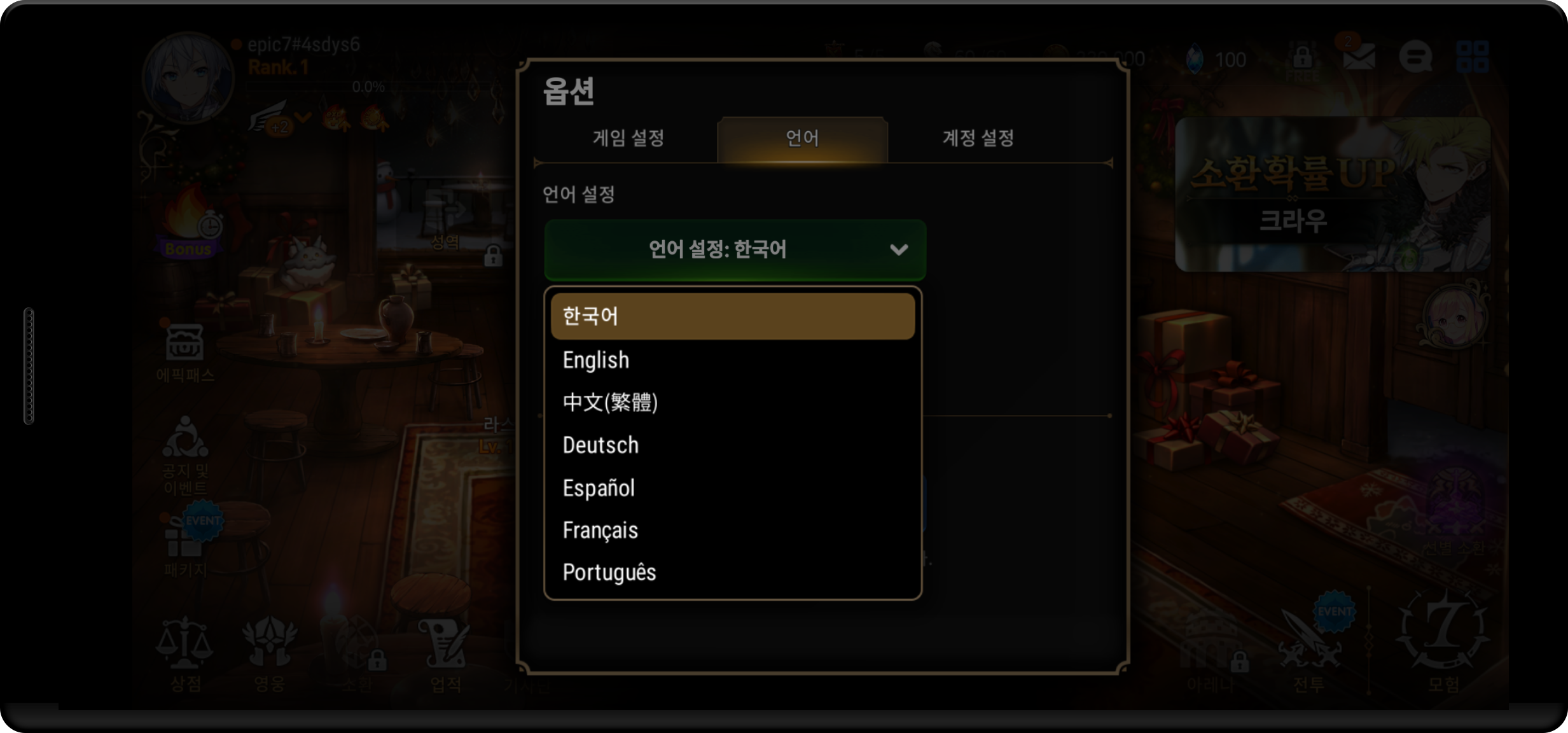
You can also change the STOVE platform's display language to match the game language, keeping the language the player experiences consistent.
All features work only after the SDK initialize completes.
Feature Composition
| Feature | Description | Mobile | PC |
|---|---|---|---|
| Get GDS | Looks up the currently connected user's country info (Global Domain Service) Includes nation, lang, regulation, timezone, etc. |
✅ | ✅ |
| Get game-constant info | Looks up, from the client after initialization, the key/value registered in Partners | ✅ | — |
| Change platform display language | Changes the STOVE platform display language to match the game language Calling it together when the game language changes keeps the language consistent |
✅ | ✅ |
| Change to device language | Restores the platform display language to the device-set language (System) | ✅ | ✅ |
Supported Platform Display Languages
A total of 10 languages are supported.
| Language code | Language name |
|---|---|
| System | The device's set language |
| English | English |
| German | German |
| Spanish | Spanish |
| French | French |
| Japanese | Japanese |
| Korean | Korean |
| Portuguese | Portuguese |
| Thai | Thai |
| SimplifiedChinese | Simplified Chinese |
| TraditionalChinese | Traditional Chinese |
Development
Getting Country/Game Info
This section covers how to get two kinds of info.
- Get GDS: gets the currently connected user's country info (Global Domain Service). Includes
nation,lang,regulation,timezone, etc. (supported on both Mobile / PC) - Get game-constant info: looks up the key-value registered in Partners from the client. (Mobile only, not supported in the PC environment)
GDS response example: {"is_default":false,"nation":"KR","lang":"ko","regulation":"KOREA","timezone":"Asia/Seoul","utc_offset":540,"ip":"211.34.57.xxx"}
Mobile
Prerequisites
- Call it after SDK initialization (
initialize) completes. Constants.getis a synchronous function. No separate callback registration is needed.- Additional prep when using get-game-constant-info: you must add the
game_configmodule to the Partners SDK Config.

Development Flow
Get GDS
- Inside the SDK-initialization-complete callback, call
Constants.get("gds", "")to look up GDS info. - Parse and use
nation,lang,regulation,timezone, etc. from the return value (JSON string). - If you only need the country code, you can simply look it up with
Constants.get("nation", ""). - If
is_defaultistrue, the country couldn't be determined by IP, so STOVE's default value was returned. Apply default handling or a retry policy in your branch logic.
Get game-constant info
- Register the key-value items the game will use in the Partners
game_configmodule. - Inside the SDK-initialization-complete callback, call
Constants.get("game_config", "")to receive the registered values as a JSON string. - Parse the JSON and use the key values you need.
Troubleshooting
Get GDS
| Situation | Cause | Action |
|---|---|---|
Empty string / nil returned | SDK initialization (initialize) isn't complete, or there's no cache after a network failure on first run | Move the call so Constants.get is called only after the initialize callback completes. On first run + network disconnection, guide the user to connect to the network and retry SDK initialization. |
is_default == true | Country determination by IP failed (VPN, data-center IP, etc.) — STOVE's default was returned | Apply an in-game default country code, or fall back to the device language via Locale.getDefault() on Android / Locale.preferredLanguages on iOS. Write country-dependent logic like payment/age to behave conservatively in that branch. |
| A previously cached value is returned | Constants are cached in SharedPreferences (Android) / encrypted UserDefaults (iOS) and only refresh when a new init response arrives | Re-initialize the SDK when the user's location/language changes or on entry after long non-use to fetch the latest GDS. |
Get game-constant info
| Situation | Cause | Action |
|---|---|---|
Empty string / nil returned | The game_config module isn't added to the Partners SDK Config, or the registered key has a typo | Check whether the key is registered in the game_config module of the Partners console and that it exactly matches the key string used in the client, then fix it. |
| Boolean return values differ by platform | Serialization differs: Android uses JSONObject, iOS uses an encrypted NSDictionary | If possible, register in a consistent format like "Y"/"N" or 0/1 instead of boolean. If you must keep existing boolean keys, explicitly write a branch in the client that handles both the Android ("true"/"false") and iOS ("0"/"1") return values. |
| Called before SDK initialization | Same as above (returns default / nil) | Adjust the call location so Constants.get("game_config", ...) is called only inside the initialize callback. |
Sample Code
Get GDS
public void GetGds() {
    string gds = Constants.Get("gds");
    //ex) {"is_default":false,"nation":"KR","lang":"ko","regulation":"KOREA","timezone":"Asia/Seoul","utc_offset":540,"ip":"211.34.57.xxx"}
    string nation = Constants.Get("nation"); // ex) KR
}
Get game-constant info
public void GetGameConstants() {
    string gameConfig = Constants.Get("game_config");
}
PC (PCSDK)
Prerequisites
- Call it after BaseSDK initialization (
Base_Initialize) completes. Calling before initialization returns aBASE_NOT_INITIALIZED(16) error. Base_GetGdsis a synchronous function. No callback registration is needed.- Game-constant info (
game_config) isn't provided by PCSDK. It's a mobile-only feature.
Development Flow
- At game start, after the
Base_RestartAppIfNecessarycallback →Base_Initializecompletes, callBase_GetGds(&gds)to look up GDS info. - Verify the returned result (
Result) withIsSuccessful(). - On success, use the
GetNation(),GetLanguage(),GetRegulation(),GetTimeZone(),GetUtcOffset(), andIsDefault()values from theStovePCGdsobject. - On failure, handle it per error code (see the troubleshooting table).
Troubleshooting
| Situation | Cause | Solution |
|---|---|---|
Calling Base_GetGds right after game start returns BASE_NOT_INITIALIZED (16) | Base_RestartAppIfNecessary is asynchronous and its callback is dispatched when Base_RunCallback is called. Base_Initialize (synchronous) must be called inside that callback's requiresRestart == false branch. Calling the GDS lookup before these two steps complete causes error 16. | Confirm requiresRestart == false in the Base_RestartAppIfNecessary callback, then call Base_Initialize, and call the GDS lookup only after Base_Initialize succeeds. If you need per-country branching at game start, structuring the boot sequence in this order avoids issues. |
The GDS lookup returns INVALID_GDS_INFO (83) | GDS-info sync between the client and STOVE server failed. Occurs when the user's network is disconnected at game start or during a temporary STOVE-side outage. | Fetch GDS again by re-initializing BaseSDK after a while, or guide the user to quit and restart the game. Guiding the user to check the network instead of retrying infinitely avoids issues. |
GDS info was received but IsDefault() is true | In environments where the country can't be determined by the user's IP (VPN, data-center IP, some mobile carriers), STOVE's default country code is returned. It's not an error but may differ from the user's actual location. | In country-dependent logic (payment, age rating, language, etc.), add a branch so it behaves conservatively when IsDefault() is true. Adding an in-game country-selection screen to correct it with user input, or explicitly designing the default behavior, avoids issues. |
Calling Base_GetGds returns INVALID_PARAM (5) | The out-parameter pointer passed (StovePCGds*) is nullptr or points to an invalid address. | Declare a StovePCGds variable right before the call and pass its address. If you'll use the looked-up info after the callback, copying the needed values in advance avoids issues. |
Also check the IsDefault() value
When the country can't be determined by IP, STOVE's default country code is returned and IsDefault() becomes true. In this case, handle it as a default in your per-country branch logic or apply a retry policy.
Sample Code
// Called inside the BaseSDK-initialization-complete callback (legacy API)
Stove::PCSDK::Base::StovePCGds gds;
auto result = Stove::PCSDK::Base::Base_GetGds(&gds);
if (result.IsSuccessful())
{
    const wchar_t* nation = gds.GetNation();
    const wchar_t* language = gds.GetLanguage();
    // Implement branch logic based on country/language.
}
else
{
    // Implement the failure logic. (see per-error-code handling)
}
Changing the Platform Display Language
Mobile
Prerequisites
- Call it after SDK initialization completes.
- 10 languages are supported, and passing
Language.Systemfollows the device-set language. - Attempting to set an unsupported language shows the default language, English.
Development Flow
- Call
Localization.setLanguage(...)when the in-game language setting changes or when applying the user's language at game start. - To change to an explicit language, pass the desired
Languagevalue as the argument. (e.g.,Language.English) - To return to the device language, pass
Language.System. (used when the game doesn't set a language separately or wants to return to the initial state)
Troubleshooting
No error returnedLocalization.setLanguage only performs local storage (SharedPreferences/UserDefaults), so it always succeeds. Invalid enum values are blocked at compile time, so there's no runtime error code.
| Situation | Cause | Action |
|---|---|---|
| The set language isn't kept after app restart | A persistent-storage (SharedPreferences/UserDefaults) permission issue or app-data reset | Rarely happens outside app reinstall/user-data deletion. If it happens, check device-storage permissions and access to the relevant key, and if needed, call setLanguage once more right after game start to sync. |
| The specified language shows in English | The passed language is outside the 10 SDK-supported languages, or that resource isn't ready | Pass only values within the SDK-supported language enum (10 types like English/Korean/Japanese). Other languages automatically fall back to English. |
Language.System shows in a language other than intended | The device OS language isn't SDK-supported → falls back to English | If you need explicit language display, pass an SDK-supported enum value directly instead of Language.System. We recommend adding a screen in the game to let the user choose their language. |
Sample Code
Setting the language
Pass the desired language code to explicitly change the platform language.
public void SetLanguage(Localization.Language language)
{
    Localization.SetLanguage(language);
}
Changing to the device language
Pass Language.System to set it to follow the device's default language.
public void SetDefaultLanguage()
{
    Localization.SetLanguage(Localization.Language.System);
}
PC (PCSDK)
Prerequisites
- Call it after BaseSDK initialization completes.
- The language can be specified by enum or string (ISO 639-1).
- Enum-based:
Base_SetLanguage(StoveLanguage)— pass a predefinedStoveLanguageenum value. - String-based:
Base_SetLanguageEx(C/C++const wchar_t*, C#string) — pass the ISO 639-1 language code used in the game as-is.
- Enum-based:
- PCSDK supports 12 languages (system / en / ko / ja / zh-cn / zh-tw / de / fr / es / pt / th / vi).
Development Flow
- Call it when the in-game language setting changes or when applying the user's language at game start.
- Call
Base_SetLanguageExspecifying the language by string (ISO 639-1), or callBase_SetLanguagewith an enum value. - To return to the device language, pass the string
"system". - Verify the returned result with
IsSuccessful().
Troubleshooting
| Situation | Cause | Solution |
|---|---|---|
Calling the language-setting API right after game start returns BASE_NOT_INITIALIZED (16) | Base_RestartAppIfNecessary is asynchronous and its callback is dispatched when Base_RunCallback is called. Base_Initialize (synchronous) must be called inside that callback's requiresRestart == false branch. Calling the language setting before these two steps complete causes error 16. | Confirm requiresRestart == false in the Base_RestartAppIfNecessary callback, then call Base_Initialize, and call the language setting only after Base_Initialize succeeds. Initializing in this order in the boot sequence and then applying the language shows subsequent SDK messages in the correct language, which avoids issues. |
Passing the user's set language code returns INVALID_PARAM (5) | Explicitly passing a code not in the supported-language list the SDK received from the STOVE cloud at startup returns error 5. (However, when called with "system", if the OS language is unsupported it auto-falls back to English (en) without error.) | If you run your own in-game language-selection UI, map to and pass a string from the SDK-supported language-code list. When the user has no preference, passing "system" to use the OS-language → English-fallback flow avoids issues. |
| SDK messages (shutdown/identity-verification/regulation notices, etc.) show in a language different from what the game set | The SDK's internal language is determined in this order: ① starts with the OS system language at BaseSDK initialization (English fallback if unsupported) → ② automatically overwritten when the language value the launcher (STOVE client) passed with the token arrives → ③ from the moment the game calls the language-setting API, that value takes priority. If the game sets the language before step ②, it gets overwritten by the launcher value again. | To follow the launcher language, don't call the language-setting API in the game. To force the game's own language, call the language-setting API after receiving the OnInitializeFinished success callback (after the launcher value is applied) and whenever an in-game language change occurs. Keeping just these two timings avoids issues. |
Language fallback / unprepared-translation-resource behavior
Passing "system" to the language-setting API follows the OS language, but if the OS language is unsupported by the SDK it auto-falls back to English (en). However, if the game directly passes an unsupported language code, INVALID_PARAM (5) is returned without fallback.
Also, if a specific language isn't prepared in the translation resources received from the STOVE cloud at SDK startup, some text may appear in English even when set to that language. The 4 languages de, fr, es, pt were added in v3.4.0, but as translations are being added in stages, some text may currently appear in English.
Sample Code
// Enum-based (legacy API)
auto result = Stove::PCSDK::Base::Base_SetLanguage(Stove::PCSDK::Base::StoveLanguage::ko);
if (result.IsSuccessful())
{
    // Implement the success logic.
}
else
{
    // Implement the failure logic.
}

// String-based (ISO 639-1)
Stove::PCSDK::Base::Base_SetLanguageEx(L"ko");

// Return to the device language
Stove::PCSDK::Base::Base_SetLanguageEx(L"system");