
- Last Updated
Game Sanctions
Understanding
When a specific user needs to be restricted from playing the game due to misconduct, etc., the operator can sanction that user via STOVE Partners.
Once a sanction is registered, the STOVE platform sends a Kick event to the game server.
The game server can receive this event and immediately remove the sanctioned user from the game.
Operation by Sanction Timing
Sanctions are applied differently depending on the user's connection status.
| Status | Mobile | PC |
|---|---|---|
| Connected (Logged in) Status | Normal use possible (No sanction popup) Sanction alert displayed upon re-login due to token expiration |
Normal use possible (No sanction popup) |
| Disconnected (Not logged in) Status | Sanction alert displayed upon login | Sanction alert displayed when starting the game from the launcher |
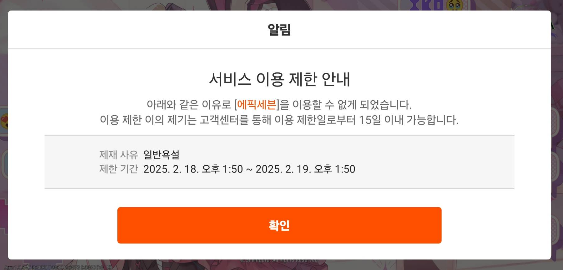
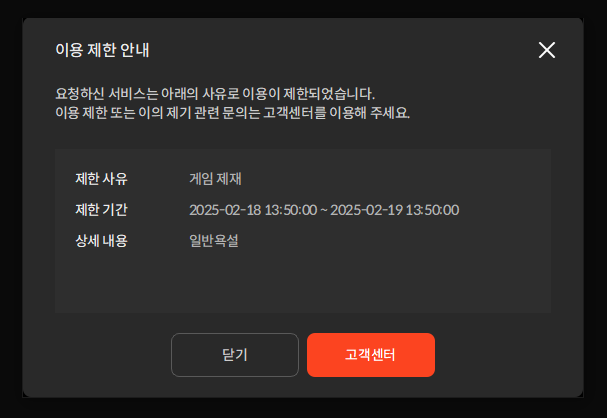
In-game Kick processing required for connected users
ㆍ While in a connected (logged in) state, the game cannot recognize the STOVE sanction status.
ㆍ When a sanction is registered, the game server must perform the Kick, and the client must perform the logout/termination process directly.
Sanction Event Flow
| Step | Action |
|---|---|
| ① Event Delivery | When a sanction is registered, STOVE sends a Kick event to the URL registered in the game |
| ② Game Processing | Notify of sanction occurrence, perform in-game Kick and STOVE Logout ㆍSTOVE Logout: Delete the STOVE token using SDK logout ( Auth.logout) in the game client and move to the start screen (PC terminates the game). Upon subsequent re-login/re-execution, STOVE will display the sanction notice popup — see In-game Menu Guide › Logout |
| ③ Re-login | Check detailed sanction reasons via popup upon user re-login |
No separate event when sanction is lifted
ㆍ The game only needs to proceed with the Kick process for sanctioned users.
Game server environment preparation before integration
ㆍ It is recommended to configure the game API server in an internal network, and ACL settings are required for STOVE ↔ Game server calls.
ㆍ If there is an Inbound ACL, allow the NAT IP for each environment of the STOVE Event Broker. (Inquire with the STOVE technical representative for IPs)
Development
Integration Overview
- User Sanction (Kick event) processing flow
When an operator registers a sanction, STOVE sends a Kick event to the game server Callback, and the game server removes the user from the game.
- PC execution flow — Check for sanctions upon user re-login
When executing from the PC launcher, STOVE checks for sanctions and blocks execution. There is nothing separate to implement in the game.
- Mobile execution flow — Check for sanctions upon user re-login
When logging in on mobile, STOVE checks for sanctions and automatically displays the sanction popup. There is nothing separate to implement in the game.
- Flow for checking sanction status before Kick (Optional)
Users who are sanctioned are blocked by STOVE at the game entry stage, so they do not reach the game server. This flow is an optional process where the game server, upon receiving a Kick event for a user currently in the game, checks their current sanction status once more via the lookup API before executing the Kick.
Callback API Configuration Guide
This is an endpoint implemented and operated directly by the CP (developer), which the STOVE Event Broker calls when a Kick event occurs. Game sanctions are delivered via the same Callback URL as STOVE events with the event_reason = GAME_RESTRICT event. For common information such as registration methods, duplicate processing, and processing flows, please also refer to the STOVE Event Guide › Callback API Configuration Guide.
API Endpoint
| Item | Content |
|---|---|
| URL | Provided by CP (e.g., https://game.example.com/stove/kick) |
| Method | POST |
| Protocol | HTTPS (TLS 1.2 or higher required) |
| Content-Type | application/json |
| Retry Policy | If no response is received for HTTP 200, the same event is resent up to 3 times at 3-second intervals. |
Request — Body Specification
| Name | Type | Required | Description |
|---|---|---|---|
| event_reason | String | Y | Reason for the event. For game sanctions, it is GAME_RESTRICT. |
| event_message | String | Y | Event message that can be displayed to the user. |
| event_time | Long | Y | Event occurrence time (unix timestamp, milliseconds). |
| target_users | Long Array | Y | List of identifiers (GUID) for users to be kicked. Up to 100 users at a time. |
Sample — Request
curl --location --request POST '{endpoint}' \
--header 'Content-Type: application/json' \
--data-raw '{
  "event_reason": "GAME_RESTRICT",
  "event_message": "Abnormal in-game trading activity",
  "event_time": 1739145600000,
  "target_users": [ 20000000001, 20000000002, 20000000003, 20000000004, 20000000005 ]
}'
Sample — Response (Success)
HTTP/1.1 200 OK

{
  "code": 0,
  "message": "SUCCESS"
}
Sample — Response (Failure)
If the response code is not 200, the STOVE Event Broker will resend the same event up to 3 times at 3-second intervals.
HTTP/1.1 500 Internal Server Error

{
  "code": 500,
  "message": "FAILURE"
}
User Sanction Information Lookup API
(Optional) This is a lookup API called by the game server after receiving a Kick event, but before executing the Kick, to verify the user's current sanction status. Since sanctioned users are blocked by STOVE at the game entry stage, it is not necessary to call this every time a user enters the game.guid and game_id can be used to check the user's sanction status. If the user is sanctioned, the sanction code and sanction period information will be returned. (The reason for the sanction is not returned.)
This guide is based on games using GUID-based services. For games based on Member_no, please check with your technical representative in advance.
Identifier Terminology (for full definitions, see Glossary)
| memberNo | A unique account number issued by STOVE upon registration as a full member. It does not change while the account is maintained. |
| guid | A user identifier issued for each game. A single account has a different guid for each game. Guests also have a guid, which is linked to the memberNo when converted to a full member. |
| game_id | A game identifier string. It is determined during partner registration and remains the same regardless of the environment (Live/Sandbox). It is used as a path parameter for this API. |
API Endpoint
| Item | Description |
|---|---|
| URL | GET /mmember/v1.0/signin/game/status/{guid}/{game_id} |
| Host (Live) | https://api.onstove.com |
| Host (Sandbox) | https://api.gate8.com |
Request — Header
| Name | Type | Required | Description |
|---|---|---|---|
| Content-Type | application/json | Y | Resource media type. |
| Authorization | String | Y | Platform authentication token. Bearer {API AccessToken} format. |
| caller-id | String | Y | API caller identification header. There are no fixed rules; please define it freely on the game server and share it with STOVE in advance. It is used as an identifier for monitoring metrics (call volume, errors, tracing). Example (Recommended): {service_id}_SERVER, {service_id}_HOME※ service_id is the Game ID registered in Partners. It is recommended not to change the value once set. |
Request — Path Params
| Name | Type | Required | Description |
|---|---|---|---|
| guid | Long | Y | Game User ID. |
| game_id | String | Y | Game identifier (Game ID registered with partners). |
Request — Query Params
| Name | Type | Required | Description |
|---|---|---|---|
| guid_yn | String | Y | Include guid in the path and call with Y. If omitted, it is treated as N, which may result in sanctions not being retrieved. |
Response — Body
| Name | Type | Required | Description |
|---|---|---|---|
| response_code | int | Y | Response code (Success: 0). |
| response_message | String | Y | Response message (Success: Success). |
| value.RESTRICT | Object | N | Sanction information. Included only if the user is under sanction. |
Response — Sanction Information (value.RESTRICT)
| Name | Type | Example | Description |
|---|---|---|---|
| memberNo | Long | 1234 | The guid of the sanctioned user. The field name retains the previous name (memberNo). |
| nickname | String | AUTONICK##9515338 | Character nickname. |
| banCd | String | B026 | Sanction code. A value registered and managed by STOVE Partners for each game; no separate mapping is required on the game side. |
| banStartDt | Long | 1649053320000 | Sanction start date (milliseconds). |
| banEndDt | Long | 1649312520000 | Sanction end date (milliseconds). |
Response — Response Code (response_code)
All responses are returned as HTTP 200, and business results must be processed by branching based on the response_code value.
| Response code | Situation | Resolution |
|---|---|---|
| 0 | Normal response | If value.RESTRICT is present, the user is sanctioned → Perform in-game Kick followed by STOVE Logout. STOVE Logout is handled by the client using SDK logout (Auth.logout) to delete the STOVE token and navigate to the start screen (PC: terminate the game) — Refer to In-game Menu Guide › Logout.If value.RESTRICT is not present, there are no sanctions. |
| 90001 | Token verification failed — caller-id·Authorization header missing/typo, or mismatch between guid/game_id in the path and token permissions |
Check the header and path values, then retry the request. |
Sample — Request
curl --location 'https://api.gate8.com/mmember/v1.0/signin/game/status/12345/{game_id}?guid_yn=Y' \
--header 'Content-Type: application/json' \
--header 'Authorization: Bearer {API accessToken}' \
--header 'caller-id: {caller-id}'
Sample — Response (No sanctions)
{
  "response_code": 0,
  "response_message": "Success"
}
Sample — Response (Sanctions applied)
{
  "response_code": 0,
  "response_message": "Success",
  "value": {
    "RESTRICT": {
      "memberNo": 1234,
      "nickname": "AUTONICK##9515338",
      "banCd": "B026",
      "banStartDt": 1649053320000,
      "banEndDt": 1649312520000
    }
  }
}
Troubleshooting
| Situation | Cause | Recommended Action |
|---|---|---|
| Callback event not received | Callback URL not registered or incorrect URL registered | Request re-verification of the registered URL from the STOVE technical contact |
| Callback event not received | STOVE NAT IP blocked by ACL/firewall | Check if the NAT IP for each environment is in the Inbound allowlist |
| Same event received 3 times | Callback API returned a response other than 200 (4xx/5xx/timeout) | Ensure a 200 response is returned even when processing logic exceptions (idempotent processing) |
Query API response_code=90001 | caller-id·Authorization header missing/typo | Check if all 3 headers (Content-Type, Authorization, caller-id) are included |
Query API response_code=90001 | guid/game_id in the path does not match token permissions | Verify game_id permissions when reissuing API AccessToken |
| Duplicate Kick processing for one user | Same event processed by multiple Callback instances | Recommended to remove duplicates using the guid key of event_time+target_users |
| Kick persists after sanction removal | No separate event sent for sanction removal (normal operation) | STOVE determines the latest sanction status during the game entry phase upon reconnection. Do not block entry separately based on Kick history on the game server |
Sample Code
This example is a reference implementation for the area directly managed by the game server. Please supplement it with dependencies, exception handling, and logging appropriate for your actual environment.
1) Callback API Reception — Kick Event Handler
@RestController
@RequestMapping("/stove")
public class StoveKickController {

    private final UserKickService kickService;

    public StoveKickController(UserKickService kickService) {
        this.kickService = kickService;
    }

    /** Endpoint that receives Kick events sent by the STOVE Event Broker */
    @PostMapping(value = "/kick", consumes = MediaType.APPLICATION_JSON_VALUE)
    public ResponseEntity<Map<String, Object>> onKickEvent(@RequestBody KickEvent event) {
        if (!"GAME_RESTRICT".equals(event.getEventReason())) {
            // Respond 200 to unknown events to prevent a retransmission loop.
            return ResponseEntity.ok(Map.of("code", 0, "message", "IGNORED"));
        }

        kickService.kickAll(event.getTargetUsers(), event.getEventMessage(), event.getEventTime());

        // Received normally → return 200 OK (if the response is not 200, the STOVE Event Broker resends up to 3 times)
        return ResponseEntity.ok(Map.of("code", 0, "message", "SUCCESS"));
    }

    @Getter @Setter
    public static class KickEvent {
        @JsonProperty("event_reason")  private String eventReason;
        @JsonProperty("event_message") private String eventMessage;
        @JsonProperty("event_time")    private Long eventTime;
        @JsonProperty("target_users")  private List<Long> targetUsers;
    }
}
2) User Sanction Info Query — REST Call
@Component
public class StoveBanInfoClient {

    private static final String HOST_LIVE    = "https://api.onstove.com";
    private static final String HOST_SANDBOX = "https://api.gate8.com";

    private final RestClient restClient;

    @Value("${stove.api.access-token}") private String apiAccessToken;
    @Value("${stove.caller-id}")        private String callerId;
    @Value("${stove.profile:live}")     private String profile;

    public StoveBanInfoClient(RestClient.Builder builder) {
        this.restClient = builder.build();
    }

    /** Query sanction status. Returns Optional.empty() for normal users. */
    public Optional<BanInfo> getBanInfo(String guid, String gameId) {
        String host = "sandbox".equalsIgnoreCase(profile) ? HOST_SANDBOX : HOST_LIVE;
        String url  = host + "/mmember/v1.0/signin/game/status/" + guid + "/" + gameId + "?guid_yn=Y";

        BanResponse res = restClient.get()
                .uri(url)
                .header(HttpHeaders.AUTHORIZATION, "Bearer " + apiAccessToken)
                .header(HttpHeaders.CONTENT_TYPE, MediaType.APPLICATION_JSON_VALUE)
                .header("caller-id", callerId)
                .retrieve()
                .body(BanResponse.class);

        if (res == null) return Optional.empty();

        switch (res.responseCode) {
            case 0:                                       // Normal
                return res.value != null ? Optional.ofNullable(res.value.RESTRICT) : Optional.empty();
            case 90001:                                   // Token verification failed
                throw new IllegalStateException("STOVE accessToken / caller-id / path mismatch — check settings");
            default:
                throw new IllegalStateException("Unexpected response_code: " + res.responseCode);
        }
    }

    @Getter @Setter
    public static class BanResponse {
        @JsonProperty("response_code")    public int responseCode;
        @JsonProperty("response_message") public String responseMessage;
        public ValueBlock value;
    }

    @Getter @Setter
    public static class ValueBlock { public BanInfo RESTRICT; }

    @Getter @Setter
    public static class BanInfo {
        public Long memberNo;
        public String nickname;
        public String banCd;
        public Long banStartDt;
        public Long banEndDt;
    }
}
3) Usage Flow When Receiving a Kick Event (Optional)
public class KickEventService {
    private final StoveBanInfoClient banClient;
    private final GameSessionService sessionService;

    /** After receiving a Kick event, check the current sanction status before kicking */
    public void onKickEvent(String guid, String gameId) {
        banClient.getBanInfo(guid, gameId).ifPresent(
            ban -> sessionService.kick(ban.memberNo, ban.banCd, ban.banEndDt)
        );
    }
}
FAQ
- For Developer Center usage/Smilegate publishing games: stove.developers@smilegate.com
- For STOVE store entry/STOVE Studio related: store.support@smilegate.com