
- Last Updated

Game Termination
Understanding
Game termination (service termination) is a feature that allows users to delete their in-game data for a specific game.
The STOVE platform integrated account is maintained, and only the characters, currency, and all information within the world connected to that game are deleted.
| Item | Description |
|---|---|
| Scope of Deletion | Characters, currency, and all information within the world of the game |
| STOVE Account | Maintained (other games can still be used) |
| Access Path | In-game settings screen |
| Grace Period | Set between 0–30 days per game (0 days means immediate termination) |
STOVE Account Maintenance
Game termination only deletes in-game information for the STOVE account (guest, full member) connected to that specific game.
The STOVE platform integrated account is maintained, and there is no impact on using other games.
Processing Method
To prevent user error, game termination must provide warning notices and confirmation features.
The termination flow varies depending on whether a grace period is set.
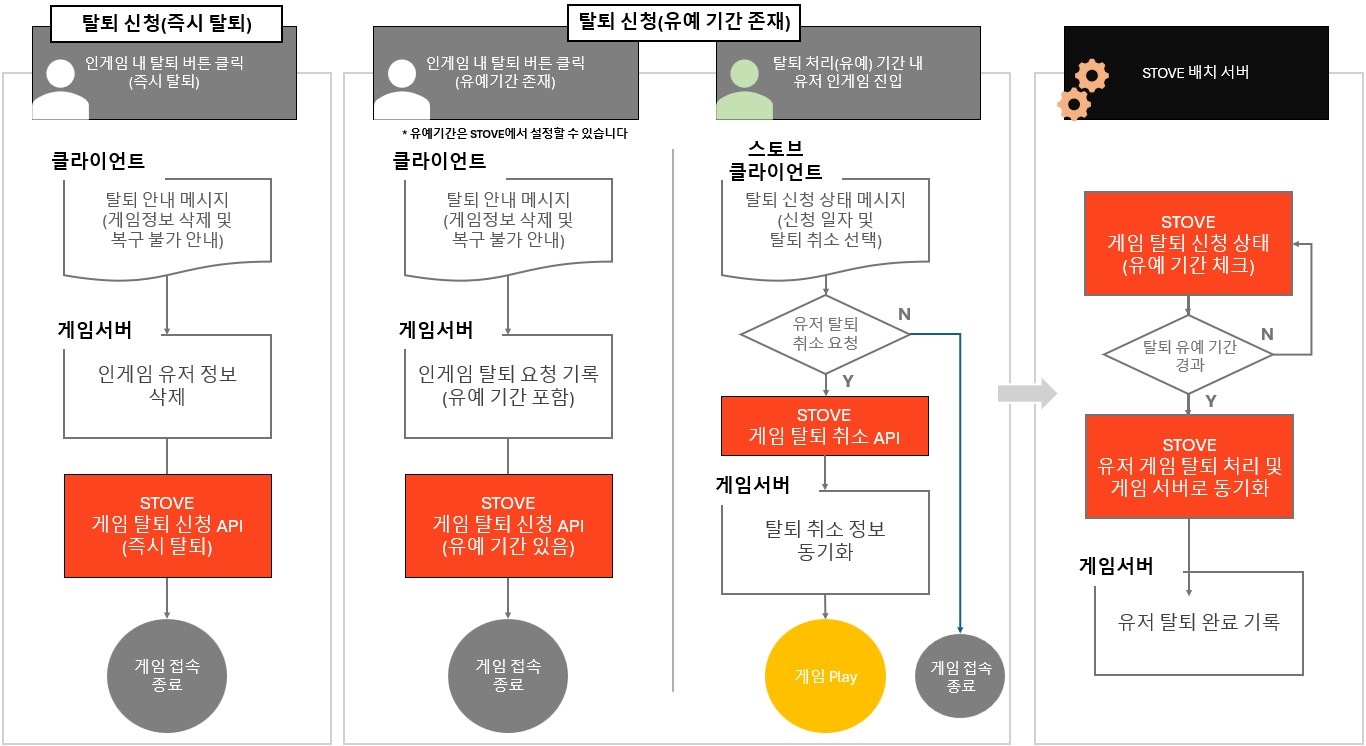
| Processing Method | Description | Notes |
|---|---|---|
| Termination Request (Immediate) | When a user requests termination, call the STOVE Game Termination Request API | Cannot be recovered once termination is complete |
| Termination Request (With Grace Period) | When a user requests termination, call the STOVE Game Termination Request API (control the grace period via API parameters) | Can be canceled during the grace period. Data is deleted after receiving the completion callback |
Grace Period Termination Process
① Once the grace period expires, STOVE automatically completes the termination.
② Once termination is complete, STOVE sends a termination-related event.
Termination Status Notification
The STOVE platform sends real-time events to the CP (developer) server when the game termination status changes.
The CP must implement a Callback API to receive these events and process them according to their operational policies.
| Event Information | Event Occurrence Situation | CP Response Guide |
|---|---|---|
Game WithdrawalGAME_WITHDRAW |
When a user requests a game withdrawal | User logout processing required |
Cancel Game Withdrawal RequestGAME_WITHDRAW_CANCEL |
When a user cancels a game withdrawal request | Event for synchronization purposes. Process according to policy. |
Game Withdrawal CompleteGAME_WITHDRAW_COMPLETE |
When a user completes a game withdrawal | Event for synchronization purposes. Process according to policy. |
Target and Restrictions
This Stove event feature only supports GUID-based service games.
Games based on Member_no require prior confirmation through a technical representative.
Integration Guide
Preparation
| Item | Content |
|---|---|
| Verify User Access Token | Pass the user's User Access Token to the Game Withdrawal Request API ㆍObtained via SDK after login, retrieve in real-time without caching |
| User Identification Method | ㆍGUID-based: Use GUID data in the Member_no field ㆍMember_no-based: Use Member_no data in the Member_no field ㆍConfirm with publishing technical representative |
| Determine Grace Period Policy | Select either immediate withdrawal or grace period withdrawal per game |
Basic Integration Structure
- Client: Provide Withdrawal UI and Warning Notifications
- Place a withdrawal button in the in-game settings screen.
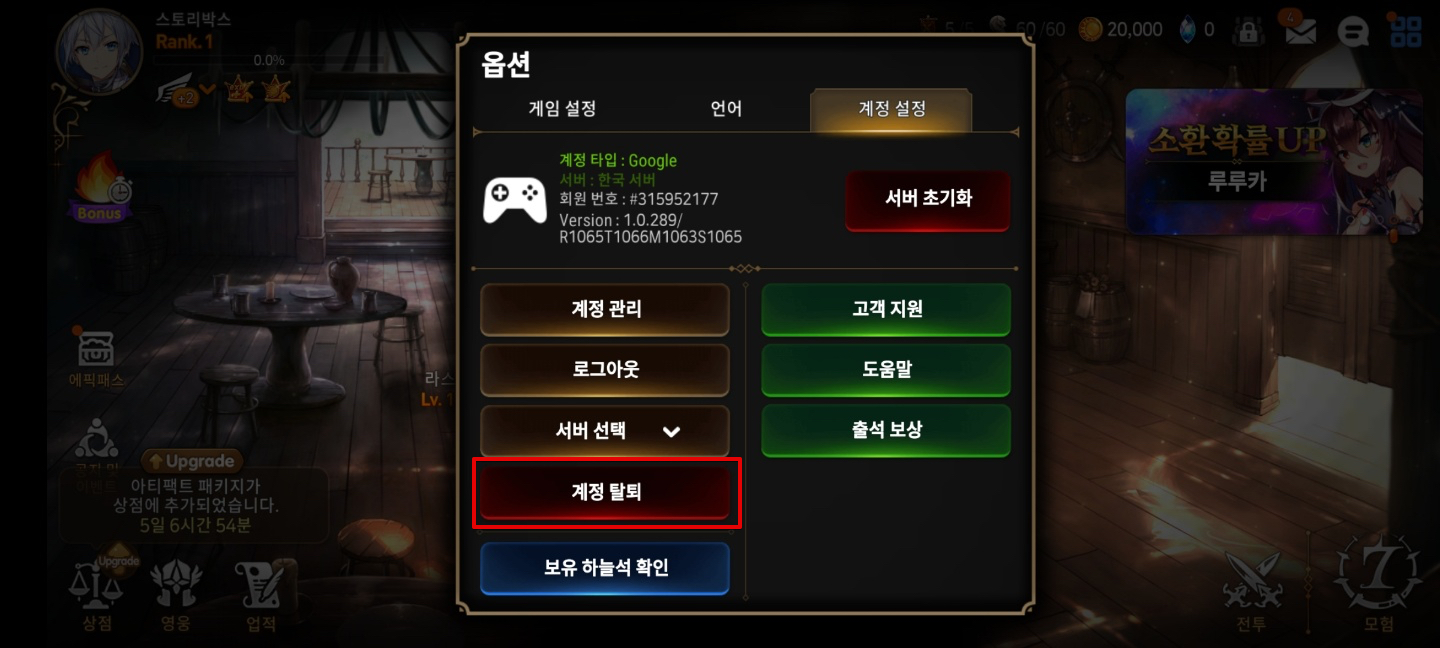
- Place a withdrawal button in the in-game settings screen.
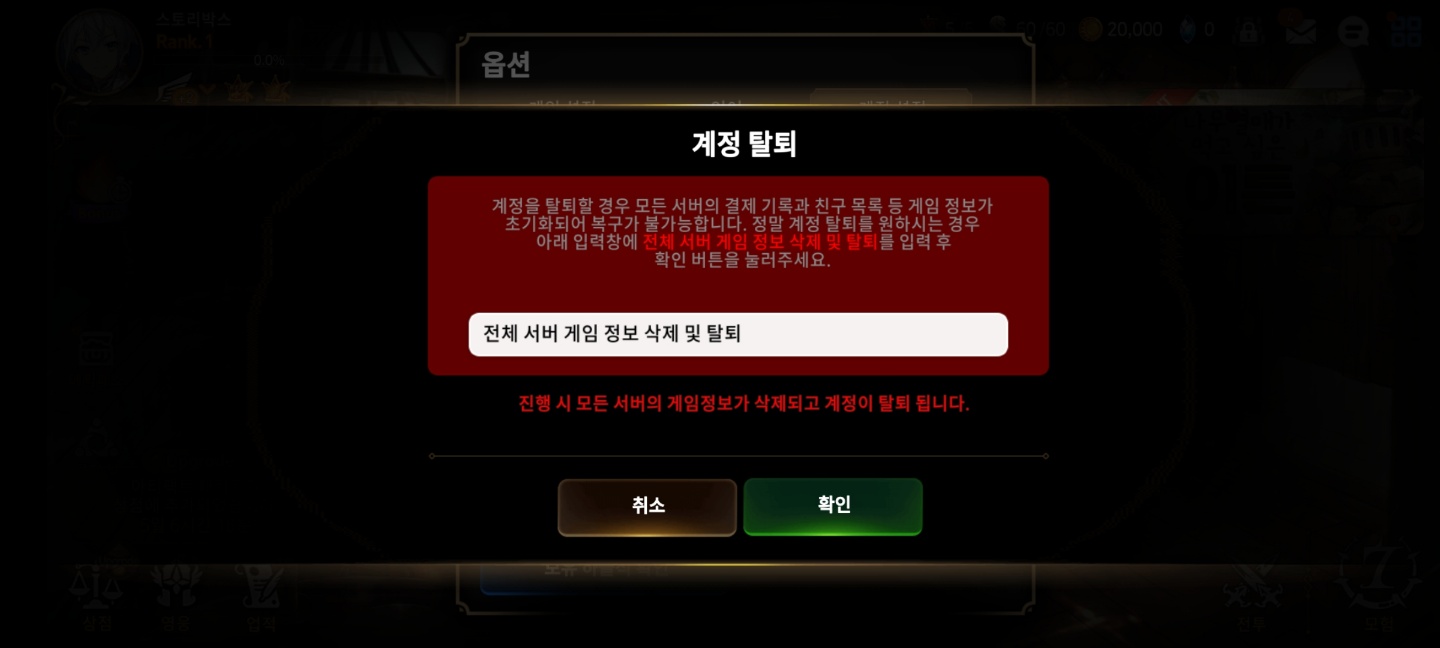
- You must provide a warning notification and a confirmation pop-up before the withdrawal request.
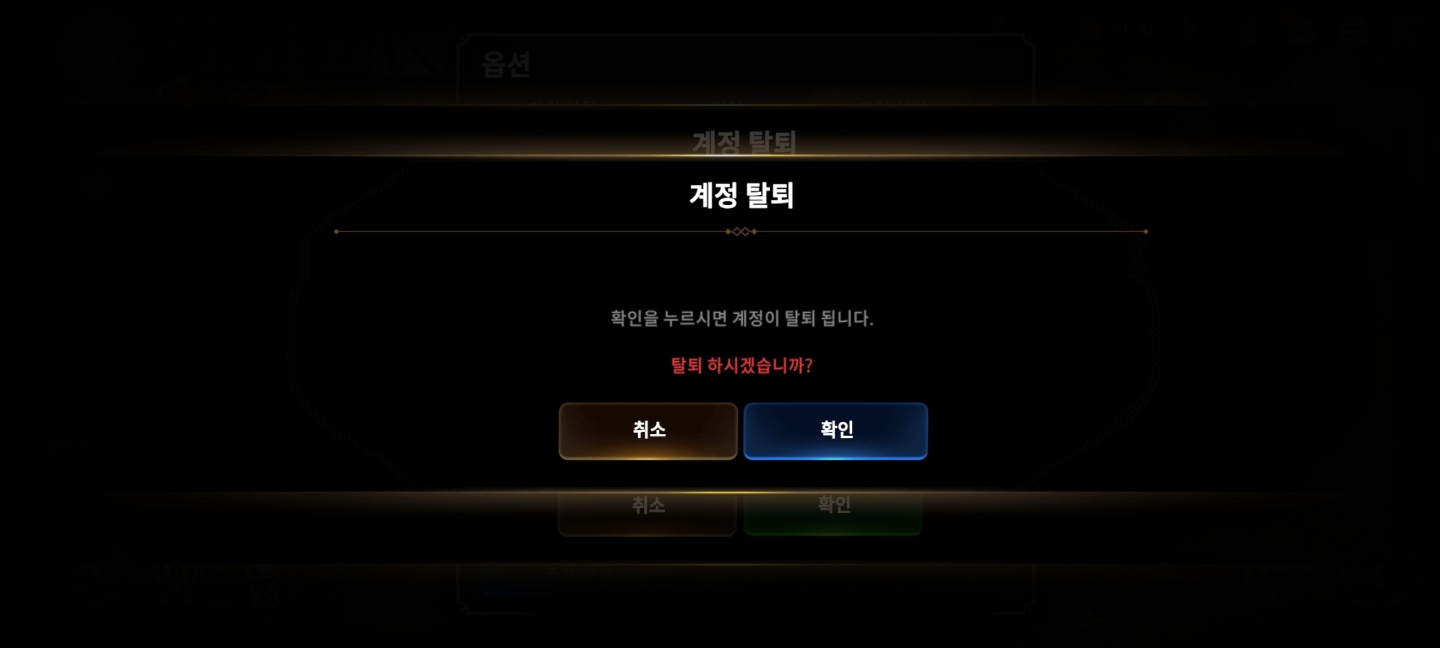
- Since the user is automatically logged out upon completion of withdrawal, you must handle the subsequent flow (e.g., exiting the game or moving to the initial screen).
| UI Type | Description |
|---|---|
| Warning Notification Pop-up | Clearly state the results of withdrawal, such as "If you withdraw, all information will be deleted and cannot be recovered." |
| Confirmation Pop-up | Implemented by the game company; prevent accidental withdrawal by inducing intentional actions such as entering a character name. |
| Grace Period Notification Pop-up (Optional) | When a grace period is applied, inform the user, "You can cancel the withdrawal within N days after requesting it." |
- Server: Game Withdrawal Processing
- Calling the Game Withdrawal Complete API does not affect the Stove platform account.
- Upon request, the Stove character information of the user identified by the provided server authentication token and game ID will be deleted across all worlds.
- In-game information recorded in the game DB must be maintained/deleted directly by the game.
- If using the Stove cash system, please note that the cash held by the character will also be deleted.
Caution when implementing GUID-based game withdrawal
If a user re-registers on the same device later, a new GUID will be issued, making it difficult to identify them as the same user.
If you wish to prevent business metric distortion due to the above issue, please implement the game withdrawal function using the Stove Character Deletion API instead of the Stove Information (Game List) API.
Please implement the game withdrawal function using the Stove Character Deletion API.
- Grace Period Settings and Data Deletion Method
- The game withdrawal grace period is managed by each game's own policy.
- When entering the game within the termination processing period (PC example)
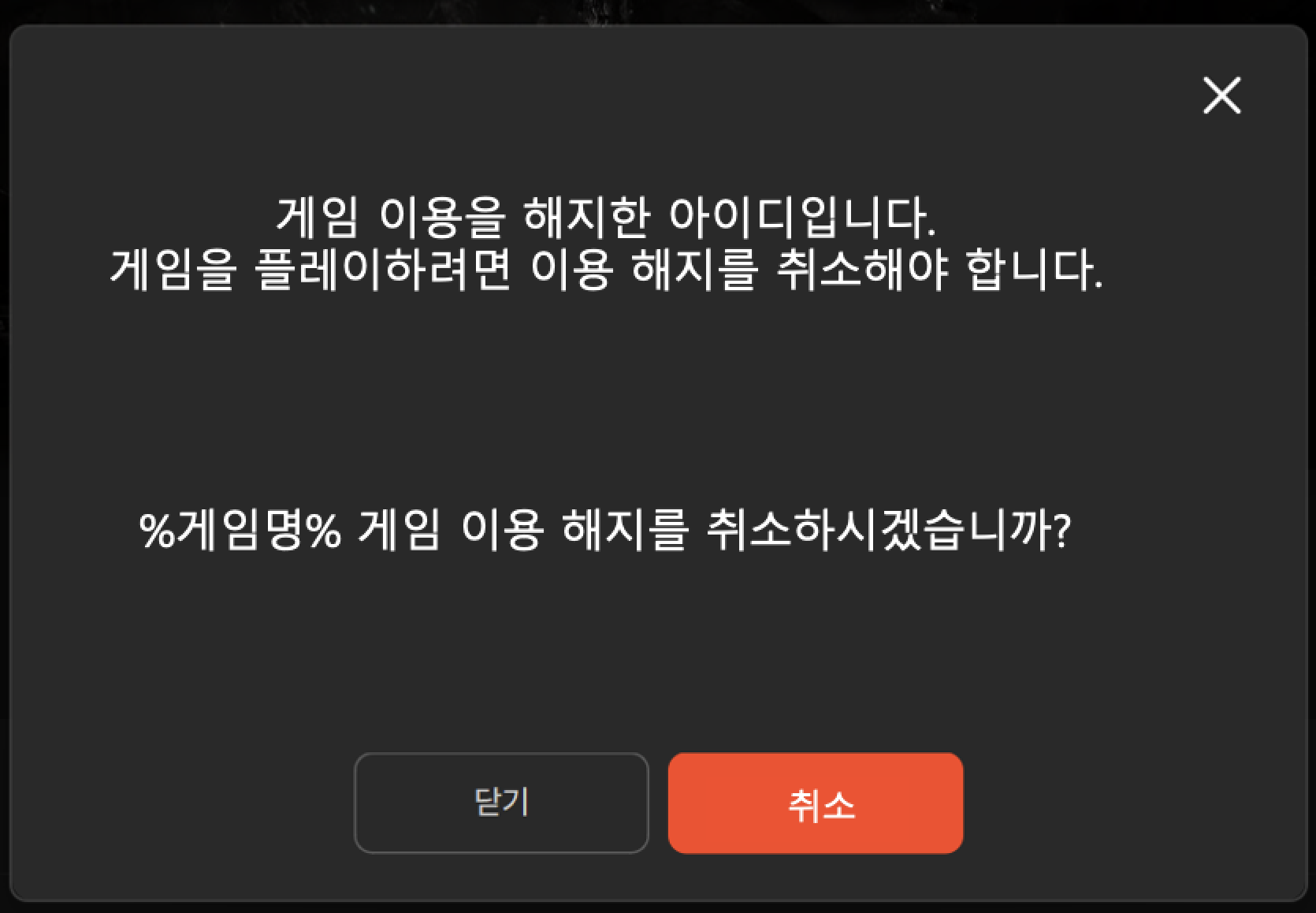
- When entering the game within the termination processing period (PC example)
- The game withdrawal grace period is managed by each game's own policy.
- When entering the game within the termination processing period (Mobile example)
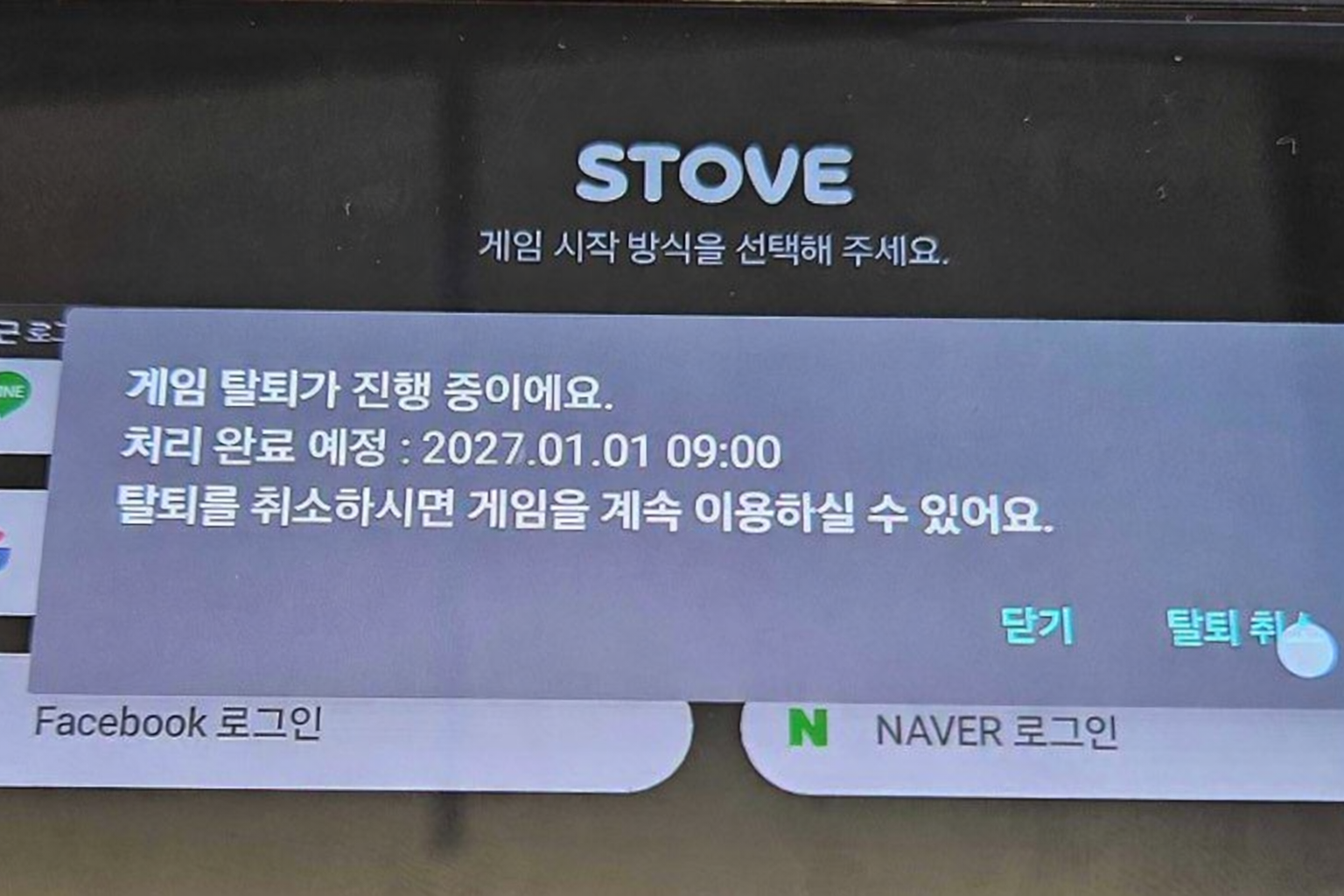
Recommended Method for In-game Data Deletion
It is recommended to first change the flag in the in-game DB, then back up and delete the data during maintenance.
Development
Mobile SDK Integration
MobileSDK handles the termination cancellation flow during authentication
- Game termination application/completion is processed via REST API/events between the game server and STOVE server; the MobileSDK is not involved. Please refer to the server integration guide for details.
- Termination cancellation is handled by the MobileSDK. If a user re-opens the game and performs an SDK login during the grace period, the cancellation UI is automatically displayed.
- The game client only needs to call
AuthUI.Loginas usual.
Operation Flow
When a user re-opens the game and logs in during the grace period, the SDK automatically checks the termination application status from STOVE and displays the cancellation UI. Once the user selects cancellation, the application status is cleared in STOVE, and the game server only needs to handle synchronization via the GAME_WITHDRAW_CANCEL event.
Implementation Requirements for Game
| Area | Task |
|---|---|
| Game Client |
Call AuthUI.Login as usual. The SDK automatically handles the cancellation UI display, processing, and subsequent login flow.
|
| Game Server |
GAME_WITHDRAW_CANCEL Implement the event receiver and clear the termination application status upon receipt
|
Be aware of inter-server synchronization when operating individual worlds
If you are operating via individual worlds rather than synchronization through a common server, you must implement synchronization between servers upon receiving the GAME_WITHDRAW_CANCEL event.
Reference
- Please refer to
AuthUI.Loginfor the full call flow of 로그인 가이드. - Please refer to the server integration guide for the game termination application API (REST), termination completion processing (STOVE automatic), and
GAME_WITHDRAW*event specifications.
PC SDK Integration
PCSDK You can display the STOVE game termination (terms withdrawal) popup from the game client by using the game termination API (IAP_WithdrawGame) provided by IAPSDK. If the user agrees to the terms withdrawal in the popup, STOVE processes the game termination.
This does not work if executed via the Steam launcher. Therefore, you should not call it if it is running through the Steam launcher.
This feature is currently limited to Lost Ark M.
As of November 12, 2025, the game termination API is provided only for Lost Ark M. It may not function correctly if called in other games. We are working on improvements to make it available for all games, and this notice will be removed once it becomes fully available.
Game Termination ≠ STOVE Account Deletion
This API only processes game-level termination (terms withdrawal). STOVE integrated account deletion must be performed separately on the STOVE web page.
Preparation
- Complete Base initialization by calling
Base_RestartAppIfNecessaryAsyncin therestartAppIfNecessary == falsebranch of theBase_InitializeExcallback. Then, initialize the IAP module withIAP_Initialize(shopKey)(orIAP_InitializeWithWndInfo(shopKey, mainWndHandle)if a parent window needs to be specified). The game termination API must be called after initialization is complete. - The callback execution function (
Base_RunCallback()) must be called periodically in the game loop for asynchronous callbacks (termination result callback, popup close callback) to function. - If terms withdrawal is successful, the SDK's internal user token expires. You should design the subsequent flow to handle the process from game termination guidance to process exit without further SDK calls.
Development Flow
- Configure Options: Set the WebView mode (Internal/External) and position/size in the termination flow parameters (
StovePCWithdrawGameOption). If you want to center the position, specify PosX/PosY as-1). - Call API: Display the terms withdrawal popup with the game termination API (
IAP_WithdrawGame). - Handle Result Callback: If the termination result callback is
gameWithdrawal == true, treat it as termination in progress. - Handle Popup Close Callback: Receive the point when the user closes the popup via the popup close callback and display the game termination guidance UI.
- Handle Game Termination: Since the SDK token expires when terms withdrawal is complete, guide the user through the results and terminate the game process without further SDK calls.
Troubleshooting
| Situation | Cause | Solution |
|---|---|---|
| The popup does not appear or does not work correctly when calling the game termination API | This API is currently provided only for Lost Ark M. If called in other games, it will not be processed by the STOVE backend. | Check with the publishing technical manager to see if your game is eligible for this feature; if not, disable the call flow. It will work fine once enabled when support for all games is provided. |
| It fails when called immediately after initialization | Base_RestartAppIfNecessaryAsync is asynchronous and the callback is dispatched when Base_RunCallback is called. You must call restartAppIfNecessary == false in the Base_InitializeEx branch of the callback to complete initialization. If the game termination API is called before this sequence is complete, it will fail. | You must call the game termination API after the Base_RestartAppIfNecessaryAsync callback → Base_InitializeEx → IAP_Initialize success. Checking whether initialization is complete with a flag in the boot sequence will prevent issues. |
| SDK API returns an authentication error when continuing the game after terms withdrawal | The SDK's internal user token expires upon successful game termination API call. Subsequent SDK API calls are not guaranteed. | If it is gameWithdrawal == true in the result callback, do not make further SDK calls, and finish the flow by guiding the user after receiving the popup close callback → game termination. |
| Result callback or popup close callback is not called | If the callback execution function (Base_RunCallback()) is not called in the game main loop, the SDK cannot deliver results to the game. | You must call the callback execution function every frame or at a regular interval in the main loop. |
Sequence Diagram
Sample Code
#include "IAPSDK.h"

using namespace Stove::PCSDK;
using namespace Stove::PCSDK::Base;
using namespace Stove::PCSDK::IAP;

void IAP_WithdrawGame_Example()
{
    StovePCWithdrawGameOption Option;
    Option.SetWebviewMode(WebViewMode::INTERNAL);
    // 정중앙 배치를 원할 경우 PosX/PosY를 -1로 지정
    Option.SetWebviewRect(0, 0, 800, 600);

    IAP_WithdrawGame(&Option,
        [](CallbackResult CallbackResult, bool GameWithdrawal)
        {
            if (CallbackResult.GetResult().IsSuccessful() && GameWithdrawal)
            {
                // 게임 해지 성공 처리
            }
        },
        [](CallbackResult CallbackResult)
        {
            // 팝업 종료 후 결과 안내 + 게임 종료
        }
    );
}
```=== "Unity"```cs
using static Stove.PCSDK.Base;
using static Stove.PCSDK.IAP;

private OnWithdrawGameFinished _onWithdrawGameFinished;
private OnIAPPopupDestroyFinished _onIAPPopupDestroyFinished;

void IAP_WithdrawGame_Example()
{
    var option = new StovePCWithdrawGameOption
    {
        webviewMode = WebViewMode.INTERNAL,
        webviewPosX = 0,
        webviewPosY = 0,
        webviewWidth = 800,
        webviewHeight = 600
    };

    _onWithdrawGameFinished = (callbackResult, gameWithdrawal) =>
    {
        if (callbackResult.result.IsSuccessful() && gameWithdrawal)
        {
            // 게임 해지 성공 — 추가 SDK 호출 금지, 종료 흐름 준비
        }
    };

    _onIAPPopupDestroyFinished = (callbackResult) =>
    {
        // 팝업 종료 후 결과 안내 + 게임 종료 처리
    };

    IAP_WithdrawGame(option, _onWithdrawGameFinished, _onIAPPopupDestroyFinished);
}
:::
::
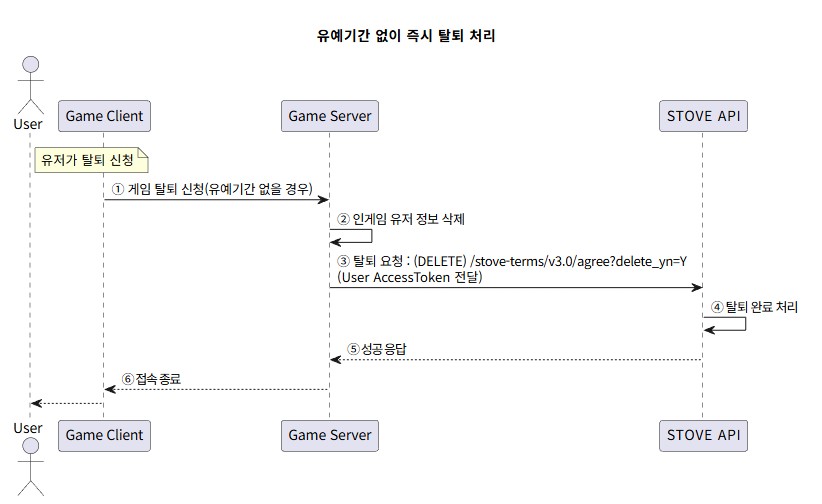
### Server Integration#### Development Flow - Immediate Withdrawal Processing0. The user requests withdrawal within the game.
- The client sends a request to the game server, including the Game User Access Token.
- The game server deletes the user information. (Controlled via transaction)
DELETE /stove-terms/v3.0/agree?service_id={게임id}is called to send the withdrawal request.
At this time, please include the Game User Access Token.- STOVE completes the withdrawal and deletes the data.
- A success response is sent to the game server.
- The user is marked as withdrawn, and their session is terminated in the game.
- Immediate withdrawal without a grace period
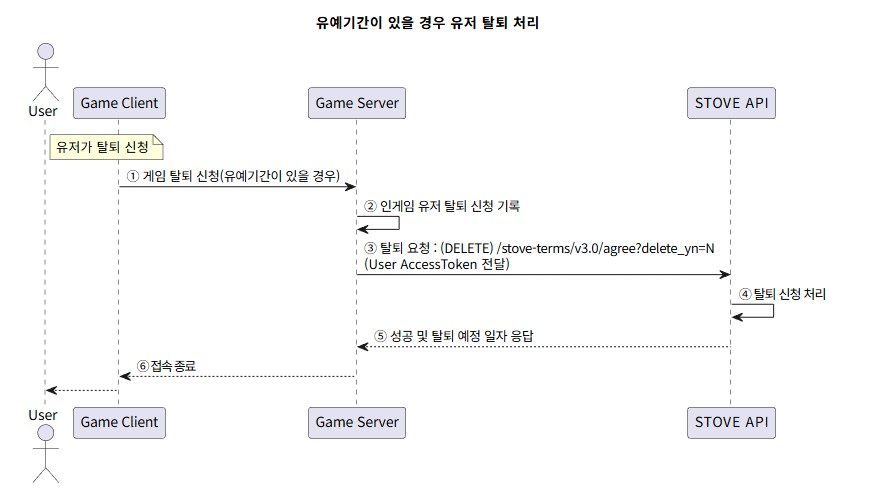
Development Flow - Withdrawal with a Grace Period
- The user requests withdrawal within the game.
- The client sends a request to the game server, including the Game User Access Token.
- The game server changes the user information status to 'withdrawal requested'. (Controlled via transaction)
DELETE /stove-terms/agree?service_id={게임id}&delete_yn=Nis called to send the withdrawal request.
At this time, please include the Game User Access Token.- STOVE processes the withdrawal request.
- The scheduled withdrawal date and a success response are sent to the game server.
- The user's withdrawal is requested, and their session is terminated in the game.
- Withdrawal processing with a grace period
Troubleshooting
Response code handling method. For detailed response codes and message specifications, please refer to the API & SDK 레퍼런스 menu.
| Response code | Situation | Handling Method |
|---|---|---|
| 70800 | Incorrect service_id value in parameters | Please enter the value corresponding to your game. |
| 70806 | Incorrect service_id value in parameters | Please enter the value corresponding to your game. |
| 70816 | Internal STOVE server error | This may be a temporary error; please retry, and if it persists, contact the technical representative. |
| 70820 | User already has a pending withdrawal request | Duplicate withdrawal requests are not allowed. |
| 70825 | User has not joined the game (agreed to terms) | Withdrawal request cannot be made because the user has not joined the game. |
| 70853 | Internal STOVE server error | This may be a temporary error; please retry, and if it persists, contact the technical representative. |
| 70854 | Internal STOVE server error | This may be a temporary error; please retry, and if it persists, contact the technical representative. |
| 70870 | Missing caller-id in request header | Please include the caller-id key value in the request header. |
| 70899 | Invalid parameter value | Please enter the correct parameter value. |
Sample Code
Example of calling the Game Withdrawal Request API (DELETE /stove-terms/v3.0/agree?service_id={게임id}).
Please replace the Base URL according to the environment (Live/Sandbox) In a production environment, it is recommended to separate it into environment variables (e.g.,
STOVE_API_BASE_URL) or framework configuration files instead of hardcoding, and inject it per environment. {.is-warning}
Use the token issued for each request as the Game User Access Token Do not leave the token in logs/storage; handle it only as a variable that is immediately discarded. Immediate withdrawal (
delete_yn=Y, default) and grace period status (delete_yn=N) differ only by the query parameter of the same call. {.is-info}
// Java 25 LTS — java.net.http.HttpClient + Jackson(ObjectMapper)
import com.fasterxml.jackson.databind.JsonNode;
import com.fasterxml.jackson.databind.ObjectMapper;
import java.net.URI;
import java.net.http.HttpClient;
import java.net.http.HttpRequest;
import java.net.http.HttpResponse;
import java.time.Duration;
import java.util.UUID;

ObjectMapper mapper = new ObjectMapper();
String baseUrl = "https://api.onstove.com";
String serviceId = "STOVE_EPIC7";
String callerId = serviceId + "_SERVER";
String callerDetail = UUID.randomUUID().toString();

try (HttpClient client = HttpClient.newBuilder()
        .connectTimeout(Duration.ofSeconds(5))
        .build()) {

    // 유예 처리(철회 예정 상태)는 URL 끝에 &delete_yn=N 추가
    URI uri = URI.create(baseUrl + "/stove-terms/v3.0/agree?service_id=" + serviceId);

    HttpRequest req = HttpRequest.newBuilder(uri)
            .header("Content-Type", "application/json")
            .header("Authorization", "Bearer " + gameUserAccessToken)
            .header("caller-id", callerId)
            .header("caller-detail", callerDetail)
            .DELETE()
            .build();
    HttpResponse<String> res = client.send(req, HttpResponse.BodyHandlers.ofString());
    JsonNode data = mapper.readTree(res.body());
    if (data.path("code").asInt() != 0) {
        // 트러블슈팅 표 참고 (70800 / 70816 / 70820 / 70825 / 70899 등)
        throw new IllegalStateException("withdraw failed: " + data.path("code"));
    }
    long withdrawDt = data.path("value").path("withdraw_dt").asLong(0L);
    if (withdrawDt > 0) {
        // 유예기간 모드 — withdrawDt 는 unix-ms 탈퇴 예정 일자. 안내 후 게임 세션 종료
    } else {
        // 즉시 철회 완료 — 게임 세션 종료
    }
}