
- Last Updated

Coupon
Understanding
By integrating the STOVE platform's coupon service, you can issue coupons in STOVE Partners and grant rewards such as items to users in the game or on the web.
Coupons are used to boost user retention through pre-registration/collab/event rewards, marketing-inflow/conversion tracking, manual CS rewards, and more.
Coupon pop-up coverage and display location
ㅁ SDK pop-up support: mobile games, multi-platform (PC+mobile) games (including PC builds)
ㅁ iOS/PC-only games: register via the STOVE website coupon box or the game homepage instead of the SDK pop-up
ㅁ Display location: designated by the CP company (developer) to fit the game UX (e.g., main lobby > settings > register coupon)
Coupon Types and Rewards
Looking at coupon types and reward composition together helps you pick the right coupon for your situation.
First pick the coupon type that fits your situation.
Coupon-type selection guide
Does the user enter the code themselves?
├─ Yes · one unique code per person (pre-registration/CS/personal events) → Standard coupon
├─ Yes · one shared code used by many (SNS/collab) → Representative (shared) coupon
├─ Yes · only pre-registered targets can enter/use the code (beta/tier-only) → Targeted coupon
├─ No · granted directly to specific user accounts (VIP/CS/attendance) → Account-grant coupon
└─ No · granted directly to the accounts of users who downloaded it (currently used mainly in the store) → Download coupon
The issuance method and the user's experience of receiving a coupon differ by coupon type.
| Coupon type | Category | Characteristics | Main use |
|---|---|---|---|
| Standard coupon | 1 : 1 | One code used by one person; the user enters the code | Pre-registration/personal events/CS rewards |
| Representative (shared) coupon | 1 : N | One code used by many; a public code is entered | Collab/SNS/seasonal events |
| Account-grant coupon | Automatic grant | Loaded into the coupon box automatically, no entry | VIP/error/manual CS rewards |
| Targeted coupon | Designated targets only | Usable only by registered targets (target verification) | Beta testers/tier-only events |
| Download coupon | Store integration | Downloaded from the store, then loaded into the coupon box (extra integration needed) ※ If the CP company builds and integrates its own download coupon box, it can be used in-game too, but it's currently used mainly in the "store" |
Driving store visits |
If a coupon's type is "to whom · how to distribute," a coupon's attribute is "what to give."
When issuing, the order is to decide the type first, then set the attribute (reward).
| Reward type | What is given | Characteristics / constraints |
|---|---|---|
| Item coupon | In-game items/currency | Granted by member number or character number |
| Discount coupon | A discount at payment (fixed amount / percentage) | Usable both in-game and in the store ※ In-game discount coupons are used at the payment window ※ Cart/bundle discount options are store-only |
| Game-pass coupon | A pass to play a store game for free | Usable only in the store |
"In this case, do this" — combinations that are actually used often.
This combination for this case
· Handing out items via SNS/collab → Representative (shared) coupon + item
· Per-person item grants / pre-registration / CS rewards → Standard coupon + item
· Granting items directly to a specific user (VIP/error rewards) → Account-grant coupon + item
· In-game payment-discount events → Standard or representative (shared) coupon + discount (users apply it at the payment window)
· Granting game passes to creators/promoters (offering trials) → Account-grant coupon + game pass
Screen Examples by Setting
The screen and experience users see in-game differ by coupon type and detailed settings.
| Setting combination | User screen |
|---|---|
| Standard coupon + fixed prefix (Prefix) | First 4 characters fixed (e.g., FREEXXXXXX) → gives a branded-coupon feel, suitable for events/collabs |
| Representative coupon + auto-generated random code | Enter a public code (e.g., 2350DWG06Z0009S5) in-game; first-come and time-limit settings are possible |
| Account-grant coupon (no entry) | Loaded into the coupon box automatically without entry; checked via notification/coupon box |
Coupon Issuance Flow
This is the full flow from issuing a coupon to delivering it to users.
Step 1. Set coupon info
In Partners [Billing > Coupon Management > Coupon Info Settings], enter the coupon type, reward, representative image, etc.
ℹ️ This step only needs to be set once. Once set, you don't need to redo it each time you issue, and you only edit it when you want to change settings like type or reward. Actual coupon issuance repeats from Step 2.
Coupon-info-settings notice
ㅁ Set the coupon type/attribute to use (required before issuance)
ㅁ STOVE coupon box use = Y → the game name is shown in the My Info coupon box (ascending by group)
ㅁ The game-pass attribute is store-only
ㅁ For the representative image, the Info Settings menu value takes priority over the issuance image
ㅁ When the game name is set to STOVE, coupon maintenance can be configured
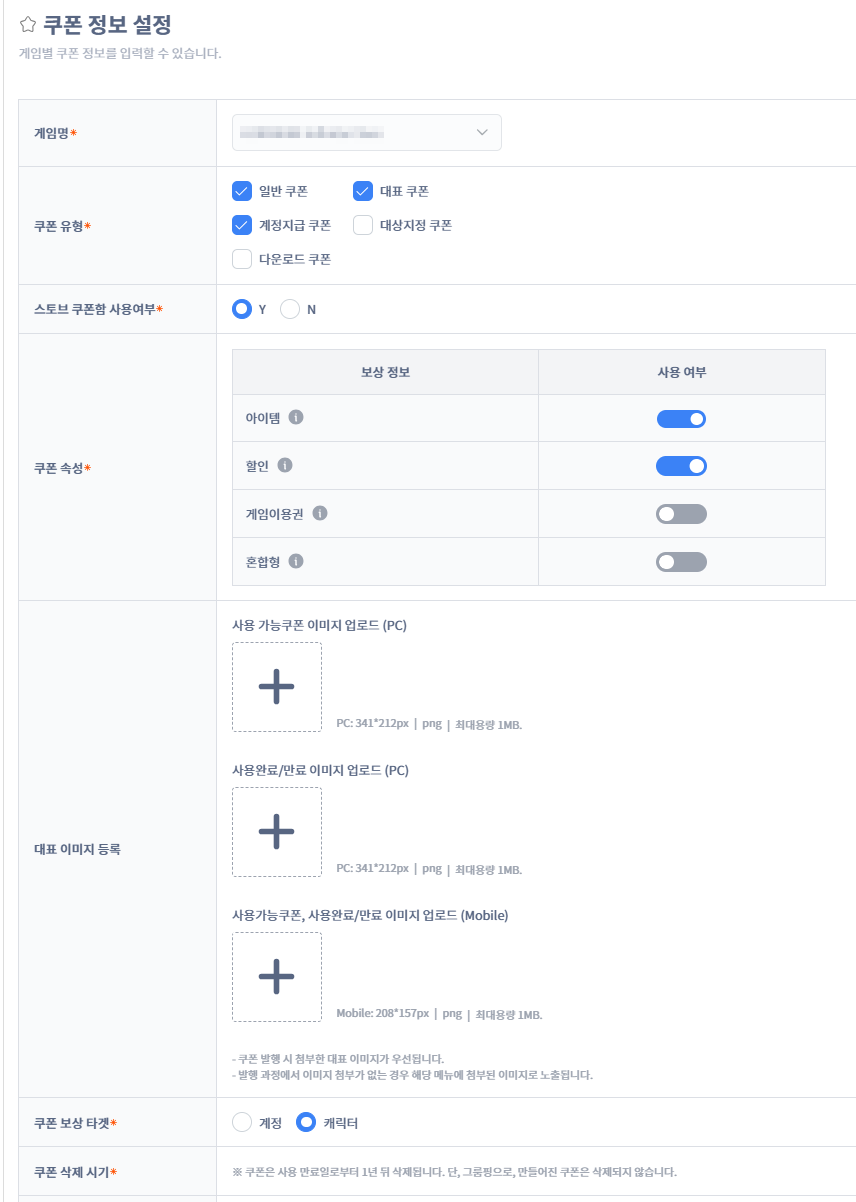
Step 2. Issue the coupon
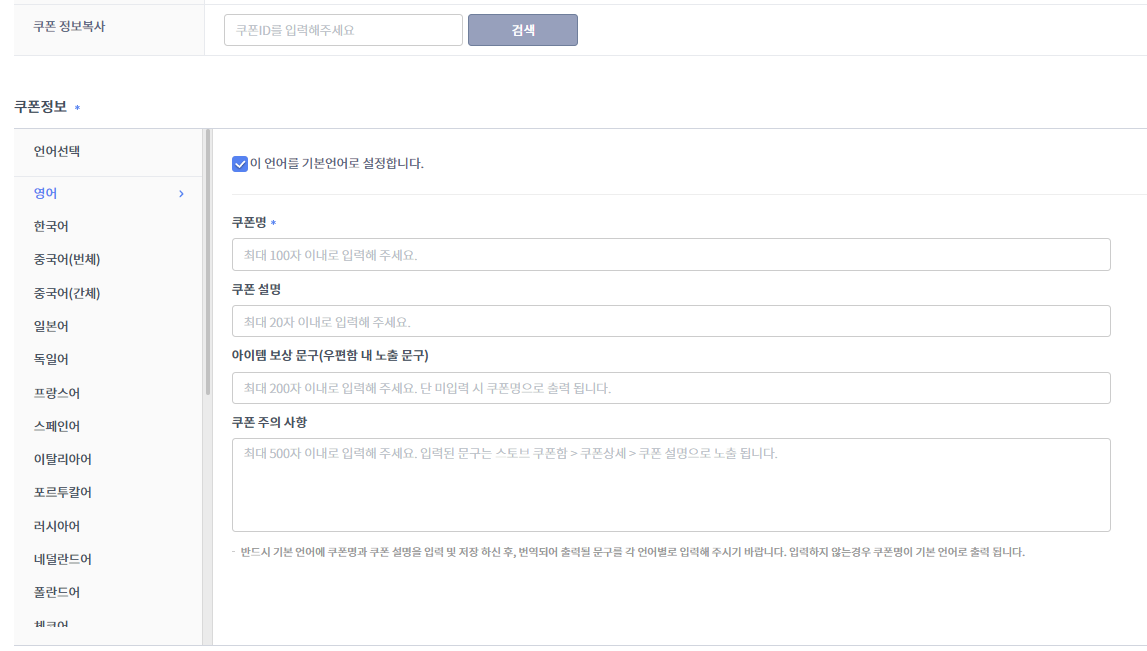
In Partners [Billing > Coupon Management > Issue Coupon], set basic info like the coupon name and the type/attribute.
Coupon info (name, description, reward text, cautions)
ㅁ Multilingual support; enter the in-game display text (item-reward text)
ㅁ Copy coupon info: entering an existing coupon ID auto-loads most of the issuance info
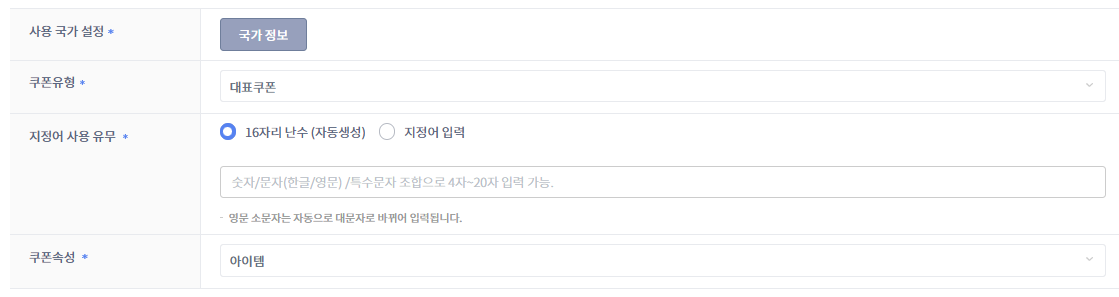
Coupon type and attribute
ㅁ The default usage country is all (configure separately if you want only some countries)
ㅁ Type/attribute are loaded from the Info Settings menu (download coupons are store-only; attributes are used when reward info is linked)
ㅁ Depending on the type, choose a directly specified custom code (designated word) or a fixed prefix (Prefix)
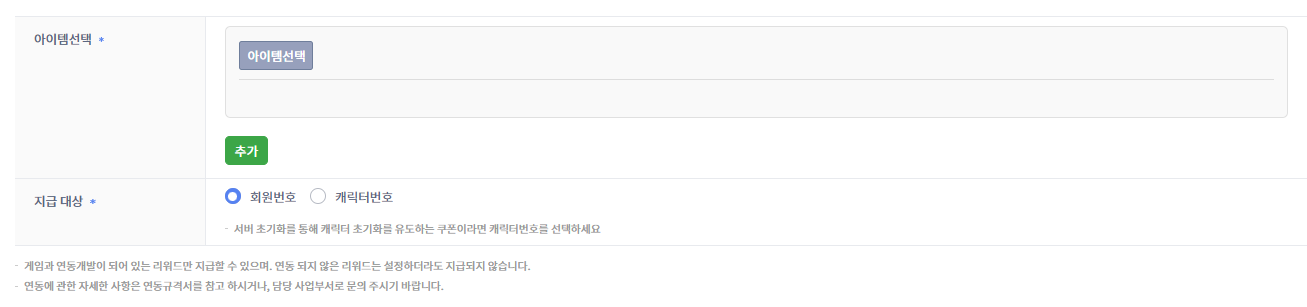
Issuing item coupons
ㅁ Add item selections to issue up to 50 (bulk issuance such as attendance rewards)
ㅁ Granted by member number by default; issuance by character number is possible (representative coupon + item attribute only)
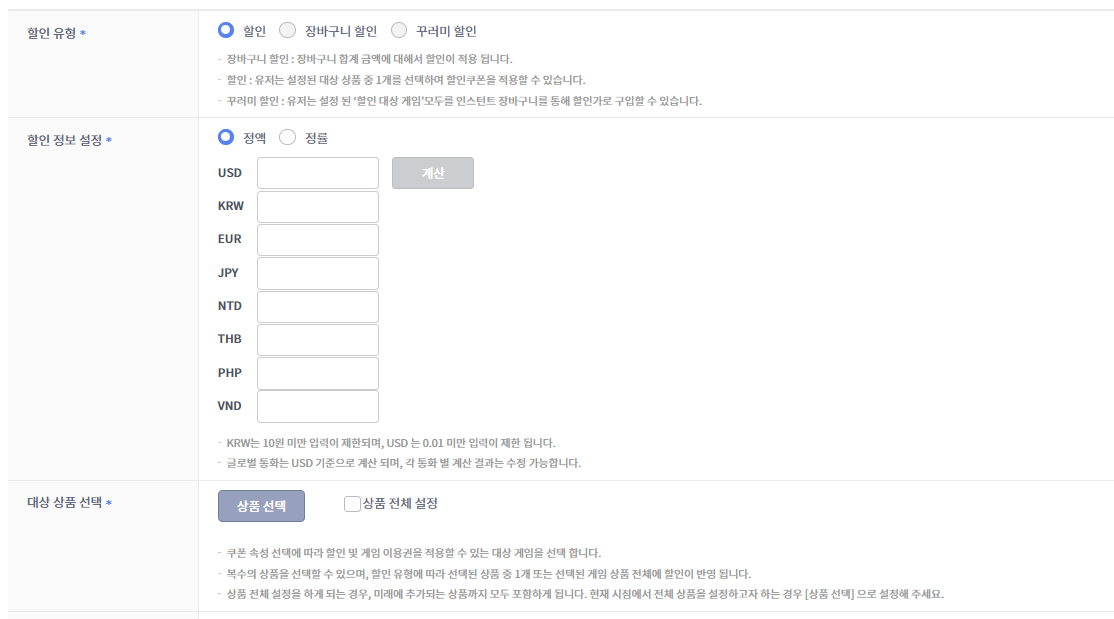
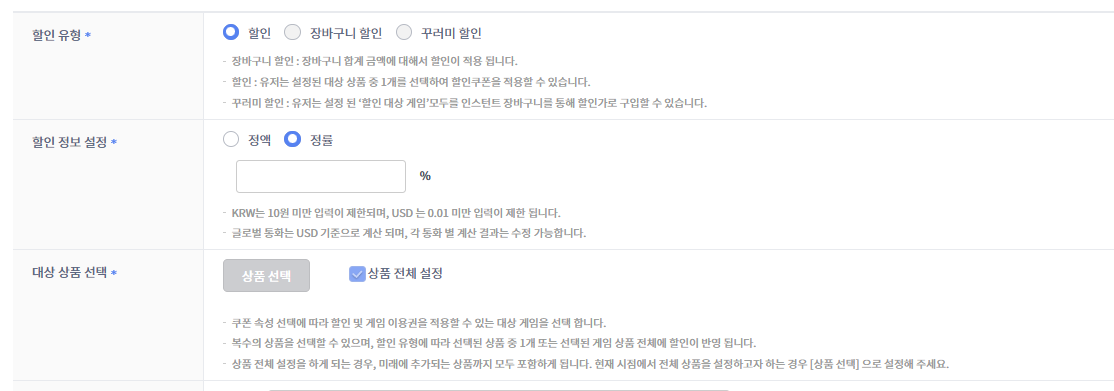
Issuing discount coupons
ㅁ Fixed-amount / percentage settings (fixed amount = some items only, percentage = all items only)
ㅁ Fixed amounts are auto-calculated in USD (using the previous month's last-day exchange rate)
ㅁ Cart/bundle discounts are store-only
Sharing discount costs
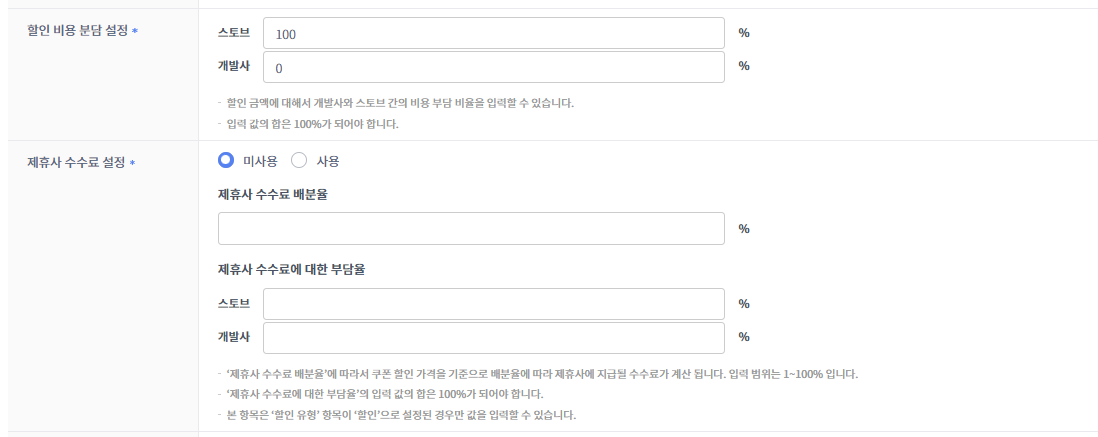
ㅁ Discount costs and partner fees can be set to be shared between the platform and the CP company
ㅁ It affects settlement, so consultation with the contact is required
Step 3. Deliver to users
Deliver the code via events/SNS/CS, etc.; account-grant and download coupons are loaded automatically.
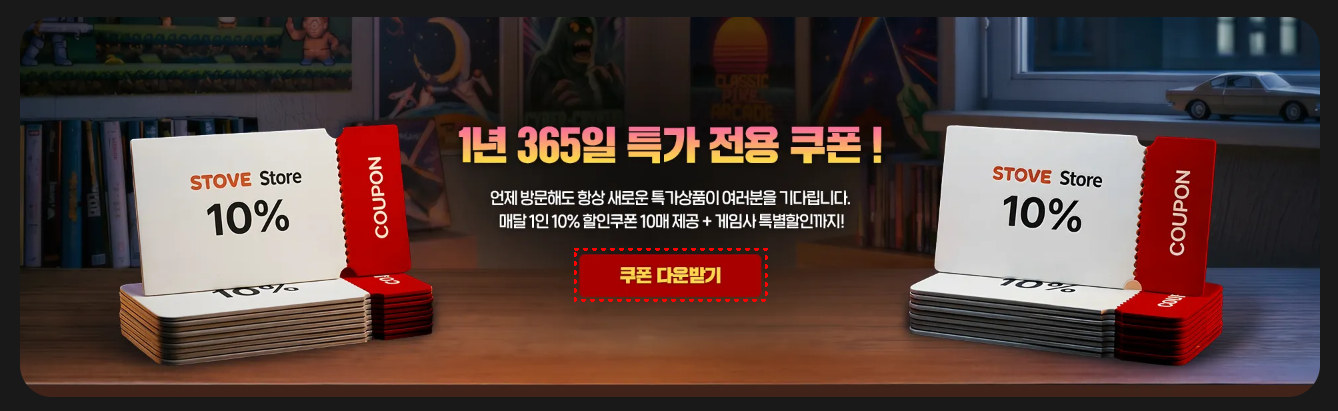
Receiving event-participation rewards
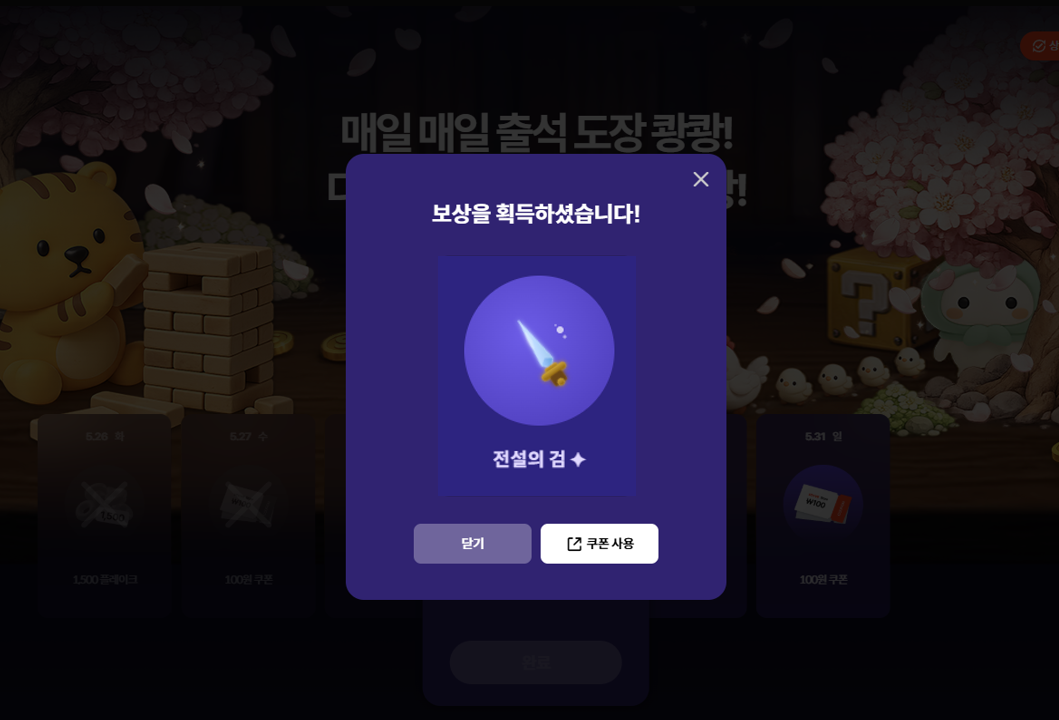
Step 4. User receipt
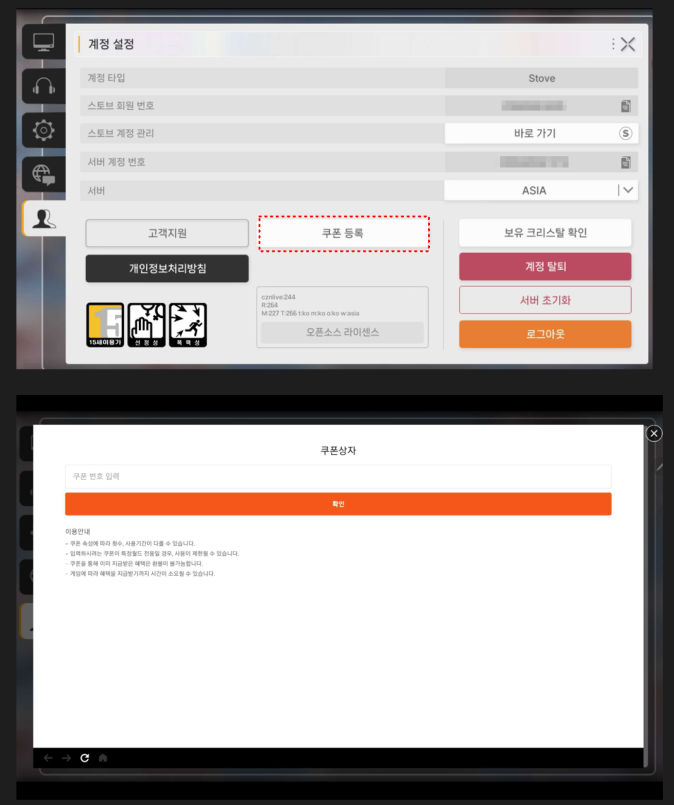
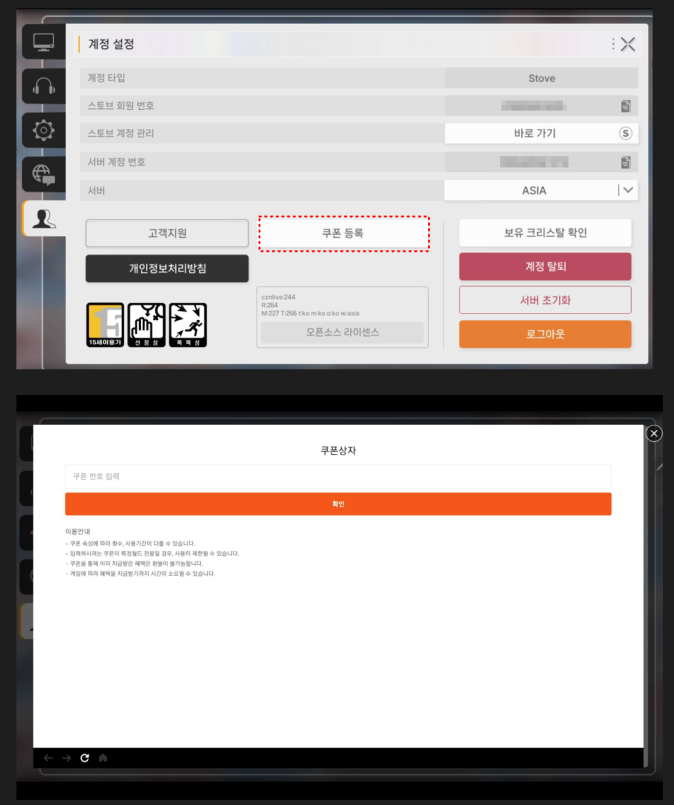
Registering it in the in-game coupon-input window or auto-checking it in the coupon box grants the reward (item/discount).
In-game coupon-registration example
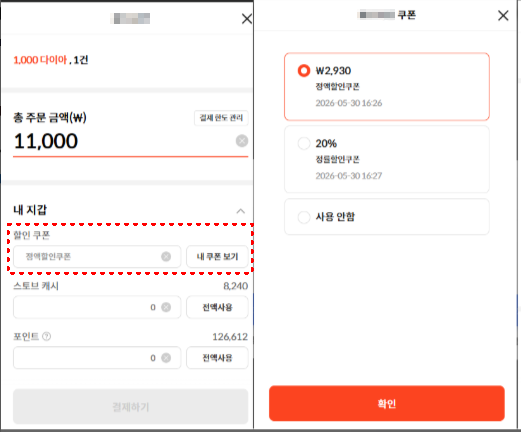
In-game discount-coupon usage example
ㅁ Unlike store discount coupons, in-game discount coupons are used at the payment window.
Display location by platform/channel
| Platform/channel | Display location | Notes |
|---|---|---|
| Mobile (Android) | In-game [Register Coupon] button → SDK coupon pop-up | Recommended for Android |
| Mobile (iOS) | In-app display not recommended | In-app input UI / external web links can be grounds for rejection (Apple guidelines) |
| PC (Windows) | In-game [Register Coupon] button → SDK pop-up or STOVE/game official homepage | SDK pop-up for multi-platform games only |
| STOVE official website | My Info > Coupon Box | Unified coupon entry, login required |
| Game official homepage | Integrate the STOVE coupon API in your own UI | Requires API calls; design customization is possible |
Development
Mobile (SDK) - Using Coupons
Using a coupon is done with a single call to the SDK-provided View.useCoupon.
The SDK requests use-processing from the STOVE ItemBox server and handles the flow through to the game-server callback (item grant).
Coupon-box list search, detail lookup, and coupon-box coupon use are in the server REST API domain, not the SDK, so see the Server Integration - ItemBox section.
Caution for iOS
Under Apple guidelines, showing an in-app coupon-input UI can be grounds for rejection.
Don't show an in-game coupon-input screen in iOS builds.
Prerequisites
- The user must be logged in.
- Pop-up info must be registered in Partners for it to work (except for the direct-call page method).
Notice
Partners configuration is done through the publishing technical contact.
Development Flow
- Collect the coupon number : Receive the coupon number the user entered in the in-game coupon-input screen.
- Call coupon use
: Calling
View.useCoupon(context, code, callback)has the SDK process the use with the ItemBox server. - Handle the result
: Branch success/failure with the
Resultpassed in the callback. : On failure, delegating toOperationUI.HandleResult(result, ...)shows the SDK's common guidance screen.
Troubleshooting
- ErrorCodes
Domain ErrorCode Description Action com.stove.server 100 A coupon usable only in a PC cafe Show a usage-environment notice and keep the input screen open. com.stove.server 997 Not Verify AccessToken Re-fetch Auth.accessTokenand call again. If the same error persists, guide the user into the login flow to get a reissued token.com.stove.server 998 Expired AccessToken Guide the user into the login flow to get a reissued token. com.stove.server 999 System Error — com.stove.server 2605 This membership account cannot use it. — com.stove.server 5031 You've exceeded the daily verification count. Show a notice and guide the user to retry after a while. com.stove.server 5105 Invalid coupon number. Show a re-check-the-coupon-number message and reset the input screen. com.stove.server 5125 This coupon has already been used. Reset the input screen and show an already-used notice. com.stove.server 5130 This coupon has been disabled. — com.stove.server 5135 This coupon has expired. Reset the input screen and show an expiry notice. com.stove.server 5155 You've exceeded this coupon's usage limit. Reset the input screen and show a notice. com.stove.server 5161 This coupon's registration period has expired. — com.stove.server 5162 This coupon can't be used in your country. — com.stove.server 5164 This coupon can't be used in this world. — com.stove.server 5165 This coupon can only be used from the coupon box. — com.stove.server 5169 It's not within this coupon's usage period. — com.stove.server 5200 You're not an eligible target for this coupon. — com.stove.server 5202 This coupon is already registered in the coupon box. — com.stove.server 6002 This coupon number can no longer be used. — com.stove.server 6026 The usage count has been exceeded. Reset the input screen and show a notice.
Cases with clear user guidance
Show in-game notices for cases like invalid coupon number (5105), already-used coupon (5125), expired coupon (5135), and usage-count exceeded (5155 / 6026).
Retrying an already-expired/used coupon is meaningless, so reset the input screen.
Sample Code
public void UseCoupon()
{
    /**
     * code : coupon input (string)
     **/
    View.UseCoupon("code", (Result result) =>
    {
        if (result.IsSuccessful)
        {
        }
        else
        {
            OperationUI.HandleResult(result, (Result operationResult) =>
            {
                /** ex) keep the current screen **/
            });
        }
    });
}
On Android, the SDK-provided input UI is also available
Calling ViewUI.coupon shows the STOVE standard coupon-input screen as-is, and when the user enters a code, the SDK proceeds through use-processing and item grant.
(Android only, not supported on iOS) For detailed usage and sample code, see In-game features — Using coupons (Android only).
PC (PCSDK) - Coupon Pop-up
Using the coupon pop-up API provided by PCSDK ViewSDK, you can show the STOVE coupon-input screen inside the game client. When the user enters the coupon number directly in the pop-up, STOVE proceeds with the use-processing and item-grant flow.
The PC SDK coupon pop-up is available only for multi-platform (PC + mobile) games.
The call works correctly only for games registered as mobile games and designated for multi-platform use in Partners > Launching > Service Integration.
For single-platform (PC-only) games, replace this with a flow where the game builds its own coupon-input UI and calls the coupon-registration API directly.
Prerequisites
- After BaseSDK initialization (
Base_InitializeorBase_InitializeEx) completes, initializing ViewSDK (View_Initialize) lets you use the coupon pop-up API. Base_RunCallback()must be called periodically in the game loop for async callbacks to work.- If using a built-in WebView (
WebViewMode::INTERNAL) pop-up, initialize withView_InitializeWithWndInfo(mainWndHandle), passing the game's mainHWND, instead ofView_Initialize.
Development Flow
- Initialization
: After completing BaseSDK initialization with
Base_Initialize(orBase_InitializeEx), callView_Initialize(). If using a built-in WebView pop-up, initialize withView_InitializeWithWndInfo(mainWndHandle), passing the game's mainHWND, instead ofView_Initialize. - Call the coupon pop-up
: When the user requests the coupon-input UI, call
View_CouponPopuporView_CouponPopupEx.- C/C++ : call
View_CouponPopup(mode, onFinished). To also receive the pop-up-close event, useView_CouponPopupEx(mode, onFinished, onDestroy).modeis aWebViewModevalue. - C# : call
View_CouponPopup(mode, onFinished)orView_CouponPopupEx(mode, onFinished, onDestroy). onFinishedis called when the pop-up finishes displaying, andonDestroywhen the pop-up's native resources are fully cleaned up.
- C/C++ : call
- Choose WebViewMode
: Set
modetoWebViewMode::EXTERNAL(external browser) orWebViewMode::INTERNAL(SDK built-in WebView), whichever fits your game environment. : Exclusive-fullscreen games must useWebViewMode::EXTERNAL. - Handle close
: Receive the
onDestroycallback to resume the game flow. If you need to refresh the inventory after coupon use, do it after this callback. - Cleanup
: When done with the coupon pop-up, clean up ViewSDK with
View_UnInitialize(), and callBase_UnInitialize()just before the game exits.
Troubleshooting
| Situation | Cause | Solution |
|---|---|---|
| I called the coupon pop-up but nothing happens | The coupon pop-up is a feature for multi-platform (PC + mobile) games only. Calling it from a game registered as single-platform in Partners won't work. | Check that the game is registered as multi-platform in Partners. For single-platform games, replacing it with a flow that shows the game's own coupon-input screen avoids issues. |
| The coupon pop-up is hidden behind the game window | If you initialize with View_Initialize without a parent window handle, the pop-up appears as a separate window and can go behind the game window. In exclusive-fullscreen mode, built-in WebView (WebViewMode::INTERNAL) pop-ups can't come above the game window due to Windows API limits. | Initialize by passing the game's main HWND to View_InitializeWithWndInfo(mainWndHandle). For exclusive-fullscreen games, always calling the pop-up in external-browser (WebViewMode::EXTERNAL) mode avoids issues. |
| The pop-up result callback isn't called | If you don't call Base_RunCallback() in the main loop, the SDK can't find a point to deliver results to the game. | Call Base_RunCallback() every frame or at a regular interval in the main loop. |
Sample Code
#include "ViewSDK.h"

using namespace Stove::PCSDK;
using namespace Stove::PCSDK::Base;
using namespace Stove::PCSDK::View;

// 1) Initialize ViewSDK (after Base_Initialize completes)
auto initResult = View_Initialize();
if (!initResult.IsSuccessful())
{
    return;
}

// 2) Coupon pop-up (Ex version: receive the close event)
View_CouponPopupEx(
    WebViewMode::EXTERNAL,
    [](CallbackResult openResult)
    {
        if (openResult.GetResult().IsSuccessful())
        {
            // Handle pop-up open
        }
    },
    [](CallbackResult destroyResult)
    {
        // Resume the game flow when the pop-up closes
    }
);

// 3) Clean up on exit
View_UnInitialize();
Server Integration - ItemBox
When a user participates in an event, the game server must be integrated to receive and process reward-grant requests. Reward-grant requests are delivered as real-time callback notifications from STOVE's ItemBox server, and the game server should receive the request and process the appropriate reward grant.
Prerequisites
The items below must be registered in advance through Partners
- Select the ItemBox integration type:
Select "Call from the STOVE server to the game server (including Transaction Id)".
Location:
Partners > Launching > Service Integration > SDK Runtime Environment Settings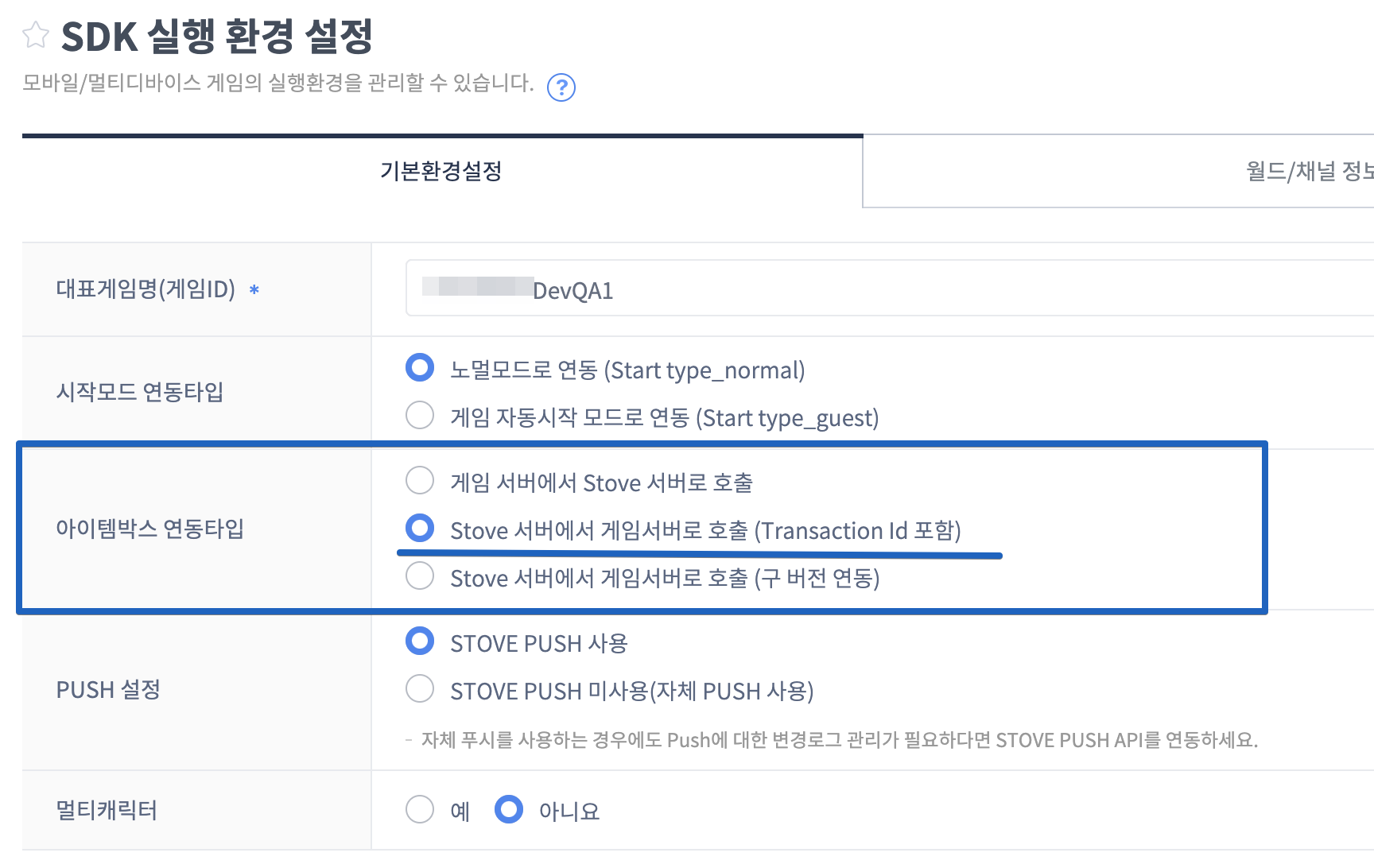
- Register a default world:
Even games that don't need worlds must designate a default world. (e.g., world_kr).
Location:
Partners > Launching > SDK Runtime Environment (MO) > World/Channel Info tab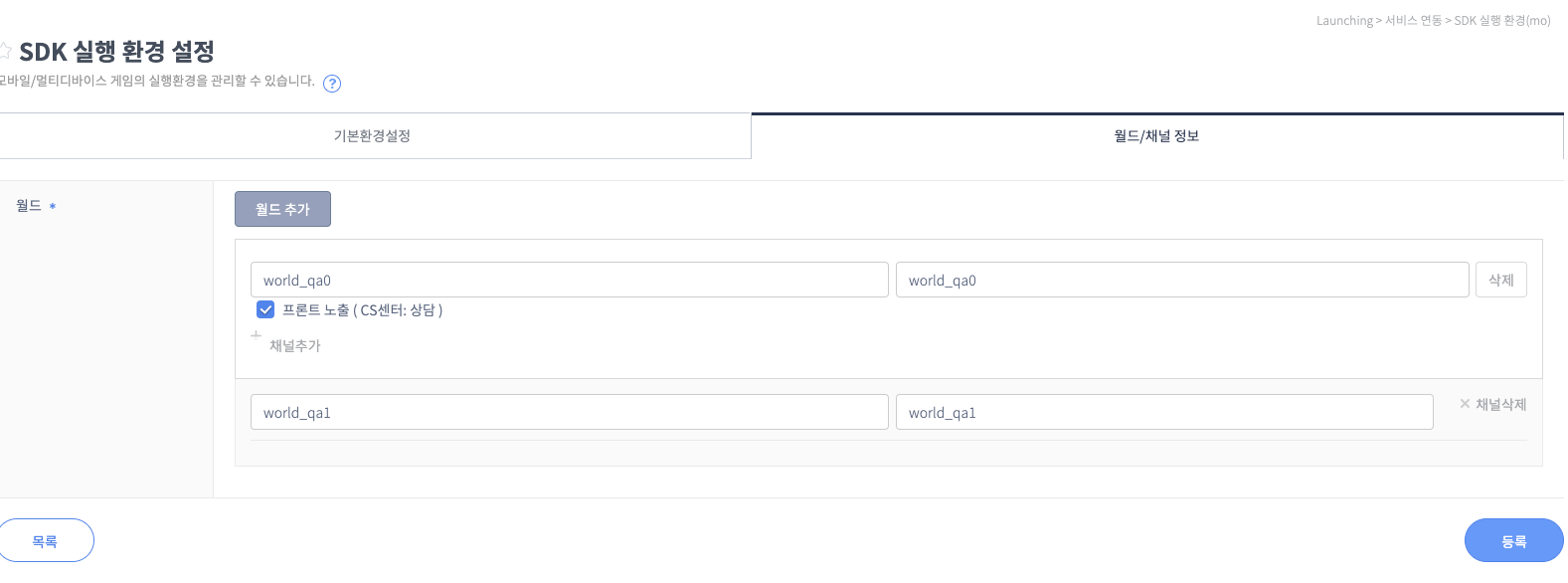
- Register the callback server URL:
Register the callback server URL that will receive item-grant requests.
Location:
Partners > GM > Service Integration > ItemBox Integration Environment (mo)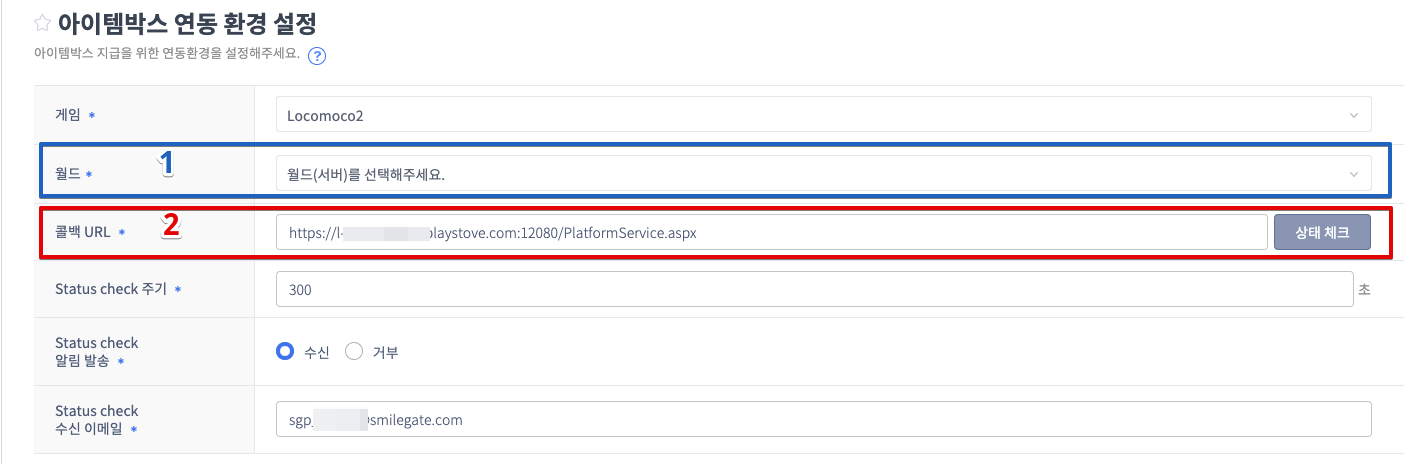
How to set up a loopback URL
The callback server (URL) must be prepared by the CP company, but if it's not ready yet and you need to test in Partners, you can use the loopback URL setup below.
Sandbox:http://i-api.gate8.com/itembox/v2/item/inboundReward
ACL work is needed to communicate with ItemBox. The STOVE platform doesn't need a separate service-opening policy; only the game server must perform the inbound-opening work.
Item-Grant API
This describes the API integration spec that the CP company must provide.
API integration info
POST {URL info registered in Partners}
Content-Type: application/json
Request
- Body
| Name | Type | Required | Example | Description |
|---|---|---|---|---|
| msg_id | String | Y | baf84a85-abcc-49fc-ba85-54b7c38331e9 | The msg ID is generated each time ItemBox sends to the game server (unique per send) |
| msg | String | Y | "aWLoj83ZxAICnRfjA+ayhd7nn1V/Fh/3I....3Of7N0s45uDN6DJjAjwqc=" | Delivered encrypted; decryption required |
| timestamp | Long | Y | 1480512039 | The Msg's timestamp (seconds from Jan 1, 1970 to the current time) |
- msg payload before encryption
| Name | Type | Required | Example | Description |
|---|---|---|---|---|
| game_id | String | Y | STOVE_GAME | Game ID |
| world_id | String | Y | world_global | World ID |
| member_no | Long | Y | 503510 | The platform user's guid (member_no for legacy games) |
| nickname_no | Long | Y | 1603829809 | The platform user's nickname_no |
| item_id | String | Y | ITEM_K001 | Game item ID |
| transaction_id | String | Y | 6b384ab9d65f422db0abf186a7f79311 | transaction id (the transaction key value; the game server uses it to determine duplicate grants) |
| service_type | String | Y | COUPON | Service type "COUPON" : sent via coupon use "EVENT" : sent via an event |
| item_amt | Integer | Y | 3 | Item quantity |
| reward_msg | String | N | This is a reward for pre-registration event participation | The message to show the user when granting the item (the content registered when creating the coupon) |
| end_dt | String | N | 20150116 | The item-grant expiry date (DateFormat: "yyyyMMdd", Default: 1 month from the request time) |
| payload | Object | N | { "item_period" : 0 } | ItemBox passes data the CP company needs in this json object (for example: for time-limited items, if there are permanent, 7-day, 30-day, and 60-day options |
Response
The game server must respond (in application/json format) to the ItemBox Call API's processing result using the return codes specified below.
Content-Type : application/json
- Body
| Name | Type | Required | Example | Description |
|---|---|---|---|---|
| return_code | Integer | Y | 0 | Processing result code |
| return_message | String | Y | OK | Processing result message - deliver an identifiable message within 50 characters |
- Return Code
| Return code | HTTP Status Code | Description | ItemBox behavior and reprocessing |
|---|---|---|---|
| 0 | 200 ok | Grant success (also the same for an already-granted transaction_id) | Grant success |
| 40001 | 200 ok | Server internal error (used for cases where re-calling the API can still grant the item) | Grant failed - reprocessing proceeds |
| 40002 | 200 ok | The requested item doesn't exist | Grant failed - no reprocessing |
| 40003 | 200 ok | User info mismatch | Grant failed - no reprocessing |
| 40004 | 200 ok | Message decryption failed | Grant failed - no reprocessing |
Sample
- Request
- This is the Request Body in unencrypted form. When actually sent to the game server, the "msg" json value part is encrypted.
- For decryption, take the received msg data, apply BASE64 Decoding, and then apply AES256 Decryption.
json{ "msg_id": "baf84a85-abcc-49fc-ba85-54b7c38331e9", "msg" : { "game_id":"STOVE_GAME", "world_id":"world_global", "member_no": 503510, "nickname_no": 1603829809, "item_id": "ITEM_K001", "transaction_id":"6b384ab9d65f422db0abf186a7f79311", "service_type":"COUPON", "item_amt":3, "reward_msg":"This is a reward for pre-registration event participation", "end_dt":"20150116", "payload": { "item_period":0 } }, "timestamp": 1480512039 } - This is the Request Body in unencrypted form. When actually sent to the game server, the "msg" json value part is encrypted.
- Responsejson
- Content-Type : application/json
{
    "return_code": 0,
    "return_message": "Success."
}
Decryption (decrypt) process
- To ensure stability and validity of requests between the ItemBox system and the game server, some data (Json Data - msg values) is encrypted when sent. Decryption is needed to read the message body.
- Encryption (encrypt) method: AES256
- Decryption (decrypt) key: Client Secret Key
- Transformation: AES/CBC/PKCS5Padding
- IV Spec: the first 16 characters of the 'Client Secret Key' value
- Decryption order: take the received msg data, apply BASE64 Decoding, then apply AES256 Decryption.
- Secret Key location:
Partners > Launching > Service Integration > Platform Integration Keys > Mobile Service Integration Key > Client Secret Key
Duplicate-grant protection
transaction_idis a unique value auto-generated when a grant request occurs; it's used to prevent missed and
duplicate item grants between the game server and ItemBox.- On successful reward grant, the game server must store the
transaction_idin-game and manage it to prevent duplicate grants. - If the ItemBox server requests an already-granted
transaction_id, the game server can just send response Data "return_code" as "0".
Automatic re-request for failures
- If sending to the game server fails due to a network failure/server error, the STOVE ItemBox service retries the failed case
once every 10 minutes, up to 5 times. In this case, the "transaction_id" in the "msg" json is used as the distinguishing key for the failed case, so the game server
must keep a record of cases successfully granted and processed by "transaction_id". - If the game server processed the grant but the ItemBox platform treated it as failed due to a missing reply or a network error,
a re-grant request can occur.
Troubleshooting
| Situation | Cause | Solution |
|---|---|---|
| The item-grant API isn't called | Occurs when not all prerequisite steps are performed correctly | Check via Partners that the prerequisite settings were done correctly. Also check that external API calls aren't blocked at the CP company's server infrastructure. |
| Message decryption fails | Occurs when the decryption process isn't performed correctly. | Check the guide's decryption-process chapter and integrate using the correct decryption key |