
- Last Updated

CAPTCHA
Understanding
CAPTCHA is an automated-input-prevention feature for blocking abnormal access by automated bots and macros.
STOVE provides two kinds of CAPTCHA.
| Category | Platform CAPTCHA | In-game CAPTCHA (implemented by the CP company) |
|---|---|---|
| Application area | Platform authentication flows such as sign-up, login, and password change | In-game areas such as game-server entry, item trading, and acquiring currency |
| Form provided | Shown automatically by the platform's own judgment (suspicious IP, 5 wrong password entries, etc.) |
STOVE provides only the CAPTCHA API (the display conditions, timing, and targets are freely designed by the CP company) |
| CAPTCHA type | Text input / puzzle (Slide, Click, Drag&drop, Rotate) | Text-input CAPTCHA |
| CP company's work | No separate integration needed | Needed (API calls + CAPTCHA UI display handling) |
This guide covers in-game CAPTCHA integration
STOVE Platform CAPTCHA requires no separate integration work.
Use Cases
In-game CAPTCHA is used to block automated bot/macro accounts from abusing game systems.
The CP company can freely design whether to show it to all users or only to users who meet specific conditions.
| Use scenario | Display timing | Description |
|---|---|---|
| Blocking automated bot accounts | At game-server selection |
Used to block mass simultaneous game entry by bot accounts On passing the CAPTCHA, you can hide it from the same user for a set period (e.g., 1 week) to reduce the burden on regular users |
| Detecting economy-system abuse | When a specific-action threshold is exceeded |
Show the CAPTCHA when a specific action such as item trading or acquiring currency occurs N times within a short period Effective at identifying and blocking macro users |
| Verification just before sensitive actions | Just before payment or important transactions | Show it just before high-value transactions, account transfers, or suspected auto-trading to prevent fraudulent use |
How It Works
Both the CAPTCHA resource-request and verification APIs must be called from the game server.
It's a structure where the game server directly controls the display conditions in the middle.
| Component | Role |
|---|---|
| Game client | Shows the CAPTCHA resource (image) on screen and passes the user's entered CAPTCHA value to the game server |
| Game server | Determines the CAPTCHA display conditions and calls the CAPTCHA resource-request and verification APIs on the STOVE Captcha server (an API Access Token is needed for API calls) |
| STOVE Captcha server | Issues the CAPTCHA image and answer key, and verifies the user input passed by the game server |
Integration Guide
Integration Preparation
Before CAPTCHA integration, preparation is needed in three main areas.
- Authentication: issue an authentication token (API Access Token) for calling the STOVE CAPTCHA API
- Display-policy design: predefine the display period, CAPTCHA level, display frequency, and display conditions (see
Designing the CAPTCHA Display Policybelow) - Operations-tool setup: set up your own ops tool so you can change policy values dynamically without a client patch (recommended)
Designing the CAPTCHA Display Policy
To flexibly adjust CAPTCHA strength during operation, we recommend a structure where you manage the items below in your own ops tool and the game server references them when calling.
| Setting item | Description | Example |
|---|---|---|
| Display period | The operation period during which the CAPTCHA is shown | Always-on / a specific date-time range |
| CAPTCHA level | The CAPTCHA difficulty. Passed via the captcha_level parameter (higher numbers mean higher difficulty) | Static image (PNG) types 1–7 / animated image (GIF) types 101–107 |
| Display frequency | How many times it's shown to the same user within the period | Every access / once within the period / once a day within the period |
| Display condition | The condition that triggers the CAPTCHA | On server selection / hidden for 1 week after passing / when trades exceed N times |
Blindly raising the difficulty increases the burden on regular users
If you only raise the CAPTCHA level when an attack pattern is observed, the pass rate for legitimate users may drop.
Operate it together with policies such as threshold-based display and hiding for 1 week after passing.
Processing Flow
Applying CAPTCHA is a two-step flow: resource request → verification.
It's a structure where the game server judges the display conditions in the middle and calls the two APIs on the STOVE Captcha server in order.
The game server performs the following 3 steps in sequence.
- Judge the display condition — inspect the ops-tool policy (display period, level, frequency, condition) and the pass history (last pass time, etc.) to decide whether to show the CAPTCHA.
- Request the CAPTCHA resource — if display is needed, get a Captcha Key and CAPTCHA image from the STOVE Captcha server and deliver them to the client.
- Verify the CAPTCHA — pass the user's input to the STOVE Captcha server to check validity, and branch into proceeding with the original action, retrying, or blocking based on the result.
Development
1. Prerequisites
These are the preconditions that must be in place before writing CAPTCHA integration code. The CAPTCHA feature operates as a Server-to-Server API called only from the game server, with no SDK dependency.
| Item | Details | Notes |
|---|---|---|
| Issue an API Access Token | The authentication token for calling the CAPTCHA API. Must be issued separately per environment (Live, Sandbox) | Request from the publishing technical contact |
| Confirm the caller | All CAPTCHA APIs are called only from the game server (Server-to-Server). Direct calls from the client leak the API Access Token and allow bypassing CAPTCHA verification, so they are prohibited |
Abuse prevention |
| Define the Caller-ID | The header identifying the API caller (game server). Define it as EXT-SERVER-{game name} in advance with the publishing technical contact |
Required |
| Define the Caller-Detail (user identifier) | The header identifying the user on the API caller's side. Choose from UUID, CUID, or character ID per your policy and pass it as a header when calling the CAPTCHA API |
Recommended |
| Extract the client IP | Used to identify blocked IPs and apply per-IP rate limits. The game server must extract the correct client IP and pass it when calling the CAPTCHA API |
Required |
| Display-policy logic | Manage the display period, level, frequency, and condition in your own ops tool; the game server references the policy at call time to judge CAPTCHA display and pass history | Recommended |
| Own ops tool | Set up the ops tool so you can change the CAPTCHA level, frequency, and condition dynamically without a client patch | Recommended |
2. Game Server Implementation
Inspect the ops-tool policy (display period, level, frequency, condition) and pass history to decide whether to show the CAPTCHA. STOVE does not manage the display history, so store and manage it yourself on the game server.
- Reference the ops-tool policy values to decide whether to show the CAPTCHA
- Store each user's last CAPTCHA-pass time and apply the display-frequency policy
- For threshold-based display, implement action-count accumulation and reset-on-pass logic
- Display-history management is the game server's responsibility (not managed by STOVE)
The CAPTCHA API consists of two parts: resource request and verification. Both are called only from the game server.
| API | Method | Path | Request parameters | Key response fields |
|---|---|---|---|---|
| CAPTCHA resource request | GET | /blockchecker/v1.0/server/captcha | Query: captcha_level, client_ip |
code, value.captcha_key, value.resource.image_url |
| CAPTCHA verification | POST | /blockchecker/v1.0/server/verify | Body: captcha_level, captcha_key, captcha_value, client_ip |
code |
The common headers are as follows.
Authorization: Bearer <API Access Token>Caller-ID: EXT-SERVER-{game name}Caller-Detail: {user identifier}- The verification API additionally needs the
Content-Type: application/jsonheader
⚠️ Caution: captcha_key usage rules
The captcha_key received from the CAPTCHA resource-request API is valid only when all of the following conditions are met.
- 2-minute (120s) validity — it auto-expires 120 seconds after issuance.
- One successful verification only — on successful verification, it's immediately invalidated and cannot be reused.
- Up to 3 cumulative failures — a value mismatch (
49702) can be re-entered with the same key, but on the 4th failure the key is invalidated.
If any of the above conditions is exceeded, 49701 is returned, and you must call the resource-request API again.
Responses come back as HTTP 200 or 401; for both APIs, code 0 is normal, and even on a 200 response, code != 0 must branch as a business error. HTTP 4xx/5xx or network exceptions outside the spec may indicate a temporary STOVE-side failure, so design retry, logging, and alarm policies together. Don't expose the response code value directly to users; branch with a context-appropriate guidance UI.
Follow-up handling by key code:
- Verification success (
0) — close the CAPTCHA layer and proceed with the original action (game entry, trade, sensitive action, etc.). Store the pass time on the game server to use for the next display-frequency/threshold judgment - Value mismatch (
49702) — show a re-entry UI with the samecaptcha_key. Note that up to 3 attempts are allowed and the 4th failure switches to49701, so handle it together with a new-resource-issuance branch - Key expired / cumulative failures exceeded / already-used key (
49701) — get a new resource from the CAPTCHA resource-request API and show it again. Retrying with the same key is meaningless - Blocked IP (
49500, can occur in both resource request and verification) — show an access-blocked notice without retry - Token error (
40101–40104,49318) — an API Access Token setup problem. Show a general notice to users and alert the operations team - Parameter error (
49200,49240,49241,49700,49713) — missing or malformed game-server call parameters. Show a general notice to users and alert the operations team - Server internal error (
49106) — a temporary STOVE-server-side error. If it persists after retry, alert the operations team
Normal flow (Happy Path)
Error-handling flow (Error Handling)
For the detailed meaning of each response code and recommended handling, refer to the "Branching by response code" item above.
This example is a reference implementation of the area the game server operates directly. Supplement dependencies, exception handling, and logging to fit your actual environment. Applying the same policy as the code classification in §"Branching by response code", we recommend a structure that throws token errors as
TokenAuthExceptionand blocked IPs asBlockedIpExceptionand handles them collectively at the controller layer. The sample code is based on usingRestClientin a Spring Boot 3.2+ (Spring Framework 6.1+) environment. Retry logic for temporary failures (49106, HTTP 5xx, network exceptions, etc.) is not included in this sample. We recommend implementing it in a separate layer with exponential backoff using libraries such as Spring Retry or Resilience4j.
@Component
public class StoveCaptchaClient {

    private static final String HOST_LIVE    = "https://api.onstove.com";
    private static final String HOST_SANDBOX = "https://api.gate8.com";

    private final RestClient restClient;

    @Value("${stove.api.access-token}") private String apiAccessToken;
    @Value("${stove.caller-id}")        private String callerId;
    @Value("${stove.profile:live}")     private String profile;

    public StoveCaptchaClient(RestClient.Builder builder) {
        this.restClient = builder.build();
    }

    /** CAPTCHA resource request. Throws BlockedIpException for blocked IPs and TokenAuthException for token errors. */
    public CaptchaResource requestCaptcha(int level, String clientIp, String callerDetail) {
        String host = "sandbox".equalsIgnoreCase(profile) ? HOST_SANDBOX : HOST_LIVE;

        CaptchaResponse res = restClient.get()
                .uri(host + "/blockchecker/v1.0/server/captcha?captcha_level={lvl}&client_ip={ip}",
                     level, clientIp)
                .header(HttpHeaders.AUTHORIZATION, "Bearer " + apiAccessToken)
                .header("Caller-ID", callerId)
                .header("Caller-Detail", callerDetail)
                .retrieve()
                .onStatus(HttpStatusCode::is4xxClientError, (req, r) -> {
                    // 40101~40104 → HTTP 401 token error
                    throw new TokenAuthException("HTTP " + r.getStatusCode());
                })
                .body(CaptchaResponse.class);

        if (res == null) throw new IllegalStateException("empty captcha response");
        switch (res.code) {
            case 0:     return res.value;
            case 49500: throw new BlockedIpException("49500");                                         // Blocked IP
            case 49318: throw new TokenAuthException("code=" + res.code + ", message=" + res.message); // Token error (in response body)
            case 49106:                                                                                 // Server internal error
                // log.error("STOVE captcha server error: code={}, message={}", res.code, res.message);
                throw new IllegalStateException("server internal: code=" + res.code + ", message=" + res.message);
            case 49240: case 49241: case 49713:                                                         // Parameter error
                // log.error("STOVE captcha param error: code={}, message={}", res.code, res.message);
                throw new IllegalStateException("param error: code=" + res.code + ", message=" + res.message);
            default:
                // log.error("STOVE captcha unknown error: code={}, message={}", res.code, res.message);
                throw new IllegalStateException("captcha request failed: code=" + res.code + ", message=" + res.message);
        }
    }

    public static class BlockedIpException extends RuntimeException {
        public BlockedIpException(String code) { super("blocked IP, code=" + code); }
    }

    public static class TokenAuthException extends RuntimeException {
        public TokenAuthException(String detail) { super("captcha token error: " + detail); }
    }

    @Getter @Setter
    public static class CaptchaResponse {
        public int code;
        public String message;
        public CaptchaResource value;
    }

    @Getter @Setter
    public static class CaptchaResource {
        @JsonProperty("captcha_key")  public String captchaKey;
        @JsonProperty("captcha_type") public String captchaType;
        public Resource resource;
    }

    @Getter @Setter
    public static class Resource {
        @JsonProperty("image_url") public String imageUrl;
    }
}
public VerifyResult verifyCaptcha(int level, String key, String value, String clientIp, String callerDetail) {
    String host = "sandbox".equalsIgnoreCase(profile) ? HOST_SANDBOX : HOST_LIVE;

    Map<String, Object> body = Map.of(
        "captcha_level", level,
        "captcha_key",   key,
        "captcha_value", value,
        "client_ip",     clientIp
    );

    VerifyResponse res = restClient.post()
            .uri(host + "/blockchecker/v1.0/server/verify")
            .header(HttpHeaders.AUTHORIZATION, "Bearer " + apiAccessToken)
            .header(HttpHeaders.CONTENT_TYPE, MediaType.APPLICATION_JSON_VALUE)
            .header("Caller-ID", callerId)
            .header("Caller-Detail", callerDetail)
            .body(body)
            .retrieve()
            .onStatus(HttpStatusCode::is4xxClientError, (req, r) -> {
                // 40101~40104 → HTTP 401 token error
                throw new TokenAuthException("HTTP " + r.getStatusCode());
            })
            .body(VerifyResponse.class);

    if (res == null) throw new IllegalStateException("empty verify response");
    switch (res.code) {
        case 0:     return VerifyResult.PASS;          // Verification success → proceed with the original action
        case 49702: return VerifyResult.RETRY;         // Value mismatch → re-enter with the same key
        case 49701: return VerifyResult.NEW_RESOURCE;  // Key invalid/expired → request a new resource
        case 49500: throw new BlockedIpException("49500");                                         // Blocked IP
        case 49318: throw new TokenAuthException("code=" + res.code + ", message=" + res.message); // Token error (in response body)
        case 49200: case 49240: case 49241: case 49700: case 49713:                                 // Parameter error
            // log.error("STOVE captcha verify param error: code={}, message={}", res.code, res.message);
            throw new IllegalStateException("param error: code=" + res.code + ", message=" + res.message);
        default:
            // log.error("STOVE captcha verify unknown error: code={}, message={}", res.code, res.message);
            throw new IllegalStateException("verify failed: code=" + res.code + ", message=" + res.message);
    }
}

public enum VerifyResult { PASS, RETRY, NEW_RESOURCE }

@Getter @Setter
public static class VerifyResponse {
    public int code;
    public String message;
}
@Service
public class GameServerCaptchaFlow {
    private final StoveCaptchaClient captchaClient;
    private final CaptchaSessionStore sessionStore;   // The game studio's own ops tool / session management

    /** When the display condition is met, issue the CAPTCHA and deliver it to the client */
    public CaptchaIssued issueCaptcha(String userId, String clientIp) {
        int level = sessionStore.resolveLevel(userId);
        CaptchaResource res = captchaClient.requestCaptcha(level, clientIp, userId);
        sessionStore.bindKey(userId, res.captchaKey, level);          // Store the user-key mapping
        return new CaptchaIssued(res.captchaKey, res.captchaType, res.resource.imageUrl);
        // Blocked IPs are thrown as BlockedIpException, so the controller handles the block-UI response
    }

    /** When the client passes the input, verify and then handle the follow-up */
    public VerifyResult verify(String userId, String userInput, String clientIp) {
        CaptchaSessionStore.Binding binding = sessionStore.lookup(userId)
            .orElseThrow(() -> new IllegalStateException("no captcha issued"));

        VerifyResult result = captchaClient.verifyCaptcha(
            binding.level, binding.captchaKey, userInput, clientIp, userId
        );

        if (result == VerifyResult.PASS) {
            sessionStore.markPassed(userId);   // Update the pass time
            sessionStore.clear(userId);
        } else if (result == VerifyResult.NEW_RESOURCE) {
            sessionStore.clear(userId);        // Key expired → prompt a new resource request
        }
        return result;
        // Recommended: handle blocked IP / token errors collectively with try-catch in the controller
    }

    public record CaptchaIssued(String captchaKey, String captchaType, String imageUrl) {}
}
3. Game Client Implementation
Show the CAPTCHA image issued by the game server on screen and pass the user's entered value back to the game server. The game implements the CAPTCHA UI design itself.
- Show the CAPTCHA image (
image_url) and Captcha Key (captcha_key) received from the game server on screen - Implement the flow that passes the user's input and the Captcha Key back to the game server
- The game designs and implements the CAPTCHA display UI itself
Resource spec and type branching
- The CAPTCHA image provided via
image_urlis 240 × 80 (PNG or GIF). Use this size as the basis for the input area and margins when designing the UI layout and scaling. - The game server also passes the
captcha_typereceived in the CAPTCHA resource response to the client, so the client can branch its rendering by type.image— a static PNG imageanimated_image— an animated GIF image
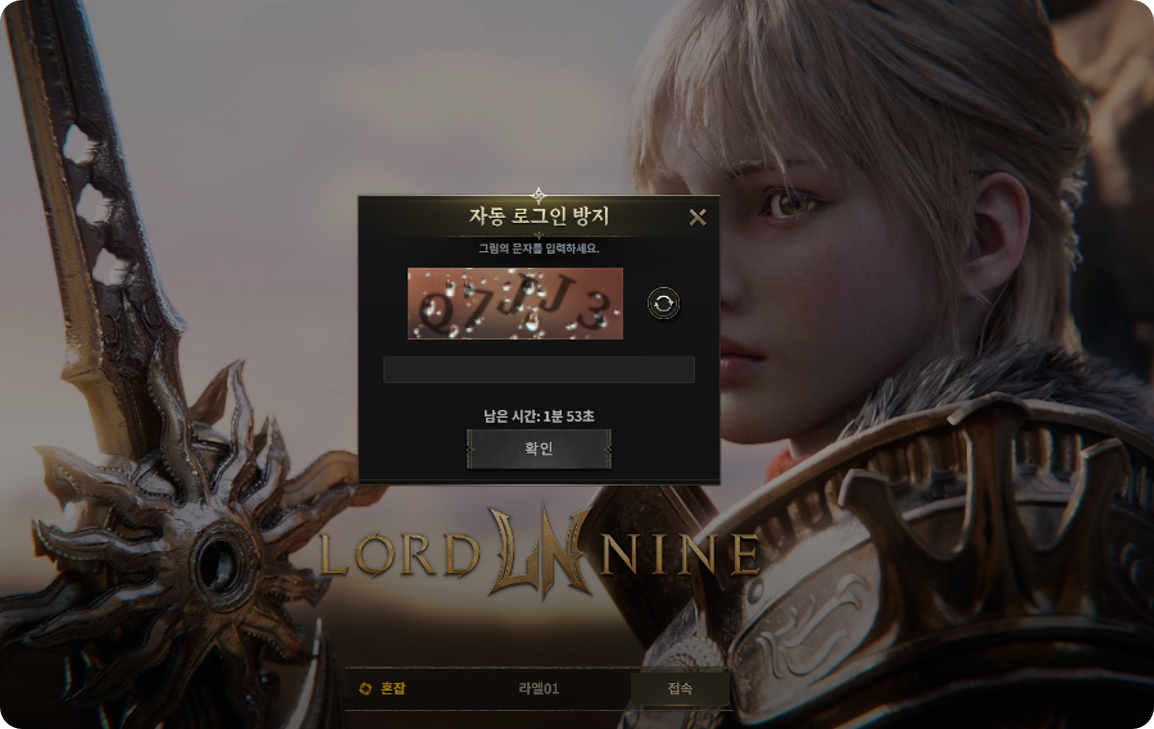
▲ Example of a CAPTCHA UI implemented by the CP company (LORDNINE)
Branch the client UI based on the verification result the game server returns. Don't expose the response code value directly to users; branch with a context-appropriate guidance UI.
Input preprocessing (recommended)
- Trim leading/trailing whitespace from the user input before passing it.
- CAPTCHA verification is case-insensitive. For user convenience, the client can standardize display/input to uppercase (or lowercase) with no effect on the result.
UI branching by verification result
The client does not receive the STOVE Captcha server's response code directly. It assumes the game server converts the STOVE response into its own status/code and passes it to the client. The branches below are based on meaning (status), not the response code, and the CP company can define and map the statuses with its own interface convention.
- Verification success — close the CAPTCHA layer and proceed with the original action
- Value mismatch — the default behavior is to keep the same CAPTCHA image and show a re-entry UI. Up to 3 retries with the same CAPTCHA are allowed, and per the CP company's own policy, refreshing on each failure (requesting a new resource every time) is also possible.
- Captcha Key expired/invalid — get a new resource, refresh the CAPTCHA image, and show it again
- Blocked IP — show a block-notice alert without retry
- Other errors — a general error notice. Design the retry flow to fit your operations policy
Summary of UI branching by situation
| Verification-result status | UI behavior | New resource request | Retry |
|---|---|---|---|
| Verification success | Close the CAPTCHA layer and proceed with the original action | Not needed | — |
| Value mismatch | Keep the same image + prompt re-entry (can refresh every time per your own policy) |
Optional (per policy) | Possible (up to 3 times) |
| Key expired/invalid | Refresh with a new image and show again | Required | Restart with a new key |
| Blocked IP | Block-notice alert | Prohibited | None |
| Other errors | General error notice | Per policy | Per policy |
The statuses above map to STOVE response codes as follows (by game-server conversion): verification success ←
0, value mismatch ←49702, key expired/invalid ←49701, blocked IP ←49500. For details on code handling in the game server, see §3 "Branching by response code".
For global games, localize the CAPTCHA UI guidance text into the game's supported languages. Also provide auxiliary-action buttons so users can correct mistakes while entering the CAPTCHA.
- Localize the CAPTCHA UI guidance text into the game's supported languages
- Provide auxiliary-action buttons such as refresh, re-enter, and cancel
- A required review item for global games
4. Operations Guide
To respond to CAPTCHA failure situations during operation, design a retry strategy and a failure-time fallback policy in advance.
- Retry targets: temporary HTTP 5xx, network exceptions,
code 49106(server internal error) - Retry policy: exponential backoff (e.g., 200ms → 500ms) recommended
When the STOVE Captcha server is temporarily down or response delays persist, we recommend a policy to pass CAPTCHA verification (bypass).
- Automatically switch to fallback mode when HTTP 5xx / timeouts exceed a threshold within a set time
- During fallback, generate logs/alarms so the operations team can be aware immediately
- After the STOVE Captcha server recovers, either auto-release fallback mode or release it manually at operational discretion
Design the following events to immediately raise alarms to the operations team.
- Token error (
40101–40104,49318) — a transient occurrence just before reissuance after token expiry can appear even in a normal operating environment, but if it persists, check the API Access Token setup - Parameter error (
49200,49240,49241,49700,49713) — missing or malformed parameters on the game-server call side. Code review needed