
- Last Updated

Membership Withdrawal
Understanding
STOVE membership withdrawal is a feature where the user deletes their entire STOVE platform account.
Unlike game cancellation, which deletes only a specific game's data, the data of all games linked to the STOVE account and the account itself are deleted.
| Item | Details |
|---|---|
| Deletion scope | The data of all games linked to the STOVE account + the STOVE account itself |
| STOVE account | Deleted |
| Entry path | STOVE Account Management > Membership Withdrawal |
| CP-company handling method | Handle after periodically looking up via the withdrawal-completed-user list API |
| Grace period | 15 days including the withdrawal-request day for the grace period, completed after a final 30 days |
STOVE Membership-Withdrawal Progress Flow
STOVE membership withdrawal is handled by the platform itself, and proceeds from request to completion in the order below.
| Step | Details |
|---|---|
| ① Withdrawal request | Account Management > STOVE Membership Withdrawal → notice → agree to the cautions → request → request complete |
| ② Grace period | 15-day grace period including the request day (e.g., request on 5/1 → grace on 5/16) |
| ③ Withdrawal complete | Completed on the final 30th day; the account is deleted + all games used are cancelled (e.g., complete on 5/31) |
| ④ Data cleanup | The CP company periodically looks up via the completed-user list API, then deletes in-game data (recommended) |
Withdrawal-Status Notifications
When a membership-withdrawal request occurs, the STOVE platform delivers a real-time event to the CP company's server.
The CP company must implement a Callback API to receive the event and handle it per its operating policy.
| Event info | When the event occurs | CP-company-side response guide |
|---|---|---|
STOVE withdrawalPLATFORM_WITHDRAW |
When the user requests STOVE platform withdrawal | Handle user logout and game restart |
User-state-change event handling flow
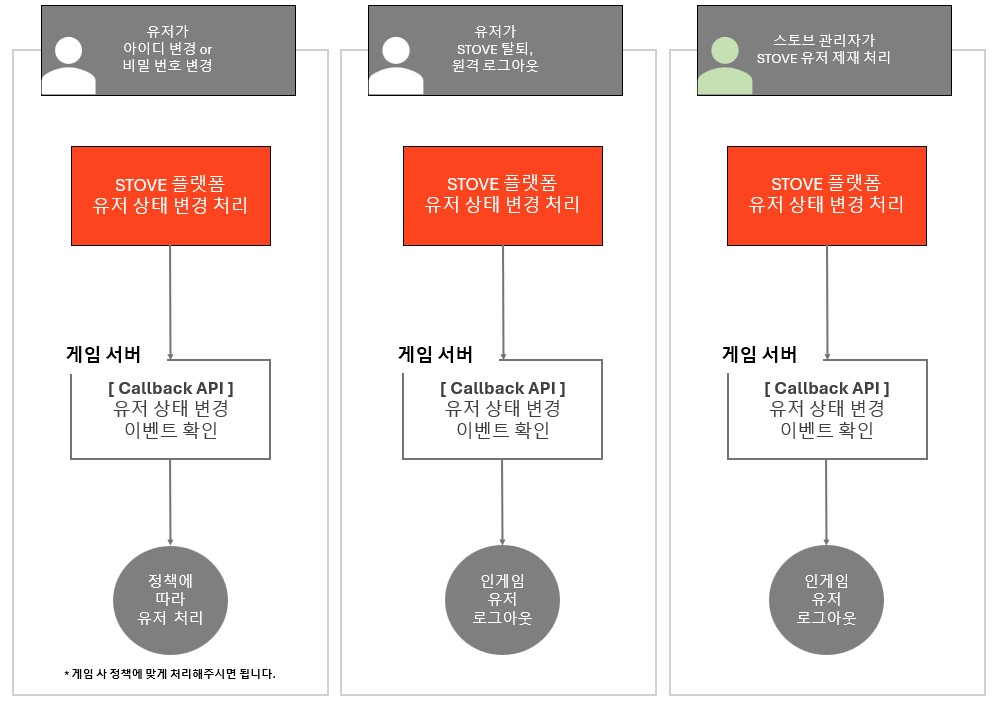
In-game event handling
ㅁ This flow doesn't apply only to membership withdrawal. Other user-state changes such as ID/password change, sanction, and remote logout are handled the same way.
ㅁ Only GUID-based service games are supported. Member_no-based games need to be confirmed in advance through the technical contact.