
- Last Updated
Steam Integration
Understanding
Steam Integration is the feature that connects a game distributed and launched through the Steam launcher to Stove platform features. When a game is launched via the Steam launcher, this feature uses the Steam login information to pass through Stove platform authentication, then boots up PCSDK3 (BaseSDK) exactly as if the game had been launched through the Stove launcher — acting as a bridge between the two. Integration uses a separate External Platform Integration Module (APIModule) provided by the Stove PC SDK.
Be sure to keep this in mind
The External Platform Integration Module is an optional component. You only need to integrate it if you distribute and run your game on the Steam launcher and want to use Stove platform features — and in that case you integrate this module together with PCSDK3. If you distribute your game only through the Stove launcher, this module is not needed and you only integrate PCSDK3.
Applicable Environment and Scope of Operation
| Item | Details |
|---|---|
| Provided environment | PC SDK 3.0 (External Platform Integration Module) only. Operates paired with PCSDK3. |
| Supported platforms | As of July 2026, only Steam is supported. On initialization, PlatformName is fixed to "STEAM". |
| Applicability | Optional. Integrated only for games that are distributed on the Steam launcher and use Stove platform features. |
| Module responsibility | Communicating with the Stove platform server to obtain required data such as the access token, and delivering it to PCSDK3. |
| Developer responsibility | All notice screens (UI) that must be shown to the user. Terms screens, access-denied / restriction / maintenance notices, error popups, and so on. |
| Steamworks SDK | Not included in the module. Operation assumes the game has already integrated and initialized the Steamworks SDK on its own. |
| Unsupported features | In the Steam build + External Platform Integration Module + PCSDK3 flow, Ownership and GameSupport (stats, achievements, leaderboards, etc.) are not supported. |
All notice UI is implemented by the developer.
Because the game engine and environment differ from developer to developer, it is difficult to provide a common UI. The SDK only reports the situation via result codes, and the developer draws the screens using in-game UI (or an in-game web browser).
The Entry Flow at a Glance
Depending on the result of the game entry check, the flow splits into roughly three branches.
- Success (0) → Receive the token and member info, then proceed directly to booting PCSDK3.
- Terms agreement required (406401) → Fetch and display the terms, obtain the user's agreement, then call the game entry check again.
- Other error → Show the notice matching the result code and exit the game.
The server evaluates entry eligibility in roughly the order blocked IP → Steam game terms agreement → game maintenance → game restriction → other errors, then returns a single result code. The client only needs to branch on that one result code.
Account Types — Shadow and Full Member
When you run the game entry check with Steam authentication info, the account is one of two types.
| Type | Description |
|---|---|
| Shadow account | An account that is registered with Steam but has not converted to a Stove full membership. It is a Steam-only temporary account that has agreed only to the Steam game terms, without agreeing to the Stove platform terms. It has no Stove member number (member_no), and a GUID is issued when the terms are agreed to. |
| Full member | An account that has completed both Steam registration and Stove full-member conversion. It has a Stove member number (member_no). |
The SDK and the game do not distinguish between the two types.
In the game entry check flow, the developer does not need to branch based on the account type (Shadow / full member). Both types behave identically. Full-member conversion is performed on the Stove web pages, and this module does not provide a dedicated conversion API. The module's responsibility ends at fetching and agreeing to the Steam game terms.
Asynchronous Callbacks and the Callback Pump
In this module, all time-consuming features (initialization, game entry check, fetching terms, agreeing to terms) operate asynchronously. Calling a function does not return the result immediately — the result is delivered via a callback.
To actually receive callbacks, you must repeatedly call the pump function Stove_APIModule_RunCallback() from the game loop. This callback runs on the thread that called the pump, so always call the pump from the game main thread. That way the callback runs on the same thread as most of your game UI and logic, reducing the synchronization burden.
Integration Guide
Preparation
| Item | Details |
|---|---|
| Steamworks SDK | For basic Steam integration, refer to the official Steamworks documentation. Required to obtain the session token, App ID, and User ID. |
| Steam session token | Issued via ISteamUser::GetAuthTicketForWebApi. This value is obtained fresh every time, so issue it right before initialization / the game entry check and use it then. |
| Game ID (GameId) | A per-game unique ID registered on the Stove platform. Contact the SGP Publishing Technology team. |
| Steam App ID (SteamAppId) | The numeric serial issued when the Steam app is registered. |
| Steam User ID (SteamUserId) | A 17-digit number. Convert ISteamUser::GetSteamID().ConvertToUint64() to a string and use it. |
| Public headers · DLL | Include the distributed DLL and the 4 public headers (see the Public Header Layout section in the separate reference document) in your project. |
| Callback driving environment | To process the SDK's asynchronous callbacks, call Stove_APIModule_RunCallback() periodically on the game main thread. |
| PCSDK3 integration | Since PCSDK3 (BaseSDK) must be booted after authentication succeeds, PCSDK3 integration must be done beforehand or in parallel. |
Developing
PC (PCSDK) — External Platform Integration Module (APIModule)
A feature exclusive to games distributed via the Steam launcher.
Integrating the External Platform Integration Module is optional. After authentication completes, it must always lead into booting PCSDK3; this module is never used entirely on its own.
Prerequisites
- Include the public headers (
api_module.h,api_module_types.h). In C, also includeapi_module_flat.hfor member access. Stove_APIModule_RunCallback()must be called periodically on the game main thread from the game loop for callbacks to be delivered correctly.- Declare callback functions as
__cdeclto match the calling convention of the header's callbacktypedef(void(__cdecl* ...)). In C#, this is aligned viaCallingConvention.Cdecl. - The result object received in a callback is owned by the module, so it is only valid during callback execution. To use it outside, copy the values inside the callback (deep-copy for strings). Parameter objects and objects returned from synchronous functions are cleaned up by the caller (Destroy). For the detailed rules, see the Object Lifetime Management section in the separate reference document.
Development Flow
- Initialize
: Initialize the module with
Stove_APIModule_Initialize(param, onFinished, userData). In the parameters, put the runtime environment, platform name ("STEAM"), Steam App ID, and Steam User ID. Because it is asynchronous, you can only call the game entry check after receiving the success callback. - Game entry check
: Call
Stove_APIModule_GameCheckerForSteam(param, onFinished, userData). Passing the Steam session token and Game ID, the server decides whether entry to this game is allowed and returns the information needed to boot PCSDK3 as the result. : In the callback, check success withGetResult()->IsSuccessful(), and on failure, get the branching code withGetExternalError(). - Branch on the result code
: Screen handling differs depending on the result code. (For the full table, see the Result Codes section in the separate reference document.)
0 (Success)→ proceed to step 4, booting PCSDK3406401 (NotAgreeTerms)→ proceed to step 5, the terms flow- Otherwise → show a per-result notice popup, then exit the game
- Boot PCSDK3
: When the game entry check succeeds, boot PCSDK3 asynchronously next. Call
Base_RestartAppIfNecessaryAsync→Base_InitializeExin that order. The connection info obtained from the game entry check is delivered to PCSDK3 by the module via internal IPC, so the developer does not need to pass the token directly. For details, refer to the PCSDK3 documentation. - Fetch and agree to terms (only when 406401)
: Fetch the terms array with
Stove_APIModule_FetchGameTermsForSteam(param, ...)and display them combined on a single screen. When the user agrees, submit withStove_APIModule_AgreeToGameTermsForSteam(param, ...)and receive theguidin the response. : When fetching, passAgTypeas1 (Steam), which denotes the Steam game service terms. The response array contains the Steam game service terms (AgreeType = "FIRST_MUST", mandatory agreement); determine the consent type by theGetAgreeType()value rather than by array index. : Once the submission succeeds, the agreement state is reflected on the server, so calling the game entry check again will no longer produce 406401. : For a new Steam user (no Stove membership), submitting the agreement causes the Stove backend to complete Shadow account creation and issue aguid. The module itself has no Shadow-creation logic. The developer does not need to perform any separate mapping with thisguid— re-calling the game entry check enters normally. : For how to compose the screen and which values to fill in, see Building the Terms Agreement Screen below. - Clean up
: On game exit, clean up the module with
Stove_APIModule_UnInitialize(). This function operates synchronously and returns a result object; after inspecting it, the caller cleans it up withDestroy(). - Check version (optional)
: When contacting technical support, include the version string obtained via
Stove_APIModule_GetVersion(buffer, length).
Launching via the Steam launcher also changes the payment (IAP) flow.
When launched via the Steam launcher, payment is processed not through Stove web payment but through Steam payment (the Steam overlay purchase window), and the backend links the Steam purchase details into the Stove platform. In particular, the Steam launcher has no automatic purchase-confirmation flow, so calling purchase confirmation (ConfirmPurchase) is required after the purchase is accepted. However, this belongs to the PCSDK3 (BaseSDK) payment API area rather than the External Platform Integration Module, so refer to the PCSDK3 payment documentation for the specific API and options.
Where Does the Notice Text Come From?
The notice screens are drawn by the developer, but you do not have to author every string yourself. For three result codes the SDK delivers the content to display along with the callback. Put the values you receive straight on the screen.
| Result code | What the SDK delivers | Where you receive it |
|---|---|---|
| 406401 Terms agreement required | Terms title, terms body, effective date, consent type | The terms items in the terms lookup (Stove_APIModule_FetchGameTermsForSteam) callback |
| 403201 Game restriction | Restriction label, restriction reason, restriction start/end time | The restriction info in the game entry check callback outcome |
| 503100 Game maintenance | Maintenance notice title, maintenance notice body, maintenance start/end time | The maintenance info in the game entry check callback outcome |
Other failure codes arrive with the code only and no extra data. You decide the text for those. The result code tables in the reference documents include suggested wording per code, so use them as-is or adjust them to your game's tone.
Tell apart the strings you author from the strings the SDK delivers.
The screen title, button labels, checkbox labels, and date format are yours to decide. The terms body, the restriction reason, and the maintenance notice body must be shown exactly as the SDK delivers them. Never summarize or reword them.
Only 406401 receives its values differently.
For 403201 and 503100 you can read the values directly inside the game entry check callback. For 406401 the game entry check callback carries no terms body. You have to call the terms lookup once more to receive it.
Building the Terms Agreement Screen
Screen Composition Example
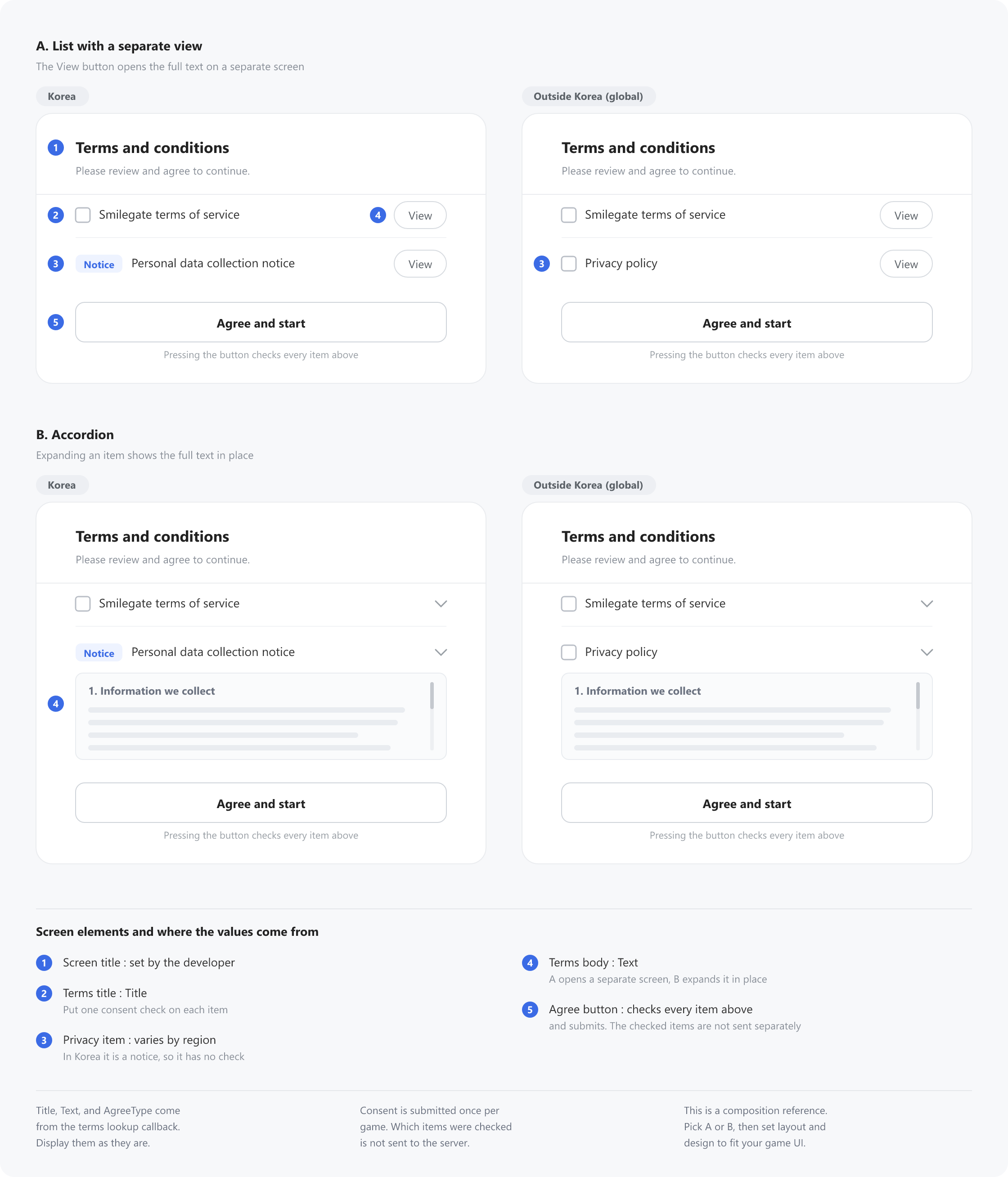
A terms screen must contain the following five elements. For where to show the terms body, pick whichever fits your game between A. List with a separate view and B. Accordion. The privacy item is shown differently to users in Korea and users outside Korea, so the image below covers all four screens.
The image below is not a design spec to implement as-is; it is a composition reference that shows which elements you need. Layout and design are up to your own game UI.
Values You Fill In
| Screen element | Where the value comes from | Notes |
|---|---|---|
| Terms title | The item's Title | Display as-is |
| Terms body | The item's Text | Delivered as HTML. It is long, so it needs scrolling |
| Consent type | The item's AgreeType | The classification the server assigns. FIRST_MUST marks terms that require first-time consent. Never decide by array position |
| Effective date | The item's EnforcedDt | Unix epoch milliseconds. The game decides whether to show it and in what format |
| Number of terms items | The item count on the outcome | Several items can be returned. You must show them all |
| Screen title, buttons, checkbox labels | Developer | The SDK does not deliver these |
The Privacy Item Varies by Region
Among the items you receive, the privacy item is shown differently to users in Korea and users outside Korea.
| Region | Item to show | Consent check |
|---|---|---|
| Korea | Personal data collection notice | A notice item, so do not place a check |
| Outside Korea (global) | Privacy policy | A consent item, so place a check |
Consent Handling Rules
- Consent is submitted per game, not per item. The consent submission API takes only the game ID and the Steam session token; it does not report which items were checked. Even if you place a checkbox on each item, submit only once.
- Present every item you received on one screen and place one consent check on each item. Notice items get no check.
- Pressing the agree button checks every item above and submits the consent. The user does not have to tick the boxes one by one, and you should not block the button on the check state.
- If the user does not agree, they cannot enter the game. Show a notice and quit the game.
- Once the submission succeeds, call the game entry check again. It will no longer return 406401.
- Confirm success in the submission callback before re-calling. Re-calling after a failure repeats 406401.
The Format of the Terms Body
The terms body is delivered as HTML. The value entered in STOVE Partners is relayed as-is, so it contains HTML by default. The body is long and contains line breaks, so keep these two rules.
- Preserve the line-break characters so paragraph separation survives.
- Put it in a scrollable area. Never truncate or summarize it.
Neither the SDK nor the server transforms the body format. If displaying HTML as-is is hard in your game UI, plain text can be provided instead.
The terms body is delivered as HTML.
If your game UI cannot display HTML as-is, plain text can be provided instead. Please contact technical support. Email : stove.developers@smilegate.com
The Language of the Terms Body
The terms body arrives in the language set on the SDK. Before fetching the terms, match your game's display language with Stove_APIModule_SetLanguage(). Without it, the game screen and the terms body can end up in different languages.
Full Integration Sequence
Troubleshooting
| Situation | Cause | Resolution |
|---|---|---|
The init callback succeeds, but the game entry check keeps failing with 400000 (BadRequest) | The Steam session token has expired or been reused. The token from GetAuthTicketForWebApi is a fresh value every time, so passing a previously cached value causes the server to reject it. | Issue a new token via GetAuthTicketForWebApi right before calling the game entry check (or initialization) and put it into the parameters. Issuing it fresh on each boot sequence avoids the problem. |
I'm trying to branch on result codes (49500 · 403201 · 406401 · 503100, etc.) but the GetResultCode() value is not what I expect | Backend response codes are delivered via GetExternalError(), not GetResultCode(). GetResultCode() is the result code classified by the SDK. | When branching based on the Result Codes table in the separate reference document, use cb->GetExternalError() (in C#, callbackResult.ExternalError). Judge success itself with GetResult()->IsSuccessful(). |
| Callbacks are not called for a long time | If Stove_APIModule_RunCallback() is not called from the game loop, asynchronous results cannot be delivered to the game. | Call Stove_APIModule_RunCallback() every frame or at a regular interval in the main loop. Calling it once between input handling and rendering avoids the problem. |
| The stack is corrupted right after entering a callback in a 32-bit build | The callback calling convention differs from the header typedef (__cdecl). In a /Gz (stdcall default) build, a convention mismatch corrupts the stack. | Declare the callback function as void __cdecl OnXxx(...) to match the convention of the header typedef. C# is already aligned via CallingConvention.Cdecl. |
| Strings received in a callback (token, nickname, etc.) are corrupted later | The result object passed to a callback is owned by the module, so it disappears from memory once the callback returns. Keeping the pointer outside results in a dangling reference. | Copy the values you need into separate variables inside the callback (deep-copy for strings). Do not Destroy() the result object itself. |
| I created a parameter object, but memory keeps growing | The parameter object created with Stove_APIModule_CreateParam was not cleaned up. | Handle "create → fill → call → clean up" as one unit. Asynchronous functions copy the values at call time, so it is safe to Destroy() right after the call. |
I agreed to the terms, but the game entry check returns 406401 again | The agreement submission (AgreeToGameTermsForSteam) failed, but the game entry check was re-called without checking the result. | In the agreement-submission callback, first confirm success with GetResult()->IsSuccessful() (in C#, Result.IsSuccessful), and re-call the game entry check only when it succeeded. |
406401 is not a failure/exit code.
It is a signal to enter the terms-agreement flow. Once the user agrees, call the game entry check again to continue.
Sample Code
An example of the full flow from Steam initialization through booting PCSDK3. Additional handling beyond the module / PCSDK3 functions is explained in comments.
Any function in the examples that does not start with Stove_ is a placeholder the SDK does not provide.
Screen and game-loop functions such as ShowNoticeUI(), ShowGameTermsUI(), QuitGame(), and IsGameRunning() are named only to explain the example — you implement them yourself for your game. Every function the External Platform Integration Module provides starts with Stove_APIModule_, and PCSDK3 functions start with Base_. Steamworks SDK functions such as GetAuthTicketForWebApi() are provided by Valve.
// External Platform Integration Module C API example. In C++, call the vtable
// methods on the pointer returned by CreateParam directly (param->SetGameId, etc.).
// (In C, use the Stove_IModuleXxx_SetYyy flat accessors from api_module_flat.h.)
#include "api_module.h"
#include "api_module_types.h"
#include <cwchar>
#include <string>
#include <vector>

extern const wchar_t* g_GameId;
extern const wchar_t* g_SteamSessionToken; // Issued fresh every time
extern const wchar_t* g_SteamAppId;
extern const wchar_t* g_SteamUserId;

void StartPcsdk();            // Boot PCSDK3 (step 7, see PCSDK3 docs)

// Screen and game functions you implement yourself
void ShowNoticeUI(const std::wstring& title, const std::wstring& body);  // exits the game on confirm
void QuitGame();
std::wstring FormatLocalDate(int64_t unixMilliseconds);

// Example view model — copy the values you need before the callback returns.
struct TermsSection
{
    std::wstring title;
    std::wstring text;
    int64_t      enforcedDt = 0;
    bool         mustAgree  = false;   // AgreeType == L"FIRST_MUST"
};

static std::vector<TermsSection> g_TermsSections;
void ShowGameTermsUI(const std::vector<TermsSection>& sections);

// The callback convention must be __cdecl
void __cdecl OnInit(const IModuleAPICallbackResult* cb);
void __cdecl OnGameChecker(const IModuleAPICallbackResult* cb,
                           const IModuleGameCheckerForSteamOutcome* outcome);
void __cdecl OnFetchTerms(const IModuleAPICallbackResult* cb,
                          const IModuleFetchGameTermsForSteamOutcome* outcome);
void __cdecl OnAgreeTerms(const IModuleAPICallbackResult* cb,
                          const IModuleAgreeToGameTermsForSteamOutcome* outcome);

// Game entry check request (create -> fill -> call -> clean up)
void RequestGameChecker()
{
    auto* param = static_cast<IModuleGameCheckerForSteamParam*>(
        Stove_APIModule_CreateParam(k_EStoveAPIModuleTypeKind_GameCheckerForSteamParam));
    if (param == nullptr) return;

    param->SetGameId(g_GameId);
    param->SetSteamSessionToken(g_SteamSessionToken);

    Stove_APIModule_GameCheckerForSteam(param, OnGameChecker, nullptr);
    param->Destroy();
}

// Fetch terms request (AgType is fixed to the Steam game service terms = 1 Steam)
void RequestFetchTerms()
{
    auto* param = static_cast<IModuleFetchGameTermsForSteamParam*>(
        Stove_APIModule_CreateParam(k_EStoveAPIModuleTypeKind_FetchGameTermsForSteamParam));
    if (param == nullptr) return;

    param->SetGameId(g_GameId);
    param->SetAgType(k_EStoveFetchGameTermsForSteamAgType_Steam);

    Stove_APIModule_FetchGameTermsForSteam(param, OnFetchTerms, nullptr);
    param->Destroy();
}

void __cdecl OnInit(const IModuleAPICallbackResult* cb)
{
    const IModuleAPIResult* result = (cb != nullptr) ? cb->GetResult() : nullptr;
    if (result == nullptr || !result->IsSuccessful())
    {
        // Init failure notice (developer UI)
        return;
    }
    RequestGameChecker();
}

void __cdecl OnGameChecker(const IModuleAPICallbackResult* cb,
                           const IModuleGameCheckerForSteamOutcome* outcome)
{
    const IModuleAPIResult* result = (cb != nullptr) ? cb->GetResult() : nullptr;

    // Judge success with IsSuccessful()
    if (result != nullptr && result->IsSuccessful())
    {
        // Obtain outcome->GetAccessToken() etc. -> boot PCSDK3 (step 7)
        StartPcsdk();
        return;
    }

    // Get the branching code with GetExternalError() (not GetResultCode())
    const int32_t externalError = (cb != nullptr) ? cb->GetExternalError() : 0;
    switch (externalError)
    {
    case k_EStoveGameCheckerForSteamResultCode_NotAgreeTerms: // 406401
        // This callback carries no terms body. Call the terms lookup once more.
        RequestFetchTerms();
        break;

    case k_EStoveGameCheckerForSteamResultCode_GameRestrict: // 403201
    {
        // The result object supplies the restriction notice text.
        const IModuleGameCheckerForSteamRestrictInfo* info =
            (outcome != nullptr) ? outcome->GetRestrictInfo() : nullptr;
        if (info != nullptr)
        {
            std::wstring title = info->GetBanTypeLabel();
            std::wstring body  = info->GetBlockReasonComment();
            body += L"\nRestriction period ";
            body += FormatLocalDate(info->GetStartDt());
            body += L" ~ ";
            body += FormatLocalDate(info->GetEndDt());

            ShowNoticeUI(title, body);
        }
        else
        {
            ShowNoticeUI(L"Game access restricted", L"You cannot play this game. Please contact customer support.");
        }
        break;
    }
    case k_EStoveGameCheckerForSteamResultCode_GameServerMaintenance: // 503100
    {
        // The result object supplies the maintenance notice text.
        const IModuleGameCheckerForSteamMaintenanceInfo* info =
            (outcome != nullptr) ? outcome->GetMaintenanceInfo() : nullptr;
        if (info != nullptr)
        {
            std::wstring title = info->GetTitle();
            std::wstring body  = info->GetMsg();
            body += L"\nMaintenance window ";
            body += FormatLocalDate(info->GetStartDt());
            body += L" ~ ";
            body += FormatLocalDate(info->GetEndDt());

            ShowNoticeUI(title, body);
        }
        else
        {
            ShowNoticeUI(L"Server maintenance", L"The server is under maintenance. Please try again later.");
        }
        break;
    }
    default:
        // 49500/400000/401000/404xxx/500xxx etc.: no extra info, so you decide the wording.
        ShowNoticeUI(L"Connection error", L"A temporary error occurred. Please try again later.");
        break;
    }
}

void __cdecl OnFetchTerms(const IModuleAPICallbackResult* cb,
                          const IModuleFetchGameTermsForSteamOutcome* outcome)
{
    const IModuleAPIResult* result = (cb != nullptr) ? cb->GetResult() : nullptr;
    if (result == nullptr || !result->IsSuccessful() || outcome == nullptr)
    {
        ShowNoticeUI(L"Terms lookup failed", L"Could not load the service terms.");
        return;
    }

    // The pointers go invalid once the callback returns, so copy the values into the view model.
    g_TermsSections.clear();

    const uint32_t count = outcome->GetContentCount();
    for (uint32_t i = 0; i < count; ++i)
    {
        const IModuleFetchGameTermsForSteamContent* c = outcome->GetContentAt(i);
        if (c == nullptr) continue;

        TermsSection section;
        section.title      = (c->GetTitle() != nullptr) ? c->GetTitle() : L"";
        section.text       = (c->GetText()  != nullptr) ? c->GetText()  : L"";
        section.enforcedDt = c->GetEnforcedDt();

        // Decide the mandatory flag by AgreeType, not by the array order.
        const wchar_t* agreeType = c->GetAgreeType(); // "FIRST_MUST" / "NONE"
        section.mustAgree = (agreeType != nullptr && wcscmp(agreeType, L"FIRST_MUST") == 0);

        g_TermsSections.push_back(std::move(section));
    }

    // Show the screen. The consent result comes back through OnUserAgreed / OnUserDeclined below.
    ShowGameTermsUI(g_TermsSections);
}

// Your UI calls this when the user presses Agree.
void OnUserAgreed()
{
    auto* param = static_cast<IModuleAgreeToGameTermsForSteamParam*>(
        Stove_APIModule_CreateParam(k_EStoveAPIModuleTypeKind_AgreeToGameTermsForSteamParam));
    if (param == nullptr) return;

    // Per-item consent values are not sent. Submit once per game.
    param->SetGameId(g_GameId);
    param->SetSteamSessionToken(g_SteamSessionToken);

    Stove_APIModule_AgreeToGameTermsForSteam(param, OnAgreeTerms, nullptr);
    param->Destroy();
}

// Without agreeing, the user cannot enter the game.
void OnUserDeclined()
{
    QuitGame();
}

void __cdecl OnAgreeTerms(const IModuleAPICallbackResult* cb,
                          const IModuleAgreeToGameTermsForSteamOutcome* outcome)
{
    const IModuleAPIResult* result = (cb != nullptr) ? cb->GetResult() : nullptr;
    if (result == nullptr || !result->IsSuccessful())
    {
        // Re-calling while the submission has failed makes 406401 repeat.
        ShowNoticeUI(L"Terms agreement failed", L"Could not process the terms agreement. Please try again later.");
        return;
    }

    const wchar_t* guid = (outcome != nullptr) ? outcome->GetGuid() : nullptr;
    (void)guid;

    // The guid needs no separate handling — re-call the game entry check right away
    RequestGameChecker();
}

void GameMain()
{
    // 1) Issue the Steam session token (fresh every time)
    // g_SteamSessionToken = SteamUser()->GetAuthTicketForWebApi(...);

    // 2) Initialize
    auto* initParam = static_cast<IModuleAPIInitializeParam*>(
        Stove_APIModule_CreateParam(k_EStoveAPIModuleTypeKind_APIInitializeParam));
    if (initParam == nullptr) return;

    initParam->SetEnvironment(L"LIVE");
    initParam->SetPlatformName(L"STEAM");   // Fixed value
    initParam->SetSteamAppId(g_SteamAppId);
    initParam->SetSteamUserId(g_SteamUserId);

    Stove_APIModule_Initialize(initParam, OnInit, nullptr);
    initParam->Destroy();

    // 3) Callback pump (game main thread)
    while (IsGameRunning())
    {
        Stove_APIModule_RunCallback();
        // After booting PCSDK3, also call Base_RunCallback()
        // ... game frame processing ...
    }

    // 4) Clean up (caller destroys synchronously returned objects)
    IModuleAPIResult* unInit = Stove_APIModule_UnInitialize();
    if (unInit != nullptr) unInit->Destroy();
}
StartPcsdk / Base_RestartAppIfNecessaryAsync / Base_InitializeEx belong to the PCSDK3 (BaseSDK) area.
For detailed usage, refer to the PCSDK3 documentation. The connection info obtained from the game entry check is delivered to PCSDK3 by the module via internal IPC, so the developer does not need to pass the token directly.