
- Cập nhật lần cuối

Game Cancellation
Understanding
Game cancellation (service cancellation) lets a user delete their in-game data for a specific game.
The STOVE platform account is kept; only the characters, currency, and all world data linked to that game are deleted.
On STOVE, canceling a game means the same thing as withdrawing consent to that game's terms of service. Anything labeled 'terms withdrawal' in this guide and in the SDK/API refers to game cancellation, and the game cancellation request API called by the game server is likewise an API that deletes the terms agreement (agree).
| Item | Description |
|---|---|
| Deletion scope | Characters, currency, and all world data for that game |
| STOVE account | Kept (other games remain available) |
| Entry point | In-game settings screen |
| Grace period | Set per game, 0–30 days (0 means immediate cancellation) ㆍWhether cancellation is immediate or deferred is determined by the delete_yn parameter of the game cancellation request API — Y (default) for immediate cancellation (0 days), N for cancellation with a grace periodㆍThe number of grace days is not passed through the API; the per-game setting applies, and the scheduled end date of the grace period is returned in the API response |
STOVE account is kept
Game cancellation deletes only the in-game data of the STOVE account (guest or full member) linked to that game.
The STOVE platform account is kept, and other games are not affected.
How it works
To prevent accidental cancellation, you must provide a warning notice and a confirmation step.
The cancellation flow differs depending on whether a grace period is set.
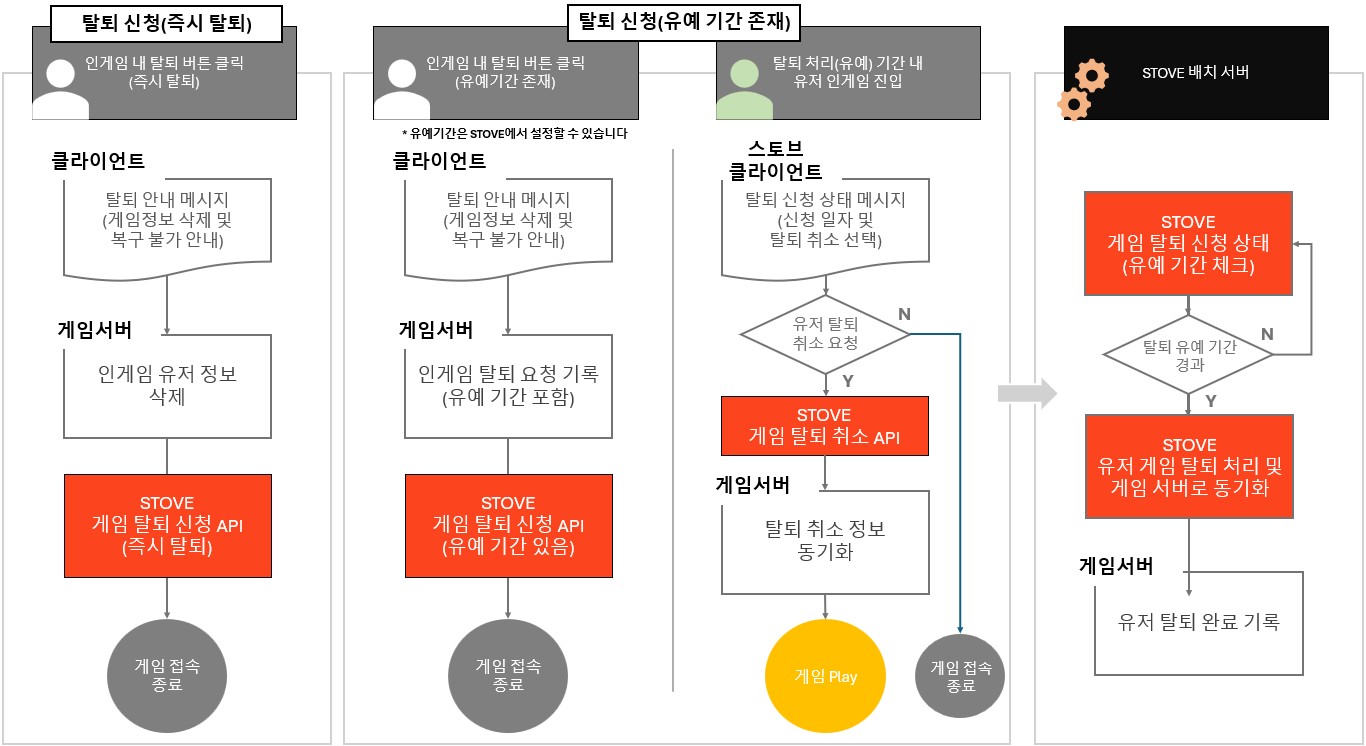
| Method | Description | Notes |
|---|---|---|
| Cancellation request (immediate) | Call the STOVE game cancellation request API when the user requests cancellation | Cannot be restored once completed |
| Cancellation request (with grace period) | Call the STOVE game cancellation request API when the user requests cancellation (select cancellation with a grace period using the delete_yn=N parameter; the per-game grace-period setting applies) |
Can be canceled during the grace period. Delete data after receiving the completion callback |
How cancellation with a grace period works
① When the grace period ends, STOVE completes the cancellation automatically.
② When the cancellation completes, STOVE delivers the related event.
Cancellation status notifications
Events by processing method (common callback for general games)
| Processing method | Event raised |
|---|---|
Immediate cancellation (0 grace days, delete_yn=Y) | GAME_WITHDRAW_COMPLETE |
| Cancellation request with a grace period | GAME_WITHDRAW |
| Revocation during the grace period | GAME_WITHDRAW_CANCEL |
| Completion after the grace period ends | GAME_WITHDRAW_COMPLETE |
For immediate cancellation, only the completion event is delivered, without a preceding request event.
The STOVE platform delivers real-time events to the game studio's server when the game cancellation status changes.
The game studio implements a Callback API to receive these events and handles them according to its operating policy.
| Event | Trigger | Game studio response |
|---|---|---|
Game cancellationGAME_WITHDRAW |
When a user requests game cancellation | Update the user's status on the game server to cancellation requested and terminate the session |
Game cancellation request canceledGAME_WITHDRAW_CANCEL |
When a user cancels a game cancellation request | Update the user's status on the game server back to active (cancellation requested → active) |
Game cancellation completeGAME_WITHDRAW_COMPLETE |
When a user completes game cancellation, When a user completes STOVE account withdrawal (joined games are canceled automatically) |
Update the user's status on the game server to cancellation complete and terminate the session Do not delete data immediately; delete it according to your operating policy, such as in a batch |
STOVE account withdrawal requestPLATFORM_WITHDRAW |
When a user requests STOVE account withdrawal | Log the user out and restart the game |
Scope and limitations
ㆍSTOVE Event is supported only for GUID-based service games.
ㆍMember_no-based games must check with their technical representative in advance.
ㆍSee the STOVE Event guide for the full event list and how to implement the Callback API. All events are received through a single Callback API and branched by the event_reason value.
STOVE Account Withdrawal Integration
STOVE account withdrawal lets a user delete their entire STOVE platform account.
Unlike game cancellation, which deletes data for a specific game only, this deletes the data of every game linked to the STOVE account along with the account itself. STOVE provides all screens and processing from the withdrawal request to completion. The game studio logs the user out on the withdrawal request and, once withdrawal completes, receives GAME_WITHDRAW_COMPLETE delivered for each joined game and cleans up in-game data the same way as a game cancellation completion.
Users can request withdrawal from the in-game menu (SDK AuthUI.Withdraw) or from STOVE Account Management > Account Withdrawal. When the request is made from the in-game menu, the SDK handles the withdrawal request and the logout, so the game studio does not need to implement a separate server feature; the game only needs to move to the start screen and prompt the user to log in again. However, because users can also request withdrawal directly on the STOVE website, you still need to handle the PLATFORM_WITHDRAW event. For how to integrate the in-game menu, see the In-game Menu guide.
| Item | Game cancellation | STOVE account withdrawal |
|---|---|---|
| Deletion scope | Characters, currency, and world data for that game | Data of every linked game + the STOVE account itself |
| STOVE account | Kept | Deleted |
| Entry point | In-game settings screen (implemented by the game studio) | In-game menu (SDK AuthUI.Withdraw) or STOVE Account Management > Account Withdrawal (screens and processing provided by STOVE) |
| Grace period | Set per game, 0–30 days | Handled automatically by STOVE policy — withdrawal completes 30 days after the request date (15-day revocable grace period + 15-day non-revocable period) |
| Game studio handling | Cancellation request integration (SDK), event handling, data deletion | Log out on receiving the request event, delete data on receiving the completion event |
Game studio response by withdrawal stage
Account withdrawal proceeds in the order request → grace period → completion. What the game studio receives and must do differs at each stage.
| Stage | When | Notification to the game studio | Game studio response |
|---|---|---|---|
| ① Withdrawal request | Immediately when the user requests it from the in-game menu or STOVE Account Management | STOVE Event PLATFORM_WITHDRAW (real time) |
Log the user out and restart the game |
| ② Grace period (revocable) | When the user revokes during the grace period | None | No action needed. The user can play normally after logging in again |
| ③ Withdrawal complete | STOVE batch after the grace period | STOVE Event GAME_WITHDRAW_COMPLETE for each joined game (delivered without a preceding GAME_WITHDRAW) |
Same handling as a game cancellation completion. Set the in-game DB flag, then back up and delete |
Handling withdrawal completion
When account withdrawal completes, STOVE cancels every game the user had joined and delivers GAME_WITHDRAW_COMPLETE for each game. It is the same event as when a user completes a game cancellation directly, so clean up data with your existing game cancellation completion logic — no additional implementation is needed. In this case only the completion event arrives, without a preceding GAME_WITHDRAW, so process it regardless of whether a request was recorded.
Handling data of withdrawn users
ㆍYou do not need to delete immediately. We recommend setting a flag in the in-game DB first, then backing up and deleting the data during maintenance.
ㆍIf you collect users' personal information, deletion is mandatory, as you may be legally liable otherwise.
ㆍSTOVE Event is supported only for GUID-based services. For Member_no-based services, contact your technical representative.
Integration Guide
Prerequisites
| Item | Description |
|---|---|
| Check the User Access Token | Pass the user's User Access Token to the game cancellation request API ㆍObtained from the SDK after login; fetch in real time without caching |
| User identification method | The cancellation request API identifies the user by the Game User Access Token in Authorization and by service_id. There is no member_no query or body field, and target_users in the common callback is a list of GUIDs. |
| Decide the grace period policy | Choose immediate cancellation or cancellation with a grace period per game ㆍThe number of grace days is set per game; agree on it with your publishing technical representative (Smilegate-published games usually use 14 days) ㆍThe game server synchronizes the end of the grace period based on the scheduled cancellation date ( withdraw_dt, unix ms) in the cancellation request API response |
Basic integration structure
- Client: provide the cancellation UI and warning notice
- Place a cancellation button on the in-game settings screen.
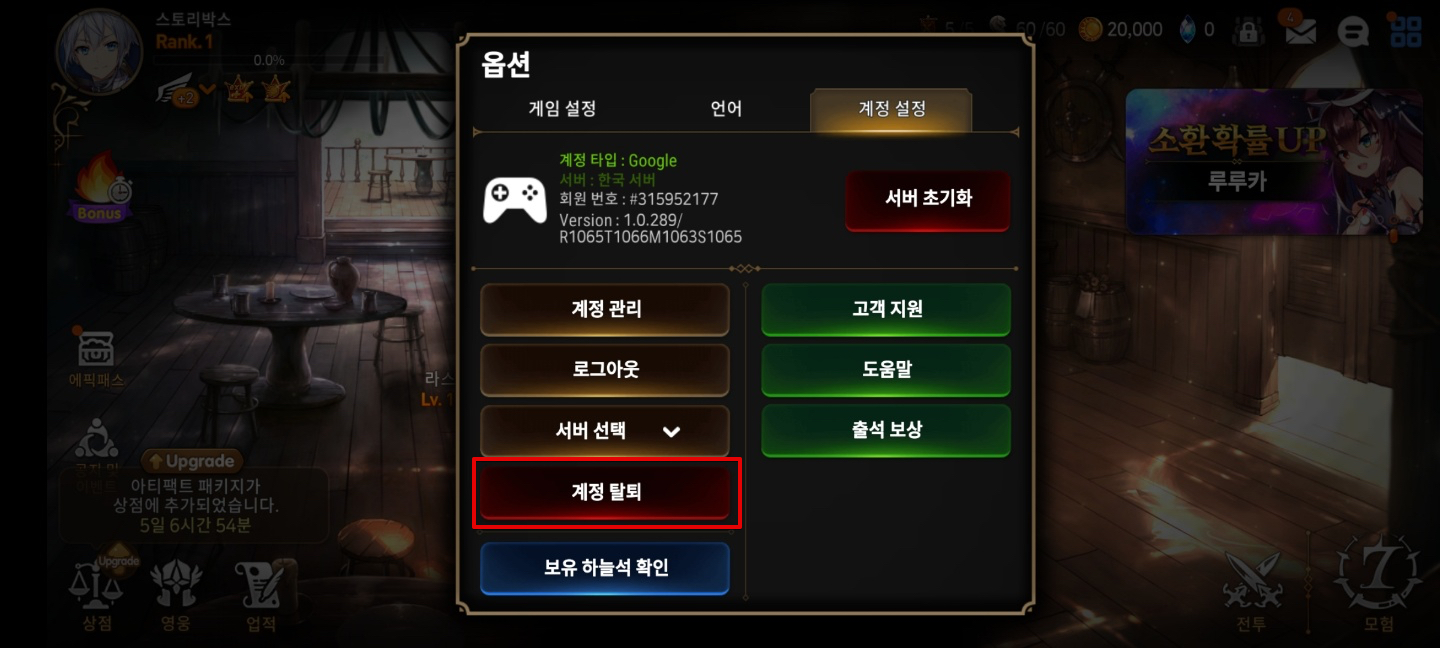
- Place a cancellation button on the in-game settings screen.
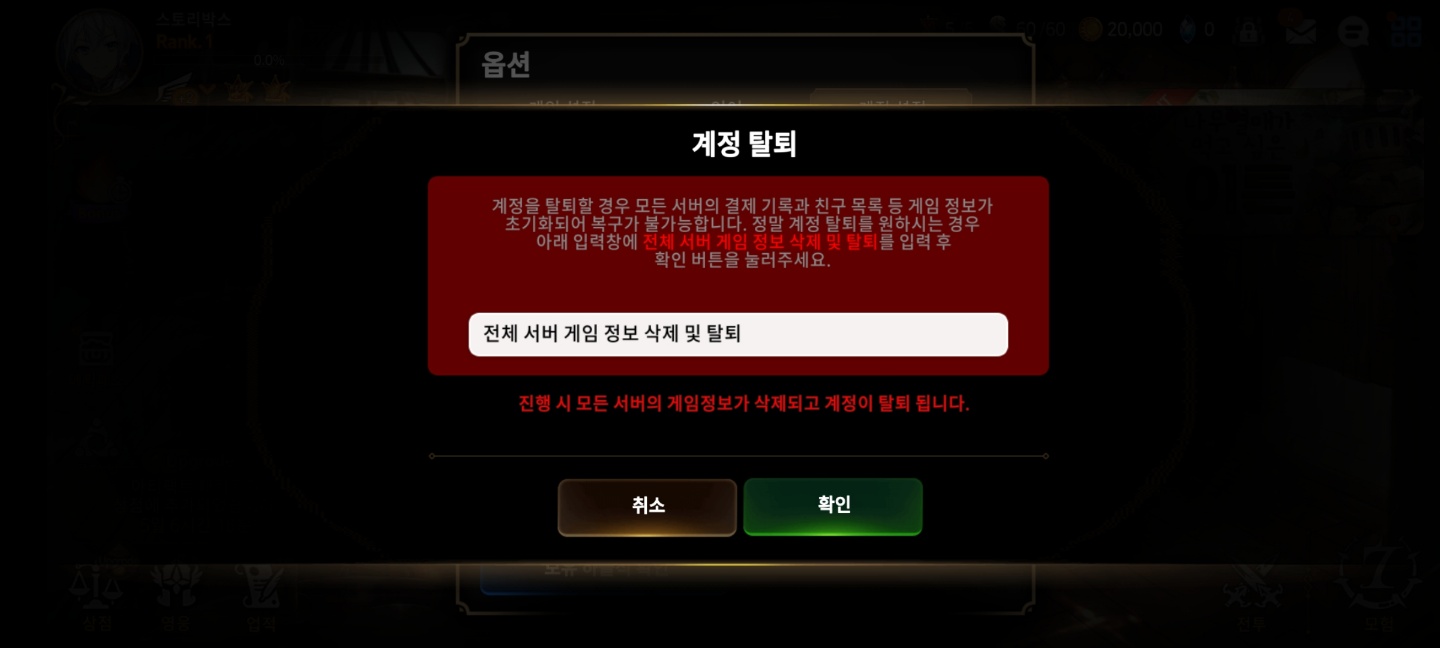
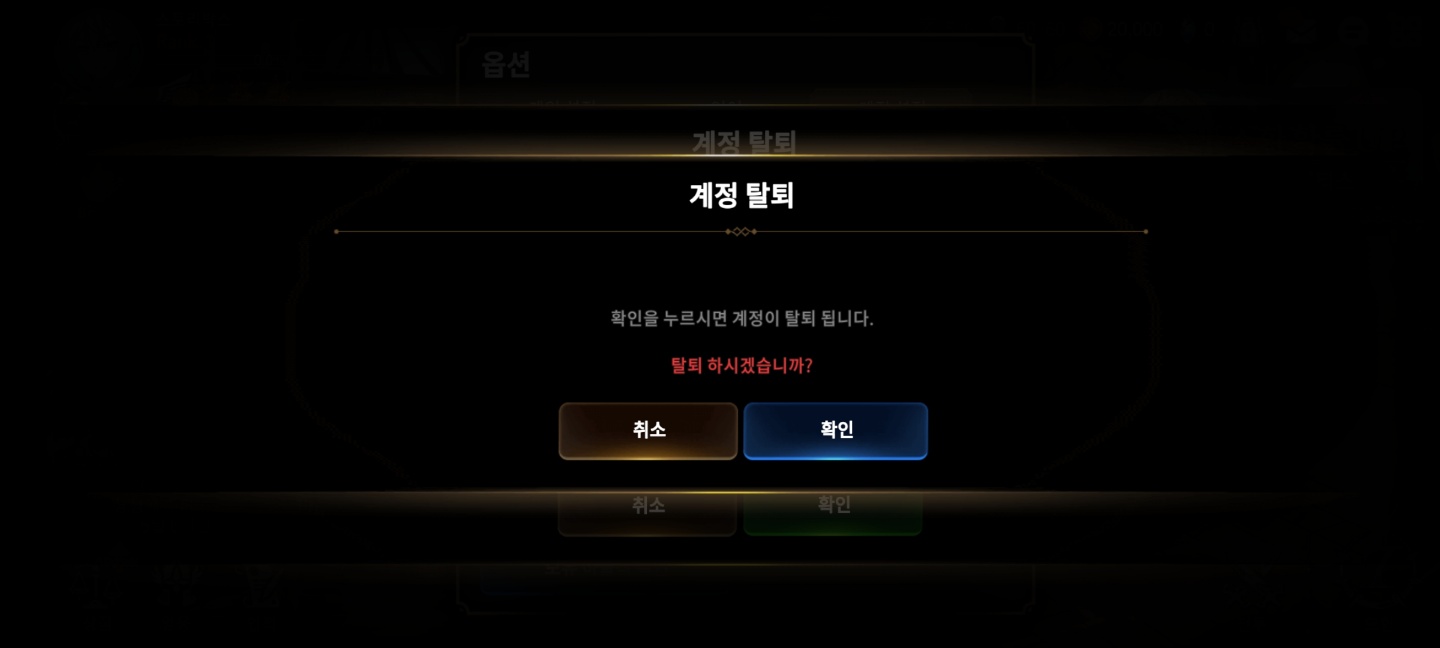
- You must show a warning notice and a confirmation popup before the cancellation request.
- The user is logged out automatically when cancellation completes, so handle the subsequent flow (e.g. exit the game or move to the start screen).
| UI type | Description |
|---|---|
| Warning notice popup | Clearly state the consequences, e.g. "Canceling deletes all your data and cannot be undone." |
| Confirmation popup | Implemented by the game studio; require a deliberate action such as typing the character name to prevent accidental cancellation |
| Grace period notice popup (optional) | When a grace period applies, inform the user, e.g. "You can cancel within N days after requesting cancellation." |
- Server: process the game cancellation
- The STOVE platform account is kept even after cancellation completes through the game cancellation request API.
- All STOVE character data of the user identified by the Game User Access Token and game ID in the request is deleted across all worlds.
- In-game data stored in the game DB must be kept or deleted by the game itself.
- If you use the STOVE currency (cash) system, note that the character's currency (cash) is deleted as well.
Caution when implementing game cancellation for GUID-based games
If the user re-registers on the same device later, a new GUID is issued, making it hard to identify them as the same user.
To keep the terms agreement and the GUID and delete only character data, use the game character deletion API (DELETE /game/v5.1/character?character_no={character unique number}).
- Setting the grace period and deleting data
- The game cancellation grace period is managed by each game's own policy. The number of grace days is not passed through the API; the value configured for each game applies, so agree on the desired number of days with your publishing technical representative. The game server can manage the end of the grace period based on the scheduled cancellation date (
withdraw_dt) in the cancellation request API response.- Entering the game during the cancellation period (PC example)
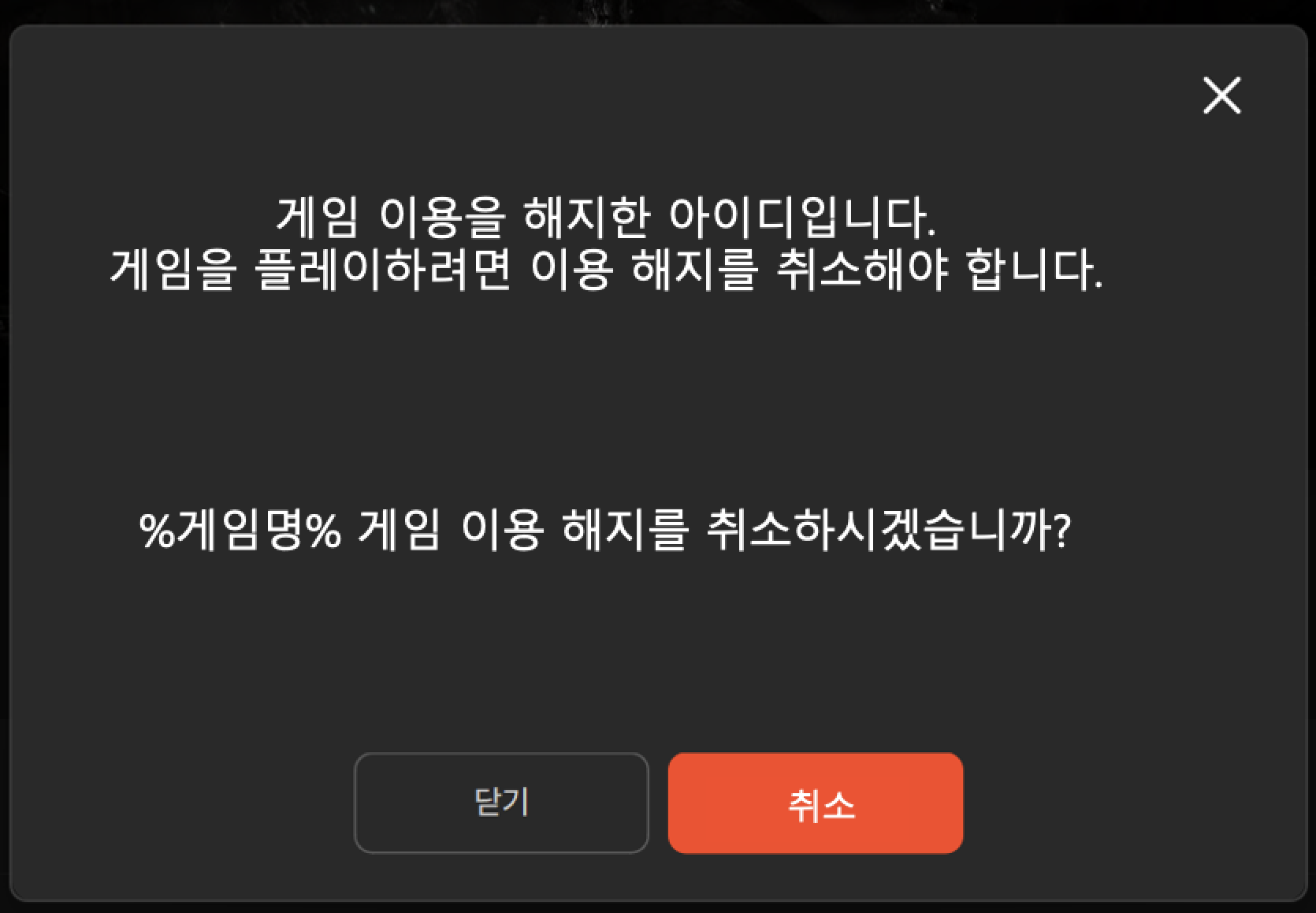
- Entering the game during the cancellation period (PC example)
- The game cancellation grace period is managed by each game's own policy. The number of grace days is not passed through the API; the value configured for each game applies, so agree on the desired number of days with your publishing technical representative. The game server can manage the end of the grace period based on the scheduled cancellation date (
- Entering the game during the cancellation period (Mobile example)
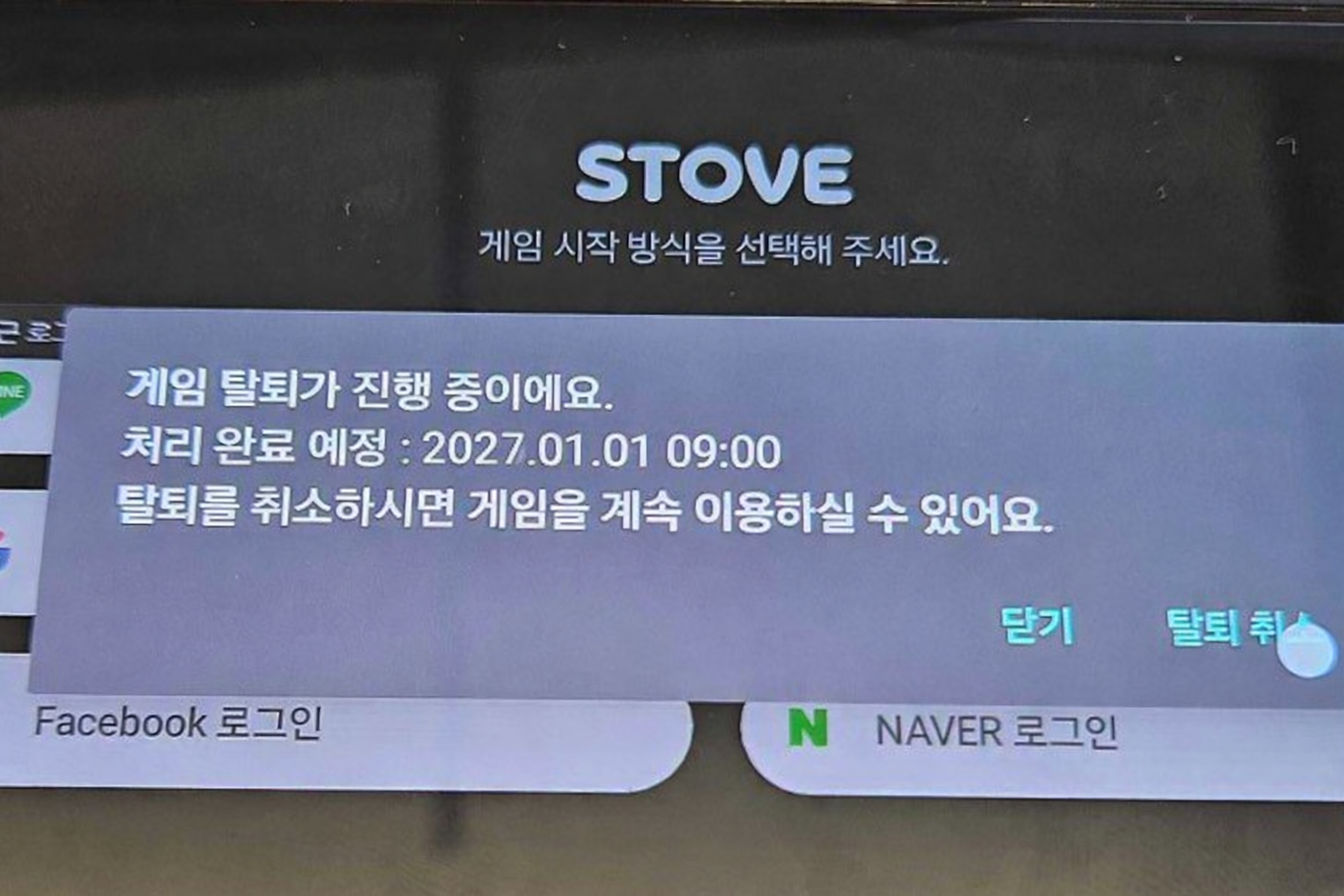
Recommended way to delete in-game data
We recommend setting a flag in the in-game DB first, then backing up and deleting the data during maintenance.
Development
Mobile SDK integration
The Mobile SDK handles cancellation revocation in the authentication flow
- Cancellation request/completion is handled by REST API/events between the game server and the STOVE server; the Mobile SDK is not involved. See the server integration guide for details.
- Only cancellation revocation is handled by the Mobile SDK. If the user launches the game again and logs in through the SDK during the grace period, the revocation UI is shown automatically.
- The game client just calls
AuthUI.Loginas usual; no additional SDK call is needed.
Flow
When the user launches the game and logs in again during the grace period, the Mobile SDK automatically checks the cancellation request status on STOVE and shows the revocation UI. If the user chooses to revoke, STOVE clears the request status, and the game server only needs to synchronize via the GAME_WITHDRAW_CANCEL event.
What the game must implement
| Area | To do |
|---|---|
| Game client |
Just call AuthUI.Login as usual. The Mobile SDK automatically handles showing and processing the revocation UI and the subsequent login flow.
|
| Game server |
GAME_WITHDRAW_CANCEL event receiver and clear the cancellation request status on receipt
|
Mind server synchronization when operating individual worlds
If you operate individual worlds rather than synchronizing through a shared server, you must implement cross-server synchronization when receiving the GAME_WITHDRAW_CANCEL event.
Notes
- For the full
AuthUI.Logincall flow, see the Login guide. - For the game cancellation request API (REST) called by the game server, completion handling (automatic on STOVE), and the
GAME_WITHDRAW*event specifications, see the server integration guide.
PC SDK integration
With the game cancellation API (IAP_WithdrawGame) provided by the PC SDK IAPSDK, the game client can open the STOVE game cancellation popup. When the user agrees to the game cancellation in the popup, STOVE processes the game cancellation.
This does not work when the game is launched via the Steam launcher. Do not call it when running through the Steam launcher.
Currently available for Lost Ark M only.
As of November 12, 2025, the game cancellation API is available for Lost Ark M only. It may not work correctly when called from other games. We are working to make it available to all games, and this notice will be removed once it is.
Game cancellation ≠ STOVE account withdrawal
This API handles per-game cancellation only. STOVE account withdrawal is handled separately on the STOVE website.
Prerequisites
- Complete Base initialization by calling
Base_InitializeExin therestartAppIfNecessary == falsebranch of theBase_RestartAppIfNecessaryAsynccallback. Then initialize the IAP module withIAP_Initialize(shopKey)(orIAP_InitializeWithWndInfo(shopKey, mainWndHandle)if you need to specify a parent window). Call the game cancellation API only after initialization completes. - The callback runner (
Base_RunCallback()) must be called periodically in the game loop for the asynchronous callbacks (cancellation result callback, popup close callback) to work. - When game cancellation succeeds, the SDK's internal user token expires. Design the subsequent flow in advance so that it goes from the exit notice to process termination without further SDK calls.
Development flow
- Configure options: Set the WebView mode (Internal/External), position, and size in the cancellation flow parameters (
StovePCWithdrawGameOption). To center the window, set PosX/PosY to-1. - Call the API: The game client calls the game cancellation API (
IAP_WithdrawGame) to open the game cancellation popup. - Handle the result callback: If the cancellation result callback returns
gameWithdrawal == true, treat the cancellation as processed. - Handle the popup close callback: Use the popup close callback to detect when the user closes the popup, then show the exit notice UI.
- Exit the game: Once game cancellation completes, the SDK token expires, so notify the user of the result without further SDK calls and terminate the game process.
Troubleshooting
| Symptom | Cause | Solution |
|---|---|---|
| I called the game cancellation API but the popup does not appear or does not work | This API is currently available for Lost Ark M only. Calls from other games are not processed by the STOVE backend. | Check with your publishing technical representative whether your game is eligible, and disable the call flow if it is not. Re-enable it once all games are supported. |
| The call fails right after initialization | Base_RestartAppIfNecessaryAsync is asynchronous, and its callback is dispatched when Base_RunCallback is called. Initialization completes only after Base_InitializeEx is called in the restartAppIfNecessary == false branch of the callback. Calling the game cancellation API before this sequence completes fails. | Call the game cancellation API only after Base_RestartAppIfNecessaryAsync callback → Base_InitializeEx → IAP_Initialize succeed. Checking an initialization-complete flag in your boot sequence avoids this. |
| SDK APIs return authentication errors when I keep playing after game cancellation | When the game cancellation API succeeds, the SDK's internal user token expires. Subsequent SDK API calls are not guaranteed. | If the result callback returns gameWithdrawal == true, make no further SDK calls; wait for the popup close callback, then finish with the user notice → game exit flow. |
| The result callback or popup close callback is not invoked | If the callback runner (Base_RunCallback()) is not called in the game client's main loop, the PC SDK cannot deliver results to the game client. | Call the callback runner every frame or at a regular interval in the main loop. |
Sequence diagram
Sample code
#include "IAPSDK.h"

using namespace Stove::PCSDK;
using namespace Stove::PCSDK::Base;
using namespace Stove::PCSDK::IAP;

void IAP_WithdrawGame_Example()
{
    StovePCWithdrawGameOption Option;
    Option.SetWebviewMode(WebViewMode::INTERNAL);
    // Set PosX/PosY to -1 to center the window
    Option.SetWebviewRect(0, 0, 800, 600);

    IAP_WithdrawGame(&Option,
        [](CallbackResult CallbackResult, bool GameWithdrawal)
        {
            if (CallbackResult.GetResult().IsSuccessful() && GameWithdrawal)
            {
                // Handle successful game cancellation
            }
        },
        [](CallbackResult CallbackResult)
        {
            // After the popup closes: show the result and exit the game
        }
    );
}
Server integration
Development flow – immediate cancellation
- The user requests cancellation in the game client.
- The game client passes the Game User Access Token along with the request it sends to the game server.
- The game server records only an in-progress status and keeps the original data.
- The game server calls
DELETE /stove-terms/v3.0/agree?service_id={gameId}to send the cancellation request.
The game server sends the Game User Access Token received from the game client with it. - STOVE completes the cancellation and deletes the data.
- STOVE returns a success response to the game server.
- After confirming that the cancellation is complete, the game server updates its local status, cleans up the data, and terminates the game client's connection.
If the API call fails or a communication error occurs, keep the original data and follow up after checking the processing result.
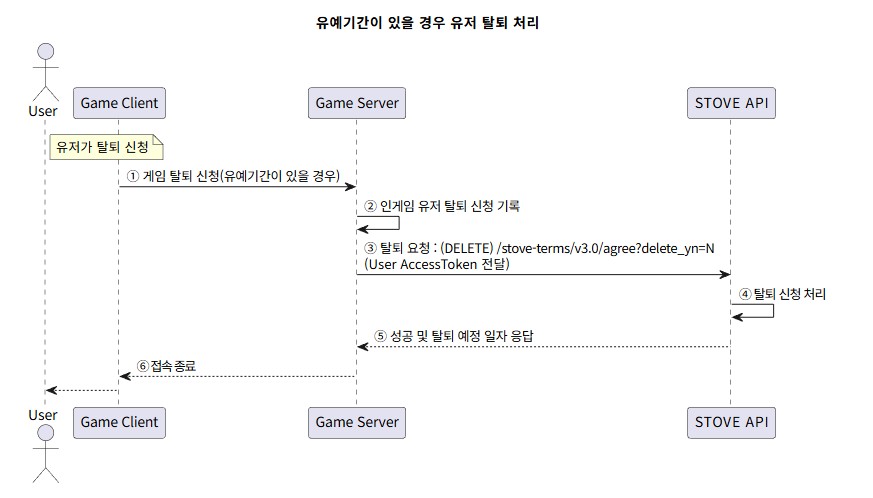
Development flow – cancellation with a grace period
- The user requests cancellation in the game client.
- The game client passes the Game User Access Token along with the request it sends to the game server.
- The game server sets the user's status to cancellation requested (controlled by a transaction).
- The game server calls
DELETE /stove-terms/v3.0/agree?service_id={gameId}&delete_yn=Nto send the cancellation request.
The game server sends the Game User Access Token received from the game client with it. - STOVE processes the cancellation request.
- STOVE returns a success response with the scheduled cancellation date to the game server.
- The user's cancellation request is complete, so the game client's connection is terminated.
- Cancellation with a grace period
Troubleshooting
How to handle each response code. See the API & SDK Reference menu for the detailed response code and message specifications.
| Response code | Situation | Action |
|---|---|---|
| 70800 | Incorrect service_id parameter value | Enter the value for your game. |
| 70806 | Incorrect service_id parameter value | Enter the value for your game. |
| 70816 | STOVE internal server error | It may be temporary; retry, and contact your technical representative if it persists. |
| 70820 | The user already has a pending cancellation request | Duplicate cancellation requests are not allowed. |
| 70825 | The user has not joined the game (no terms agreement) | Cancellation cannot be requested because the user has not joined the game. |
| 70853 | STOVE internal server error | It may be temporary; retry, and contact your technical representative if it persists. |
| 70854 | STOVE internal server error | It may be temporary; retry, and contact your technical representative if it persists. |
| 70870 | caller-id missing from the request header | Add the caller-id key to the request header. |
| 70899 | Invalid parameter value | Enter a valid parameter value. |
Sample code
Examples of the game server calling the game cancellation request API (DELETE /stove-terms/v3.0/agree?service_id={gameId}).
Replace the base URL according to the environment (Live/Sandbox)
In production, we recommend injecting it per environment via an environment variable (e.g. STOVE_API_BASE_URL) or a framework config file instead of hardcoding it.
Use a freshly issued Game User Access Token for every request
Do not write the token to logs or storage; keep it only in a variable that is discarded immediately. Immediate cancellation (delete_yn=Y, default) and the grace period state (delete_yn=N) differ only by the query parameter of the same call.
// Java 25 LTS — java.net.http.HttpClient + Jackson(ObjectMapper)
import com.fasterxml.jackson.databind.JsonNode;
import com.fasterxml.jackson.databind.ObjectMapper;
import java.net.URI;
import java.net.http.HttpClient;
import java.net.http.HttpRequest;
import java.net.http.HttpResponse;
import java.time.Duration;
import java.util.UUID;

ObjectMapper mapper = new ObjectMapper();
String baseUrl = "https://api.onstove.com";
String serviceId = "STOVE_EPIC7";
String callerId = serviceId + "_SERVER";
String callerDetail = UUID.randomUUID().toString();

try (HttpClient client = HttpClient.newBuilder()
        .connectTimeout(Duration.ofSeconds(5))
        .build()) {

    // For a grace period (pending cancellation), append &delete_yn=N to the URL
    URI uri = URI.create(baseUrl + "/stove-terms/v3.0/agree?service_id=" + serviceId);

    HttpRequest req = HttpRequest.newBuilder(uri)
            .header("Content-Type", "application/json")
            .header("Authorization", "Bearer " + gameUserAccessToken)
            .header("caller-id", callerId)
            .header("caller-detail", callerDetail)
            .DELETE()
            .build();
    HttpResponse<String> res = client.send(req, HttpResponse.BodyHandlers.ofString());
    JsonNode data = mapper.readTree(res.body());
    if (data.path("code").asInt() != 0) {
        // See the troubleshooting table (70800 / 70816 / 70820 / 70825 / 70899, etc.)
        throw new IllegalStateException("withdraw failed: " + data.path("code"));
    }
    long withdrawDt = data.path("value").path("withdraw_dt").asLong(0L);
    if (withdrawDt > 0) {
        // Grace period mode — withdrawDt is the scheduled cancellation date in unix ms. Notify the user, then end the game session
    } else {
        // Immediate cancellation complete — end the game session
    }
}
FAQ
- Developer Center usage / Smilegate-published games: stove.developers@smilegate.com
- STOVE Store onboarding / STOVE Studio: store.support@smilegate.com